1. Giriş
The SocketScan S700 is a 1D barcode scanner featuring Bluetooth wireless technology, designed for efficient and reliable barcode scanning. It comes with a dedicated Charging Dock for convenient power management and storage. This device is engineered for scanning 1D barcodes from both paper and digital screens, making it versatile for various applications such as retail point-of-sale (POS), field service, inventory management, and asset tracking.
Its lightweight and ergonomic design, coupled with a long-lasting battery, ensures sustained operation throughout typical workdays. The scanner includes intuitive indicator lights for battery status, Bluetooth connectivity, and scanning notifications, providing clear operational feedback.
2. Paket İçeriği
- SocketScan S700 Linear Barcode Scanner
- Şarj İstasyonu
- 2 AA Pil (dahil)
3. Kurulum ve Şarj
Before initial use, ensure the SocketScan S700 scanner is fully charged. The included Charging Dock provides a convenient way to power the device and keep it ready for use.

Figure 3.1: SocketScan S700 in Charging Dock. The scanner fits securely into the dock for charging and storage, ensuring it is always ready for operation.
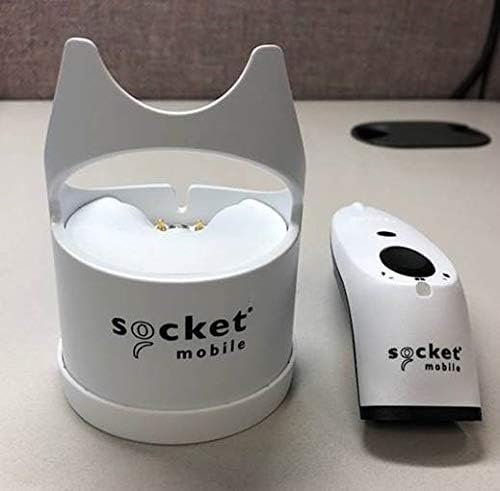
Figure 3.2: SocketScan S700 and Charging Dock separated. This image shows the scanner and its dock as individual components, highlighting their compact design.
3.1 Tarayıcının Şarj Edilmesi
- Connect the Charging Dock to a power source using the provided cable (if applicable, or assume standard USB connection).
- Place the SocketScan S700 scanner into the Charging Dock. Ensure it is seated correctly.
- The battery indicator light on the scanner will illuminate to show charging status. A full charge typically takes a few hours.
3.2 Bluetooth Eşleştirme
The SocketScan S700 utilizes Bluetooth wireless technology for connectivity with host devices. It is compatible with a wide range of Bluetooth-enabled smartphones, tablets, notebooks, and desktop computers, including iOS, Android, and Windows devices.
- Tarayıcının açık olduğundan emin olun.
- Put the scanner into pairing mode. (Refer to the quick start guide for specific button presses, typically holding the power button or a dedicated pairing button until the Bluetooth indicator flashes).
- On your host device (smartphone, tablet, computer), navigate to the Bluetooth settings.
- Arama available devices and select "SocketScan S700" from the list.
- Confirm the pairing. The Bluetooth indicator light on the scanner will turn solid when successfully connected.
For applications with integrated Capture SDK, the scanner offers native compatibility. For other applications, it operates in HID (keyboard emulation) mode, allowing it to function as a standard keyboard input device.
4. Tarayıcının Çalıştırılması
The SocketScan S700 is designed for straightforward 1D barcode scanning. Once paired with your host device, it is ready for operation.

Figure 4.1: Scanning 1D Barcodes and Compatibility. This image illustrates the scanner's ability to read 1D barcodes and its broad compatibility with popular POS and mobile operating systems.
4.1 Barkodların Taranması
- Point the scanner's optical window at the 1D barcode you wish to scan.
- Press the scan button (typically the large button on the top of the scanner).
- A successful scan will be indicated by an audible beep and/or a visual confirmation from the scanner's indicator lights. The scanned data will be transmitted to your connected host device.
The scanner reads all common 1D/linear and stacked barcodes. For example, it can read barcodes like 0510933300004.
4.2 Gösterge Işığı
- Pil Göstergesi: Pil seviyesini ve şarj durumunu gösterir.
- Bluetooth Göstergesi: Indicates Bluetooth connection status (pairing mode, connected, disconnected).
- Scanning Indicator: Provides feedback on scan success or failure.
5. Bakım
Proper maintenance ensures the longevity and optimal performance of your SocketScan S700 scanner and Charging Dock.
5.1 Temizlik
- Yumuşak, tiftiksiz bir bez kullanın ve hafifçe kurulayın.ampened with water or a mild cleaning solution to wipe the exterior of the scanner and dock.
- Avoid using abrasive cleaners, solvents, or harsh chemicals, as these can damage the device's surface.
- Do not immerse the scanner or dock in any liquid.
- Keep the optical scanning window clean to ensure accurate barcode reading. Use a lens cleaning cloth if necessary.
5.2 Pil Bakımı
The S700 is equipped with a long-lasting battery. To maximize battery life:
- Regularly charge the scanner using the Charging Dock.
- Pilin sık sık tamamen bitmesini önleyin.
- Uzun süre kullanılmayacaksa tarayıcıyı serin ve kuru bir yerde saklayın.
6. Sorun Giderme
SocketScan S700 cihazınızla ilgili sorunlarla karşılaşırsanız, aşağıdaki yaygın sorun giderme adımlarına bakın:
6.1 Bluetooth Bağlantı Sorunları
- Scanner not pairing: Ensure the scanner is in pairing mode (Bluetooth indicator flashing). Check that Bluetooth is enabled on your host device. Try forgetting the device on your host device and re-pairing.
- Sık sık bağlantı kesintileri: Ensure the scanner is within the effective range of your host device. Check for interference from other wireless devices. Ensure the scanner's battery is sufficiently charged.
- Scanner not recognized: Hem tarayıcıyı hem de ana cihazınızı yeniden başlatın.
6.2 Tarama Sorunları
- Tarayıcı barkodları okumuyor: Ensure the barcode is a 1D/linear type. Check if the barcode is damaged or poorly printed. Clean the scanner's optical window. Ensure adequate lighting.
- Hiçbir veri iletilmedi: Verify that the scanner is successfully paired with your host device. Check the application on your host device to ensure it is ready to receive input.
6.3 Güç Sorunları
- Tarayıcı açılmıyor: Ensure the batteries are correctly inserted and charged. Place the scanner in the Charging Dock to confirm charging.
- Pil çabuk bitiyor: Ensure the scanner is fully charged before use. Reduce unnecessary scanning or keep the scanner in the dock when not actively in use.
7. Özellikler
| Özellik | Detay |
|---|---|
| Ürün Boyutları | 5.2 x 1.5 x 1.6 inç |
| Ürün Ağırlığı | 0.6 ons |
| Model Numarası | CX3483-1978 |
| ASIN | B07MC61DT7 |
| Piller | 2 adet AA pil (dahil) |
| Bağlantı Teknolojisi | Bluetooth |
| Uyumlu Cihazlar | Akıllı telefon, Tablet |
| Üretici | Soket Mobil, Inc. |
| Barkod Uyumluluğu | Reads all common 1D / linear and stacked barcodes |
8. Garanti ve Destek
Ayrıntılı garanti bilgileri ve teknik destek için lütfen resmi Socket Mobile web sitesine başvurun. webSite üzerinden satın alabilir veya müşteri hizmetleriyle iletişime geçebilirsiniz. Garanti talepleriniz için satın alma belgenizi saklayın.
For the most up-to-date support resources, including FAQs, drivers, and contact information, visit the manufacturer's official support page.


