1. Giriş
This manual provides detailed instructions for the LAUNCH Creader Elite V3.0 OBD2 Scanner, a professional diagnostic tool designed specifically for Land Rover and Jaguar vehicles. It covers device setup, operational procedures for various diagnostic and service functions, software updates, and troubleshooting tips. Please read this manual thoroughly before operating the device to ensure correct usage and optimal performance.
2. Ürün Bittiview
2.1. Kutuda Neler Var?
- 1 * LAUNCH Creader Elite V3.0 OBD2 Scanner for JLR
- 1 * OBD2 Diagnostic Cable
- 1 * Hızlı Başlangıç Kılavuzu
- 1 * Kullanım Kılavuzu
2.2. Temel Özellikler
The LAUNCH Creader Elite V3.0 offers a comprehensive suite of features for vehicle diagnostics and maintenance:
- Gelişmiş Donanım: Features Android 8.1 operating system, 32GB ROM, 3000mAh battery, and 2.4&5GHz dual-band Wi-Fi for improved performance.
- DoIP Protocol Support: Supports the new DoIP protocol for Land Rover & Jaguar models manufactured after 2017 (requires an adapter).
- Full Systems Diagnostics: Provides in-depth scanning for all available vehicle modules, including engine, transmission, ABS, SRS, and more.
- Çift Yönlü Kontrol (Aktif Test): Allows control of vehicle components and systems for active testing, such as windows, mirrors, wipers, and horn.
- Kapsamlı Hizmet Fonksiyonları: Includes Oil Reset, Electronic Parking Brake (EPB) Reset, Battery Management System (BMS) Reset, Steering Angle Sensor (SAS) Calibration, Injector Coding, Throttle Relearn, Height Calibration, Transmission Adaptation, Crankshaft/Camshaft Relearn, Sunroof Calibration, and more.
- 4'ü 1 arada Canlı Veri Akışı: Displays real-time data from multiple sensors simultaneously in a graphical format, with recording and playback capabilities.
- Smart Diagnostic Functions: Features Auto VIN for automatic vehicle identification, DTC Lookup for code explanations, and the ability to generate and share diagnostic reports.
- Tam OBD2 Fonksiyonları: Supports all 10 OBD2 test modes for universal vehicle compatibility (post-1996 models).
- Ömür Boyu Ücretsiz Güncellemeler: Provides lifetime free software updates specifically for Land Rover and Jaguar vehicle brands.
2.3. Device Comparison
The Creader Elite V3.0 offers significant upgrades over previous versions:

Image: Comparison of Creader Elite V3.0, V2.0, and V1.0, highlighting V3.0's superior features like DoIP, Android 8.1, 32GB memory, and 2.4&5GHz WiFi.
2.4. Fiziksel Açıklama
The device features a durable orange casing with a 4-inch touchscreen display. The back of the device includes product identification details such as the model number, FCC ID, and serial number.
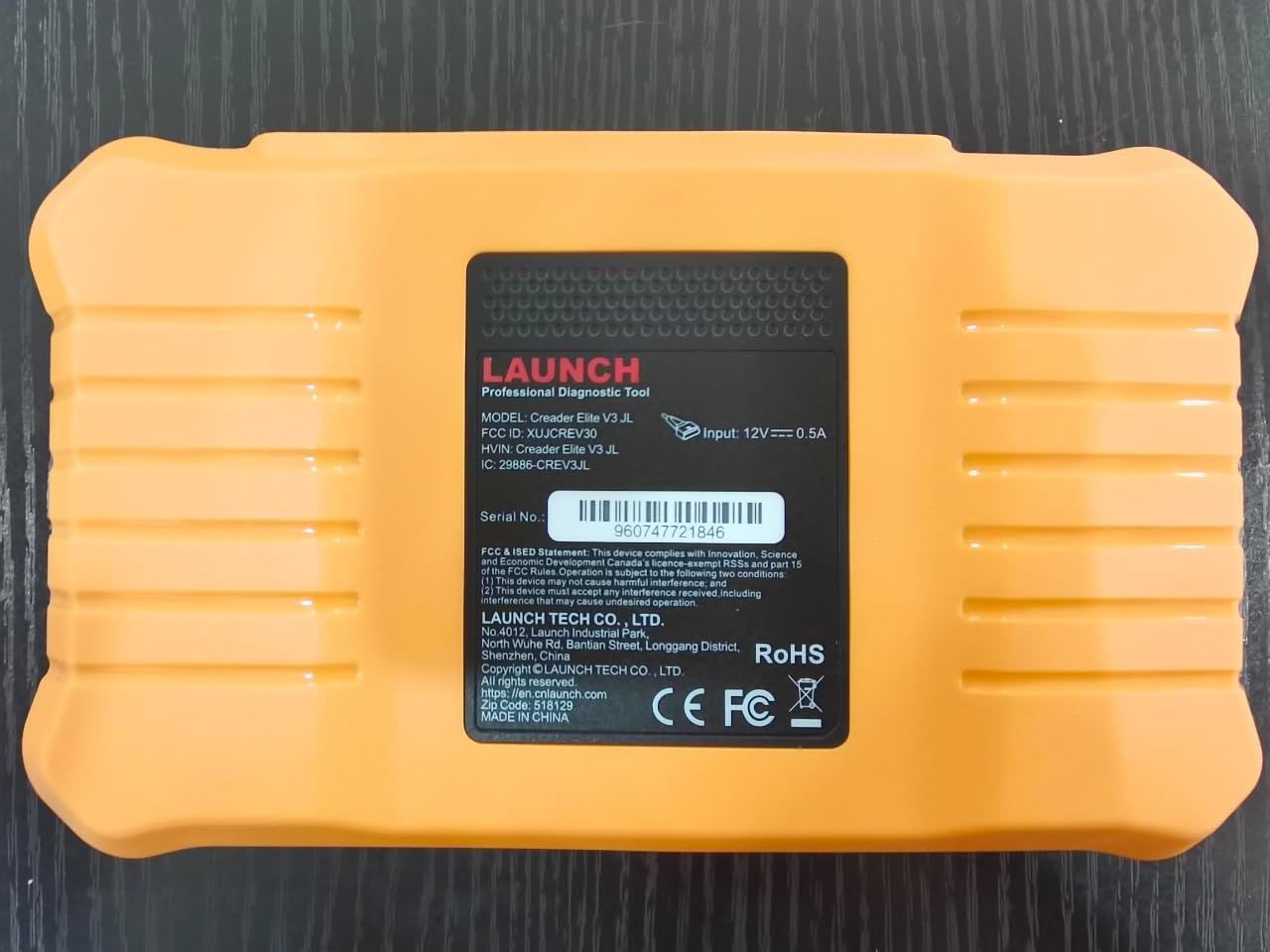
Resim: Arka view of the LAUNCH Creader Elite V3.0, displaying the model number, FCC ID, and serial number (e.g., 960747721846).
3. Kurulum
3.1. İlk Güç Açma
- Cihazın tamamen şarj edildiğinden veya bir güç kaynağına bağlı olduğundan emin olun.
- Ekran aydınlanana kadar güç düğmesine basılı tutun.
- Ekranda beliren yönergeleri izleyerek tercih ettiğiniz dili ve bölgeyi seçin.
3.2. Wi-Fi Bağlantısı
- Ana menüden şuraya gidin: Ayarlar.
- Seçme Wifi ve açın.
- Listeden istediğiniz Wi-Fi ağını seçin ve istenirse şifreyi girin.
- Confirm the connection. A stable internet connection is required for software updates and online resources.
3.3. Kayıt ve Aktivasyon
Upon first use or after a factory reset, you may be prompted to register your device. Follow the on-screen instructions to create an account or log in. This step is crucial for accessing software updates and technical support.
4. Kullanım Talimatları
4.1. Araca Bağlantı
- Locate the vehicle's OBD2 diagnostic port, typically under the dashboard on the driver's side.
- Aracın kontak anahtarının açık olduğundan emin olun. ON position (engine off or running, depending on the test).
- Connect the OBD2 diagnostic cable to the vehicle's OBD2 port and to the LAUNCH Creader Elite V3.0 device.
- The device will automatically power on or prompt you to do so.
4.2. Full Systems Diagnostics
This function allows you to scan all available electronic control units (ECUs) in the vehicle.

Image: Display showing OE-level all system diagnostics, including Auto VIN, fault codes, 4-in-1 live data, and MIL reset.
- Ana menüden şunu seçin: Yerel Teşhis.
- Choose the vehicle brand (Land Rover or Jaguar).
- Seçme Otomatik Arama or Manuel Seçim. Auto Search (Auto VIN) will attempt to automatically identify the vehicle.
- Once the vehicle is identified, select Sağlık Raporu or Sistem Taraması to perform a comprehensive scan of all modules.
- Review the diagnostic trouble codes (DTCs) and ECU information. You can then choose to clear codes if necessary.
4.3. Hizmet Fonksiyonları
The Creader Elite V3.0 provides numerous maintenance and reset services. Access these functions via Diagnose > Brand > System Selection > Special Function.

Resim: Üzeriview of various service functions including Oil Reset, Brake Reset, SAS Calibration, Start-Stop Reset, TPMS Reset, Injector Coding, Battery Reset, ABS Bleeding, Seat Calibration, and Height Calibration.
Common services include:
- Yağ Sıfırlama: Motor yağı ömür sistemini sıfırlar.
- EPB Sıfırlama: Resets the electronic parking brake after replacement.
- SAS Kalibrasyonu: Direksiyon açısı sensörünü kalibre eder.
- Enjektör Kodlaması: Yeni enjektör numaralarını ECU'ya kodlar.
- Gaz Kolu Yeniden Öğrenme: Relearns the throttle body position.
- Yükseklik Kalibrasyonu: Calibrates the vehicle's suspension height.
- Pil Sıfırlama: Registers a new battery replacement.
- ABS Kanaması: ABS fren sisteminin havasını alma işlemlerini gerçekleştirir.
Note: The availability of specific service functions may vary depending on the vehicle model and year. Always check compatibility before performing a service.
4.4. Çift Yönlü Kontrol (Aktif Testler)
Active tests allow you to send commands to vehicle systems and components to verify their functionality.

Image: Depicts bi-directional active tests, showing the device sending commands to vehicle actuators like wipers, windows, clutch, and injectors to check their status.
- Navigate to the desired vehicle system within the diagnostic menu.
- Seçme Aktif Test or Çift Yönlü Kontrol.
- Choose the specific component or system you wish to test (e.g., 'Wiper Test', 'Window Test', 'Horn Test').
- Ekranda gösterilen talimatları izleyerek bileşeni etkinleştirin ve tepkisini gözlemleyin.
4.5. Tam OBD2 Fonksiyonları
For universal vehicle diagnostics (all OBD2 compliant vehicles after 1996), use the OBD II Menü seçeneği.
- Kodları Okuyun: Retrieves generic (P0, P2, P3, U0) and manufacturer specific (P1, P3, U1) codes.
- Kodları Temizle: Clears diagnostic trouble codes and turns off the Malfunction Indicator Light (MIL).
- Canlı veri: Aracın sensörlerinden gelen gerçek zamanlı veri akışını görüntüler.
- I/M Hazırlık: Emisyonla ilgili izleme cihazlarının hazır olup olmadığını kontrol eder.
- Çerçeveyi Dondur: Displays a snapshot of operating conditions at the time of an emission-related fault.
- O2 Sensör Testi: Oksijen sensörü izleme test sonuçlarını alır.
- Yerleşik Monitör Testi (Mod 6): Emisyonla ilgili güç aktarma sistemi bileşenleri ve sistemleri için sonuçları getirir.
- EVAP Sistemi Testi (Mod 8): Buharlaşma emisyon kontrol sisteminin testini başlatır.
- Araç bilgisi: Retrieves vehicle identification number (VIN), calibration ID (CALID), and calibration verification number (CVN).
4.6. Real-Time Monitoring and Data Stream
Monitor various vehicle parameters in real-time to diagnose intermittent issues or verify repairs.

Image: Real-time monitoring screen showing battery voltage, transmission oil temperature, coolant temperature, and vehicle speed, with a detailed 4-in-1 data stream graph below.
- From the diagnostic menu, select Canlı Veri.
- İzlemek istediğiniz parametreleri seçin.
- The device can display up to four data streams simultaneously in a graphical format.
- Kullanın Kayıt Ve Playback functions to capture and review data for later analysis.
4.7. Smart Diagnostic Features
The device includes features to streamline the diagnostic process:
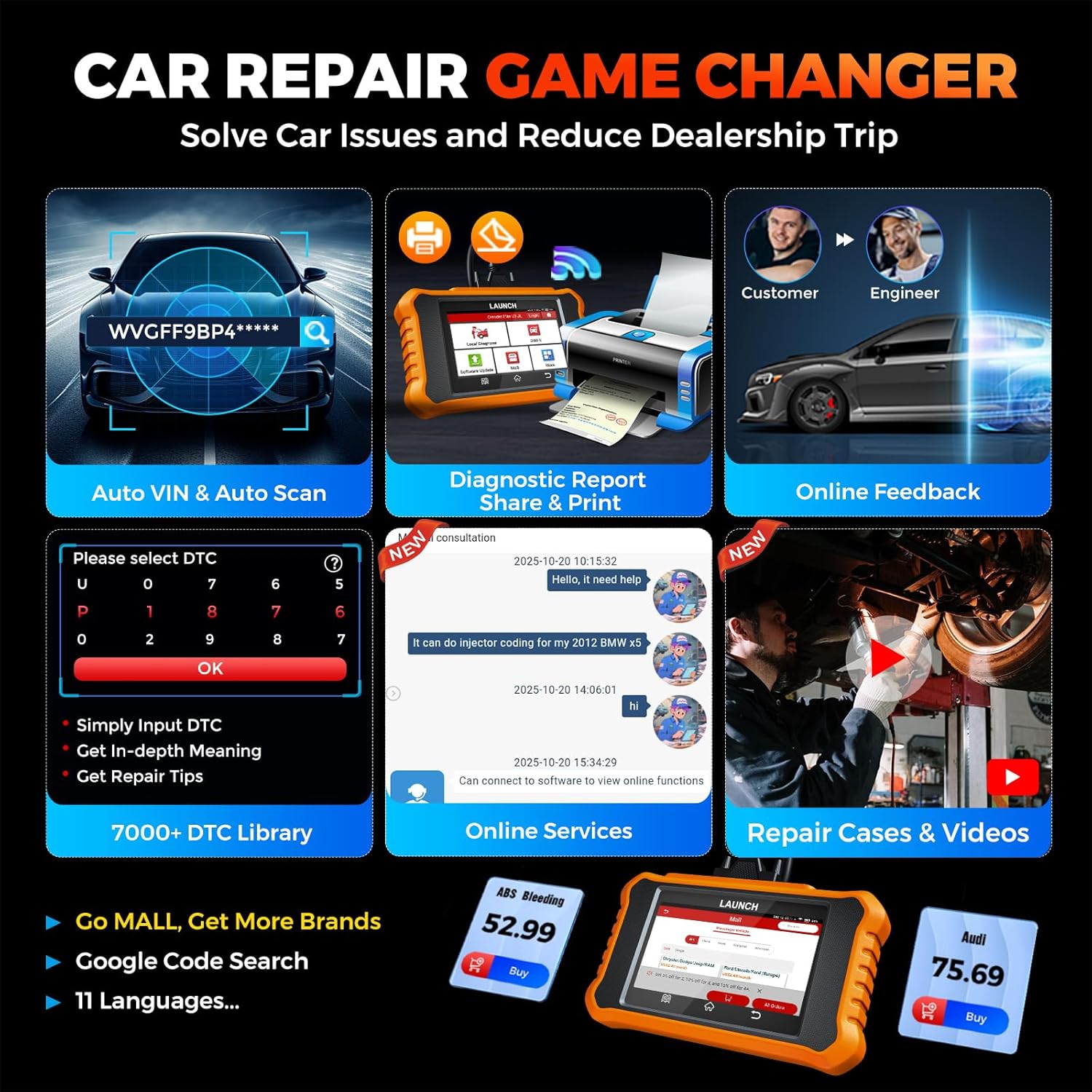
Image: Smart diagnostic features such as Auto VIN, diagnostic report generation and printing, online feedback, 7000+ DTC library, and access to online services.
- Araç VIN numarası: Automatically identifies vehicle information (year, make, model) for quicker diagnostics.
- DTC Arama: Provides detailed explanations for diagnostic trouble codes.
- Tanı Raporu: Generates a professional diagnostic report that can be shared or printed.
- Çevrimiçi Geri Bildirim: Allows users to submit feedback or issues directly to technical support.
5. Maintenance & Updates
5.1. Yazılım Güncellemeleri
The LAUNCH Creader Elite V3.0 offers lifetime free software updates for Land Rover and Jaguar brands.
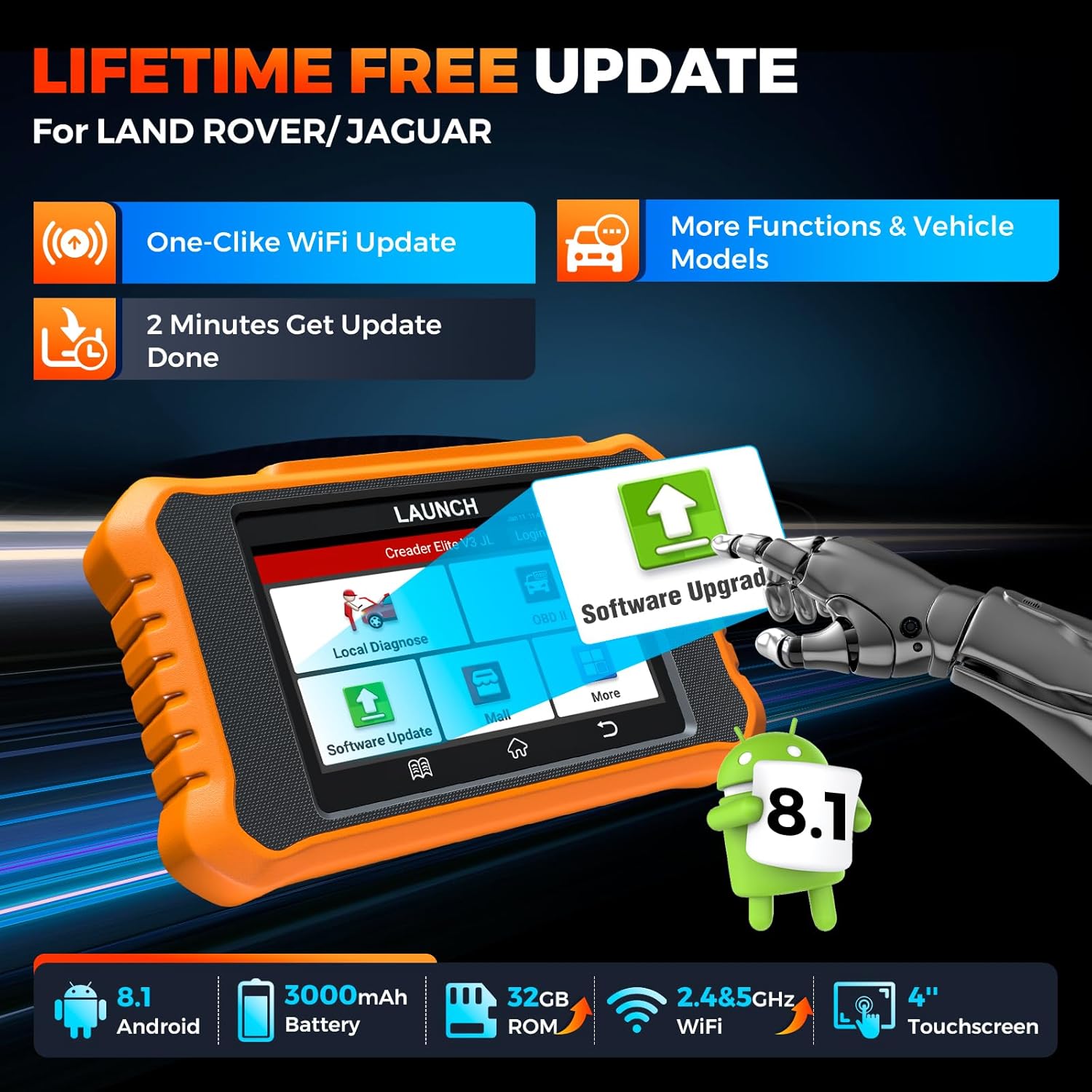
Image: Device screen illustrating the one-click Wi-Fi update process, emphasizing lifetime free updates for Land Rover/Jaguar and the ability to get more functions and vehicle models.
- Cihazın istikrarlı bir Wi-Fi ağına bağlı olduğundan emin olun.
- Ana menüden şunu seçin: Yazılım Güncellemesi.
- The device will check for available updates.
- Select the updates you wish to install and follow the on-screen prompts. Updates typically take a few minutes.
5.2. Expanding Vehicle Coverage (Mall)
If you require diagnostic capabilities for other vehicle brands beyond Land Rover and Jaguar, you can purchase additional software packages from the Alışveriş merkezi application on the device. Please note that software purchased from the Mall is typically valid for one year and may require re-purchase after expiry.
5.3. Cihaz Bakımı
- Cihazınızı temiz tutun, toz ve nemden uzak tutun.
- Cihazı düşürmekten veya güçlü darbelere maruz bırakmaktan kaçının.
- Cihazı kullanılmadığında serin ve kuru bir yerde saklayın.
- Sadece verilen şarj kablosunu ve aksesuarlarını kullanın.
6. Uyumluluk
The LAUNCH Creader Elite V3.0 is primarily designed for:

Image: Device interface showing diagnostic options for Land Rover (Defender, Discovery, Range Rover, Evoque) and Jaguar (E-Pace, F-Pace, F-Type, S-Type, X-Type, XE, XF, XJ, XK) models, with a note on DoIP protocol for models after 2017.
- Land Rover: Compatible with models such as Defender, Discovery, Discovery Sport, Range Rover, Range Rover Evoque, etc.
- Jaguar: Compatible with models such as E-Pace, F-Pace, F-Type, S-Type, X-Type, XE, XF, XJ, XK, etc.
- DoIP Protocol: Supports Land Rover & Jaguar models after 2017, requiring a separate DoIP adapter.
- Universal OBD2: Fully compatible with all OBD2 compliant vehicles manufactured after 1996 for basic OBD2 functions.
For specific vehicle compatibility, it is recommended to contact technical support via obdbox21@163.com.
7. Özellikler
| Örnek | LAUNCH Creader Elite 3.0-JL |
| İşletim Sistemi | Android 8.1 |
| Ekran Boyutu | 4 inç |
| Dahili Depolama (ROM) | 32 GB |
| Pil Kapasitesi | 3000mAh |
| Wifi | 2.4 & 5GHz Dual-band |
| Güç Kaynağı | Pil ile çalışır |
| Ürün Ağırlığı | 1.49 pound |
| Paket Boyutları | 8 x 7.5 x 1.5 inç |
| Otomotiv Uyum Türü | Universal Fit (for OBD2 functions) |
8. Sorun Giderme
8.1. Cihaz Açılmıyor
- Check battery level. Connect the device to a charger and allow it to charge for at least 30 minutes.
- Güç düğmesinin doğru şekilde basılı tutulduğundan emin olun.
- If connected to the vehicle, ensure the vehicle's ignition is on and the OBD2 cable is securely connected.
8.2. Araçla İletişim Hatası
- Verify the OBD2 cable is securely connected to both the device and the vehicle's port.
- Aracın kontak anahtarının açık olduğundan emin olun. ON konum.
- Confirm that the vehicle is OBD2 compliant (generally 1996 and newer for US vehicles).
- Try a different OBD2 compliant vehicle to rule out a vehicle-specific issue.
- Ensure the correct vehicle brand software is installed and up to date.
8.3. Yazılım Güncellemesi Başarısızlığı
- Check your Wi-Fi connection for stability and signal strength.
- Ensure the device has sufficient battery charge or is connected to power during the update process.
- Verify that there is enough free storage space on the device.
- Restart the device and attempt the update again.
8.4. Inaccurate Readings or Functions Not Working
- Ensure the vehicle's make, model, and year are correctly identified by the device.
- Verify that the specific function is supported for your vehicle model and year. Refer to the compatibility section or contact support.
- Ensure the device software is fully updated.
9. Garanti ve Destek
9.1. Garanti Bilgileri
The LAUNCH Creader Elite V3.0 comes with an Extended 60-Day Return & Replacement policy and a 5-Year Quality Backup. Please retain your proof of purchase for warranty claims.
9.2. Teknik Destek
For any technical assistance, questions, or compatibility inquiries, please contact our support team:
- E-posta: obdbox21@163.com
- Our support team is available 24/7/365.
Note: Please direct all support inquiries to the provided email address. Do not contact LAUNCH Tech USA for support related to this specific product.