1. Giriş
Thank you for choosing the GAOMON 72 inch Kitchen Pantry Cabinet. This versatile storage unit is designed to enhance your kitchen, dining room, or living space with its functional design and ample storage capacity. This manual provides detailed instructions for assembly, operation, maintenance, and safety to ensure a smooth and enjoyable experience with your new cabinet.

Image 1.1: The GAOMON 72 inch Kitchen Pantry Cabinet in a living room setting, showcasing its design and potential placement.
2. Güvenlik Bilgileri
Lütfen montaj ve kullanımdan önce tüm güvenlik talimatlarını dikkatlice okuyun. Bu talimatlara uyulmaması yaralanmaya veya ürünün hasar görmesine neden olabilir.
- Ağırlık sınırı: Maksimum ağırlık kapasitesini aşmayın 450 pound for the entire cabinet. Distribute weight evenly across shelves and drawers.
- Devrilme Önleyici Cihaz: It is crucial to install the included anti-tipping device to prevent the cabinet from falling, especially in households with children or pets. Securely fasten the device to a wall stud.
- Toplantı: Assemble the cabinet on a soft, clean surface to prevent scratches. Ensure all hardware is tightened securely before use. Do not overtighten.
- Atama: Place the cabinet on a flat, stable, and level surface. Avoid placing it near heat sources or in direct sunlight to prevent material degradation.
- Çocuk Güvenliği: Montaj sırasında küçük parçaları ve ambalaj malzemelerini çocuklardan uzak tutun. Çocukların dolabın üzerine tırmanmasına veya onunla oynamasına izin vermeyin.

Image 2.1: Details of the anti-tipping device, handles, and hinges, highlighting key safety and durability features.
3. Paket İçeriği
Before beginning assembly, please verify that all parts and hardware are present. Refer to the included assembly instructions for a complete list of components. If any parts are missing or damaged, please contact GAOMON customer support.
Tipik Bileşenler Şunları İçerir:
- Top Cabinet Section (with glass doors)
- Bottom Cabinet Section (with solid doors)
- Çekmece Montajı
- Ayarlanabilir Raflar
- Arka Paneller
- Hardware Pack (screws, dowels, cam locks, hinges, handles, anti-tipping kit)
- Montaj Talimatları Kılavuzu

Image 3.1: Dimensional diagram of the cabinet, illustrating the various sections and their measurements.
4. Montaj Talimatları
Assembly of your GAOMON cabinet is designed to be straightforward. Follow the step-by-step instructions provided in the separate assembly manual included with your product. Ensure you have all necessary tools (typically a Phillips head screwdriver and a hammer) before you begin.
Genel Kurul Adımları:
- Paketi açın ve tanımlayın: Carefully unpack all components and lay them out on a clean, soft surface. Identify each part using the labels and the parts list in your assembly manual.
- Assemble Base Unit: Begin by assembling the base frame of the bottom cabinet section according to the diagrams. Attach side panels to the bottom panel.
- Çekmecelerin raylarını takın: Secure the drawer runners to the designated side panels of the bottom cabinet.
- Çekmeceyi Birleştirin: Construct the drawer box and attach the drawer front. Insert the assembled drawer into the runners.
- Attach Bottom Cabinet Doors: Install hinges onto the bottom cabinet doors and then attach the doors to the cabinet frame. Adjust as needed for proper alignment.
- Assemble Top Cabinet Section: Follow similar steps to assemble the top cabinet section, including attaching the glass doors.
- Bölümlere Katılın: Carefully place the assembled top cabinet section onto the bottom cabinet section and secure them together using the provided connectors.
- Arka Panelleri Takın: Attach the back panels to both sections of the cabinet.
- Ayarlanabilir Rafları Takın: Place the shelf pins into the desired holes and then rest the adjustable shelves on top.
- Devrilmeyi Önleyici Cihazı Takın: Securely fasten the anti-tipping device to the top rear of the cabinet and then to a wall stud using appropriate wall anchors. This step is critical for safety.
5. Kullanım Talimatları
Your GAOMON pantry cabinet offers versatile storage solutions. Here’s how to best utilize its features:
- Ayarlanabilir Raflar: The cabinet features adjustable shelves in both the upper and lower sections. To adjust, remove items from the shelf, lift the shelf, remove the metal pins, reposition the pins to the desired height, and then replace the shelf. Ensure pins are fully inserted and the shelf is stable before placing items on it.
- Çekmece Kullanımı: The large central drawer operates on smooth metal runners. Pull gently to open and push firmly to close. Avoid overloading the drawer to ensure smooth operation and prevent damage.
- Open Compartment/Microwave Stand: The spacious open compartment is ideal for small appliances like a microwave, coffee maker, or toaster. It includes a cable management hole at the back for neat organization of power cords.
- Cam kapılar: The upper cabinet features glass doors, perfect for displaying decorative items or easily accessing frequently used kitchenware.
- Solid Doors: The lower cabinet with solid doors provides concealed storage for larger items or those you prefer to keep out of sight.
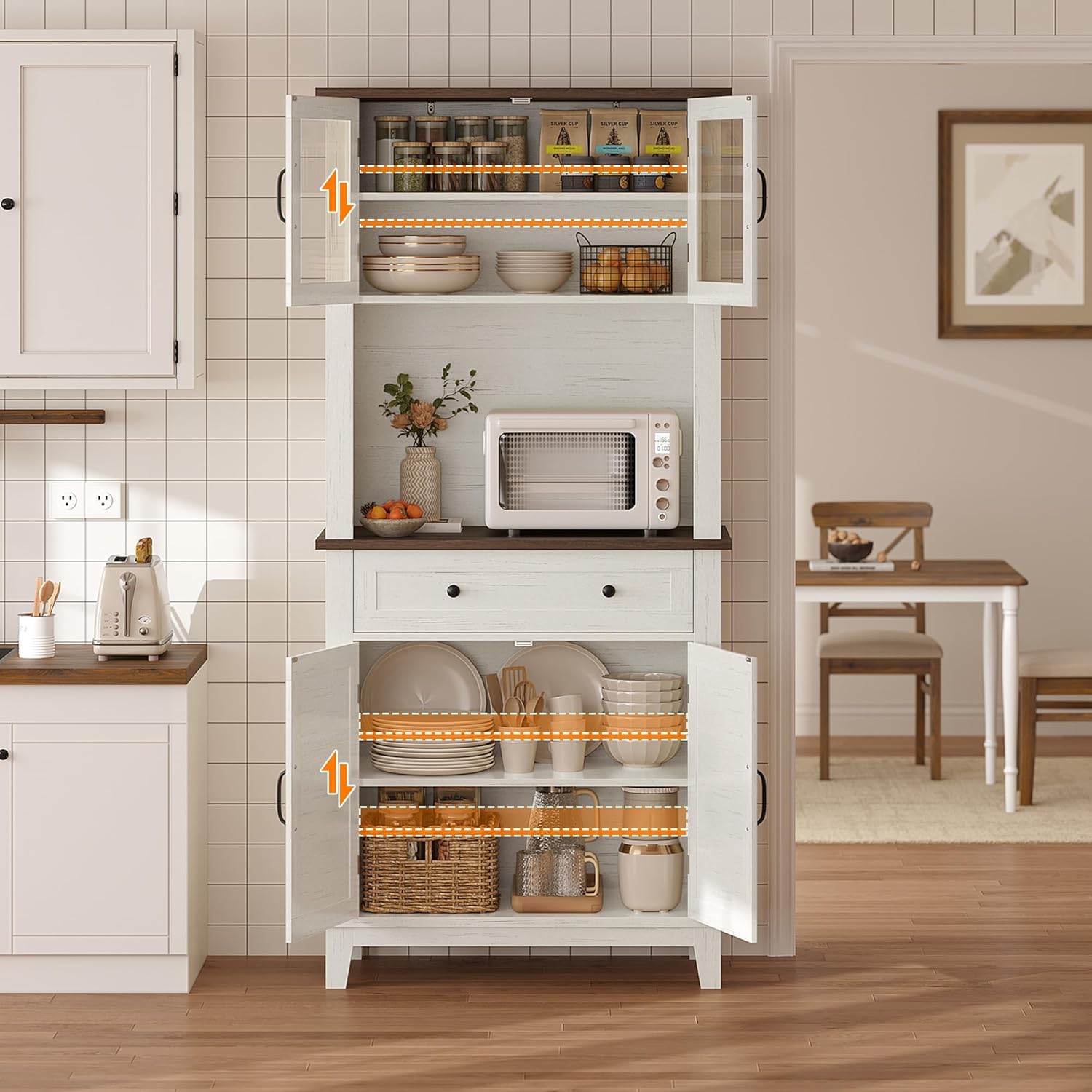
Image 5.1: The cabinet integrated into a kitchen, demonstrating its use as a pantry and microwave stand.
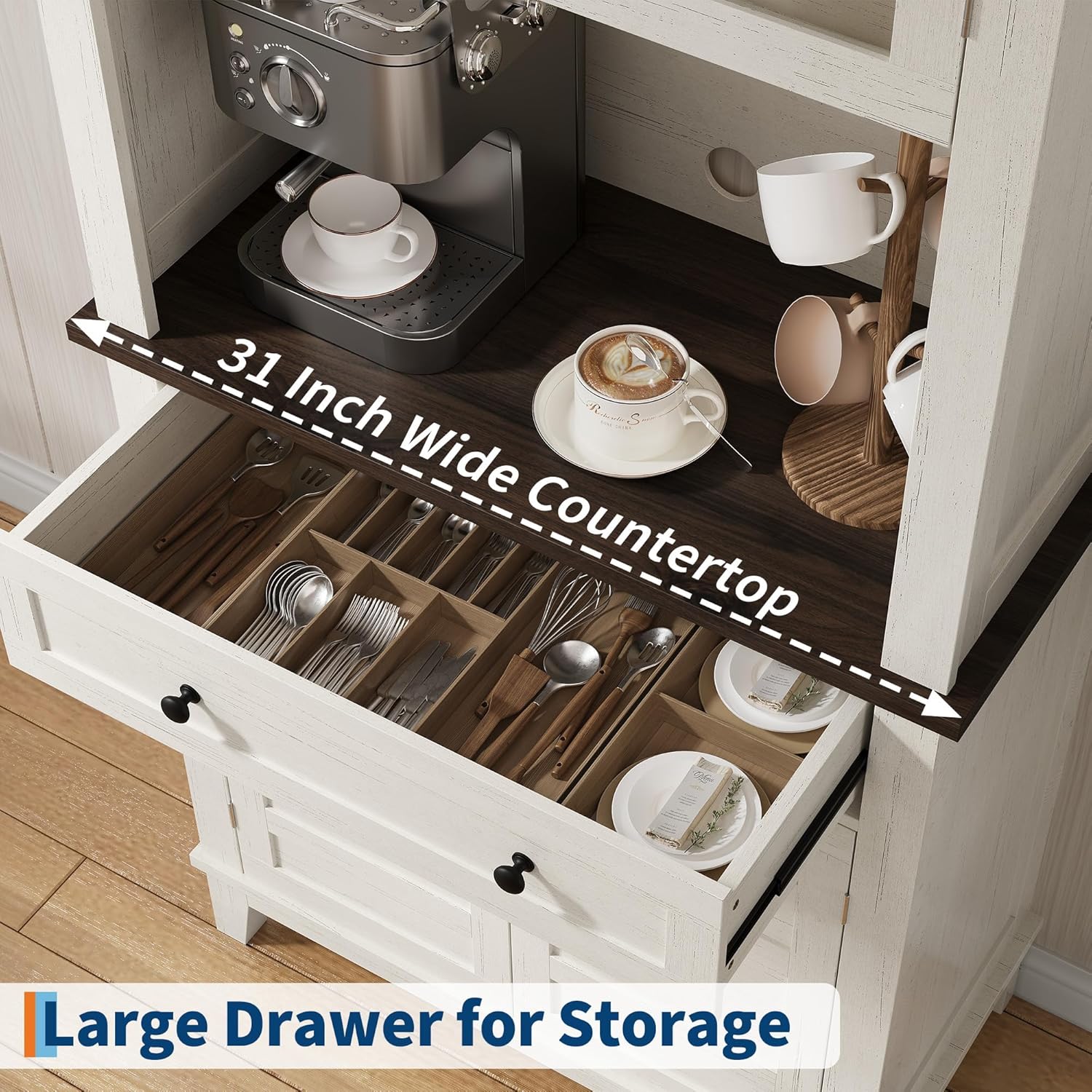
Resim 5.2: Ayrıntılı view of the spacious drawer for storage and the 31-inch wide countertop, suitable for a coffee bar setup.
6. Bakım
Proper care and maintenance will extend the life and appearance of your GAOMON cabinet.
- Temizlik: Yüzeyleri yumuşak bir bezle silin.amp cloth. Avoid using harsh chemicals, abrasive cleaners, or polishes that may damage the finish. For glass doors, use a standard glass cleaner.
- Dökülmeler: Su geçirmez olmayan ahşap yüzeylerde lekelenme veya su hasarını önlemek için dökülen sıvıları hemen temizleyin.
- Donanım: Tüm vidaları ve bağlantı elemanlarını periyodik olarak kontrol ederek sıkı olduklarından emin olun. Gerekirse tekrar sıkın, ancak aşırı sıkmayın.
- Çevresel Koşullar: Maintain a stable room temperature and humidity. Extreme fluctuations can cause wood products to warp or crack.
7. Sorun Giderme
Dolaplarınızla ilgili herhangi bir sorunla karşılaşırsanız, aşağıdaki yaygın sorunlar ve çözümlere bakın:
- Dolap sallanıyor:
- Kabinin düz bir yüzeye yerleştirildiğinden emin olun.
- Check that all assembly screws and cam locks are fully tightened.
- Verify the anti-tipping device is securely installed.
- Doors or Drawer Do Not Close Properly:
- Check for obstructions inside the cabinet or drawer.
- Adjust the hinges on the doors if they are misaligned. Most hinges allow for minor adjustments.
- Ensure the drawer runners are correctly installed and free of debris.
- Çizikler veya Küçük Hasarlar:
- Küçük çizikler için, mobilya tamir kalemi veya dolabın beyaz rengine uygun rötuş boyası kullanılabilir.
If these solutions do not resolve the issue, please contact GAOMON customer support for further assistance.
8. Özellikler
| Özellik | Detay |
|---|---|
| Marka | GAOMON |
| Model Adı | MJ_B41Ai8npYaopXyLCiBA4A |
| Ürün Model Numarası | PHO_355KQB89-qcx4A |
| Renk | Beyaz |
| Ürün Boyutları | 31.5"D x 15.75"G x 72.24"Y |
| Boyut | 32 inch Wide |
| Malzeme | Mühendislik Ahşap |
| Ağırlık sınırı | 450 Pound |
| Ürün Ağırlığı | 103.1 Pound |
| Montaj Tipi | Kat Dağı |
| Kurulum Türü | Solo |
| Özel Özellik | Ayarlanabilir Raf |
| Dahil Bileşenler | Çekmeceler |
| Montaj Gerekli | Evet |
| UPC | 820567450663 |
9. Garanti ve Destek
GAOMON is committed to providing high-quality products and customer satisfaction. While specific warranty details are not provided in this manual, please retain your proof of purchase for any warranty claims.
For any questions, concerns, missing parts, or assistance with assembly or troubleshooting, please contact GAOMON customer support. Refer to the contact information provided with your purchase or visit the official GAOMON webdestek seçenekleri için site.


