1. Giriş
This manual provides essential information for the safe and efficient use of your DOOGEE Note56 Android 16 smartphone. Please read it thoroughly before using your device.

Resim: Ön ve arka view of the DOOGEE Note56 smartphone, showcasing its design and key specifications like 6150mAh battery, Android 16, 6.56-inch display, and 90Hz refresh rate.
2. Kurulum
2.1. Paket İçeriği
Paketinizin aşağıdaki öğeleri içerdiğini doğrulayın:
- DOOGEE Note56 Smartphone
- Güç Adaptörü
- USB kablosu
- SIM İtici Aracı
- Koruyucu Kılıf
- Hızlı Başlangıç Kılavuzu (bu kılavuz)
2.2. SIM Kart ve TF Kart Takılması
The DOOGEE Note56 supports dual SIM cards and a TF (microSD) card for expandable storage.
- Cihazın yan tarafında bulunan SIM kart tepsisini bulun.
- SIM kart çıkarma aracını tepsinin yanındaki küçük deliğe yerleştirin ve tepsi dışarı çıkana kadar hafifçe bastırın.
- Place your Nano-SIM cards and/or TF card into the designated slots on the tray. Ensure the gold contacts face downwards.
- Tepsiyi yerine oturana kadar dikkatlice telefona yeniden yerleştirin.
2.3. İlk Güç Açma ve Temel Yapılandırma
- DOOGEE logosu görünene kadar Güç düğmesini basılı tutun.
- Dilinizi seçmek, bir Wi-Fi ağına bağlanmak ve Google hesabınızı kurmak için ekrandaki talimatları izleyin.
- Configure security settings such as screen lock (PIN, pattern, password) and face recognition.
2.4. Cihazın Şarj Edilmesi
Connect the USB cable to the power adapter and then to the phone's charging port. Plug the adapter into a power outlet. The battery indicator will show charging status. For optimal battery life, use the provided charger.
3. Kullanım Talimatları
3.1. Android 16 İşletim Sistemi
The DOOGEE Note56 runs on the latest Android 16 system, offering an optimized and intuitive user experience. It features improved application launch speeds, enhanced responsiveness, and a refined user interface. A new Privacy Space function allows for hiding sensitive data and applications, ensuring secure usage.

Resim: Üzeriview of the Android 16 operating system interface, displaying various applications, settings menus, and system information.
3.2. Ekran Özellikleri
The device is equipped with a 6.56-inch IPS waterdrop display, providing a smooth visual experience with a 90Hz high refresh rate. The 720x1612 HD+ resolution and 90% screen-to-body ratio enhance viewing of movies and videos. Two eye-friendly modes are included to reduce eye strain during prolonged use.

Resim: Yakın çekim view of the DOOGEE Note56's 6.56-inch IPS display, illustrating its vibrant colors and the smooth 90Hz refresh rate.
3.3. Kamera Fonksiyonları
Capture vivid and beautiful photos with the 8MP main camera and take clear selfies with the 5MP front camera. The device utilizes AI functions for enhanced photography, including:
- Yapay Zeka Sahne Tanıma: Automatically detects and optimizes settings for 12 different scenes.
- Gece Modu: Düşük ışık koşullarında fotoğraf kalitesini artırır.
- Portre modu: Arka planı bulanıklaştırarak profesyonel görünümlü fotoğraflar oluşturur.
- Yüksek Dinamik Aralık (HDR): Enhances dynamic range for balanced exposure.
- Profesyonel Mod: Kamera ayarları üzerinde manuel kontrol imkanı sunar.
- Gülümseme Yakalama: Gülümseme algılandığında otomatik olarak fotoğraf çeker.
- Panorama: Captures wide-angle scenic shots.
- Devamlı atış: Ard arda çok sayıda fotoğraf çeker.
- Fun Filters: Apply various creative effects to your photos.

Image: Diagram illustrating the 8MP rear camera and 5MP front camera specifications, along with icons representing various AI scene recognition modes.

Image: The camera interface of the DOOGEE Note56, highlighting features like HDR, Pro Mode, Smile Capture, Panorama, Continuous Shooting, Night Mode, and Fun Filters, with a sampFotoğraf.

Image: The 5MP front camera's capabilities for selfies, demonstrating Beauty Mode and Portrait Effect for bright, natural, and shareable self-portraits.
3.4. Bellek ve Depolama
The DOOGEE Note56 is equipped with 24GB RAM (3GB physical RAM + 21GB extended RAM) and 64GB of internal storage (ROM). It supports TF card expansion up to 2TB, providing ample space for photos, videos, and applications. This powerful memory configuration ensures smooth multitasking and minimizes lag during gaming or heavy app usage.

Resim: Dahili view diagram highlighting the 64GB ROM and 24GB RAM (composed of 3GB physical and 21GB extended RAM) for seamless performance.
3.5. Bağlantı ve Navigasyon
The device supports Bluetooth 4.2 for stable wireless connections and 4G Dual SIM for broad network compatibility both domestically and internationally. For navigation, it integrates three major positioning systems: GPS, GLONASS, and Galileo, ensuring accurate location services from urban areas to remote locations.
3.6. Diğer Akıllı Özellikler
- Instant Face Recognition: Unlock your device quickly and securely using your face.
- FM Radyo: Enjoy local radio stations without an internet connection.
- 3.5 mm Kulaklık Girişi: Connect your wired headphones for audio playback and calls.
- Smart Body Sensor: (Specific functionality not detailed, refers to general smart sensor capabilities).
- Çift Sistem Modu: Allows for separate user environments.
- Süper Pano: Geliştirilmiş pano işlevselliği.
- Screen Optimization & Color Customization: Adjust display settings for personal preference.

Image: Visual representation of instant face recognition, accurate GPS navigation, and the FM radio interface on the DOOGEE Note56.

Resim: Bir kolaj gösterisiasing various smart OS features of the DOOGEE Note56, including smart body sensor, dual system mode, super clipboard, RAM expansion, screen optimization, and screen color customization.
4. Bakım
4.1. Pil Yönetimi
The DOOGEE Note56 features a 6150mAh large capacity battery, designed for extended use. It supports approximately 1000 charge/discharge cycles and offers up to 4 years of durable battery life. The device also supports 5W reverse charging, allowing it to act as a power bank for other devices.
- Pil ömrünü uzatmak için aşırı sıcaklıklardan kaçının.
- Pili düzenli olarak tamamen boşaltmayın.
- En iyi şarj performansı için orijinal şarj cihazını kullanın.
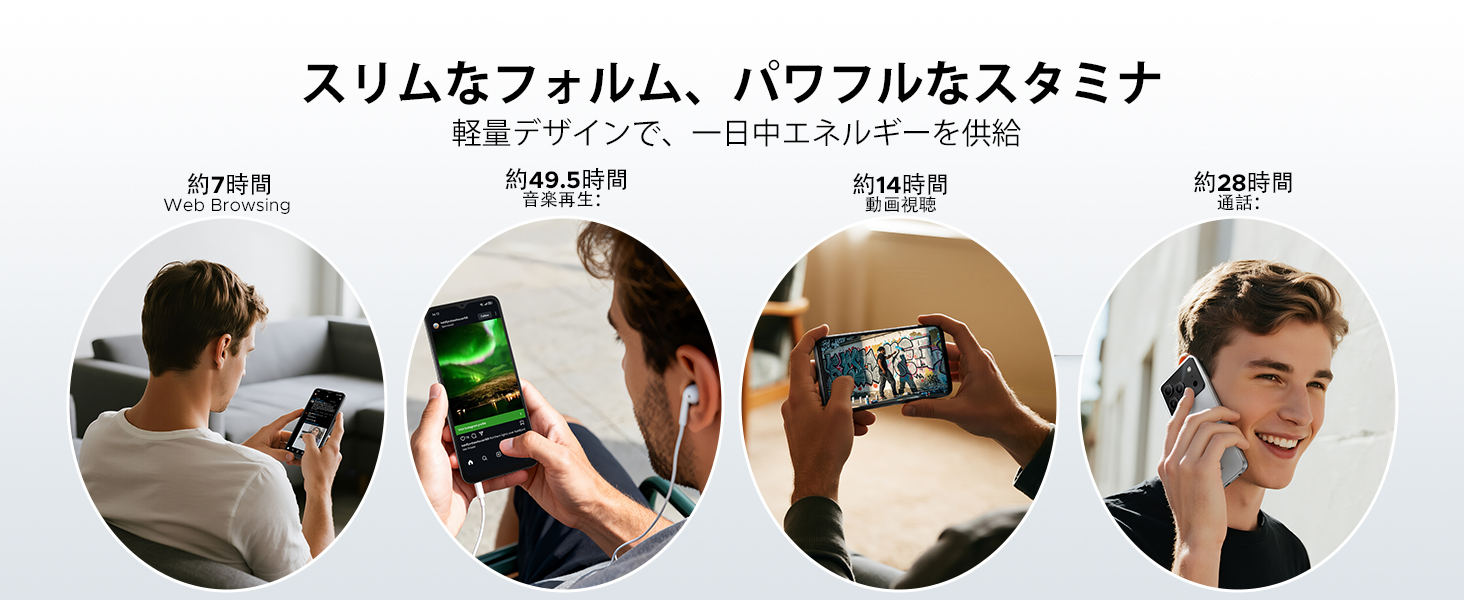
Image: Diagram illustrating the 6150mAh silicon-carbon battery, highlighting its features such as 1000 charge cycles, 4 years of durability, 20% smaller size, and 5W reverse charging capability.

Image: Infographic showing estimated battery life for different activities on the DOOGEE Note56: approximately 7 hours for web browsing, 49.5 hours for music playback, 14 hours for video watching, and 28 hours for calls.
4.2. Temizlik ve Bakım
- Cihazın ekranını ve gövdesini temizlemek için yumuşak, tüy bırakmayan bir bez kullanın.
- Sert kimyasallar veya aşındırıcı malzemeler kullanmaktan kaçının.
- Keep the device away from excessive dust and moisture.
4.3. Yazılım Güncellemeleri
Regularly check for and install software updates to ensure your device has the latest features, security patches, and performance improvements. You can usually find this option in the device's settings under 'System' or 'About phone'.
5. Sorun Giderme
If you encounter issues with your DOOGEE Note56, refer to the following common troubleshooting steps:
- Cihaz açılmıyor: Pilin şarjlı olduğundan emin olun. Yeniden başlatmayı zorlamak için Güç düğmesini en az 10-15 saniye basılı tutun.
- Uygulamaların çökmesi veya donması: Uygulamayı kapatıp tekrar açın. Ayarlar > Uygulamalar bölümünden uygulamanın önbelleğini ve verilerini temizleyin. Sorun devam ederse, uygulamayı kaldırıp yeniden yükleyin.
- Ağ bağlantı sorunları: Check if Airplane Mode is off. Restart the device. Verify your SIM card is correctly inserted and your mobile data plan is active. For Wi-Fi, try forgetting the network and reconnecting.
- Şarj sorunları: Ensure the charging cable and adapter are securely connected and undamaged. Try a different outlet or charger. Clean the charging port gently.
- Yavaş performans: Gereksiz arka plan uygulamalarını kapatın. Önbelleği düzenli olarak temizleyin. Depolama alanınızı boşaltmayı düşünün.
Daha karmaşık sorunlar için lütfen destek bölümüne bakın.
6. Özellikler
| Özellik | Şartname |
|---|---|
| Ekran Boyutu | 6.56 inç |
| Pil Kapasitesi | 6150 mAh |
| Renk | Siyah (diğer renk seçenekleri mevcuttur) |
| Marka Adı | DOOGEE |
| Üretici | DOOGEE |
| Yayın Yılı | 2025 |
| Dahil Bileşenler | Güç Adaptörü |
| Uyumlu işletim sistemi | Android 16 |
| Diğer Özellikler | SIM-free |
| Model Adı | NOT56 |
| Görüntü Türü | IPS |
| Paket Boyutları | 19.3 x 10.5 x 5.1 cm; 410 g |
| Üretici Referansı | NOT56 |
| Kurulu RAM Boyutu | 24 GB |
| Bellek Depolama Kapasitesi | 64 GB |
7. Garanti ve Destek
7.1. Garanti Bilgileri
The DOOGEE Note56 comes with a 1 yıllık garanti from the date of purchase, ensuring peace of mind for your usage. This warranty covers manufacturing defects under normal use conditions.
7.2. Destek Ekibiyle Nasıl İletişime Geçilir?
In the unlikely event of a product defect or if you require technical assistance, please contact our support team through the following methods:
- Via Amazon Purchase History: Navigate to your Amazon purchase history and contact our store directly regarding your order.
- Via Product Page: On the product page, click on the store name located below the 'Add to Cart' button. Then, click the 'Ask a Question' button displayed in the upper right corner to send us an inquiry.