1. Giriş
This manual provides instructions for the assembly, operation, and maintenance of your Okin Overbed Bedside Table with Wheels, Model OKPM50502716WAS. This versatile table is designed for various uses, including reading, writing, eating, or using a laptop, and features adjustable height and a tilting desktop for ergonomic comfort.

Image 1.1: The Okin Overbed Table is suitable for various scenarios, including use over a bed, next to a couch, or with a chair.
2. Güvenlik Bilgileri
- Maksimum Yük Kapasitesi: Do not exceed the maximum static load capacity of 22 lbs (10 kg) on the desktop. Overloading can cause instability and damage.
- Kararlılık: Ensure the table is placed on a flat, stable surface. Lock the wheels when the table is in a stationary position to prevent unintended movement.
- Tilting Section: When the desktop is tilted, ensure items placed on it are secure and will not slide off. Avoid placing heavy or fragile items on the tilting section when it is not flat.
- Sıvılar: Exercise caution when placing beverages on the table, especially near electronic devices. Use the integrated cup holder for added security.
- Toplantı: Tüm montaj talimatlarını dikkatlice izleyin. Kullanmadan önce tüm vidaların ve bağlantı elemanlarının iyice sıkıldığından emin olun.
- Çocuklar: Keep children away from the table during assembly and adjustment to prevent injury.

Image 2.1: The H-base design provides stability, supporting up to 22 lbs (10 kg) of weight. Always adhere to the maximum load capacity.
3. Paket İçeriği
Montaja başlamadan önce tüm bileşenlerin mevcut olduğundan emin olun. Herhangi bir parça eksik veya hasarlıysa, lütfen müşteri hizmetleriyle iletişime geçin.
- Desktop with tilting mechanism and cup holder
- Main Support Column (with pneumatic lifting system)
- Temel çerçeve
- Hidden Wheels (pre-installed or to be installed)
- Montaj Kılavuzu
- Installation Tool (Hex key/Wrench)
4. Montaj Talimatları
Montaj genellikle yaklaşık 15 dakika sürer. Lütfen şu adımları dikkatlice izleyin:
- Bileşenleri Paketinden Çıkarın: Tüm parçaları ambalajından dikkatlice çıkarın ve çizilmeleri önlemek için temiz ve yumuşak bir yüzeye serin.
- Attach Main Support Column to Base: Secure the main support column to the base frame using the provided screws and installation tool. Ensure it is firmly attached.
- Attach Desktop to Main Support Column: Connect the desktop assembly to the top of the main support column. Align the mounting points and secure with the provided fasteners.
- Stabiliteyi Kontrol Edin: Once assembled, gently shake the table to ensure all connections are secure and the table is stable.

Image 4.1: Visual guide illustrating the quick installation process, typically completed within 15 minutes.

Resim 4.2: Patlamış bir view of the table components, demonstrating how they fit together for assembly.
5. Kullanım Talimatları
5.1. Yükseklik Ayarı
The table features a gas spring pneumatic lifting system for smooth and quiet height adjustment. To adjust the height:
- Locate the height adjustment lever, typically found under the desktop.
- Kolu basılı tutun.
- Gently raise or lower the desktop to your desired height (range: 29.7 to 43.3 inches).
- Release the lever to lock the desktop in place.

Image 5.1: The pneumatic lift system allows for easy and smooth height adjustments, accommodating both sitting and standing postures.
5.2. Desktop Tilt Function
The desktop is designed with a split surface: a larger section that tilts and a smaller fixed section with a cup holder. The tilting section can be adjusted from 0° to 70°.
- To tilt the desktop, locate the adjustment mechanism (usually a lever or knob) underneath the tilting section.
- Engage the mechanism to unlock the tilt.
- Adjust the tilting section to your desired angle. An anti-slip edge is present to prevent items from sliding off.
- Release the mechanism to lock the tilt in place.
- The smaller, fixed section remains flat, providing a stable surface for drinks or other items.

Image 5.2: The desktop can be tilted to various angles (0-70 degrees) for comfortable reading or laptop use, with a fixed section for beverages.

Image 5.3: The table features a movable desktop that tilts and a fixed desktop section to keep items steady and secure.
5.3. Hareketlilik
The table is equipped with hidden wheels for easy movement. The low-profile base (1.57 inches high) allows it to slide under most beds and furniture.
- To move the table, ensure the wheels are unlocked (if applicable).
- Masayı istediğiniz konuma nazikçe itin veya çekin.
- Once positioned, lock the wheels to prevent accidental movement.
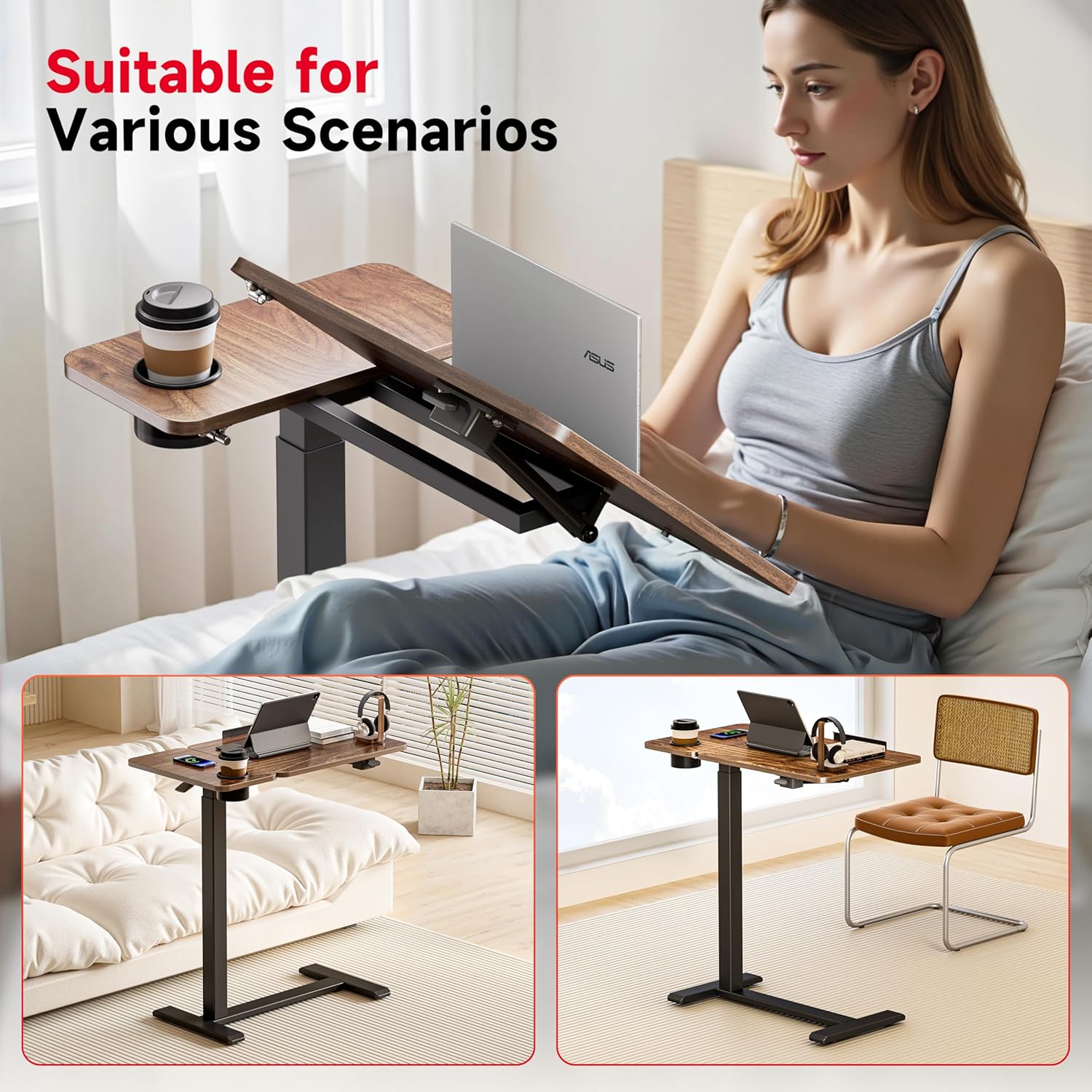
Image 5.4: The table features hidden casters for smooth movement, allowing it to easily slide under furniture.
6. Bakım
- Temizlik: Wipe the tabletop and frame with a dry cloth. For stubborn marks, a slightly damp Bez kullanılabilir ve hemen kurutulmalıdır. Aşındırıcı temizleyicilerden veya sert kimyasallardan kaçının.
- Düzenli Kontroller: Tüm vida ve bağlantı elemanlarının sıkılığını düzenli olarak kontrol edin. Stabiliteyi korumak için gerekirse tekrar sıkın.
- Jant Bakımı: Keep the wheels free of dust and debris to ensure smooth movement.
7. Sorun Giderme
- Masa Sallantıları:
Çözüm: Ensure all assembly screws are securely tightened. Verify the table is on a level surface. - Yüksekliği ayarlamakta zorluk:
Çözüm: Check if the height adjustment lever is fully engaged or disengaged. Ensure there are no obstructions in the pneumatic lifting mechanism. - Masaüstü bilgisayar düzgün bir şekilde eğilmiyor:
Çözüm: Inspect the tilting mechanism for any obstructions or debris. Ensure the locking mechanism is fully disengaged before attempting to tilt. - Wheels Not Rolling:
Çözüm: Check if the wheels are locked. Clean any hair or debris that may be caught in the wheel casters.
8. Özellikler

Image 8.1: Detailed dimensions and weight capacity of the Okin Overbed Table.
| Özellik | Detay |
|---|---|
| Model Numarası | OKPM50502716WAS |
| Ürün Boyutları (D x G x Y) | 27.6" x 15.8" x 29.7" (minimum height) |
| Ayarlanabilir Yükseklik Aralığı | 29.7" ila 43.3" |
| Desktop Tilt Range | 0° ila 70° |
| Maksimum Statik Yük Kapasitesi | 22 lbs (10 kg) |
| Ürün Ağırlığı | 23.4 Pound |
| Çerçeve Malzemesi | Alaşımlı Çelik |
| Üst Malzeme | Odun |
| Taban Yüksekliği | 1.57 inç |
| Dahil Bileşenler | Montaj Kılavuzu, Kurulum Aracı |
| Ürün Bakım Talimatları | Kuru Bezle Silin |
9. Garanti ve Destek
Okin is committed to customer satisfaction. While specific warranty details are not provided in this manual, we offer 24-hour customer service for any pre- or post-purchase issues.
For assistance, please contact us via the Amazon Message Center. Your satisfaction is our priority.


