1. Giriş
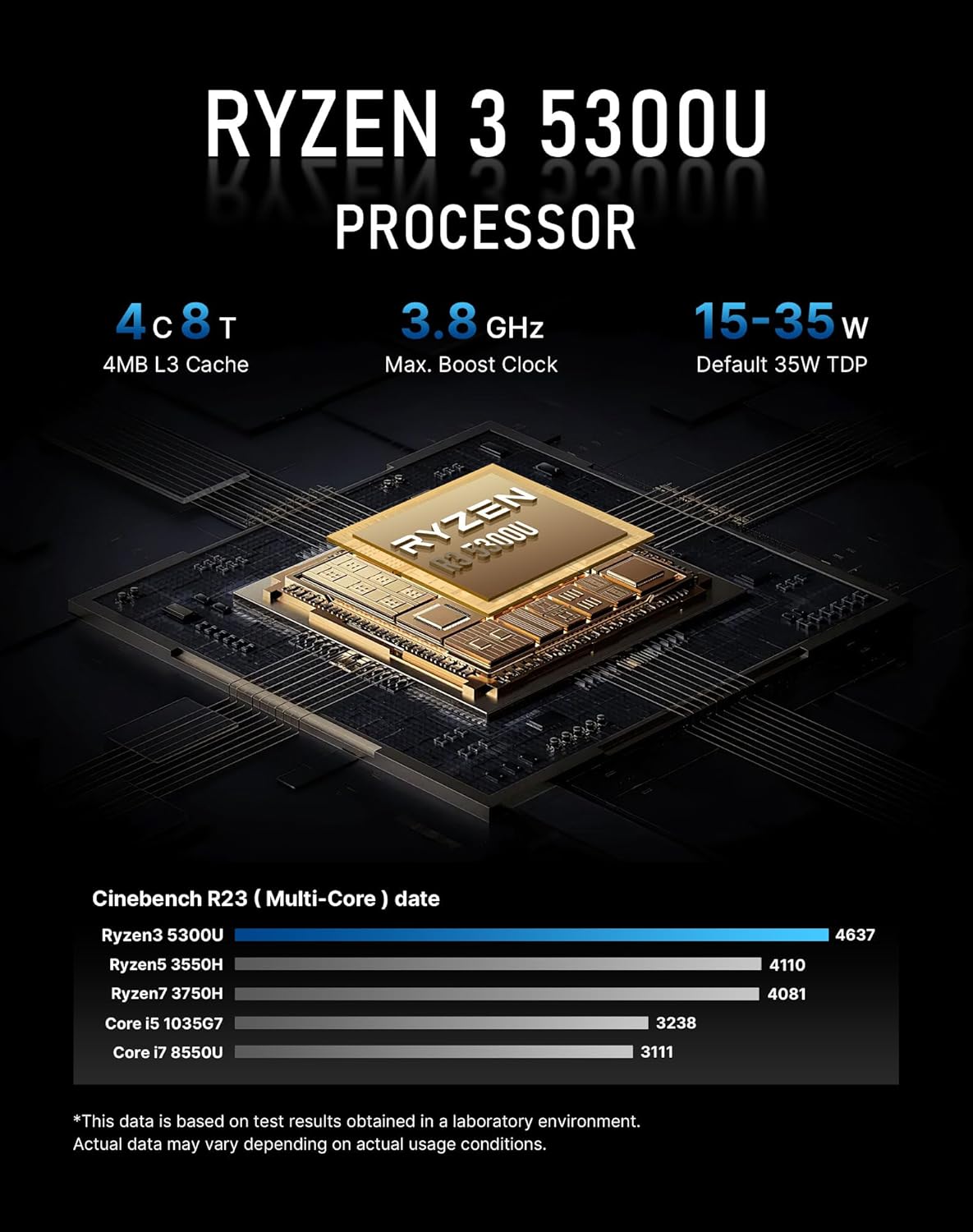
This manual provides essential information for setting up, operating, and maintaining your BOSGAME E5 Multi-Functional Mini PC. The BOSGAME E5 is equipped with a Ryzen 3 5300U 4-core 8-thread processor, 16GB DDR4 RAM, and a 1TB PCIe 3.0x4 SSD, offering robust performance for various tasks. It supports triple display output via HDMI, DisplayPort, and USB-C, and features Wi-Fi 5 and Bluetooth 5.0 connectivity.

Image 1.1: The BOSGAME E5 Mini PC, a compact and powerful desktop computer.
2. Kutuda Neler Var?
Kurulum işlemine geçmeden önce paketteki tüm öğelerin eksiksiz olduğundan emin olun.
- BOSGAME E5 Mini PC x1
- Kullanıcı Kılavuzu x1
- HDMI 2.0 Kablosu x1
- 19V 3.42A Güç Adaptörü x1
- VESA Mount & Screws x1

Image 2.1: Contents of the BOSGAME E5 Mini PC package, including the device, cables, power adapter, and VESA mount.
3. Kurulum Talimatları
3.1 Çevre Birimlerini Bağlama
- Ekranı Bağla: Use the provided HDMI 2.0 cable to connect your monitor to the HDMI port on the Mini PC. Alternatively, use a DisplayPort or USB-C cable for compatible displays. The Mini PC supports up to three displays simultaneously at 4K@60Hz.
- Klavye ve Fareyi Bağlayın: Plug your USB keyboard and mouse into the available USB 3.2 Type-A ports on the front or rear of the Mini PC.
- Ağ Bağlantısı (İsteğe bağlı): For a wired internet connection, connect an Ethernet cable from your router to one of the 1000Mbps RJ45 LAN ports on the rear. For wireless connectivity, the device supports Wi-Fi 5.
- Gücü bağlayın: Plug the 19V 3.42A power adapter into the DC-in port on the rear of the Mini PC, then plug the adapter into a power outlet.
3.2 İlk Önyükleme ve İşletim Sistemi Kurulumu
- Güç Açık: Mini bilgisayarın ön tarafında bulunan güç düğmesine basın. Güç gösterge ışığı yanacaktır.
- İlk kurulum: Follow the on-screen instructions to complete the Windows 11 Pro operating system setup. This includes selecting your language, region, and creating a user account.
- Ağ yapılandırması: During the OS setup, you will be prompted to connect to a network. If using Wi-Fi, select your network and enter the password. If using a wired connection, it should connect automatically.
Resim 3.1: Üzeriview of the BOSGAME E5 Mini PC's front and rear ports, highlighting various connectivity options.
4. Kullanım Talimatları
4.1 Güç Açma/Kapatma
- Güç Açık: Ön paneldeki güç düğmesine basın.
- Kapat: In Windows, click the Start button, then Power, and select 'Shut down'.
- Tekrar başlat: Windows'ta Başlat düğmesine, ardından Güç'e tıklayın ve 'Yeniden Başlat'ı seçin.
4.2 Ekran Yapılandırması
The BOSGAME E5 supports up to three independent displays at 4K@60Hz. Connect your monitors using the HDMI 2.0, DisplayPort, and USB-C outputs. Once connected, Windows will automatically detect the displays. You can configure display settings (resolution, orientation, extended/duplicated desktop) via the Windows Display Settings.

Image 4.1: Illustration of the BOSGAME E5 Mini PC supporting a triple display setup for enhanced productivity.
4.3 Ağ ve Kablosuz Bağlantı
- Kablolu LAN: Utilize the dual 1000Mbps RJ45 LAN ports for high-speed, stable wired network connections.
- Kablosuz 5: Connect to wireless networks using the integrated Wi-Fi 5 module. Access Wi-Fi settings through the Windows taskbar network icon.
- Bluetooth 5.0: Pair Bluetooth-enabled devices such as keyboards, mice, headphones, or speakers via the integrated Bluetooth 5.0. Manage Bluetooth devices in Windows Settings.

Image 4.2: Visual representation of the BOSGAME E5 Mini PC's wireless capabilities, including Wi-Fi 5 and Bluetooth 5.0 for various peripherals.
5. Bakım
5.1 Memory and Storage Upgrade
The BOSGAME E5 comes with 16GB DDR4 RAM and a 1TB M.2 2280 PCIe SSD. The storage is expandable up to 4TB. For detailed instructions on upgrading RAM or SSD, please refer to the official BOSGAME support resources or consult a qualified technician.
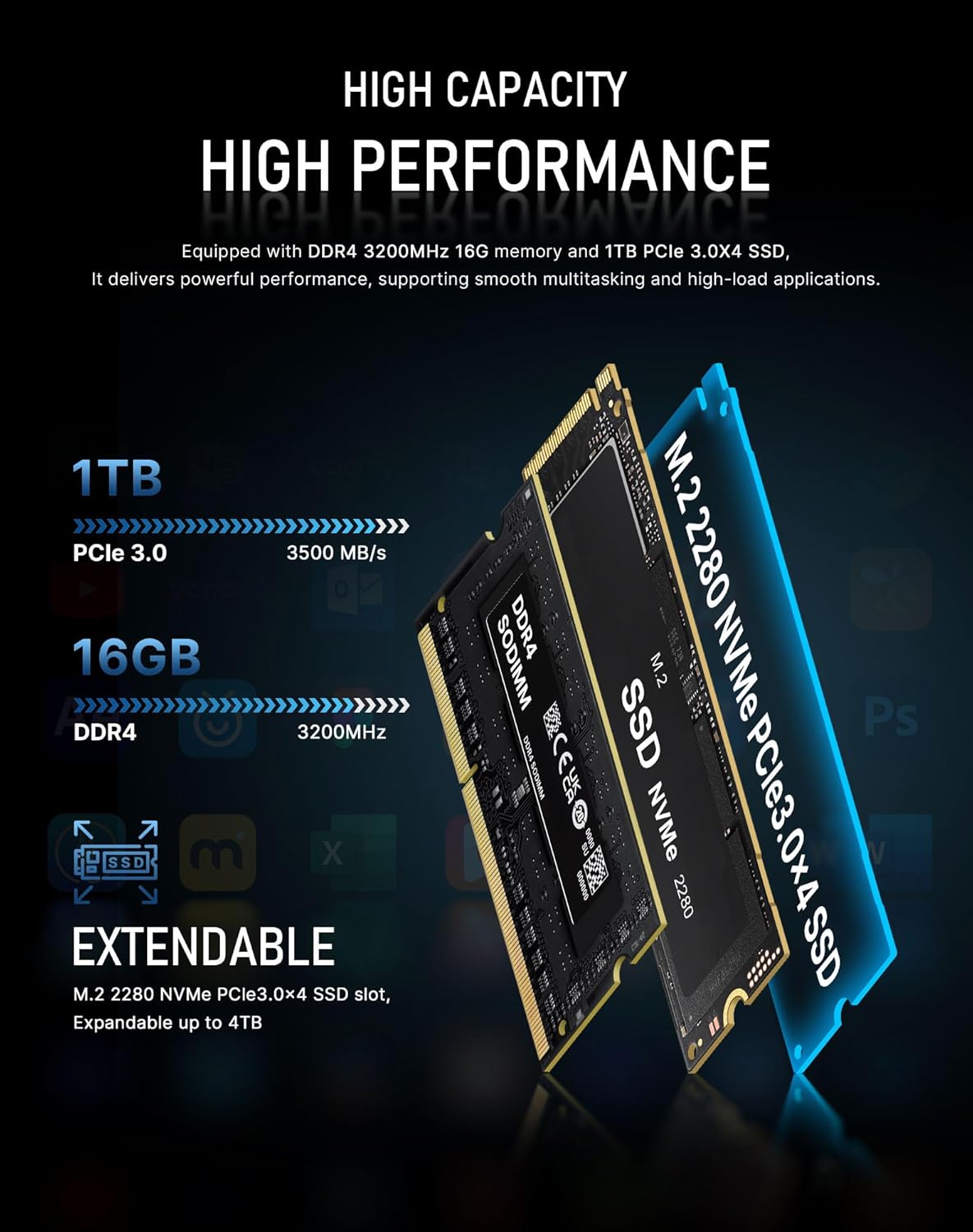
Image 5.1: Illustration of the internal memory (DDR4) and M.2 NVMe PCIe SSD components of the BOSGAME E5 Mini PC.
5.2 Internal Structure Overview
Understanding the internal layout can assist with maintenance and upgrades. The Mini PC features a plastic base, SSD heatsink, SYS Fan, SO-DIMM DDR4 3200MHz slots, motherboard, CPU, heat conducting phase change material, M.2 2280 NVMe PCIe3.0 slot, heat sink with double heatpipe and single air vent, CPU Smart Fan, and a plastic body.

Resim 5.2: Patlamış view diagram illustrating the internal components and structure of the BOSGAME E5 Mini PC.
6. Sorun Giderme
- Görüntü yok: Ensure the monitor is powered on and correctly connected to the Mini PC via HDMI, DisplayPort, or USB-C. Try a different cable or display port.
- Güç Yok: Verify the power adapter is securely connected to both the Mini PC and a working power outlet. Check if the power indicator light is on.
- İnternet bağlantısı yok: For wired connections, check the Ethernet cable and router status. For Wi-Fi, ensure the correct network is selected and the password is entered accurately. Restart the Mini PC and your router.
- Yavaş Performans: Close unnecessary applications. Check for background updates. Ensure sufficient free storage space.
- Çevresel Aygıt Algılanamadı: Aygıtı farklı bir USB bağlantı noktasına bağlamayı deneyin. Sürücülerin güncel olduğundan emin olun.
7. Özellikler
| Özellik | Detay |
|---|---|
| İşlemci | AMD Ryzen 3 5300U (4-core, 8-thread, up to 3.8GHz) |
| Grafikler | Radeon Graphics (Max Graphics Frequency 1500MHz) |
| Veri deposu | 16GB DDR4 |
| Depolamak | 1TB M.2 2280 PCIe 3.0x4 SSD (Expandable up to 4TB) |
| Görüntü Çıktısı | 1x HDMI 2.0, 1x DisplayPort, 1x USB-C (Triple Display 4K@60Hz) |
| USB Bağlantı Noktaları | 3x USB 3.2 Type-A, 1x USB 2.0 Type-A, 1x USB-C |
| Ağ | 2x 1000Mbps RJ45 LAN, Wi-Fi 5 |
| Bluetooth | Bluetooth 5.0 |
| Ses | 3.5mm Combo Jack (CTIA specifications) |
| İşletim Sistemi | Windows 11 Pro |
| Boyutlar | 6.54 x 6.38 x 4.21 inç (Paket) |
| Ağırlık | 2.42 pound |
8. Garanti ve Destek
BOSGAME provides free and reliable lifetime after-sales service for the E5 Mini PC. All products hold FCC, ROHS, and CE certifications. Additionally, a 1-year professional factory support and 24/7 online customer service are available to assist with any inquiries or issues.
For further assistance, please visit the official BOSGAME websitesine gidin veya doğrudan müşteri desteğiyle iletişime geçin.


