1. Kurulum
This section guides you through the initial setup of your Ulefone RugKing 3 Pro.
1.1 Cihazınızın Kutusundan Çıkarılması
Upon opening the package, you will find the Ulefone RugKing 3 Pro smartphone along with essential accessories. Please check the contents against the list below.
- Ulefone RugKing 3 Pro Smartphone
- AC Power Charger (100~240V)
- USB-A to Type-C Data Cable (100cm)
- Ekran Koruyucu (önceden uygulanmış veya kutuda)
- SIM Tepsisi Çıkarıcı
- Kordon
- Kullanım Kılavuzu (bu belge)
Video: Ulefone Rugking 3 Pro Unboxing Video. This video demonstrates the unboxing process and shows all included items.
1.2 SIM Kart Kurulumu
SIM kartınızı/kartlarınızı ve/veya microSD kartınızı takmak için:
- Cihazın yan tarafındaki SIM tepsisini bulun.
- SIM kart tepsisi çıkarma aracını tepsinin yanındaki küçük deliğe yerleştirin ve tepsi dışarı çıkana kadar sıkıca bastırın.
- SIM tepsisini dikkatlice dışarı çekin.
- Place your Nano-SIM card(s) and/or microSD card into the designated slots on the tray. Ensure the gold contacts are facing down and the cards are correctly oriented.
- Tepsiyi, cihazın yan tarafıyla aynı hizaya gelene kadar yavaşça içeri doğru itin.
Resim: Close-up of the Ulefone RugKing 3 Pro showing the SIM card tray location and how to insert the SIM card and microSD card.
1.3 İlk Güç Açma
Press and hold the Power button (located on the right side of the device) until the Ulefone logo appears on the screen. Follow the on-screen prompts to complete the initial setup, including language selection, Wi-Fi connection, and Google account setup.
2. Cihazınızın Çalıştırılması
This section details the key features and functionalities of your Ulefone RugKing 3 Pro.
2.1 Android 15 İşletim Sistemi
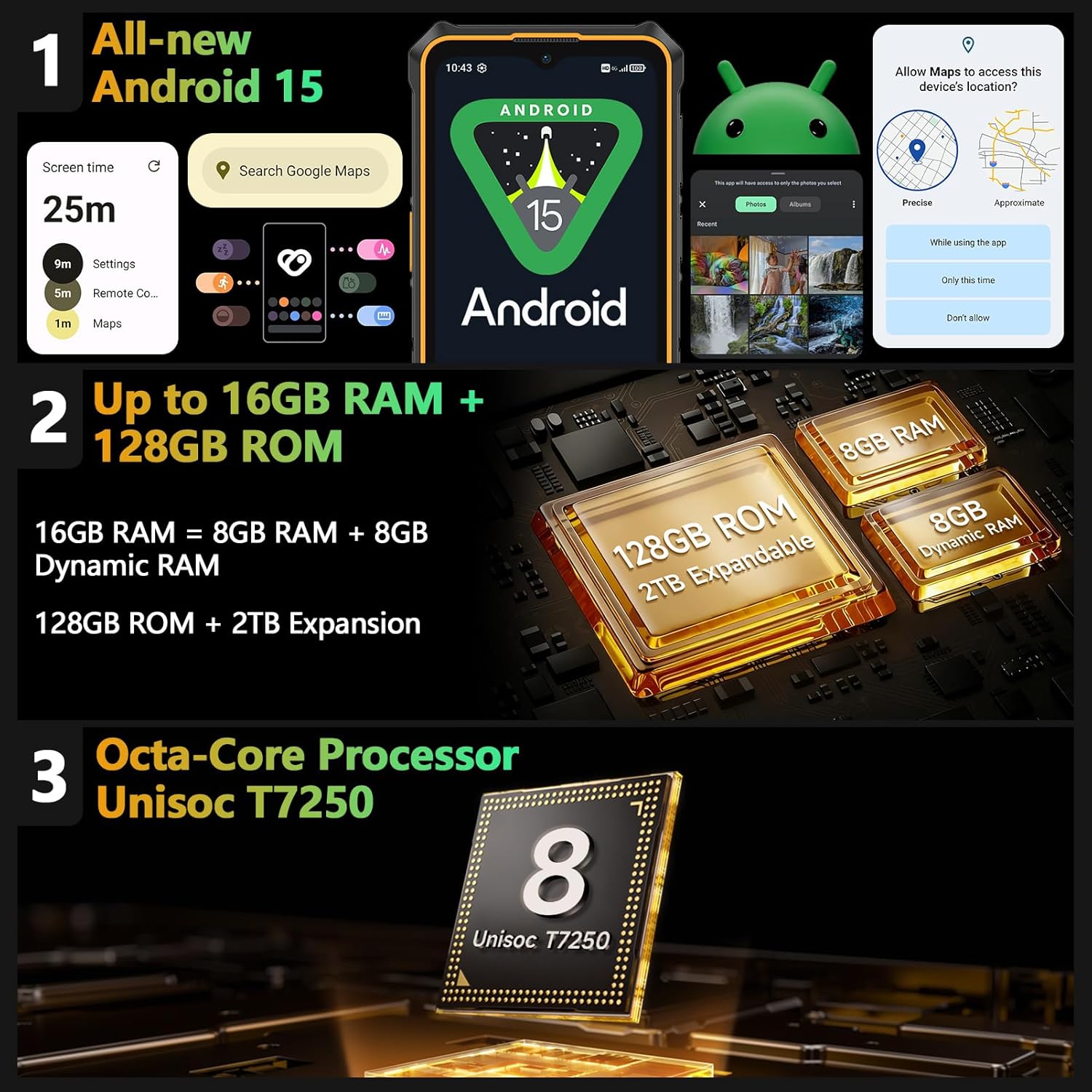
Your device runs on Android 15, offering enhanced security features, improved privacy controls, and optimized performance. Key features include:
- Advanced Theft Detection: Helps keep your device and data safe.
- Özel Alan: Secure sensitive data and applications.
- Uygulama Eşleştirme: Multitask efficiently by using two apps simultaneously on the screen.
- Enhanced Large-Screen Optimization: Improved user experience for the 6.56-inch display.

Resim: Visual representation of Android 15 features, including privacy settings and app pairing, on the Ulefone RugKing 3 Pro screen.
2.2 Ekran
The Ulefone RugKing 3 Pro features a 6.56-inch display with a 120Hz refresh rate and 500 nits brightness, providing a smooth and vibrant visual experience. It is protected by Corning Gorilla Glass for enhanced scratch resistance.

Resim: The Ulefone RugKing 3 Pro display showcasing its 120Hz refresh rate and Corning Gorilla Glass protection.
2.3 Kamera Fonksiyonları
Capture high-quality photos and videos with the versatile camera system:
- 48MP Ana Kamera: For detailed outdoor photography with an f/1.8 aperture.
- 2MP Makro Kamera: Ideal for capturing intricate details of small objects.
- 8MP Ön Kamera: Selfie çekmek ve görüntülü görüşmeler için mükemmel.

Resim: Üzerindeview of the Ulefone RugKing 3 Pro's camera system, highlighting the 48MP main camera, 2MP macro camera, and 8MP front camera.
Video: Ulefone Rugking 3 Pro Hands-On. This video demonstrates various features including the macro camera in use.
2.4 AI Assistant (Gemini)
The device integrates an AI assistant, Gemini, along with Ulefone AI Pro features for intelligent and productive tasks:
- AI Recording Summary: One-tap note-taking and speech-to-text transcription.
- AI Writing Assist: Smart formatting, style rewriting, translation, and proofreading.
- Ulefone Screen Search: Circle an item on your screen to search for it.
- AI Calculator: Handwriting math solver.

Resim: Illustration of Ulefone AI Pro features, including AI assistant capabilities like screen search and writing assist.
2.5 Water-Lock Mode
Activate Water-Lock mode to disable touchscreen functionality, allowing safe use of your phone in wet conditions without accidental touches. This ensures screen visibility even in rain.

Resim: The Ulefone RugKing 3 Pro being used in rain with Water-Lock Mode activated, preventing accidental touches.
2.6 Super Torch
The device features a powerful 120 lumens flashlight, activated with a one-key function. This "Super Torch" is designed to illuminate your path in dark environments.

Resim: The Ulefone RugKing 3 Pro's 120 lumens Super Torch illuminating a dark path.
2.7 Ek Özellikler
- NFC-Enabled: Temassız ödeme ve veri transferi için.
- Özel Anahtar: A programmable button for quick access to frequently used functions (single click, double click, long press).
- Outdoor Toolbox: A suite of tools for outdoor activities.
- 3-Card Slot: Supports two SIM cards and one microSD card simultaneously.
- GPS + GLONASS + Beidou + Galileo: Comprehensive satellite navigation for accurate positioning.
- Yüz Tanıma Kilidi: Secure and convenient device unlocking.
- Kulaklık Gerektirmeyen FM Radyo: Enjoy radio without needing wired headphones as an antenna.

Resim: Visuals of various additional features including NFC, custom key, outdoor toolbox, and navigation systems.
3. Bakım
Proper care and maintenance will ensure the longevity and optimal performance of your Ulefone RugKing 3 Pro.
3.1 Dayanıklılık ve Koruma
The RugKing 3 Pro is built to withstand harsh environments, certified with IP68/IP69K ratings for water and dust resistance, and MIL-STD-810H for shock resistance. This means it can endure submersion, dust exposure, and drops from up to 2 meters.

Resim: Demonstrates the ruggedness of the Ulefone RugKing 3 Pro, highlighting its IP68/IP69K and MIL-STD-810H certifications for water, dust, and shock resistance.
3.2 Pil Yönetimi
The device is equipped with a 5600mAh battery, providing extended usage times. To maximize battery life:
- Aşırı sıcaklıklardan kaçının.
- Lütfen ürünle birlikte verilen şarj aletini ve kablosunu kullanın.
- Optimize screen brightness and background app usage.
The phone supports dock charging for convenient and rapid recharging. The dock charger is sold separately.

Resim: The Ulefone RugKing 3 Pro highlighting its 5600mAh battery capacity and support for dock charging.
4. Sorun Giderme
If you encounter any issues with your Ulefone RugKing 3 Pro, please refer to the following common solutions:
- Cihaz açılmıyor: Pilin şarjlı olduğundan emin olun. Cihazı şarj cihazına bağlayın ve tekrar açmayı denemeden önce birkaç dakika bekleyin.
- Ekran tepkisiz: Perform a forced restart by holding the Power button for approximately 10-15 seconds.
- Ağ bağlantı sorunları: Check if your SIM card is properly inserted. Verify your network settings and ensure mobile data is enabled. Try restarting the device.
- Uygulamaların çökmesi veya donması: Sorunlu uygulamanın önbelleğini temizleyin veya yeniden yükleyin. Cihazınızın yazılımının güncel olduğundan emin olun.
- Water-Lock Mode issues: Ensure the mode is properly activated or deactivated as needed. If the screen remains unresponsive after exiting the mode, restart the device.
For more complex issues, please contact Ulefone customer support.
5. Özellikler
Below are the detailed technical specifications for the Ulefone RugKing 3 Pro:
| Özellik | Detay |
|---|---|
| Marka | Ulefone |
| Model Adı | RugKing 3 Pro |
| İşletim Sistemi | Android 15 |
| Kurulu RAM Bellek Boyutu | 16 GB |
| Bellek Depolama Kapasitesi | 128 GB (microSD ile 2 TB'a kadar genişletilebilir) |
| Ekran Boyutu | 6.56 inç |
| Çözünürlük | 1080p (Display Resolution Maximum: 720 x 1612 Pixels) |
| Yenileme Hızı | 120 Hz |
| Kablosuz Taşıyıcı | Kilidi Açıldı |
| Hücresel Teknoloji | 4G |
| Renk | Siyah |
| SIM Kart Yuvası Sayısı | Çift SIM |
| Bağlayıcı Türü | USB Tip C |
| Form Faktörü | Dokunmatik Ekran |
| Su Direnç Seviyesi | Waterproof (IP68/IP69K) |
| Ek Özellikler | Built-In Flashlight, Dual SIM, Rugged Body, Waterproof |
| Ön Fotoğraf Sensörü Çözünürlüğü | 8 MP |
| Rear Facing Camera Photo Sensor Resolution | 48 MP (Main), 2 MP (Macro) |
| Number of Rear Facing Cameras | 3 |
| Number of Front Cameras | 1 |
| Pil Kapasitesi | 5600 Miliamp Saat |
| Battery Average Life (Talk Time) | 28 Saat |
| Ürün Boyutları | 6.84 x 3.26 x 0.51 inç |
| Desteklenen Uydu Navigasyon Sistemi | BeiDou, GLONASS, GPS, Galileo |
6. Garanti ve Destek
Your Ulefone RugKing 3 Pro comes with a manufacturer's warranty and dedicated support.
- Garanti: The device includes a 12-month manufacturer warranty service in the US.
- Müşteri Desteği: For any questions or assistance regarding your product, please contact Ulefone customer service. Refer to the official Ulefone website or the included warranty card for contact details.


