1. Giriş
This manual provides instructions for the safe and effective operation of the OWON ADS824A Digital Oscilloscope. The ADS824A is a 200MHz, 4-channel, 12-bit digital oscilloscope designed for high-precision testing. It features a 1.25GSa/s real-time sampling rate and a 50M storage depth, making it suitable for signal integrity verification, circuit fault identification, digital circuit design, debugging, and automotive electronics testing. This device integrates an oscilloscope, frequency counter, voltmeter, and FFT spectrum analyzer into a single unit.
2. Ürün Bittiview
2.1 Temel Özellikler
- 200MHz bandwidth with four analog channels.
- 1.25GSa/s gerçek zamanlı sampling rate and 50M storage depth.
- Up to 700,000wfms/s waveform refresh rate.
- 12-bit vertical resolution (4096 levels) for capturing microvolt-level signal fluctuations.
- Integrated functions: oscilloscope, frequency counter, voltmeter, and FFT spectrum analyzer.
- Supports 43 automatic measurements with advanced math functions and a built-in glossary.
- 7-inch multi-touch TFT-LCD display.
- Communication interfaces: HDMI, USB device, USB Host, Trig Out(P/F), LAN.
- Supports various triggering modes including edge, video, pulse width, slope, Nth edge, and logic.
- Includes 2-channel hardware decoding for RS-232/UART, I2C, SPI, CAN, and LIN protocols.
2.2 Kutuda Neler Var?
The OWON ADS824A package typically includes:
- OWON ADS824A Digital Oscilloscope Unit
- Güç Adaptörü
- Kullanıcı Kılavuzu
- USB kablosu
2.3 Fiziksel Aşırıview

Şekil 2.3.1: Ön view of the OWON ADS824A Digital Oscilloscope, showing the display and control panel.

Figure 2.3.2: Front panel highlighting key specifications such as 4 channels, 1.25GSa/s, 200MHz bandwidth, and 700,000 wfms/s refresh rate.

Şekil 2.3.3: Yakın çekim view of the control knobs for horizontal and vertical adjustments.
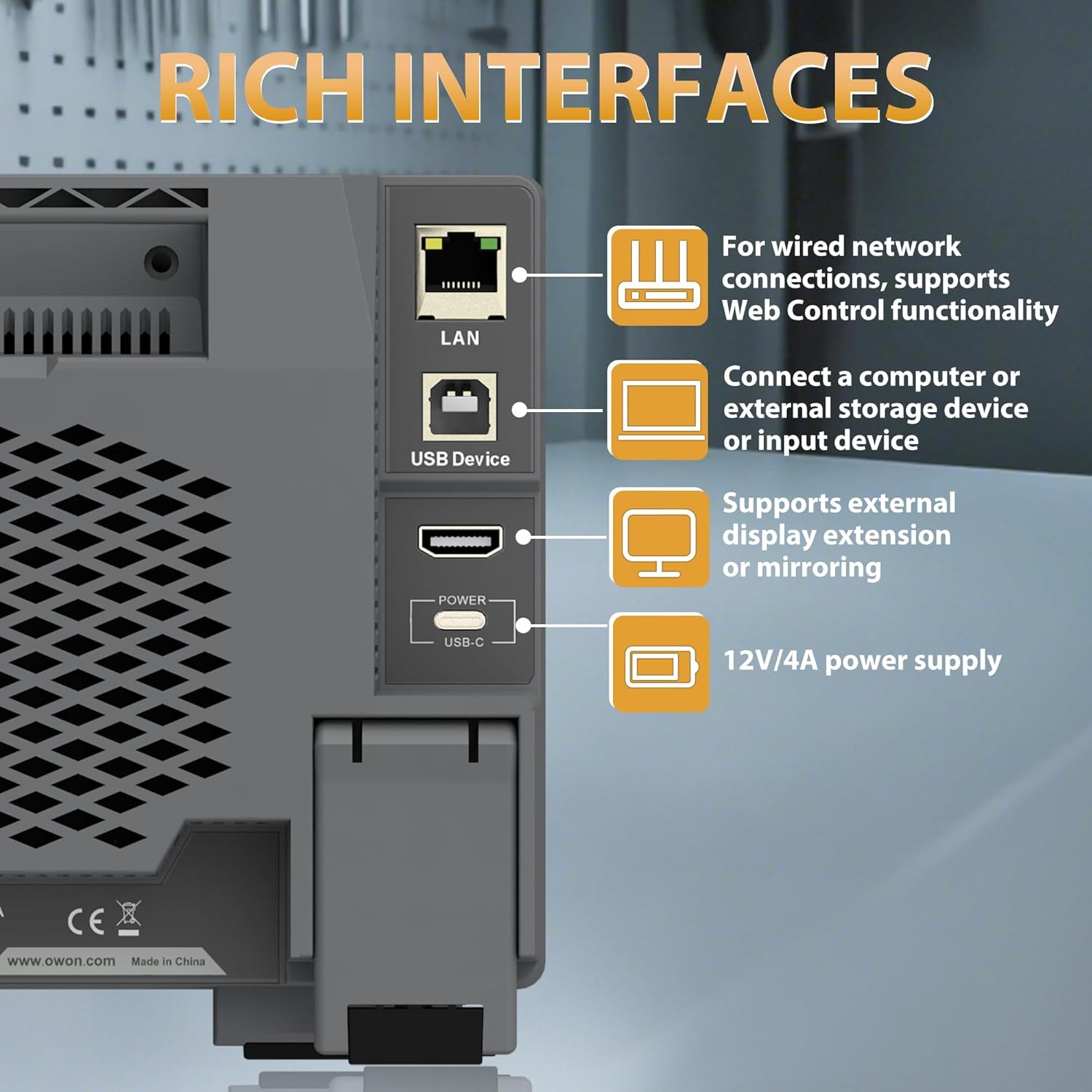
Figure 2.3.4: Rear panel showing the LAN, USB Device, HDMI, and USB-C Power interfaces.

Şekil 2.3.5: Üst ve arka view illustrating the overall dimensions and port layout.
3. Kurulum
3.1 Güç Bağlantısı
- Connect the provided power adapter to the USB-C Power interface on the rear panel of the oscilloscope.
- Güç adaptörünü uygun bir AC elektrik prizine takın.
- Cihazı açmak için ön panelde bulunan güç düğmesine basın.
3.2 Prob Bağlantısı
- Connect the BNC connector of the oscilloscope probe to one of the four input channels (CH1-CH4) on the front panel.
- Ensure the probe's ground clip is securely connected to the ground reference of the circuit under test.
- Attach the probe tip to the test point on the circuit.
4. Kullanım Talimatları
4.1 Temel İşlemler
The ADS824A features a 7-inch multi-touch display for intuitive control.

Figure 4.1.1: The 7-inch multi-touch TFT-LCD display allows for direct interaction with the waveform and menu settings.
- Güç Açma/Kapatma: Ön paneldeki güç düğmesine basın.
- Navigasyon: Use the multi-touch screen or the physical control knobs to navigate menus and adjust settings.
- Otomatik ayar: Press the 'Autoset' button to automatically adjust horizontal and vertical settings for optimal waveform display.
4.2 Waveform Display and Control
- Yatay Kontroller: Adjust the time base (s/div) and horizontal position using the dedicated knobs.
- Dikey Kontroller: Ses seviyesini ayarlayıntage scale (V/div) and vertical position for each channel using their respective knobs.
- Yakınlaştır: The device supports zoom windows for detailed waveform analysis.

Figure 4.2.1: Illustration of the waveform capture rate, showing the ability to display complex signals effectively.
4.3 Ölçüm Fonksiyonları
The ADS824A offers extensive measurement capabilities:
- Otomatik Ölçümler: Access 43 automatic measurement functions. A built-in glossary assists in understanding technical terms for quick setup.
- Parametric Statistics: Supports measurement indicators and cursor gating for detailed analysis.
- Cursor Gating: Utilize visual indicators and zoom windows for precise cursor measurements in FFT and XY modes.

Figure 4.3.1: Display showing the interface for 43 auto measurements and the technical terms glossary.

Şekil 4.3.2: Ekran views demonstrating parametric statistics and cursor gating with visual indicators.
4.4 Tetikleme
The oscilloscope supports various triggering options to capture specific events:
- Tetikleyici Türleri: Edge, Video, Pulse Width, Slope, Nth Edge, Logic, Under-amplitude, Over-amplitude, and Timeout.
- Kurmak: Access trigger settings via the dedicated 'Trigger' button or on-screen menu.

Figure 4.4.1: Interface showing advanced triggering options and hardware decoding capabilities.
4.5 Gelişmiş İşlev
- FFT Spektrum Analiz Cihazı: Perform 1M-point FFT analysis for accurate frequency component display.
- Dijital Voltmetre (DVM): Integrated 4-digit voltmeter for ACrms, DC, and AC+DCrms measurements.
- Frekans Sayacı: Integrated 6-digit digital frequency counter.
- Protokol Kod Çözme: Supports 2-channel hardware decoding for common serial protocols including RS-232/UART, I2C, SPI, CAN, and LIN.
- Yüksek Çözünürlük: The 12-bit vertical resolution (4096 levels) allows for capturing minute signal fluctuations, crucial for power ripple and noise analysis.

Figure 4.5.1: Display illustrating the FFT spectrum analysis and 256-level grayscale display features.

Şekil 4.5.2: Ekran views demonstrating 50Mpts storage depth settings, 4-digit voltmeter, and 6-digit frequency counter.

Figure 4.5.3: Comparison illustrating the enhanced detail provided by the 12-bit high-resolution display compared to a standard oscilloscope.
4.6 Harici Cihaz Bağlantısı
The ADS824A supports various external devices:
- USB Ana Bilgisayarı: Connect a mouse or keyboard for enhanced control and efficiency.
- USB aleti: Connect to a computer for data transfer or remote control.
- LAN: For wired network connections and Web Kontrol işlevselliği.
- HDMI: Connect to an external display for extended or mirrored viewIng.
5. Bakım
5.1 Temizlik
Cihazın performansını ve görünümünü korumak için:
- Dış yüzeyini yumuşak bir bezle silin.amp Kumaş.
- Avoid using abrasive cleaners or solvents that may damage the casing veya ekran.
- Ensure no liquids enter the device openings.
5.2 Depolama
When not in use, store the oscilloscope in a clean, dry environment away from direct sunlight and extreme temperatures.
5.3 Pil Bakımı
The ADS824A includes a built-in lithium battery for portability. Proper battery care ensures longevity:
- İlk kullanımdan önce pili tam olarak şarj edin.
- Akünün sık sık tamamen boşalmasından kaçının.
- If storing for extended periods, charge the battery to approximately 50% and recharge every few months.
- The built-in battery helps avoid issues caused by ground loops, providing a safe floating ground for measurements.

Figure 5.3.1: Information regarding the built-in lithium battery, emphasizing portability and ground loop avoidance.
6. Sorun Giderme
This section addresses common issues you might encounter with the OWON ADS824A oscilloscope.
| Sorun | Olası Neden | Çözüm |
|---|---|---|
| Güç yok | Power adapter not connected or faulty; battery discharged. | Check power connections. Ensure adapter is working. Charge the battery. |
| Dalga formu görüntülenmiyor. | Probe not connected; signal too small/large; incorrect trigger settings. | Verify probe connection. Adjust vertical scale (V/div). Press 'Autoset'. Check trigger level and mode. |
| Kararsız dalga formu | Incorrect trigger level or mode; noisy signal. | Adjust trigger level. Change trigger mode. Use averaging acquisition mode. |
| Ekran tepkisiz | Geçici yazılım hatası. | Cihazı yeniden başlatın. Sorun devam ederse, destek ekibiyle iletişime geçin. |
7. Özellikler
Detailed technical specifications for the OWON ADS824A Digital Oscilloscope.

Figure 7.1.1: Table detailing key oscilloscope specifications including bandwidth, sampling rate, and vertical resolution.
| Parametre | Değer |
|---|---|
| Bant genişliği | 200 MHz |
| Kanallar | 4 |
| Sampling Oranı | 1.25 GSa/s (Gerçek zamanlı) |
| Max. Waveform Capture Rate | 700,000 wfms/s |
| Max Memory Depth | 50 Mpts |
| Dikey Çözünürlük | 12 bit |
| Dikey Hassasiyet Aralığı | 500 uV/div - 10 V/div |
| Giriş Empedansı | 1 MΩ±2%, parallel with 20 pF±5 pF |
| Zaman Tabanı Aralığı | 1 ns/div - 1000 s/div |
| Zaman Tabanı Doğruluğu | ±(0.01% + 0.1tdv) |
| Bus Decoding | RS232/UART, I2C, SPI, CAN, LIN |
| Giriş Bağlantısı | DC, AC, Ground |
| Ürün Boyutları | 10.25 x 3.07 x 6.3 inç |
| Ürün Ağırlığı | 3.3 pound |
8. Garanti ve Destek
For warranty information and technical support, please refer to the documentation provided with your purchase or visit the official OWON webMüşteri hizmetleri iletişim bilgileri genellikle üreticinin destek sayfasında mevcuttur.