giriiş
Thank you for choosing the OUKITEL Smartwatch. This device is designed to enhance your daily life with smart features, comprehensive health monitoring, and various sports modes. This manual provides detailed instructions to help you set up, operate, and maintain your smartwatch effectively. Please read this manual thoroughly before use to ensure optimal performance and longevity of your device.
Kutuda Neler Var?
- OUKITEL Smartwatch
- Şarj kablosu
- Kullanıcı Kılavuzu
Kurulum Kılavuzu
1. Akıllı Saati Şarj Etme
Before first use, fully charge your smartwatch. Connect the magnetic charging cable to the charging contacts on the back of the watch and plug the USB end into a power adapter (not included) or a computer's USB port. A full charge typically takes about 2.5 hours.

Image: The OUKITEL Smartwatch connected to its magnetic charging cable, displaying a charging icon on its screen.
A full charge provides approximately 5-10 days of normal usage and up to 30 days in standby mode.
2. Uygulama Kurulumu ve Eşleştirme
To unlock all features, download the companion app (e.g., "GloryFit" as mentioned in reviews) on your smartphone. The app is compatible with iOS 9.0+ and Android 6.0+ devices.
- Scan the QR code in the user manual or search for the app name in your phone's app store (Apple App Store for iOS, Google Play Store for Android).
- Uygulamayı yükleyip açın.
- Ekrandaki yönergeleri izleyerek bir hesap oluşturun ve profesyonel hesabınızı kurun.file.
- Akıllı telefonunuzda Bluetooth’u etkinleştirin.
- In the app, search for your OUKITEL Smartwatch and select it to pair. Confirm the pairing request on both your phone and the smartwatch.
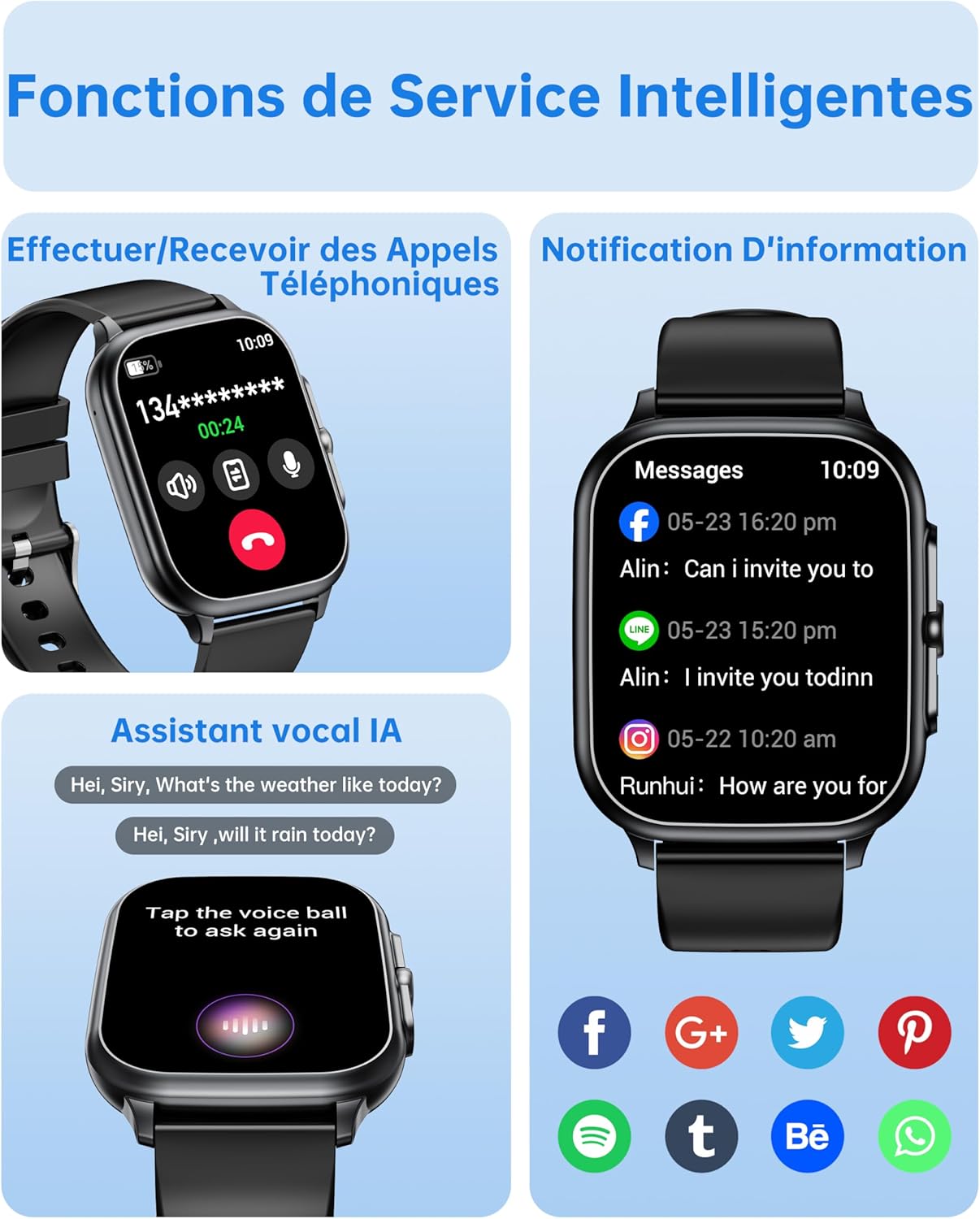
Image: The OUKITEL Smartwatch screen showing an incoming call interface, illustrating its Bluetooth call functionality and readiness for connection.
Kullanım Talimatları
Temel Gezinme
The OUKITEL Smartwatch features a 1.91-inch HD touchscreen for intuitive control. Swipe left, right, up, or down to navigate through menus and functions. Press the side button to return to the home screen or access the app list.
Akıllı Fonksiyonlar
- Bluetooth Aramaları: Once paired with your phone, you can make and receive calls directly from your smartwatch. Access the dial pad, call history, or contacts on your watch.
- Yapay Zeka Sesli Asistan: Utilize the integrated AI voice assistant (e.g., Alexa) to perform voice commands such as asking questions, checking the weather, or initiating calls.
- Bildirimler: Receive real-time notifications for calls, SMS, and various social media apps (WhatsApp, Facebook, etc.) directly on your wrist.
- Müzik Kontrolü: Akıllı telefonunuzdaki müzik çalmayı (oynat, duraklat, parçaları atla) doğrudan akıllı saatinizden kontrol edin.
- Diğer Fonksiyonlar: Includes weather forecasts, stopwatch, timer, alarm clock, remote camera control, and a "Find My Phone" feature.

Image: A composite image showing the smartwatch interface for making/receiving calls, displaying app notifications, and interacting with the AI voice assistant.
Sağlık İzleme
The smartwatch provides 24/7 health tracking to help you monitor your well-being.
- Nabız İzleme: Gün boyunca kalp atış hızınızı sürekli olarak takip eder. View Uygulamada gerçek zamanlı veriler ve geçmişe dönük trendler.
- Kan Oksijen (SpO2) İzlemesi: Kanınızdaki oksijen satürasyon seviyelerini ölçer.
- Uyku Takibi: Analyzes your sleep patterns, including deep sleep, light sleep, and awake times, to help improve sleep quality.
- Stres İzleme: Monitors your stress levels.

Image: A composite image showing the smartwatch displaying heart rate, blood oxygen levels, and sleep duration data, alongside a person running outdoors.
Spor Modları ve Aktivite Takibi
The smartwatch offers over 100 indoor and outdoor sports modes, including walking, running, cycling, hiking, basketball, and football. It records exercise data such as steps, heart rate, and calories burned.

Image: A person on a bicycle, with the smartwatch displaying various sports modes and an activity analysis screen showing duration, heart rate, calories, and steps.
Özelleştirme
Personalize your smartwatch with over 100 built-in watch faces. You can also upload your favorite photos to create unique custom dials through the companion app. The watch supports 6 different menu styles.

Image: The OUKITEL Smartwatch showcasing different menu styles and customizable watch faces, including options to use personal photos.
Bakım
Suya Dayanıklılık (IP68)
The OUKITEL Smartwatch is IP68 waterproof, meaning it is resistant to splashes, rain, and sweat. It can withstand daily water exposure like hand washing. However, it is uygun değil for hot baths, saunas, diving, or exposure to corrosive liquids like seawater.

Image: The OUKITEL Smartwatch highlighting its IP68 water resistance with icons representing protection against rain, hand washing, and perspiration.
Temizlik ve Bakım
- Saatinizi ve kayışınızı düzenli olarak yumuşak ve kuru bir bezle silin.
- Sert kimyasallar veya aşındırıcı malzemeler kullanmaktan kaçının.
- Şarj etmeden önce şarj kontaklarının temiz ve kuru olduğundan emin olun.
Sorun giderme
| Sorun | Olası Çözüm |
|---|---|
| Akıllı saat açılmıyor. | Saatinizin tam şarjlı olduğundan emin olun. Saatinizi en az 30 dakika şarj cihazına takın. |
| Akıllı telefonla eşleştirilemiyor. |
|
| Yanlış sağlık verisi okumaları. |
|
| Screen turns on too frequently (as noted in reviewS). | Check the watch settings for "Raise to Wake" or "Wrist Sense" features. You may be able to adjust sensitivity or disable it if it's causing unwanted screen activation. |
| Bildirimler görünmüyor. |
|
Özellikler
| Marka | OUKITEL |
| Model Numarası | B0FXGFXMT5 |
| İşletim Sistemi | iOS, Android |
| Ekran Boyutu | 1.91 inç |
| Bağlantı Teknolojisi | Bluetooth |
| Özel Özellikler | AI Voice Assistant & Notifications, 100+ Sports Modes, 1.91 Inch HD Screen |
| Uyumlu Cihazlar | Akıllı telefon |
| Suya Dayanıklılık | IP68 |
| Küresel Konumlama Sistemi | GPS yok |
| Şekil | Dikdörtgen |
| Hedef Kitle | Kadınlar, Erkekler |
Garanti ve Destek
The OUKITEL Smartwatch comes with a 1 yıllık üretici garantisiBu garanti, normal kullanım koşullarında malzeme ve işçilik hatalarını kapsar.
For technical support, troubleshooting assistance, or warranty claims, please contact OUKITEL customer service through their official website or the contact information provided with your purchase. Please have your model number (B0FXGFXMT5) and proof of purchase ready when contacting support.


