1. Giriş
Satın aldığınız için teşekkür ederizasing the ThermoPro TP210B Wireless Refrigerator/Freezer Thermometer. This device is designed to help you monitor the temperature of your refrigerator and freezer wirelessly, ensuring your food is stored at optimal temperatures. With a strong 500ft/150m wireless range and customizable alarms, you can easily keep track of temperature fluctuations.
2. Paket İçeriği
- 1 x Alıcı Ünitesi
- 1 x Verici Ünitesi
- 2 adet AAA pil (alıcı için)
- 1 x USB Charging Cable (for Transmitter)
- 1 x Kullanım Kılavuzu
3. Temel Özellikler
- Genişletilmiş Kablosuz Menzili: Up to 500ft/150m using advanced RF technology for stable connection.
- Hemen Kullanıma Hazır, Önceden Eşleştirilmiş: No complex setup required; units are pre-paired from the factory.
- Geniş Ölçüm Aralığı: Accurate readings within ±0.9°F across -40°F to 158°F (-40°C to 70°C).
- Akıllı Sıcaklık Uyarıları: Customizable high/low temperature limits with audio-visual alarms.
- Easy-to-Read Backlit Display: Shows fridge and freezer readings, Max/Min records, and low-battery status.
- Considerate Power Design: Receiver uses AAA batteries, transmitter features a rechargeable lithium battery.
- Esnek Yerleştirme Seçenekleri: Receiver has hook, stand, or magnet; transmitter has clip or stand.
4. Kurulum
4.1. Receiver Battery Installation
- Open the battery compartment on the back of the receiver unit.
- 2 adet AAA pili, kutupların doğru olmasına dikkat ederek (+/-) takın.
- Pil bölmesini sıkıca kapatın.
Note: The receiver requires 2 AAA batteries, which are included in the package.
4.2. Transmitter Charging
- Locate the charging port on the transmitter unit.
- Connect the provided USB charging cable to the transmitter and a standard USB power source (e.g., wall adapter, computer USB port).
- Allow the transmitter to charge fully before first use. The charging indicator will change when fully charged.
Note: The transmitter uses a rechargeable lithium battery designed for low-temperature environments.
4.3. Initial Pairing (Pre-Paired)
The ThermoPro TP210B units are pre-paired at the factory. Simply power on both the receiver and transmitter, and they should automatically connect. If connection issues occur, refer to the Troubleshooting section.
4.4. Yerleşim
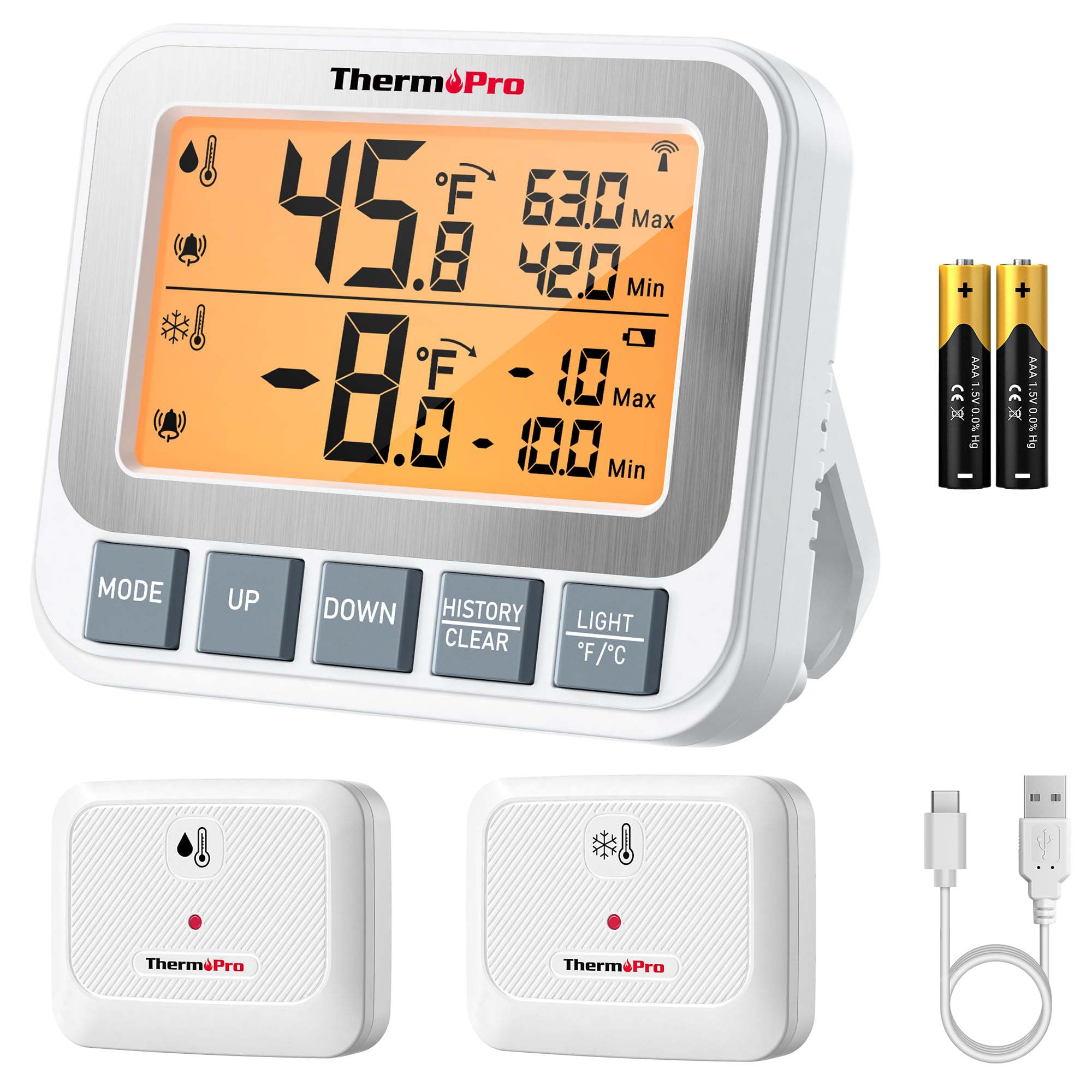
Image: ThermoPro TP210B Receiver and Transmitter. The receiver displays temperatures, while the transmitter sends data from inside the appliance.
Alıcı Yerleşimi:
- Use the integrated stand to place it on a countertop.
- Utilize the magnetic back to attach it to a metallic surface.
- Hang it using the hook on the back.
- Place the receiver in a location where you can easily view the display and hear alarms, within the 500ft/150m range of the transmitter.
Verici Yerleşimi:
- Place the transmitter inside your refrigerator or freezer.
- Use the integrated clip to attach it to a shelf or rack.
- Ensure the transmitter is not obstructed by large items that could block the wireless signal.
5. Kullanım Talimatları
5.1. Güç Açma/Kapatma
- Basın GÜÇ button on both the receiver and transmitter to turn them on or off.
5.2. Sıcaklık Ölçümü
- The receiver's backlit LCD display will show the current temperature from the transmitter.
- The display typically shows both the current temperature and the all-time Max/Min records.
5.3. Setting Temperature Alarms
The TP210B allows you to set custom high and low temperature limits for alerts.
- Basın UYARI button on the receiver. The high limit will flash.
- Kullanın UP or AŞAĞI buttons to adjust the high temperature limit.
- Basmak UYARI again to confirm the high limit and move to the low limit setting.
- Kullanın UP or AŞAĞI buttons to adjust the low temperature limit.
- Basmak UYARI a third time to confirm the low limit and exit alarm setting mode.
When the temperature exceeds the set range, the receiver will emit an audio-visual alarm.
5.4. Max/Min Temperature Records
- The receiver automatically records the maximum and minimum temperatures detected since the last reset.
- Basın MAKSİMUM/MİNİMUM button to cycle through current, maximum, and minimum temperature readings.
- To reset the Max/Min records, press and hold the MAKSİMUM/MİNİMUM düğmesine 3 saniye süreyle viewing the Max/Min display.
5.5. Arka aydınlatma
- The receiver features a bright backlit display for easy reading in low-light conditions.
- The backlight will activate automatically when a button is pressed and will turn off after a short period of inactivity to conserve battery.
6. Bakım
6.1. Temizlik
- Üniteleri ad ile silin.amp bezle silin. Suya batırmayın.
- Aşındırıcı temizleyiciler veya çözücüler kullanmayınız.
6.2. Battery Replacement (Receiver)
- When the low battery indicator appears on the receiver display, replace the 2 AAA batteries.
- Yeni pilleri takarken kutupların doğru olmasına dikkat edin.
6.3. Transmitter Charging
- Recharge the transmitter's lithium battery when the low battery indicator appears.
- Verilen USB şarj kablosunu kullanın.
6.4. Depolama
- If storing the device for an extended period, remove the AAA batteries from the receiver.
- Aşırı sıcaklıklardan uzak, kuru bir yerde saklayın.
7. Sorun Giderme
| Sorun | Olası Neden | Çözüm |
|---|---|---|
| No temperature reading / "--" displayed | Transmitter not powered on, out of range, or low battery. |
|
| Yanlış sıcaklık okumaları | Sensor obstruction, extreme environmental conditions, or sensor malfunction. |
|
| Alarmlar çalmıyor | Alarm limits not set correctly or alarm function disabled. |
|
| Transmitter battery drains quickly | Operating in extremely low temperatures or frequent signal transmission. |
|
8. Özellikler
- Sıcaklık Aralığı: -40°F ila 158°F (-40°C ila 70°C)
- Sıcaklık Doğruluğu: ± 0.9 ° F (± 0.5 ° C)
- Kablosuz Menzili: Açık havada 150 metreye kadar (500 fit)
- İletim Frekansı: 433 MHz
- Alıcı Gücü: 2 x AAA pil (dahil)
- Verici Gücü: Rechargeable Lithium battery (included, with USB charging cable)
- Görüntülemek: Arka aydınlatmalı LCD
- Boyutlar (Alıcı): Yaklaşık 4.33 inç (uzunluk)
- Ağırlık (Ürün): Yaklaşık 11.2 ons
9. Garanti ve Destek
ThermoPro bu ürün için malzeme ve işçilik kusurlarına karşı garanti vermektedir. Ayrıntılı garanti bilgileri, ürün kaydı veya teknik destek için lütfen resmi ThermoPro web sitesini ziyaret edin. websiteye gidin veya doğrudan müşteri hizmetleriyle iletişime geçin.
Resmi Webalan: www.thermopro.com
Müşteri Desteği: Refer to the contact information provided on the ThermoPro website veya ürün ambalajı.


