giriiş
Satın aldığınız için teşekkür ederizasing the ROCAM CR1030DAB Solar DAB+/FM Emergency Radio. This portable radio is designed for reliable communication and power in various situations, from daily use to outdoor adventures and emergencies. It features DAB+/FM radio reception, Bluetooth connectivity, multiple charging options including solar and hand crank, a powerful 12000 mAh battery, and integrated lighting functions. Please read this manual thoroughly before use to ensure proper operation and to maximize the product's lifespan.
Güvenlik Talimatları
- Do not expose the device to extreme temperatures, direct sunlight for prolonged periods (beyond charging), or high humidity.
- Telsizi düşürmekten veya şiddetli darbelere maruz bırakmaktan kaçının.
- Cihazı kendiniz sökmeyin veya tamir etmeye çalışmayın. Tüm servis işlemlerini yetkili personele yaptırın.
- Keep the device away from water and other liquids, except for its IPX6 water resistance which protects against strong jets of water. Do not submerge.
- Ensure the USB-C port cover is securely closed when not in use, especially in wet conditions.
- El krankını kullanırken, sabit ve orta hızda çevirin. Aşırı güç veya hız mekanizmaya zarar verebilir.
- The SOS alarm is very loud. Avoid activating it unnecessarily or near sensitive ears.
- Pilleri yerel düzenlemelere göre atın.
Paket İçeriği
Paketin içinde tüm öğelerin mevcut olduğundan emin olun:
- 1 × ROCAM CR1030DAB Radio
- 1 × USB-C Şarj Kablosu
- 1 × Portable Strap
- 1 × Kullanım Kılavuzu
Ürün Bittiview
Radyonun bileşenlerini ve kontrollerini iyice öğrenin.

Resim: Ön view of the ROCAM CR1030DAB radio, highlighting its display, control buttons, and extended antenna. The radio is shown in an outdoor setting, emphasizing its portable and robust design.
Temel Bileşenler:
- 2.4 inç Renkli Ekran: Shows station information, battery level, time, and menu options.
- Kontrol Düğmeleri: Power, Mode, Menu, Scan, Volume, Navigation (Up/Down/Left/Right/OK), SOS.
- Teleskopik Anten: For optimal DAB+/FM signal reception.
- Güneş paneli: Located on top for solar charging.
- El Krank: On the side for manual power generation.
- El feneri: Integrated LED light on one end.
- Okuma Lamp: Foldable panel with 12 LEDs.
- USB-C Giriş/Çıkış Portu: For charging the radio and charging external devices.
- Kulaklık Jakı (3.5 mm): Özel dinleme için.
- Pil Bölmesi: For AAA backup batteries.

Resim: Ayrıntılı view of the radio's 2.4-inch color display, illustrating its clarity and the information presented, such as station name and signal strength.
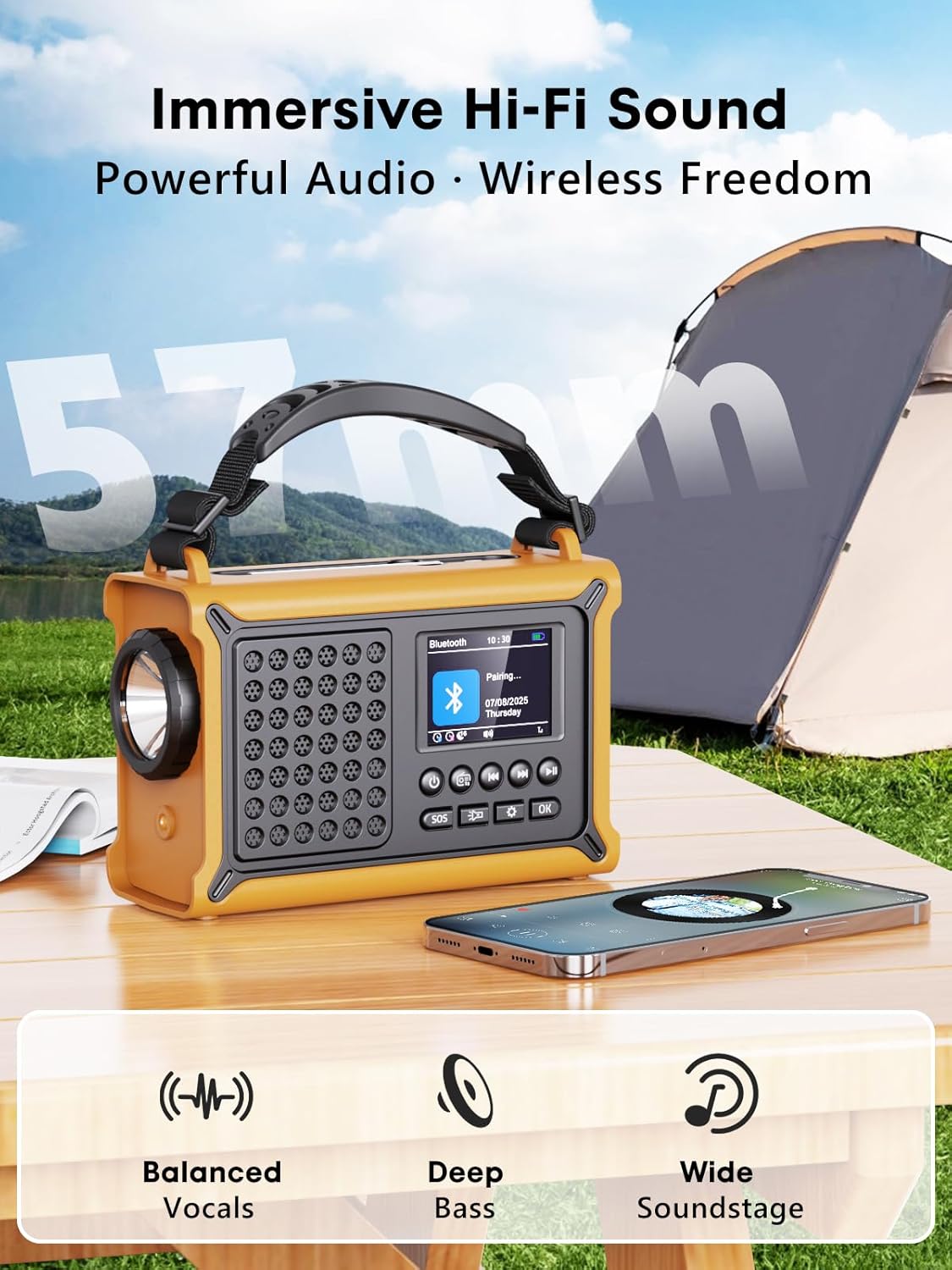
Resim: The radio highlighting its audio capabilities, featuring 57mm speakers designed for clear, powerful sound with balanced vocals and deep bass.

Resim: The radio held in hand, illustrating its ultra-portable design and compact dimensions (17.3 cm length, 12.1 cm height, 7.4 cm width), along with its IPX6 water resistance.
Kurmak
1. İlk Şarj
Before first use, it is recommended to fully charge the radio's internal 12000 mAh battery using the supplied USB-C cable. Connect the USB-C cable to the radio's USB-C input port and the other end to a standard USB power adapter (not included) or a computer USB port. The charging indicator on the display will show the charging status. A full charge ensures maximum battery life and optimal performance.
2. Inserting AAA Batteries (Optional Backup)
For an additional power backup, you can insert 3 AAA batteries (not included) into the battery compartment. This provides an alternative power source if the internal rechargeable battery is depleted and other charging methods are unavailable.
3. Güç Açma ve Dil Seçimi
Basılı tutun Güç button to turn on the radio. Upon first power-on, you may be prompted to select your preferred language from the 12 available options. Use the navigation buttons to select and the OK Onaylamak için düğmeye basın.
Kullanım Talimatları
Açma/Kapatma
- Açmak için: tuşuna basın ve basılı tutun Güç düğme.
- Kapatmak için: tuşuna basın ve basılı tutun Güç Tekrar düğmeye basın.
DAB+/FM Radio Operation
- Mod seç: Basın Mod DAB+ ve FM radyo modları arasında geçiş yapmak için kullanılan düğme.
- Anteni Genişlet: Fully extend the telescopic antenna for best reception.
- Otomatik tarama: DAB+ veya FM modunda, tuşuna basın. Tarama button to automatically search for available stations. The radio will store up to 40 DAB+ and 40 FM stations.
- Manual Tuning/Station Selection: Kullanın Yukarı/Aşağı navigation buttons to browse through scanned stations or manually tune frequencies.
- Ses Kontrolü: Kullanın Ses +/- Ses seviyesini ayarlamak için düğmeler.
- Ön ayarlar: Bir radyo istasyonunu kaydetmek için, istediğiniz istasyona ayarlayın, ardından tuşuna basılı tutun. OK button. Use navigation buttons to select a preset number and press OK to save. To recall a preset, briefly press the OK button, then use navigation to select the preset.
Bluetooth Bağlantısı
- Bluetooth Moduna Girin: Basın Mod button until "Bluetooth" appears on the display. The radio will enter pairing mode, indicated by a blinking Bluetooth icon.
- Eşleştirme: On your smartphone or other Bluetooth device, enable Bluetooth and search for available devices. Select "ROCAM CR1030DAB" from the list.
- Bağlandı: Once paired, the radio will emit a confirmation sound, and the Bluetooth icon will stop blinking. You can now play audio from your device through the radio.
Radyoyu Şarj Etme
The radio offers multiple charging methods for its internal 12000 mAh battery:

Resim: The radio demonstrating its versatile charging capabilities, including the solar panel, USB-C input, hand crank, and the option for AAA batteries.
- USB-C Şarjı: Connect the supplied USB-C cable to a 5V/2A (or higher) USB power source. This is the fastest charging method.
- Güneş Şarjı: Place the radio with the solar panel facing direct sunlight. The solar charging indicator will illuminate. This method is ideal for maintaining charge or slow charging in emergencies. The 8500 mm² panel provides 350 mA.
- El Krank Şarjı: Rotate the hand crank clockwise or counter-clockwise at a steady pace (approx. 120-150 RPM). Cranking for 1 minute can provide several minutes of radio playback. The hand crank generates 650 mA.
- AAA Piller: If the internal battery is depleted, the radio can operate using 3 AAA batteries (not included) inserted into the battery compartment.
External Device Charging (Power Bank Function)
The radio can act as a power bank to charge external devices like smartphones. Connect your device's charging cable to the radio's USB-C output port. The radio's 12000 mAh battery provides a 5V/1A output.
Aydınlatma Fonksiyonları

Resim: A composite image illustrating the radio's versatile lighting options: a powerful 5W flashlight, the SOS red flashing light, and a soft 12-LED reading lamp.
- El feneri: Basın El feneri button once to turn on the 5W LED flashlight. Press again to cycle through brightness levels (if available) or turn off.
- Okuma Lamp: Lift the reading lamp panel. Press the Okuma Lamp button (often combined with flashlight button or a separate one) to activate the 12-LED reading lamp. Press again to cycle through brightness levels or turn off.
SOS Alarm Fonksiyonu
Acil bir durumda, tuşuna basın ve basılı tutun s.o.s. button. The radio will emit a loud 120 dB siren and flash a red light to attract attention. Press the s.o.s. button again to deactivate the alarm.
Bakım
- Temizlik: Radyoyu yumuşak bir bezle silin, damp bezle silin. Aşındırıcı temizleyiciler veya çözücüler kullanmayın.
- Depolamak: When not in use for extended periods, store the radio in a cool, dry place. It is recommended to fully charge the internal battery every 3-6 months to maintain its health.
- Pil Bakım: Avoid completely draining the internal battery frequently. Recharge it as soon as possible when the low battery indicator appears.
Sorun giderme
| Sorun | Olası Neden | Çözüm |
|---|---|---|
| Radyo açılmıyor. | Pil bitmiş. | Charge the radio via USB-C, solar, or hand crank. Ensure AAA batteries are inserted correctly if using them. |
| Zayıf radyo alımı. | Anten uzatılmamış, sinyal zayıf, parazitlenme mevcut. | Fully extend the telescopic antenna. Reposition the radio to a location with better signal. Perform an auto scan again. |
| Bluetooth cihazı bağlanamıyor. | Radio not in pairing mode, device too far, already connected to another device. | Ensure the radio is in Bluetooth pairing mode. Move the device closer to the radio. Disconnect from other Bluetooth devices. |
| Harici cihaz şarj olmuyor. | Radyo pili çok zayıf, kablo yanlış, cihaz uyumlu değil. | Ensure the radio has sufficient charge. Use a compatible USB-C cable. Some devices may draw too much power. |
| El krankı sıkışmış veya şarj etmiyor. | Mechanism obstruction, incorrect cranking speed. | Check for any obstructions. Rotate the crank at a steady, moderate pace. Do not force it. |
Özellikler
| Örnek | CR1030DAB |
| Radyo Bantları | DAB+, FM |
| Bluetooth Sürümü | 5.0 |
| Pil Kapasitesi | 12000 mAh (Lithium) |
| Şarj Yöntemleri | USB-C, Solar, Hand Crank, 3x AAA Batteries (backup) |
| Güneş Paneli Boyutu | 8500 mm² (350 mA output) |
| Hand Crank Output | 650mA |
| USB Çıkışı | 5V/1A |
| Görüntülemek | 2.4 inç Renkli LCD |
| Ön Ayarlar | 80 (40 DAB+, 40 FM) |
| Suya Dayanıklılık | IPX6 |
| SOS Alarm | 120 dB |
| El feneri | 5W LED |
| Okuma Lamp | 12-LED |
| Boyutlar | 12 cm uzunluk x 17.2 cm genişlik x 7.3 cm yükseklik (yaklaşık) |
| Ağırlık | 820 gram (yaklaşık) |

Resim: A comparison chart detailing the specifications of the ROCAM CR1030DAB against generic alternatives, emphasizing its advanced features like a larger color display, higher battery capacity, and more efficient charging.
Garanti ve Destek
ROCAM products are designed for reliability and performance. This product comes with a standard manufacturer's warranty. For specific warranty details, please refer to the documentation provided with your purchase or contact ROCAM customer support.
If you encounter any issues or have questions regarding the operation or maintenance of your ROCAM CR1030DAB radio, please contact our customer support team.
- Müşteri Desteği: Refer to your product packaging or the ROCAM official webiletişim bilgileri için site.
- Çevrimiçi Kaynaklar: Visit the ROCAM webSSS, ürün kaydı ve ek destek materyalleri için site.


