1. Giriş
Thank you for choosing the KAIWEETS KC200D Digital Clamp Meter. This device is a compact, high-precision instrument designed for electrical measurements in various settings, including home, commercial, and industrial environments. It features True RMS technology for accurate readings of complex waveforms, Non-Contact Voltage (NCV) detection for enhanced safety, and a clear backlit LCD for easy readability. This manual provides essential information for safe and effective use of your clamp metre.
2. Güvenlik Bilgileri
To ensure safe operation, please read and understand all safety warnings and operating instructions before using this instrument. Failure to observe these warnings can result in serious injury or death.
- Daima yerel ve ulusal güvenlik kurallarına uyun.
- Ölçüm cihazında hasar varsa veya test uçlarındaki yalıtım bozulmuşsa cihazı kullanmayın.
- Nominal hacimden fazlasını uygulamayıntage, as marked on the meter, between terminals or between any terminal and ground. The maximum operating voltage 600V'tur.
- vol ile çalışırken çok dikkatli oluntag60V DC veya 30V AC RMS'nin üzerinde. Bu voltajlartagşok tehlikesi yaratabilir.
- Keep your fingers behind the finger guards on the test leads during use.
- Ölçüm cihazını patlayıcı gaz, buhar veya toz ortamlarında çalıştırmayın.
- Fonksiyonları değiştirmeden önce test uçlarını devreden çıkarın.
- Always turn off the power to the circuit under test before connecting or disconnecting the test leads.
- Ölçüm cihazını çalıştırmadan önce pil kapağının iyice kapalı olduğundan emin olun.
3. Paket İçeriği
Verify that all items listed below are present and undamaged:
- 1 x KAIWEETS KC200D Digital Clamp Metre
- 1 x Kullanım Kılavuzu
- 1 x Saklama Çantası
- 2 adet test kablosu (kırmızı ve siyah)
- 2 x AAA 1.5V Pil
4. Ürün Bittiview
The KAIWEETS KC200D is designed for ease of use and durability. Familiarize yourself with the main components:
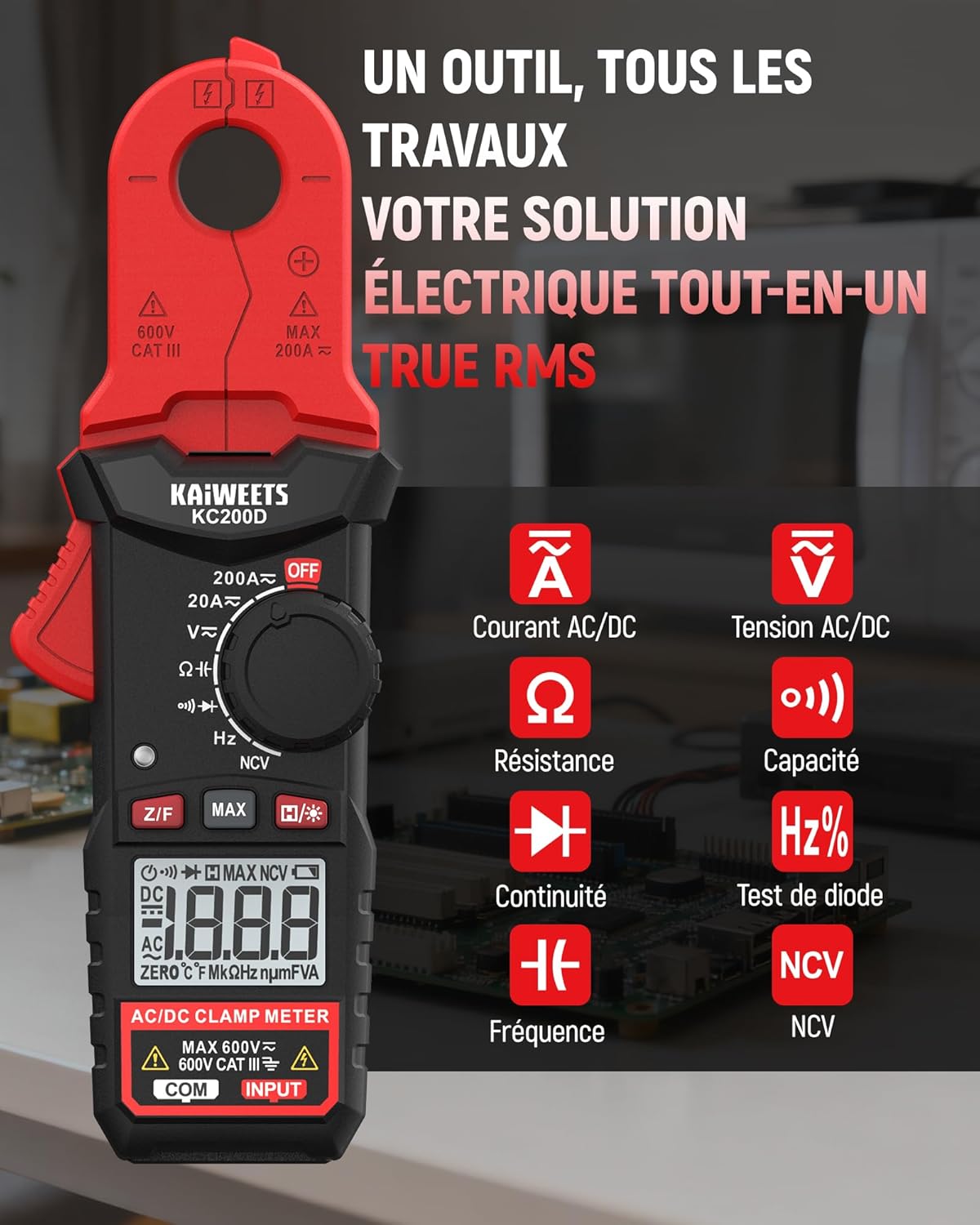
Şekil 4.1: KAIWEETS KC200D Clamp Meter with its various measurement functions highlighted, including AC/DC Current, AC/DC Voltage, Resistance, Capacitance, Frequency, Diode Test, Continuity, and NCV.
4.1 Temel Bileşen
- Clamp Çene: Temassız AC/DC akım ölçümü için kullanılır.
- İşlev Kadranı: Ölçüm modlarını seçmek için döner anahtar.
- LCD Ekran: Ölçüm değerlerini, birimleri ve göstergeleri gösterir.
- Düğmeler: For special functions like Data Hold, MAX/MIN, DC Zero, Backlight, and NCV.
- Giriş Terminalleri: Vol için test uçlarını bağlamak içintage, resistance, capacitance, frequency, diode, and continuity measurements.
5. Kurulum
5.1 Pil Kurulumu
The KC200D requires two AAA 1.5V batteries (included).
- Sayacın KAPALI olduğundan emin olun.
- Ölçüm cihazının arkasındaki pil bölmesini bulun.
- Pil bölmesi kapağını açmak için tornavida kullanın.
- Insert the two AAA batteries, observing the correct polarity (+ and -).
- Pil bölmesi kapağını yerine takın ve vidayla sabitleyin.
5.2 Test Uçlarının Bağlanması
Test uçları gerektiren ölçümler için (hacimtage, resistance, capacitance, frequency, diode, continuity):
- Insert the red test lead into the "INPUT" terminal.
- Insert the black test lead into the "COM" (Common) terminal.
6. Kullanım Talimatları
Always select the appropriate function before making any measurement. Turn the function dial to the desired measurement mode.
6.1 AC/DC Akım Ölçümü (Clamp)
Cl'yi kullanınamp jaw for non-contact current measurement. This method is ideal for safely measuring current without breaking the circuit.

Şekil 6.1: clamp jaw of the KC200D measuring current on a single electrical wire, demonstrating its compact design and precision.
- İşlev kadranını konumuna çevirin. 20A ~ or 200A ~ position for AC current, or 20A= or 200A= Doğru akım için.
- Cl tuşuna basınamp Çeneyi açmak için tetikleyici.
- Encircle only bir conductor with the clamp çene. Kapatmayın.amp around multiple wires, as this will result in an inaccurate reading.
- For DC current measurement, press the Z/F button to zero the display before clampIng.
- LCD ekranda mevcut değeri okuyun.
6.2 AC/DC Cilttage Ölçüm
Hacmi ölçmek içintage, use the test leads.
- İşlev kadranını konumuna çevirin. V~ (AC Cilttage) veya V= (DC Cilttage) konum.
- Connect the red test lead to the positive side of the circuit and the black test lead to the negative side (or ground).
- Cildi okutagLCD ekranda e değeri.
6.3 Direnç Ölçümü
Direnci ölçmeden önce devrenin enerjisinin kesildiğinden emin olun.
- İşlev kadranını konumuna çevirin. Ω konum.
- Ölçümü yapılacak bileşenin üzerine test uçlarını bağlayın.
- LCD ekranda direnç değerini okuyun.
6.4 Kapasite Ölçümü
Discharge capacitors completely before measurement to avoid damage to the meter or injury.
- İşlev kadranını konumuna çevirin. Kapasitans position (often shared with Diode/Continuity, press FUNC to cycle).
- Test uçlarını kondansatörün iki ucuna bağlayın.
- Kapasitans değerini LCD ekranda okuyun.
6.5 Frekans Ölçümü
Frekansı ölçmek için:
- İşlev kadranını konumuna çevirin. Hz% konum.
- Connect the test leads across the circuit where frequency is to be measured.
- LCD ekranda frekans değerini okuyun.
6.6 Diyot Testi
Diyotun devreden bağlantısının kesildiğinden emin olun.
- İşlev kadranını konumuna çevirin. Diyot position (often shared with Capacitance/Continuity, press FUNC to cycle).
- Connect the red test lead to the anode and the black test lead to the cathode.
- İleriye dönük bir cilttage drop will be displayed for a good diode. Reverse the leads; the display should show OL (Open Loop).
6.7 Süreklilik Testi
Devre enerjisinin kesildiğinden emin olun.
- İşlev kadranını konumuna çevirin. Süreklilik position (often shared with Diode/Capacitance, press FUNC to cycle).
- Test uçlarını bileşen veya kabloya bağlayın.
- If there is continuity (low resistance), the meter will emit an audible beep.
6.8 Temassız Hacimtage (NCV) Tespiti
The NCV function allows for quick and safe detection of live AC voltage doğrudan temas olmaksızın.

Şekil 6.2: The KC200D performing Non-Contact Voltage (NCV) detection near an electrical outlet, showing visual indicators for low and high voltage varlığı.
- İşlev kadranını konumuna çevirin. NCV konum.
- Bring the top end of the meter near the conductor or outlet.
- The meter will emit an audible beep and illuminate LED indicators, with frequency increasing as voltage gücü artar.
6.9 Özel Fonksiyonlar

Şekil 6.3: The KC200D highlighting its user-friendly functions: MAX for peak value, Z/F for DC current zeroing, H for data hold, backlight for low-light conditions, and auto-off for battery saving.
- Data Hold (H/* button): Ekrandaki mevcut okumayı dondurmak için basın. Serbest bırakmak için tekrar basın.
- MAX/MIN (MAX button): Press to display the maximum or minimum measured value. Press again to cycle.
- DC Current Zero (Z/F button): For DC current measurements, press this button before clamping to zero out any residual readings.
- Backlight (H/* long press): Long press the H/* button to turn the display backlight ON or OFF for improved visibility in low-light conditions.
- Otomatik Kapanma: The meter automatically powers off after approximately 15 minutes of inactivity to conserve battery life. Press any button or rotate the function dial to wake it up.
7. Bakım
7.1 Temizlik
Ölçüm cihazını kuru ve yumuşak bir bezle silin. Aşındırıcı veya çözücü maddeler kullanmayın.
7.2 Pil Değişimi
When the battery indicator appears on the LCD, replace the batteries as described in the Setup section (5.1 Battery Installation).
7.3 Depolama
Ölçüm cihazı uzun süre kullanılmayacaksa, sızıntıyı ve hasarı önlemek için pilleri çıkarın. Ölçüm cihazını taşıma çantası içinde serin ve kuru bir yerde saklayın.
8. Sorun Giderme
| Sorun | Olası Neden | Çözüm |
|---|---|---|
| Sayaç açılmıyor | Pillerin bitmiş olması; Pilin yanlış takılması | Pilleri değiştirin; Pil kutuplarını kontrol edin. |
| Inaccurate current reading | Multiple conductors in clamp jaw; DC current not zeroed | Ensure only one conductor is clamped; Press Z/F button for DC current |
| "OL" displayed (Overload) | Measurement exceeds range; Open circuit (for continuity/resistance) | Select a higher range (if available); Check circuit connections |
| NCV tespiti yok | AC hacmi yoktage present; Meter not close enough to source | AC ses seviyesini doğrulayın.tage presence; Move meter closer to the live conductor |
9. Özellikler
Technical specifications for the KAIWEETS KC200D Digital Clamp Metre:
| Özellik | Şartname |
|---|---|
| Model Numarası | KC200D |
| Görüntülemek | 2000 Sayım, Arkadan Aydınlatmalı LCD |
| AC Akım | 20A/200A (±(2.5% + 5 digits)) |
| Doğru Akım | 20A/200A (±(2.5% + 5 digits)) |
| AC Hacmitage | 2V/20V/200V/600V (±(1.0% + 5 digits)) |
| DC Hacmitage | 200mV/2V/20V/200V/600V (±(0.5% + 5 digits)) |
| Rezistans | 200Ω/2kΩ/20kΩ/200kΩ/2MΩ/20MΩ (±(1.0% + 5 digits)) |
| Kapasitans | 2nF/20nF/200nF/2µF/20µF/200µF/2mF/20mF (±(4.0% + 5 digits)) |
| Sıklık | 2Hz/20Hz/200Hz/2kHz/20kHz/200kHz/2MHz/20MHz (±(1.0% + 3 digits)) |
| Diyot Testi | Evet |
| Süreklilik Testi | Evet |
| NCV Algılama | Evet |
| Güç Kaynağı | 2 x AAA 1.5V Pil |
| Güvenlik Derecelendirmesi | CAT III 600V, Pollution Level: 2 |
| Boyutlar | 20.7 x 11.3 x 4.7 cm (Paket) |
| Ağırlık | 308 gram (Paket) |
10. Garanti ve Destek
KAIWEETS products are designed for reliability and performance. For warranty information, technical support, or service inquiries, please refer to the contact information provided on the KAIWEETS official website or contact your local distributor. Please retain your purchase receipt as proof of purchase for warranty claims.


