giriiş
Thank you for choosing the Altec Lansing Comfort Pro Over Ear Bluetooth Headphones. These headphones are designed to provide a high-quality audio experience with advanced features such as Active Noise Cancellation (ANC), Environmental Noise Cancellation (ENC), Spatial Audio, and a long-lasting battery. This manual will guide you through the setup, operation, and maintenance of your new headphones.
Kutuda Neler Var?
- Altec Lansing Comfort Pro Wireless Headphones
- USB-C Şarj Kablosu (açıkça belirtilmemiş ancak şarj için olduğu ima ediliyor)
- Audio Cable (not explicitly listed but common for wired use)
- Carrying Case (implied by images)
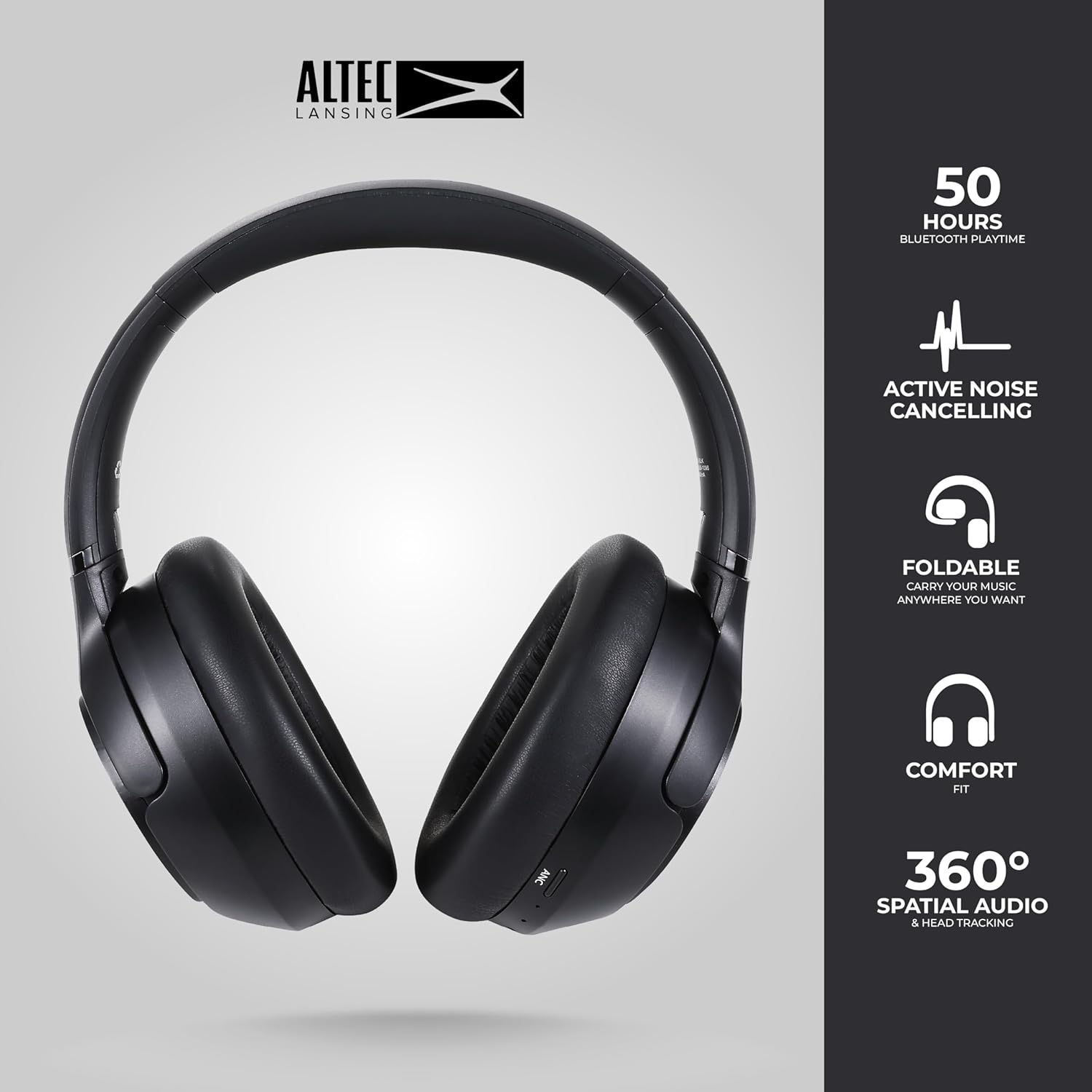
Image: The Altec Lansing Comfort Pro headphones, showcasing their sleek design and key features like 50 hours Bluetooth playtime, Active Noise Cancelling, foldable design, comfort fit, and 360° Spatial Audio & Head Tracking.
Kurmak
1. Kulaklıkları Şarj Etme
Before first use, fully charge your headphones. Connect the provided USB-C charging cable to the charging port on the headphones and the other end to a USB power source. The LED indicator will show charging status and turn off or change color when fully charged. A full charge typically takes approximately two hours.
2. Açma/Kapama
- Açmak İçin: LED göstergesi yanana kadar Güç düğmesini yaklaşık 3 saniye basılı tutun.
- Kapatmak İçin: LED göstergesi kapanana kadar Güç düğmesini yaklaşık 3 saniye basılı tutun.
3. Bluetooth Eşleştirme
The headphones support Bluetooth 5.4 for stable connectivity and multipoint pairing for connecting to two devices simultaneously.
- Kulaklıkların kapalı olduğundan emin olun.
- Press and hold the Power button for approximately 5-7 seconds until the LED indicator flashes rapidly (usually blue and red), indicating pairing mode.
- Cihazınızda (akıllı telefon, dizüstü bilgisayar, tablet) Bluetooth ayarlarına gidin ve Bluetooth'u etkinleştirin.
- Arama available devices and select "Altec Lansing Comfort Pro" from the list.
- Bağlandıktan sonra LED göstergesinin yanıp sönmesi duracak ve sabit mavi renkte kalacaktır.
- For multipoint pairing, connect to the first device, then put the headphones back into pairing mode and connect to the second device. The headphones will intelligently switch between the two connected devices.

Resim: Ayrıntılı view of the Altec Lansing Comfort Pro headphones highlighting the adjustable headband and the soft, lightweight ear cushions designed for comfort during extended use.
İşletim
Kulaklık Kontrolleri
The headphones feature intuitive controls located on the earcups. Refer to the image below for button identification.

Resim: Yakın çekim view of the right earcup of the Altec Lansing Comfort Pro headphones, showing the power button, volume controls, and other function buttons.
- Güç Düğmesi: Press and hold to power on/off. Short press for play/pause, answer/end calls.
- Sesi Aç (+): Kısa basışla sesi açın. Uzun basışla sonraki parçaya geçin.
- Sesi kıs (-): Kısa basıldığında ses kısılır. Uzun basıldığında önceki parça çalınır.
- ANC Düğmesi: Press to cycle through Active Noise Cancellation modes (ANC On, Ambient Mode, ANC Off).
- Çok Fonksiyonlu Düğme (MFB): Double press to activate Voice Assistant (Siri/Google Voice). Triple press to activate Low Latency Mode.
Aktif Gürültü Önleme (ANC) ve Çevresel Gürültü Önleme (ENC)
The Comfort Pro headphones feature powerful ANC to block out external noise and ENC for clear calls. Press the dedicated ANC button to toggle between ANC On, Ambient Mode (allowing some environmental sounds for awareness), and ANC Off. ENC is automatically active during calls to ensure your voice is clear.
Mekansal Ses
Experience immersive sound with Spatial Audio. This feature creates a 3D soundstage, making audio feel more lifelike. Spatial Audio is automatically enabled when supported by your device and content.
Düşük Gecikme Modu
For gaming or video playback where audio-visual synchronization is critical, activate Low Latency Mode by triple-pressing the MFB. This reduces audio delay for a more synchronized experience.
Sesli asistan
Access your device's voice assistant (Siri or Google Voice) by double-pressing the MFB. You can then issue commands through the headphone's microphone.
Yönetim Çağrı
- Çağrıyı Cevapla/Sonlandır: Güç düğmesine kısa basın.
- Çağrıyı Reddet: Güç düğmesini 2 saniye basılı tutun.
Bakım
Temizlik
Kulaklıklarınızın performansını ve görünümünü korumak için:
- Kulaklıkların kulaklık kısımlarını ve kafa bandını yumuşak, kuru ve tüy bırakmayan bir bezle silin.
- İnatçı kirler için hafifçe silinampBezi suyla yıkayın. Sert kimyasallar, çözücüler veya aşındırıcı temizleyiciler kullanmaktan kaçının.
- Hiçbir açıklıktan nem girmesine izin vermeyin.
Depolamak
When not in use, store your headphones in the provided carrying case to protect them from dust, scratches, and impacts. The foldable design allows for compact storage.

Image: The Altec Lansing Comfort Pro headphones neatly folded and stored inside their protective carrying case, emphasizing portability and protection.
Pil Bakımı
- Pilin sık sık tamamen boşaltılmasından kaçının.
- Kulaklıkları uzun süre kullanmayacaksanız, kısmen şarj edilmiş halde saklayın.
- Pil ömrünü azaltabilecek aşırı sıcaklıklardan kaçının.
Sorun giderme
If you encounter any issues with your Altec Lansing Comfort Pro headphones, refer to the following common solutions:
- Kulaklık açılmıyor: Kulaklıkların tamamen şarj olduğundan emin olun. Kulaklıkları bir güç kaynağına bağlayın ve birkaç dakika sonra tekrar deneyin.
- Cihazla eşleştirilemiyor:
- Kulaklığın eşleştirme modunda olduğundan emin olun (LED hızla yanıp sönüyor).
- Cihazınızın Bluetooth özelliğini kapatıp açın.
- Delete "Altec Lansing Comfort Pro" from your device's Bluetooth list and attempt to pair again.
- Cihaza özgü sorunları elemek için farklı bir cihazla eşleştirmeyi deneyin.
- Ses yok veya ses seviyesi düşük:
- Hem kulaklığınızdaki hem de bağlı cihazınızdaki ses seviyelerini kontrol edin.
- Kulaklıkların Bluetooth üzerinden doğru şekilde bağlandığından emin olun.
- If using a wired connection, ensure the audio cable is fully inserted into both the headphones and the audio source.
- ANC etkili bir şekilde çalışmıyor:
- ANC düğmesine basarak ANC'nin etkinleştirildiğinden emin olun.
- Kulaklarınızın etrafında iyi bir sızdırmazlık sağlamak için kulaklıkların uyumunu ayarlayın.
- ANC is most effective against low-frequency, constant noise. It may not completely block out voices or sudden, high-frequency sounds.
- Sesli asistan yanıt vermiyor: Ensure your device's voice assistant is enabled and that the headphones are properly connected. Double-press the MFB firmly.
Özellikler
| Model Adı | MX3050 (MZX3050-BLK-STK-6) |
| Bağlantı Teknolojisi | Kablosuz (Bluetooth) |
| Bluetooth Sürümü | 5.4 |
| Pil Ömrü | Up to 60 Hours (40 Hours with ANC activated) |
| Gürültü Kontrol Özellikleri | Aktif Gürültü Engelleme (ANC), Çevresel Gürültü Engelleme (ENC) |
| Kulaklık Şekli | Kulak Üstü |
| Kontrol Yöntemi | App, Voice, On-headphone buttons |
| Uyumlu Cihazlar | Akıllı Telefonlar, Dizüstü Bilgisayarlar, Tabletler |
| Malzeme | Fabric/Silicone and Plastic/Metal (Combination) |
| Ürün Ağırlığı | 1 Pound |
| Su Direnç Seviyesi | Su geçirmez |
Garanti ve Destek
For warranty information and customer support, please refer to the documentation included with your purchase or visit the official Altec Lansing website. You can typically find detailed warranty terms, FAQs, and contact information for technical assistance there.
Çevrimiçi Kaynaklar: www.alteclansing.com


