1. Ürün Bittiview
The KLIM Cassette Player Boombox is a versatile audio device combining classic cassette playback with modern features like AM/FM radio, Bluetooth connectivity, and USB playback/recording. Its portable design allows for use at home or on the go.
Temel Özellikler:
- Kaset Çalar ve Kaydedici
- AM/FM Radyo Tuneri
- Bluetooth Connectivity for wireless streaming
- USB Port for MP3 playback and recording
- Integrated Microphone for direct recording
- Headphone Jack for private listening
- Dual Power: AC power cord or 4 x C-type batteries (not included)
- Portable design with a carrying handle
Kutuda Neler Var:
- KLIM Cassette Player Boombox
- AC Güç Kablosu
- Kullanıcı Kılavuzu

Şekil 1: Ön view of the KLIM Cassette Player Boombox, showcasing its controls and cassette compartment.
2. Kurulum
Cihaza Güç Verme:
The KLIM Cassette Player Boombox can be powered in two ways:
- AC Gücü: Connect the included AC power cord to the device's power input and then to a standard wall outlet.
- Pil Gücü: For portable use, insert 4 x C-type batteries (not included) into the battery compartment located on the underside of the device. Ensure correct polarity.

Şekil 2: Alt taraf view showing the battery compartment for portable power.
3. Kullanım Talimatları
3.1. Cassette Player/Recorder
- Slide the function selector to 'TAPE'.
- Press the 'OPEN' button to open the cassette compartment.
- Insert a cassette tape with the open side facing up.
- Kaset bölmesini kapatın.
- Use the 'PLAY', 'STOP/EJECT', 'FFWD' (Fast Forward), and 'REW' (Rewind) buttons to control playback.
- To record, ensure a blank tape is inserted. Press the 'REC' button to start recording from the built-in microphone, radio, or USB.

Şekil 3: Üst view of the boombox with a cassette tape inserted into the compartment.
3.2. AM/FM Radyo
- Slide the function selector to 'RADIO'.
- En iyi sinyal alımı için teleskopik anteni uzatın.
- Use the 'BAND' switch to select between AM and FM frequencies.
- Rotate the 'TUNING' knob to find your desired radio station.
3.3. Bluetooth Bağlantısı
- Slide the function selector to 'BT' (Bluetooth).
- The device will enter pairing mode, indicated by a flashing light or audible prompt.
- Akıllı telefonunuzda veya tabletinizde Bluetooth'u etkinleştirin ve kullanılabilir cihazları arayın.
- Select 'KLIM Cassette Player' (or similar name) from the list to pair.
- Eşleştirme işlemi tamamlandıktan sonra, cihazınızdan kablosuz olarak ses akışı yapabilirsiniz.
3.4. USB Oynatma ve Kayıt
- Slide the function selector to 'USB'.
- MP3 ses dosyası içeren bir USB flash sürücü takın fileUSB bağlantı noktasına takın.
- The device will automatically begin playing the audio files. Use the playback controls (play/pause, skip) to navigate.
- To record to USB, ensure a USB drive is inserted. Press the 'REC' button while in radio or cassette mode to record the audio source directly to the USB drive.
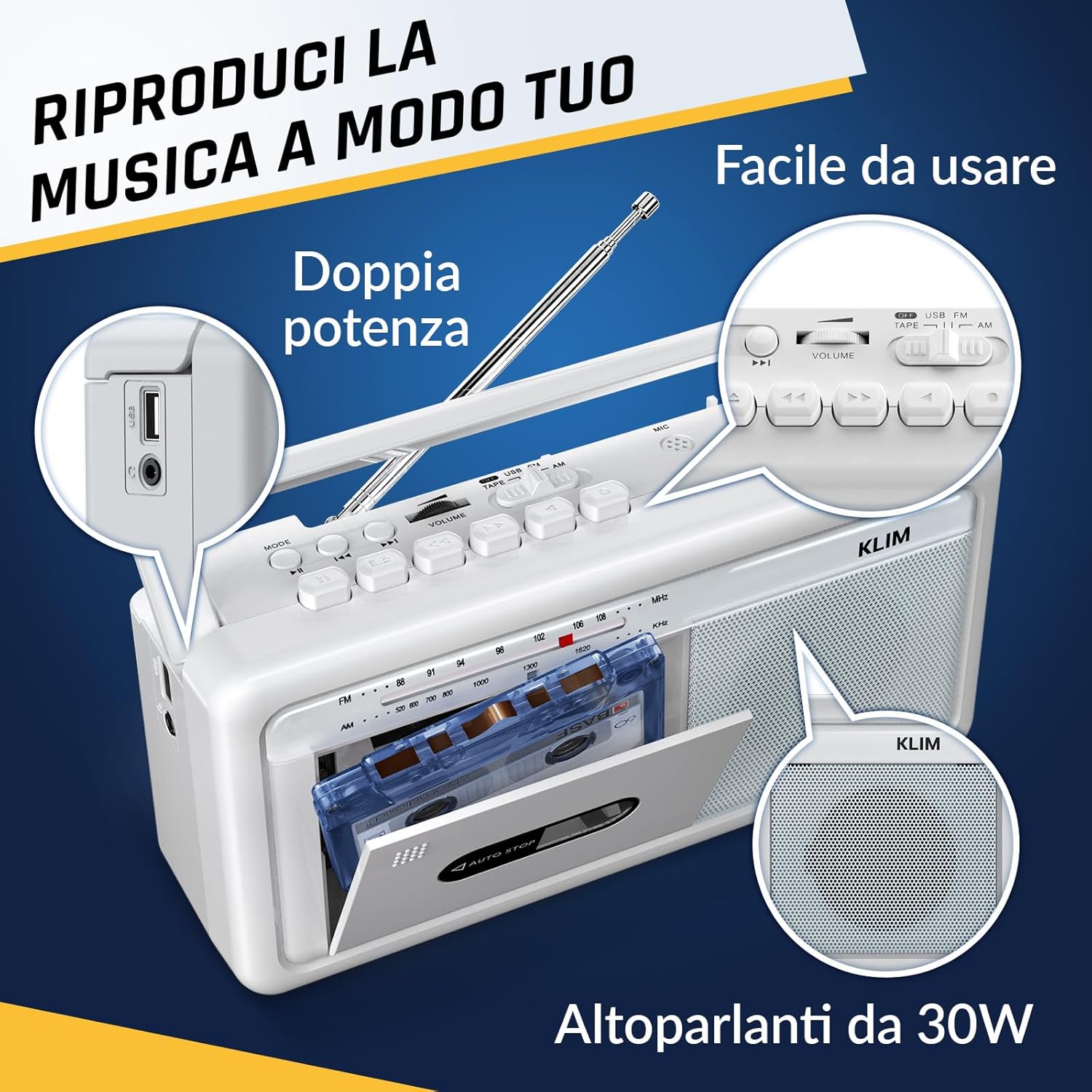
Şekil 4: Yan view highlighting the USB port for media playback and recording.
3.5. Kulaklık Kullanımı
Connect standard 3.5mm headphones to the headphone jack for private listening. The internal speakers will automatically mute when headphones are connected.
Video 1: Instructions on how to record a tape to USB using the WTB-795 model. This video demonstrates the USB recording functionality.
Video 2: Bittiview of a retro cassette player with USB, Bluetooth, and AM/FM radio features, similar to the KLIM Cassette Player Boombox.
4. Bakım
- Cihazınızı yumuşak ve kuru bir bezle silerek temiz tutun. Sıvı temizleyici veya çözücü kullanmaktan kaçının.
- Regularly clean the cassette head and pinch rollers with a cotton swab lightly dampEn iyi ses kalitesini sağlamak ve kasetin zarar görmesini önlemek için izopropil alkol ile sonlandırılmıştır.
- Keep the device away from direct sunlight, heat sources, and excessive dust or moisture.
- Uzun süre kullanılmadığında, sızıntıyı önlemek için pilleri çıkarın.
5. Sorun Giderme
| Sorun | Olası Çözüm |
|---|---|
| Güç yok | Check if the AC power cord is securely connected. If using batteries, ensure they are inserted correctly and are not depleted. |
| Hoparlörlerden ses gelmiyor | Increase the volume. Ensure headphones are not connected. Check the function selector is in the correct mode (TAPE, RADIO, BT, USB). |
| Zayıf radyo alımı | Extend the telescopic antenna fully. Adjust the antenna direction. Try moving the unit to a different location. |
| Kaset çalmıyor/kaydetmiyor | Ensure the tape is inserted correctly. Check if the tape is damaged. Clean the cassette head and pinch rollers. |
| Bluetooth bağlanmıyor | Ensure the unit is in Bluetooth mode. Make sure your device's Bluetooth is enabled and within range. Try unpairing and re-pairing the device. |
| USB oynatma sorunları | Ensure the USB drive is formatted correctly (FAT32) and contains compatible audio files (MP3, WAV, WMA, AAC, FLAC). Try a different USB drive. |
6. Özellikler
- Marka: Klim
- Modeli: Kaset çalar
- Ürün Ölçüleri: 25x13.1x7.6 cm
- Ürün Ağırlığı: 1 kilo
- Uyumlu Cihazlar: MP3 Çalar, Akıllı Telefon, Tablet
- Ses Çıkış Modu: Stereo
- Desteklenen Ses Biçimleri: Cassette, Analog Radio, MP3, WAV, WMA, AAC, FLAC, Bluetooth
- Güç Kaynağı: Corded Electric (AC) / 4 x C-type Batteries (not included)
- Bağlantı Teknolojisi: USB, Bluetooth
- Renk: Don Beyazı
- Ürün Numarası: KLSIN4825
7. Garanti ve Destek
The KLIM Cassette Player Boombox comes with a 5 yıllık garanti. For any questions, technical assistance, or warranty claims, please contact KLIM customer support. Our team is available 24/7 to assist you.
Please refer to the contact information provided in your product packaging or visit the official KLIM webdaha fazla ayrıntı için site.


