1. Giriş
This manual provides detailed instructions for the safe and efficient operation of your Bigme B6 Color Ebook Reader. Please read this manual thoroughly before using the device and retain it for future reference.
Paket İçeriği
- Bigme B6 E-kitap Okuyucu
- Koruyucu Kılıf
- Kullanım Kılavuzu (bu belge)
- Şarj kablosu

Image 1.1: Bigme B6 Color Ebook Reader and included protective case.
2. Ürün Bittiview
Familiarize yourself with the components and features of your Bigme B6 device.
Temel Özellikler
- Görüntülemek: 6-inch Color E-paper display, 300 PPI resolution.
- İşlemci: Octa-core CPU for responsive performance.
- Bellek saklama alanı: 4GB RAM and 64GB internal storage, expandable via Micro-SD card (up to 1TB).
- İşletim Sistemi: Android 14, providing access to various applications.
- Bağlantı: Bluetooth and Wi-Fi for wireless communication.
- Ses: Integrated Hi-Fi Speakers.
- Tasarım: Ultra ince profesyonelfile at 6.98mm.
- Göz Konforu: Features Zero Blue Light and Flicker-Free technology, TUV Rheinland certified for reduced eye strain.

Resim 2.1: Üzeriview of the Bigme B6 Ebook Reader's main features.
3. Kurulum
3.1 İlk Şarj
Before first use, fully charge your Bigme B6. Connect the device to a power source using the provided charging cable. The charging indicator will show the charging status.
3.2 Güç Açma/Kapatma
- Açmak için: Ekran aydınlanana kadar güç düğmesini basılı tutun.
- To power off: Press and hold the power button, then select "Power Off" from the options.
- To sleep/wake: Briefly press the power button.
3.3 Ağ Bağlantısı (Wi-Fi)
- Ana ekrandan şuraya gidin: Ayarlar.
- Seçme Ağ ve İnternet.
- Geçiş Wifi AÇIK'a.
- İstediğiniz Wi-Fi ağını listeden seçin.
- İstendiğinde şifreyi girin ve dokunun Bağlamak.
3.4 İlk Sistem Yapılandırması
Upon first power-on or after a factory reset, follow the on-screen prompts to select your language, connect to Wi-Fi, and set up your Google account (optional, for app store access).
4. Kullanım Talimatları
4.1 Temel Gezinme
- Dokunmatik Ekran: Tap to select items, swipe to scroll, pinch to zoom.
- Ana Ekran: Displays installed applications and widgets.
- Bildirim paneli: Ekranın üst kısmından aşağı doğru kaydırarak hızlı ayarlara ve bildirimlere erişebilirsiniz.
- Kontrol Merkezi: Access system settings like Wi-Fi, Bluetooth, brightness, and refresh modes.
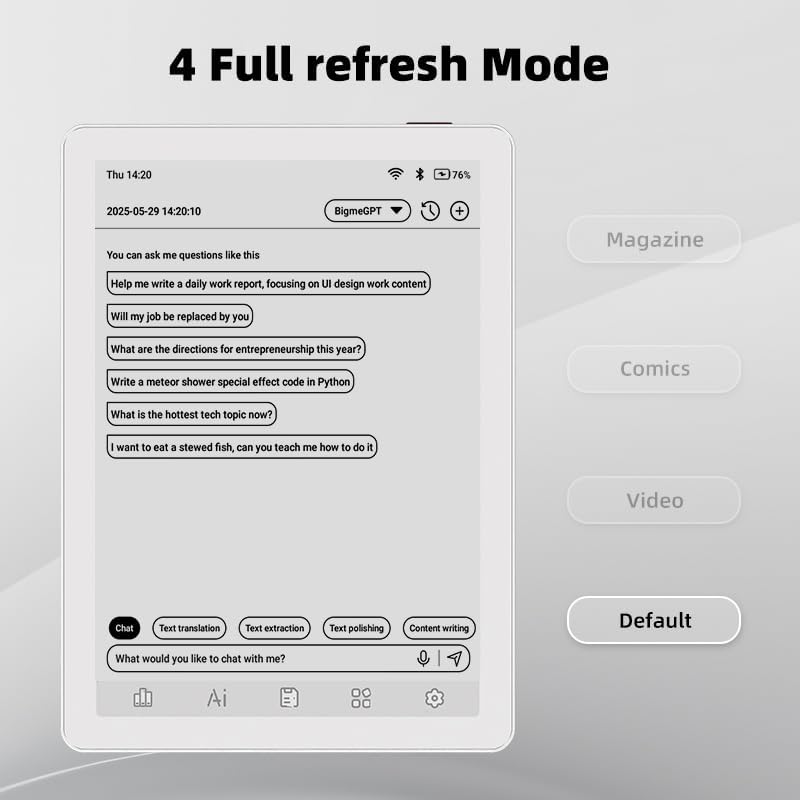
Image 4.1: The Bigme B6 home screen displaying various application icons.

Image 4.2: Accessing the Control Center for quick adjustments to device settings.
4.2 Reading eBooks
The Bigme B6 supports over 19 eBook formats, including PDF, TXT, EPUB, MOBI, and more. You can load books via USB or download them directly through reading applications.
- Open a reading application (e.g., the default reader or a downloaded app like Kindle or Libby).
- Select the book you wish to read from your library.
- Tap the left or right side of the screen to turn pages.
- Tap the center of the screen to access reading options (font size, line spacing, contrast, etc.).
- To highlight text: Press and hold on a word, then drag the selection handles to cover the desired text. Options for highlighting or notes will appear.

Image 4.3: Reading an eBook and highlighting text with color on the Bigme B6.
4.3 Uygulama Yönetimi
As an Android 14 device, you can install applications from the Google Play Store or other compatible sources.
- Uygulamalar yükleniyor: Açın Uygulama Mağazası icon (Google Play Store) on your home screen, search for the desired app, and follow the installation prompts.
- Uygulamaları Kaldırma: Git Ayarlar > UygulamalarUygulamayı seçin ve dokunun. Kaldır.
4.4 Audiobooks and Media Playback
The device supports audiobook playback through its built-in Hi-Fi speakers or connected Bluetooth headphones.
- Playing Audiobooks: Use a compatible audiobook application.
- Connecting Bluetooth Headphones: Git Ayarlar > Bağlı cihazlar > Bluetooth, enable Bluetooth, and pair with your headphones.

Image 4.4: The Bigme B6 supports audiobooks, allowing for hands-free listening.
4.5 Ekran Yenileme Modları
The Bigme B6 offers multiple refresh modes to optimize display performance for different content types.
- Access refresh modes from the Control Center or Display Settings.
- Yaygın kullanım şekilleri şunlardır:
- Varsayılan: Standard reading mode.
- Dergi: Optimized for images and text in magazines.
- Comics: Enhanced for comic book viewIng.
- Video: Provides a smoother refresh rate for video content (note: e-paper displays have limitations for video).

Image 4.5: Selecting from various refresh modes to suit different content types.
5. Bakım
5.1 Cihazın Temizlenmesi
- Cihazın ekranını ve gövdesini yumuşak, tüy bırakmayan bir bezle nazikçe silin.
- İnatçı lekeler için hafifçeampBezi suyla veya elektronik cihazlar için özel olarak tasarlanmış bir ekran temizleyiciyle silin.
- Sert kimyasallar, aşındırıcı malzemeler ve aşırı nem kullanmaktan kaçının.
5.2 Pil Bakımı
- Cihazınızı düzenli olarak şarj edin, ancak uzun süre tamamen boşta bırakmaktan kaçının.
- Do not expose the device to extreme temperatures, as this can affect battery life.
- Use only the provided or a certified charging cable and adapter.
5.3 Depolama
When not in use for extended periods, store the device in a cool, dry place, away from direct sunlight and extreme temperatures. It is recommended to charge the device to about 50% before long-term storage.
6. Sorun Giderme
| Sorun | Olası Neden | Çözüm |
|---|---|---|
| Cihaz açılmıyor. | Pil zayıf; cihaz donmuş. | Cihazı en az 30 dakika şarj edin. Güç düğmesini 10-15 saniye basılı tutarak zorunlu yeniden başlatma işlemi gerçekleştirin. |
| Screen is unresponsive or slow. | Temporary software glitch; too many apps running. | Restart the device. Close unnecessary background applications. Check for system updates. |
| Wi-Fi'ye bağlanılamıyor. | Yanlış parola; yönlendirici sorunu; Wi-Fi devre dışı. | Ensure Wi-Fi is enabled and the password is correct. Restart your Wi-Fi router. Try connecting to a different network. |
| Pil çabuk bitiyor. | High screen brightness; many background apps; frequent Wi-Fi/Bluetooth use. | Reduce screen brightness. Close unused applications. Disable Wi-Fi and Bluetooth when not needed. Adjust refresh mode settings. |
| Applications crash or freeze. | App incompatibility; insufficient memory. | Update the application. Clear the app's cache (Settings > Apps > [App Name] > Storage & cache). If issues persist, uninstall and reinstall the app. |
7. Özellikler
| Model Adı | US-B6 |
| Görüntülemek | 6-inch Color E-paper, Electronic Ink, 300 PPI |
| İşletim Sistemi | Android 14 |
| Veri deposu | 4 GB |
| Dahili Depolama | 64 GB |
| Genişletilebilir Depolama | Micro-SD card (up to 1TB support) |
| Bağlantı | Bluetooth, Wi-Fi |
| Pil | 1 Standart Dışı Pil (dahil) |
| Ölçüler (Uzunluk x Genişlik x Kalınlık) | 5.88" x 4.25" x 0.28" (14.94 cm x 10.8 cm x 0.71 cm) |
| Ürün Ağırlığı | 6.2 ons (175.77 gram) |
| Desteklenen e-Kitap Biçimleri | PDF, TXT, EPUB, EPUB3, HTML, HTM, AZW3, FB2, DOC, DOCX, MOBI, OEB, CBR, RPC, RTF, DJVU, ZIP |
8. Garanti ve Destek
8.1 Garanti Bilgileri
Please refer to the warranty card included with your product for specific warranty terms and conditions. The warranty typically covers manufacturing defects for a specified period from the date of purchase.
8.2 Müşteri Desteği
For technical assistance, troubleshooting not covered in this manual, or warranty claims, please contact Bigme customer support. Contact details can usually be found on the Bigme official websitede veya ürün ambalajında yer almamaktadır.
Ayrıca ziyaret edebilirsiniz Bigme Store on Amazon Ek ürün bilgileri ve destek kaynakları için.


