1. Giriş
The Antec FLUX M Mini-Tower Case is designed for micro-ATX systems, emphasizing efficient cooling and versatile functionality. It incorporates the F-LUX Platform for optimized airflow and supports a range of high-performance components within a compact form factor.
2. Temel Özellikler
2.1. F-LUX Platform and Airflow Design
The case utilizes the F-LUX Platform with a vertical airflow design, promoting efficient heat exhaust from bottom to top. A large mesh front panel and multi-directional vents ensure extensive air intake and heat dissipation.
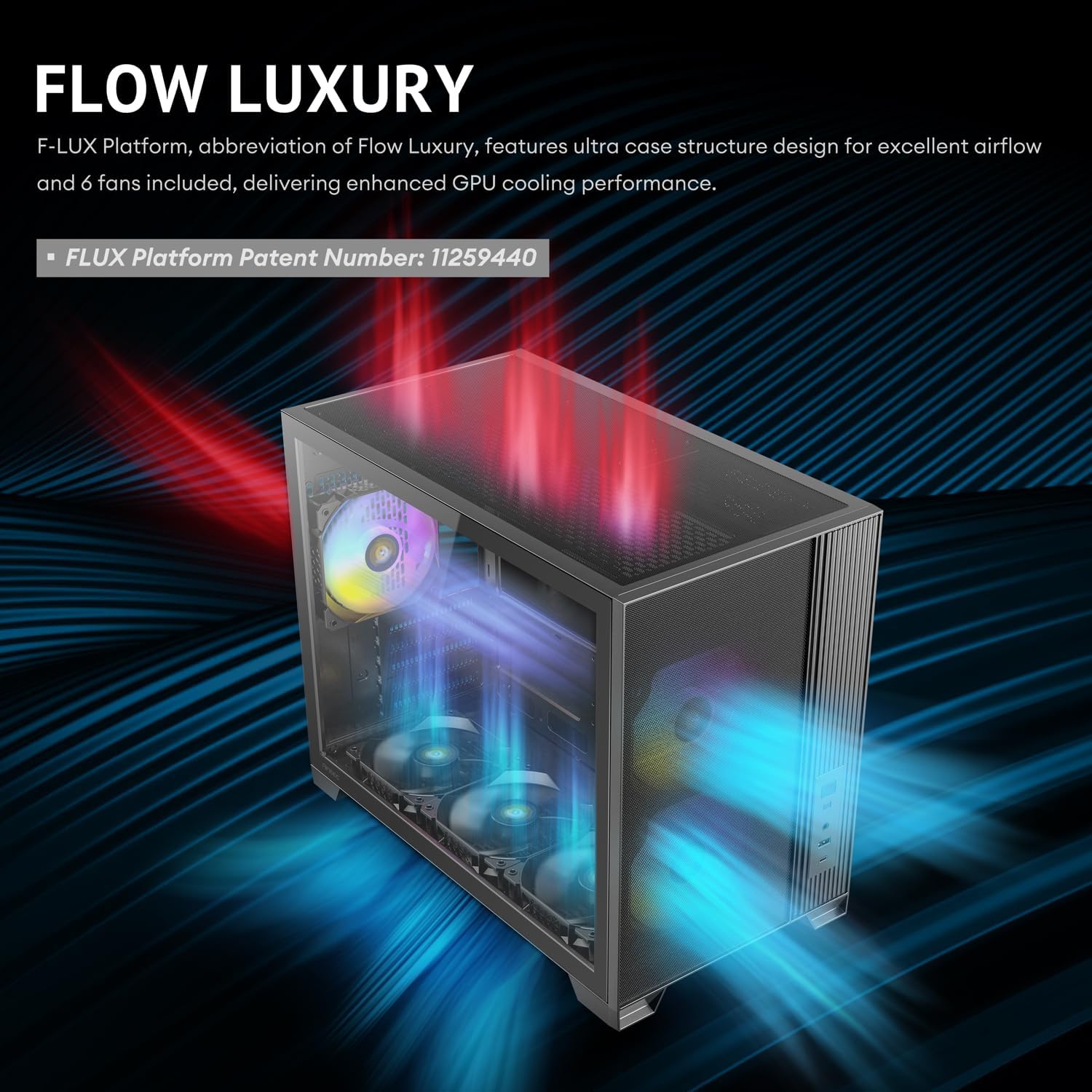
Image: Illustration of the F-LUX Platform's vertical airflow design within the Antec Flux M case, showing cool air entering from the bottom and front, and hot air exiting from the top and rear.
2.2. Pre-installed High-Performance Fans
The FLUX M comes equipped with six pre-installed 120mm PWM fans for immediate cooling performance:
- 2 x 120mm ARGB PWM fans (front)
- 3 x 120mm PWM reverse fans (bottom)
- 1 x 120mm ARGB PWM fan (rear)

Resim: Yakın çekim view of the two types of 120mm fans included with the Antec Flux M case: a colorful ARGB PWM fan and a black PWM reverse fan.
2.3. Radyatör Desteği
The case supports up to a 360mm radiator at the top, allowing for advanced liquid cooling solutions to manage high thermal loads.
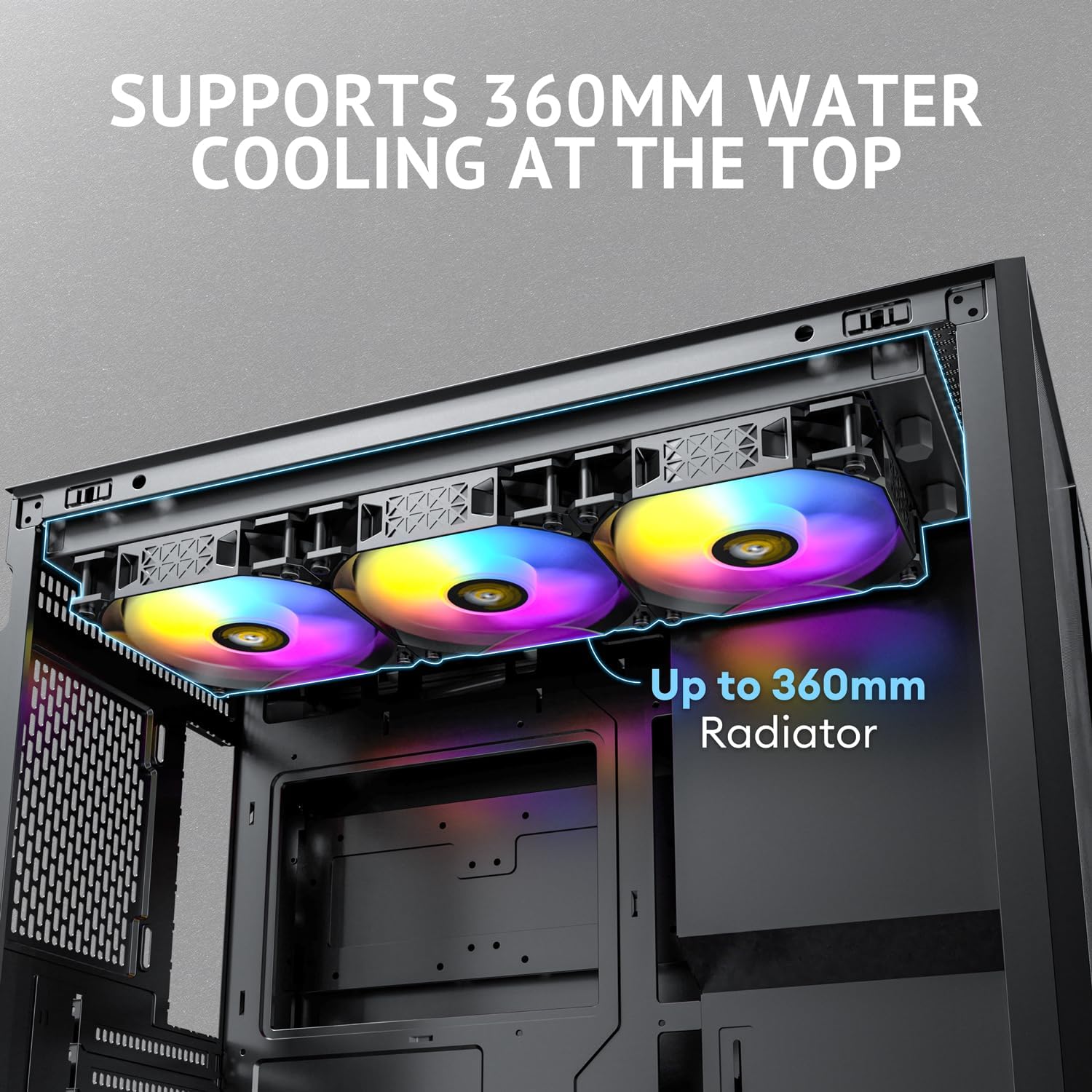
Image: Interior top view of the Antec Flux M case, highlighting the mounting points for a 360mm liquid cooling radiator.
2.4. Kablo Yönetimi
Generous cable management space is provided with up to 59mm at the front and 49mm at the rear of the motherboard tray, facilitating clean and organized builds.

Image: Diagram illustrating the available cable management space behind the motherboard tray in the Antec Flux M case, indicating 59mm at the front and 49mm at the rear.
2.5. Front-Mounted PSU Chamber & Extension Cable
The case features a front-mounted PSU chamber to optimize internal airflow and free up space. An included 13A extension cable ensures stable power delivery and flexible PSU installation.

Resim: Dahili view of the Antec Flux M case, highlighting the front-mounted power supply chamber and the routing of the 13A power extension cable.
2.6. Built-in GPU Bracket
A built-in GPU support bracket is included to prevent graphics card sag, compatible with high-performance graphics cards.
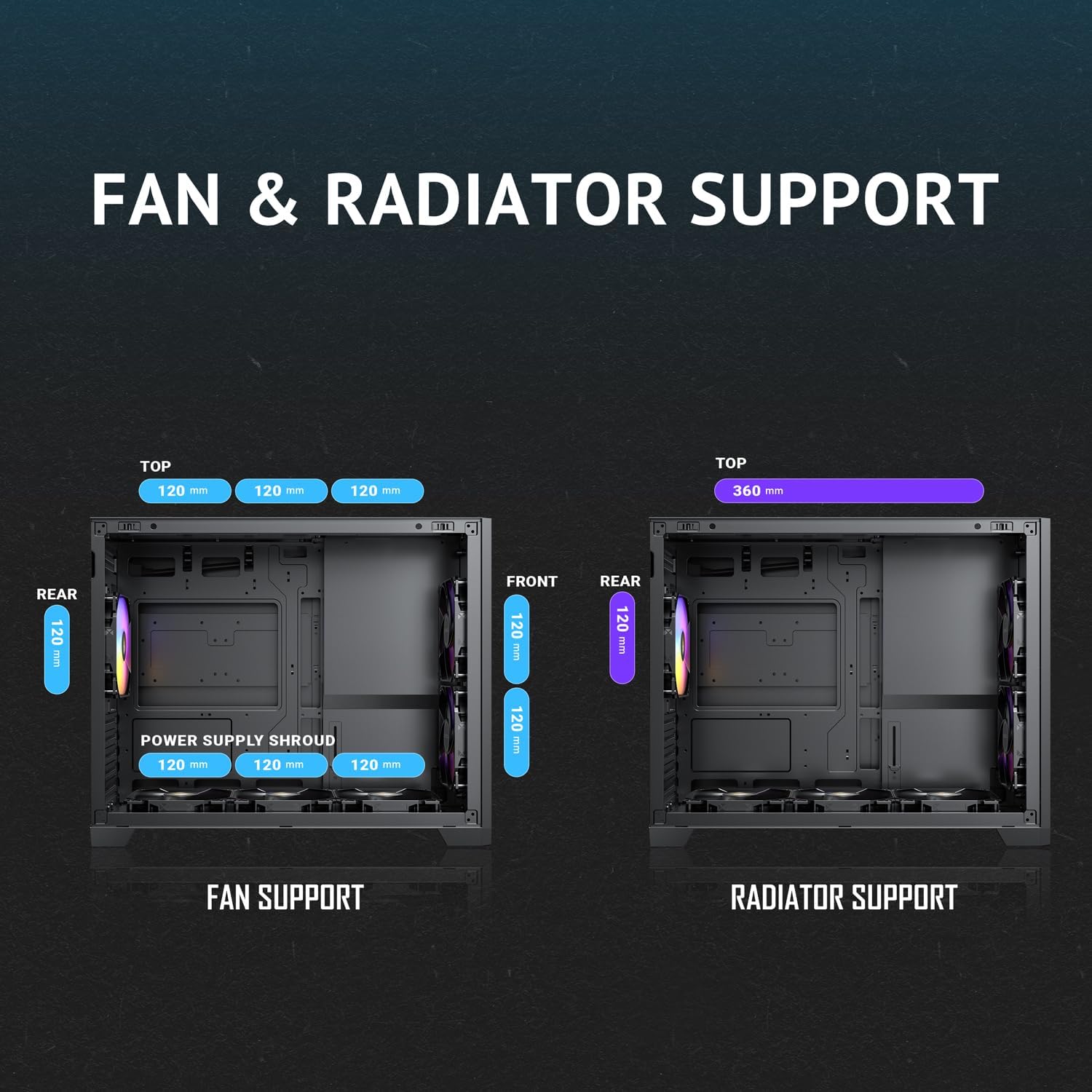
Resim: Yakın çekim view of the adjustable built-in GPU support bracket within the Antec Flux M case, designed to prevent graphics card sag.
2.7. Tool-Free Panel Design
The tempered glass side panel features a tool-free design for easy access to internal components.

Image: The Antec Flux M case with its tempered glass side panel swung open, illustrating the tool-free access mechanism.
2.8. G/Ç Paneli
The front I/O panel includes essential ports for connectivity:
- Güç Düğmesi
- Sıfırlama Düğmesi
- Mic / HD-AUDIO Jack
- USB 3.0 Bağlantı Noktası
- Type-C 3.2 Gen 2 Port
Resim: Ayrıntılı view of the Antec Flux M case's front I/O panel, showing the power and reset buttons, audio jacks, USB 3.0, and Type-C 3.2 Gen 2 ports.
2.9. Full-Size Dust Filters
Equipped with full-size dust filters to protect internal components from dust buildup and simplify maintenance.
3. Kurulum ve Kurulum
3.1. Davayı Hazırlama
Before installing components, remove the tempered glass side panel by gently pulling it open. The top panel can also be removed for easier access during installation.

Image: The Antec Flux M case with its side and top panels detached, revealing the internal chassis structure and fan mounts.
3.2. Anakart Kurulumu
The Antec Flux M supports Micro ATX and Mini ITX motherboards. Install your motherboard onto the pre-installed standoffs. Ensure all necessary cables (front panel connectors, USB, audio) are routed through the designated cutouts.

Image: Internal diagram of the Antec Flux M case, illustrating the placement areas for the motherboard, CPU, and GPU, along with fan and radiator support.
3.3. Fan ve Radyatör Montajı
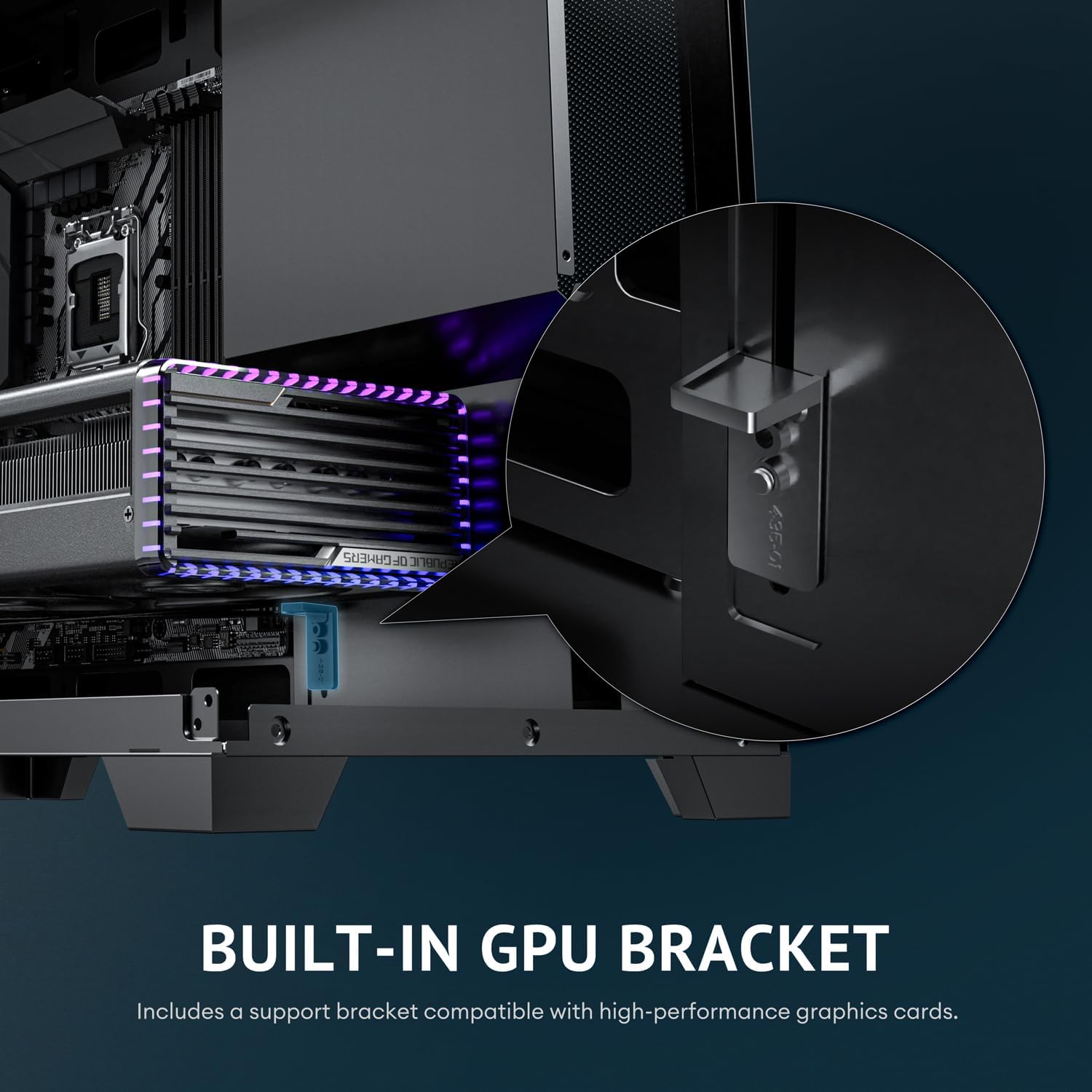
The case comes with pre-installed fans. For additional cooling or liquid cooling, refer to the following:
- Tepe: Supports up to 3 x 120mm fans or a 360mm radiator.
- Arka: 1 adet 120 mm fan (önceden takılı).
- Ön: 2 x 120mm fans (pre-installed).
- Alt: 3 x 120mm reverse fans (pre-installed).

Image: Diagram illustrating the various fan and radiator mounting locations within the Antec Flux M case, including top, rear, front, and power supply shroud areas.
3.4. GPU Kurulumu
Install your graphics card into the appropriate PCIe slot on your motherboard. Utilize the built-in GPU support bracket to prevent sag. The case supports GPUs up to 405mm in length.

Resim: Dahili view of the Antec Flux M case with a graphics card installed, demonstrating the bottom air intake optimization and clearance for the GPU.
3.5. Power Supply and Storage Installation
Install your ATX power supply into the front-mounted chamber. Connect the included 13A extension cable. The case provides space for SSD/HDD storage behind the motherboard tray.

Image: Internal diagram of the Antec Flux M case, indicating the placement areas for the power supply unit and SSD/HDD storage drives.
4. Kullanım Talimatları
Once all components are installed and connected, replace the side and top panels. Connect your peripherals and power cable. Use the power button on the front I/O panel to start your system. The ARGB fans can be controlled via your motherboard's RGB software or a compatible controller.
5. Bakım
Regular cleaning of the dust filters is recommended to maintain optimal airflow and cooling performance. The full-size dust filters can be easily removed for cleaning.
6. Sorun Giderme
If your system experiences unexpected shutdowns or overheating, verify that all fans are spinning correctly and that dust filters are clean. Ensure all power connections are secure. Consult your component manuals for specific troubleshooting steps related to individual hardware.
7. Özellikler
| Marka | Öntek |
| Model Adı | Flux M |
| Dava Türü | küçük kule |
| Anakart Uyumluluğu | Mikro ATX, Mini ITX |
| Malzeme | Alaşımlı Çelik |
| Ürün Boyutları (UxGxY) | 18.07" x 14.37" x 9.72" |
| Ürün Ağırlığı | 14 pound |
| Soğutma Yöntemi | Hava |
| Önceden yüklenmiş Fanlar | 6 x 120mm PWM (3 ARGB, 3 Reverse) |
| Üst Radyatör Desteği | 360mm'ye kadar |
| GPU Maksimum Uzunluğu | 405mm |
| CPU Soğutucu Maksimum Yükseklik | 175mm |
| Ön G / Ç Bağlantı Noktaları | 1x USB 3.0, 1x Type-C 3.2 Gen 2, Mic/HD-AUDIO |
8. Garanti ve Destek
Garanti bilgileri ve teknik destek için lütfen resmi Antec web sitesine başvurun. website or contact Antec customer service directly. Protection plans may be available for purchase separately through your retailer.
- 3-Year Protection Plan (available)
- 4-Year Protection Plan (available)
- Complete Protect (monthly plan available)
9. Resmi Ürün Videoları
9.1. Antec FLUX M, 6 PWM Fans Included
Video: An official video from MA Labs showcasing the Antec Flux M case and its six included PWM fans, highlighting their features and performance.
9.2. JONSBO D32 PRO Micro ATX PC Case
Video: An official video from JONSBO showcasing the D32 PRO Micro ATX PC Case, demonstrating its design, features, and compatibility. This video is relevant for understanding Micro-ATX case design principles.
9.3. darkFlash WD200 MATX PC Case with Handle
Video: An official video from Kitchen Marvel showcasing the darkFlash WD200 MATX PC Case, highlighting its design and features, including a carrying handle. This video is relevant for understanding Micro-ATX case design principles.
9.4. RAIDMAX i803 LCD Case Custom Display ARGB Fans Showcase!
Video: An official video from Raidmax Tech showcasing the i803 LCD Case with custom display and ARGB fans. This video is relevant for understanding ARGB fan features and case aesthetics.
9.5. AsiaHorse Pegasus Micro ATX PC Case
Video: An official video from Asiahorse showcasing the Pegasus Micro ATX PC Case, demonstrating its features and design. This video is relevant for understanding Micro-ATX case design principles.
9.6. darkFlash FLOATRON F1 MATX PC Case
Video: An official video from Kitchen Marvel showcasing the darkFlash FLOATRON F1 MATX PC Case, demonstrating its features and design. This video is relevant for understanding Micro-ATX case design principles.


