giriiş
This manual provides detailed instructions for the setup, operation, and maintenance of your Zebronics Pixaplay 35 Android Smart LED Projector. Please read this manual thoroughly before using the product to ensure proper functionality and to prevent damage.
Önemli Güvenlik Bilgileri
- Havalandırma açıklıklarını kapatmayın. Projektörün etrafında yeterli hava akışı sağlayın.
- Projeksiyon cihazının merceğine doğrudan göz temasından kaçının.amp Açık.
- Yalnızca cihazla birlikte verilen güç adaptörünü kullanın.
- Projeksiyon cihazını sudan, nemden ve aşırı sıcaklıklardan uzak tutun.
- Projektörü kendiniz sökmeye veya onarmaya çalışmayın. Tüm servis işlemlerini yetkili personele yaptırın.
Ürün Bittiview
The Zebronics Pixaplay 35 is a compact Android Smart LED Projector designed for versatile home entertainment. It features 4K UHD support, 4000 lumens brightness, and a 240° tilt mechanism for flexible projection.
Paket İçeriği
- Projector - 1 Unit
- Uzaktan kumanda
- Power Adapter - 1 Unit
- HDMI Kablosu
- QR Code Guide - 1 Unit
- Cotton Swab Pack - 1 Unit
Projektör Bileşenleri

Şekil 1: Ön-üst view of the Zebronics Pixaplay 35 projector with its remote control.
The projector features a compact design with a lens at the front, ventilation grilles on the sides, and various ports at the rear for connectivity. The included remote control allows for easy navigation and settings adjustment.
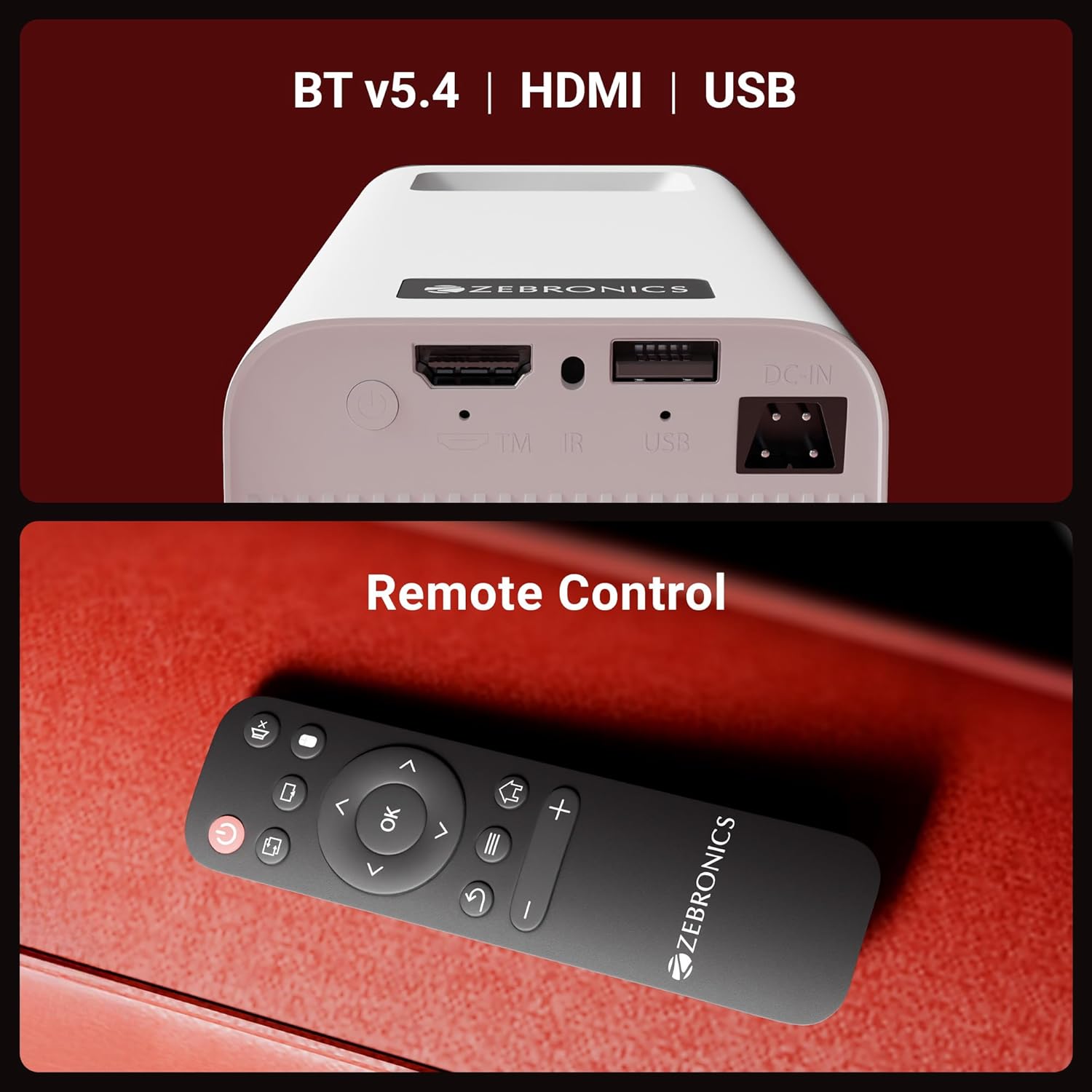
Şekil 2: Arka view of the projector highlighting the connectivity ports (DC-IN, USB, HDMI) and the remote control.
The rear panel includes a DC-IN port for power, a USB port for media playback, and an HDMI port for connecting external devices. An IR receiver is also present for remote control operation.
Kurulum Talimatları
1. Yerleşim
Position the projector on a stable, flat surface. The 240° tilt mechanism allows you to adjust the projection angle for optimal viewing on a wall or screen. Ensure there are no obstructions in front of the lens or around the ventilation areas.

Şekil 3: The projector's 240° tilt mechanism allows for flexible positioning and projection angles.
For best results, project onto a smooth, light-colored surface. The projector can create a screen size of up to 254cm (100 inches).

Şekil 4: The projector can display images up to 254cm (100 inches) diagonally, creating a large viewDeneyim.
2. Güç Bağlantısı
Connect the provided power adapter to the DC-IN port on the projector and then plug it into a power outlet.
3. İlk Güç Açma
Press the power button on the projector or the remote control to turn on the device. The projector will boot up and display the Android smart interface.
Kullanım Talimatları
Uzaktan kumanda
Use the included remote control to navigate the projector's interface, adjust settings, and control media playback. Ensure batteries are correctly inserted.
Odak Ayarlaması
Rotate the focus wheel located near the lens to achieve a clear and sharp image on your projection surface.
Otomatik Keystone Uyarlaması
The projector features automatic vertical keystone correction. This function automatically adjusts the image to be rectangular even if the projector is placed at an angle. Manual adjustment may be available in settings for fine-tuning.
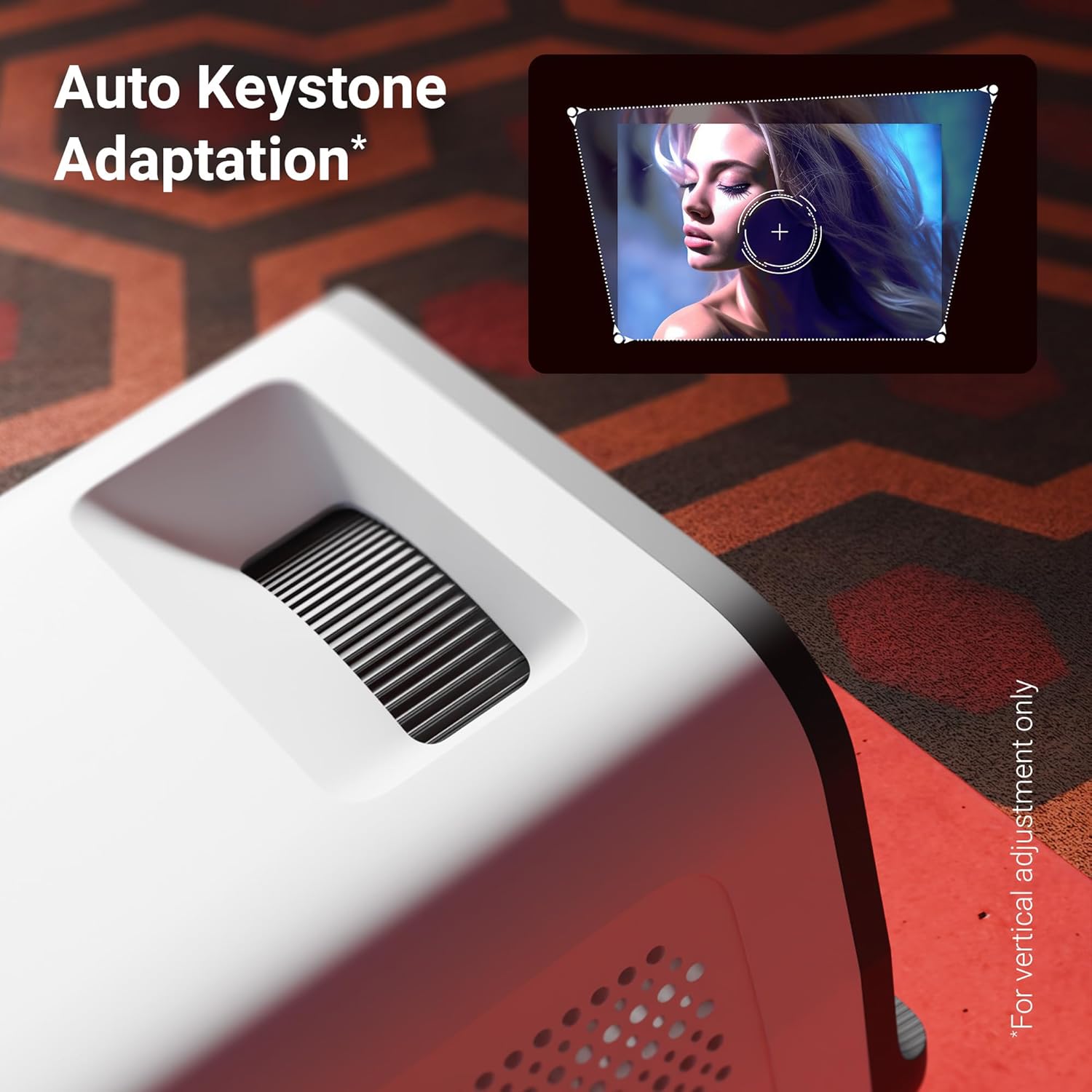
Şekil 5: The auto keystone adaptation feature corrects vertical image distortion automatically.
Bağlantı
- HDMI: Dizüstü bilgisayarlar, oyun konsolları veya Blu-ray oynatıcılar gibi harici cihazları bir HDMI kablosu kullanarak bağlayın. Projektörün menüsünden HDMI giriş kaynağını seçin.
- USB BAĞLANTI: Medya dosyalarını oynatmak için USB sürücüsünü USB bağlantı noktasına takın. files (photos, videos, music) directly from the drive.
- Bluetooth v5.4: Pair Bluetooth audio devices like speakers or headphones for enhanced sound. Access Bluetooth settings in the Android interface.
- Wi-Fi (2.4GHz ve 5GHz): Connect the projector to your home Wi-Fi network to access online content, streaming apps, and firmware updates.
- Miracast & iOS Screen Mirroring: Wirelessly mirror the screen of your Android or iOS smartphone/tablet to the projector. Follow the on-screen instructions for pairing.
Smart Features (Android OS)
The projector runs on an Android operating system, allowing you to download and use various OTT (Over-The-Top) applications like Netflix and Prime Video directly on the device. Navigate the app store to install desired applications.
Temel Özellikler
- 4K UHD Support: Experience high-resolution content with support for 4K Ultra HD input, delivering sharp and detailed images.
- 4000 Lümen Parlaklığı: LED lamp provides 4000 lumens, ensuring bright and clear visuals for an immersive viewDeneyim.
- Up to 254cm (100") Screen Size: Project large images suitable for home theater setups.
- 240° Tilt Mechanism: Offers flexible projection angles, reducing glare and improving viewkonfor.
- Auto Keystone Adaptation: Automatically corrects vertical image distortion for a perfectly rectangular picture.
- Dahili Hoparlör: Integrated speaker provides audio output for convenience. External audio can be connected via Bluetooth or other ports.
- 30,000-hour LED Lamp Hayat: Uzun ömürlü LED lamp ensures extended usage without frequent replacement.
- Dört Çekirdekli İşlemci: Enhances performance and responsiveness for smooth operation of the Android OS and applications.
- Çift Bant Wi-Fi: Supports both 2.4GHz and 5GHz Wi-Fi for stable and fast wireless connectivity.
- Miracast & iOS Screen Mirroring: Seamlessly cast content from Android and iOS devices.

Şekil 6: Üzerindeview of key features including brightness, connectivity, and processing power.

Şekil 7: The projector includes a built-in speaker for integrated audio playback.
Bakım
- Lens Temizliği: Use a soft, lint-free cloth or the provided cotton swab to gently clean the projector lens. Do not use abrasive cleaners.
- Havalandırma: Regularly check and clean the ventilation grilles to prevent dust buildup, which can affect performance and lifespan.
- Depolamak: Projeksiyon cihazını uzun süre kullanılmadığı zamanlarda, serin, kuru ve tozdan ve doğrudan güneş ışığından korunaklı bir yerde saklayın.
Sorun giderme
| Sorun | Olası Neden | Çözüm |
|---|---|---|
| Resim görüntülenmiyor | Güç bağlantısı yok; Yanlış giriş kaynağı; Objektif kapağı takılı. | Ensure power is connected and unit is on. Select correct HDMI/USB input. Remove lens cap. |
| Görüntü bulanık | Odak ayarı yapılmamış; Projektör ekrana çok uzak/yakın. | Odak tekerleğini ayarlayın. Projektörü en uygun mesafeye yeniden konumlandırın. |
| Ses yok | Ses seviyesi çok düşük; Ses kapalı; Harici ses aygıtı bağlı/eşleştirilmiş değil. | Increase volume. Unmute. Check Bluetooth connection or external audio cable. |
| Uzaktan kumanda çalışmıyor | Batteries low/incorrectly inserted; Obstruction between remote and projector. | Replace batteries. Ensure clear line of sight to IR receiver. |
| Wi-Fi bağlantı sorunları | Yanlış parola; Yönlendirici çok uzakta; Ağ paraziti. | Verify Wi-Fi password. Move projector closer to router. Try connecting to 2.4GHz or 5GHz band. |
Özellikler
| Marka | ZEBRONİK |
| Örnek | Zeb-Pixa Play 35 |
| Ekran Teknolojisi | NEDEN OLMUŞ |
| Görüntü Türü | 4K UHD Support |
| Yerel Çözünürlük | 1280 x 720 Piksel |
| Görüntü parlaklığı | 4000 Lümen |
| Görüntü Kontrast Oranı | 1000:1 |
| En Boy Oranı | 16:10 |
| Bağlantı Teknolojisi | Bluetooth v5.4, HDMI, USB, Dual-band Wi-Fi (2.4GHz & 5GHz) |
| Uyumlu Cihazlar | Laptops, Smartphones, Tablets, Gaming Consoles, Blu-ray Players, Media Streaming Devices |
| Ürün Boyutları | 10.5x8.8x16.5 cm |
| Ürün Ağırlığı | 355 gr |
| Montaj Tipi | Masa Üstü Montaj |
Garanti ve Destek
The Zebronics Pixaplay 35 Projector comes with a 1 yıllık garanti from the date of purchase. For warranty claims, technical support, or service inquiries, please contact Zebronics customer service. Refer to the QR Code Guide included in your package for contact details or visit the official Zebronics webalan.
Üretici: Zebronics Hindistan Özel Limited Şirketi


