1. Giriş
The BLUETTI Elite 10 Mini Portable Power Station is a compact and versatile power solution designed for various applications, including camping, travel, and emergency backup. Featuring a 128Wh LiFePO4 battery and a 200W AC outlet, it provides reliable power for small electronic devices. Its lightweight and airline-friendly design makes it an ideal companion for on-the-go power needs.

Figure 1: BLUETTI Elite 10 Mini Portable Power Station, showcasinKompakt tasarımı ve ön paneliyle dikkat çekiyor.
2. Güvenlik Talimatları
Please read and understand all safety instructions before operating the BLUETTI Elite 10. Failure to follow these instructions may result in electric shock, fire, or serious injury.
- Üniteyi sökmeyin, onarmayın veya değiştirmeyin.
- Üniteyi ateşten, sudan ve aşırı sıcaklıklardan uzak tutun.
- Cihazı düşürmekten veya şiddetli darbelere maruz bırakmaktan kaçının.
- Yalnızca onaylı aksesuarları ve şarj kablolarını kullanın.
- Kullanım ve şarj sırasında uygun havalandırmayı sağlayın.
- Çocukların erişemeyeceği yerde saklayınız.
3. Ürün Özellikleri
- Versatile Power Output: Equipped with a 200W AC outlet, 100W USB-C fast charging, and multiple DC ports to power various devices.
- Kompakt ve Taşınabilir: Weighs approximately 4.0 lbs (1.8 kg) with an ergonomic handle, making it easy to carry.
- Airline-Friendly Capacity: 128Wh battery capacity falls within the 100–160Wh range, allowing it to be carried on most major airlines with prior approval (limit 2 per passenger).
- Kesintisiz Güç Kaynağı (UPS): Features a built-in 10ms UPS and 350W bypass output for seamless power during outagee.
- Çoklu Şarj Seçenekleri: Supports 150W AC charging (full in 70 mins), 100W solar charging, and 100W car charging.
- Akıllı Uygulama Kontrolü: Connect via Bluetooth to customize charging modes, adjust lighting, and monitor power status in real time.
- Entegre LED Aydınlatma: Offers 3 lighting modes (warm/cool light, SOS) for up to 50 hours of illumination.
4. Başlarken ve Kurulum
4.1. Kutudan Çıkarma ve Paket İçeriği
Paketi açtığınızda tüm bileşenlerin mevcut olduğundan emin olun:
- BLUETTI Elite 10 Mini Power Station
- AC Şarj Kablosu
- Araba Şarj Kablosu
- Kullanıcı Kılavuzu

Figure 2: Contents of the BLUETTI Elite 10 package.
4.2. İlk Şarj
Before first use, fully charge the BLUETTI Elite 10. Connect the AC charging cable to the AC input port on the unit and then to a wall outlet. The display will indicate charging status. A full charge via AC takes approximately 70 minutes.
5. Ürün Bittiview
5.1. Ön panel
The front panel features the main display, control buttons, and various output ports:
- DC Çıkışı (12V/5A): For compatible DC devices.
- Ekran Görüntüsü: Giriş/çıkış suyunu gösterir.tage, pil yüzdesitage ve kalan çalışma süresi.
- DC Düğmesi: DC çıkış portlarını etkinleştirir.
- Güç Düğmesi: Üniteyi açar/kapatır.
- AC Düğmesi: Activates the AC output outlet.
- USB-C 100W Output: For fast charging compatible USB-C devices.
- USB-A 15W Outputs (x2): Standard USB-A ports for charging.
- USB-C 15W Output: Additional USB-C port.
Figure 3: Front panel layout of the BLUETTI Elite 10.
5.2. Side and Rear Panels
The side and rear panels house additional input/output ports and the LED light:
- DC/PV Input (12-28V/8A, 100W Max): For solar or car charging.
- AC Çıkışı (120V/200W): Standard wall outlet for AC-powered devices.
- AC Girişi: For charging the unit via wall outlet.
- LED Işık: Multi-mode light for illumination.

Figure 4: Rear panel showing AC output and LED light.
5.3. Boyutlar ve Ağırlık
The Elite 10 is designed for portability:
- Boyutlar: Yaklaşık olarak 7.8"U x 5.7"G x 4.3"Y (19.8cm x 14.5cm x 11cm)
- Ağırlık: Yaklaşık 4.0 lbs (1.8 kg)

Figure 5: Visual representation of the Elite 10's compact size.
6. Kullanım Talimatları
6.1. Açma/Kapama
Press and hold the main power button on the front panel to turn the unit on or off. The display will illuminate upon activation.
6.2. AC Prizlerinin Kullanımı
To use the AC outlet, press the 'AC' button on the front panel. The AC icon on the display will light up. Plug your AC-powered device into the AC output port on the rear panel. Ensure your device's power consumption does not exceed 200W.
6.3. DC Çıkışlarının Kullanımı
To use the DC output ports (USB-C, USB-A, 12V/5A), press the 'DC' button on the front panel. The DC icon on the display will light up. Connect your devices to the appropriate USB or 12V DC output ports.
6.4. Charging the Elite 10
The Elite 10 supports three charging methods:
- AC Şarjı: Connect the AC charging cable to the AC input port and a wall outlet. Max 150W, full charge in approximately 70 minutes.
- Güneş Şarjı: Connect a compatible solar panel (e.g., BLUETTI PV60L/PV60F/PV100) to the DC/PV input port. Max 100W.
- Araç Şarjı: Connect the car charging cable to the DC/PV input port and your vehicle's cigarette lighter socket. Max 100W.

Figure 6: Various charging methods for the Elite 10.
6.5. Kesintisiz Güç Kaynağı (UPS) İşlevi
When the Elite 10 is connected to an AC wall outlet and has devices plugged into its AC output, it can function as a UPS. In case of a power outage, the unit will automatically switch to battery power within 10 milliseconds, providing continuous power to connected devices up to 350W bypass output.
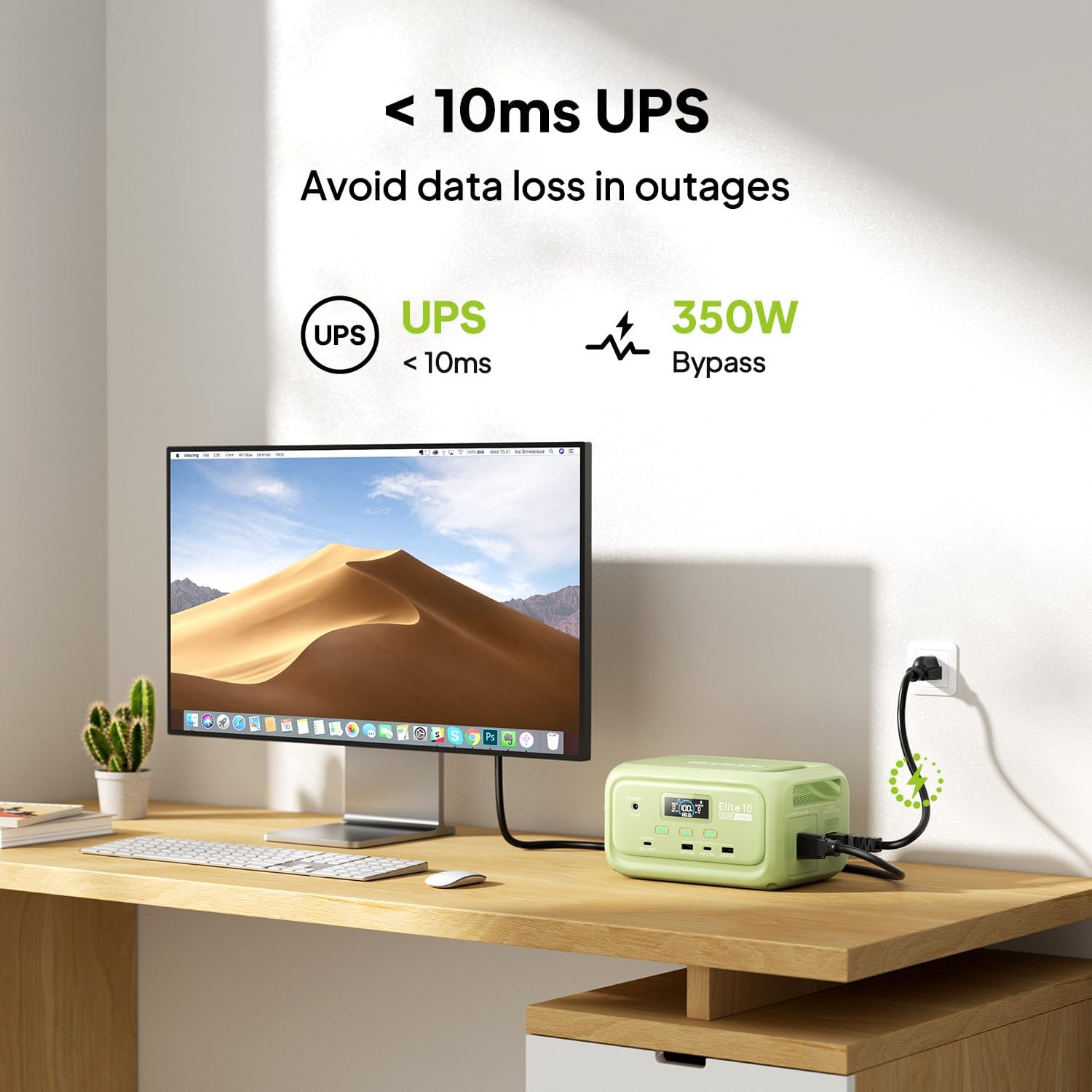
Figure 7: Illustration of the Elite 10's UPS capability.
6.6. LED Aydınlatma
The LED light on the rear panel offers three modes: warm light, cool light, and SOS. Press the dedicated light button to cycle through modes or turn it off. The light can provide up to 50 hours of illumination.
6.7. Akıllı Uygulama Kontrolü
Download the BLUETTI app and connect to your Elite 10 via Bluetooth. The app allows you to monitor power status, customize charging modes, and adjust lighting settings remotely.

Figure 8: Managing the Elite 10 via the BLUETTI mobile application.
7. Bakım ve Saklama
- Temizlik: Üniteyi temizlemek için kuru ve yumuşak bir bez kullanın. Aşındırıcı temizleyiciler veya çözücüler kullanmayın.
- Sıcaklık: Store and operate the unit within the recommended temperature range (typically 0°C to 40°C or 32°F to 104°F).
- Uzun süreli depolama: If storing for extended periods, charge the unit to 50-80% every 3-6 months to prolong battery life. Store in a cool, dry place.
8. Sorun Giderme
If you encounter issues with your BLUETTI Elite 10, refer to the following common solutions:
- Ünite Açılmıyor: Pilin şarjlı olduğundan emin olun. Değilse, şarj etmek için bir AC prizine bağlayın.
- Portlardan Çıkış Yok: Verify that the respective DC or AC output buttons are pressed and their indicators are lit. Check if the device connected requires more power than the unit can provide.
- Yavaş Şarj: Ensure you are using the original BLUETTI charging cables. Check the power source for adequate output.
- Aşırı Yük Koruması: Ünite kapanırsa, bunun nedeni aşırı yüklenme olabilir. Bazı cihazların bağlantısını kesin ve üniteyi yeniden başlatın.
For persistent issues, contact BLUETTI customer support.
9. Özellikler
| Özellik | Detay |
|---|---|
| Örnek | Seçkin 10 |
| Pil Kapasitesi | 128 Wh LiFePO4 |
| AC Çıkışı | 120V/200W (Pure Sine Wave) |
| USB-C Çıkışı | 1 x 100W, 1 x 15W |
| USB-A Çıkışı | 2x15W |
| DC Çıkış | 12V/5A |
| DC/PV Girişi | 12-28V/8A, 100W Maks |
| AC Şarj Süresi | Approx. 70 minutes (150W Max) |
| UPS Fonksiyonu | 10ms switchover, 350W bypass |
| Boyutlar (U x G x Y) | 7.8" x 5.7" x 4.3" (19.8 cm x 14.5 cm x 11 cm) |
| Ağırlık | 4.0 lbs (1.8 kg) |
10. Garanti ve Destek
The BLUETTI Elite 10 Mini Portable Power Station comes with a standard manufacturer's warranty. Please refer to the warranty card included in your package or visit the official BLUETTI webAyrıntılı garanti şartları ve koşulları için siteyi ziyaret edin.
For technical support, troubleshooting assistance, or any product-related inquiries, please contact BLUETTI customer service through their official channels.


