1. Giriş
This user manual provides comprehensive instructions for the installation, operation, and maintenance of your NIVIAN NVS-MINICURTAIN-WR-KIT WiFi Roller Shutter Controller. This device is designed to integrate motorized blinds and awnings into your smart home system, offering control via the Tuya Smart app, an included RF remote, and voice assistants like Amazon Alexa and Google Assistant. Please read this manual thoroughly before use to ensure proper functionality and safety.
2. Güvenlik Bilgileri
- Elektrik tesisatı: Installation should only be performed by a qualified electrician or a person with sufficient knowledge of electrical systems. Ensure the main power supply is disconnected before installation.
- Cilttage Uyumluluk: Güç kaynağı hacminin doğru olduğundan emin oluntage matches the device's specifications (100-240V AC, 50/60Hz).
- Aşırı Yük Koruması: Do not exceed the maximum current rating of 3A. The device includes overvoltage koruma.
- Malzeme Güvenliği: The device is constructed with flame-retardant materials for enhanced safety.
- Çevre: Cihazı neme, aşırı sıcaklıklara veya aşındırıcı ortamlara maruz bırakmayın.
- Çocuklar ve Evcil Hayvanlar: Cihazı ve parçalarını çocukların ve evcil hayvanların erişemeyeceği yerlerde saklayın.
3. Paket İçeriği
Paket aşağıdaki öğeleri içermelidir:
- NIVIAN NVS-MINICURTAIN-WR-KIT WiFi Roller Shutter Controller
- RF Uzaktan Kumanda
- Kullanım Kılavuzu (bu belge)
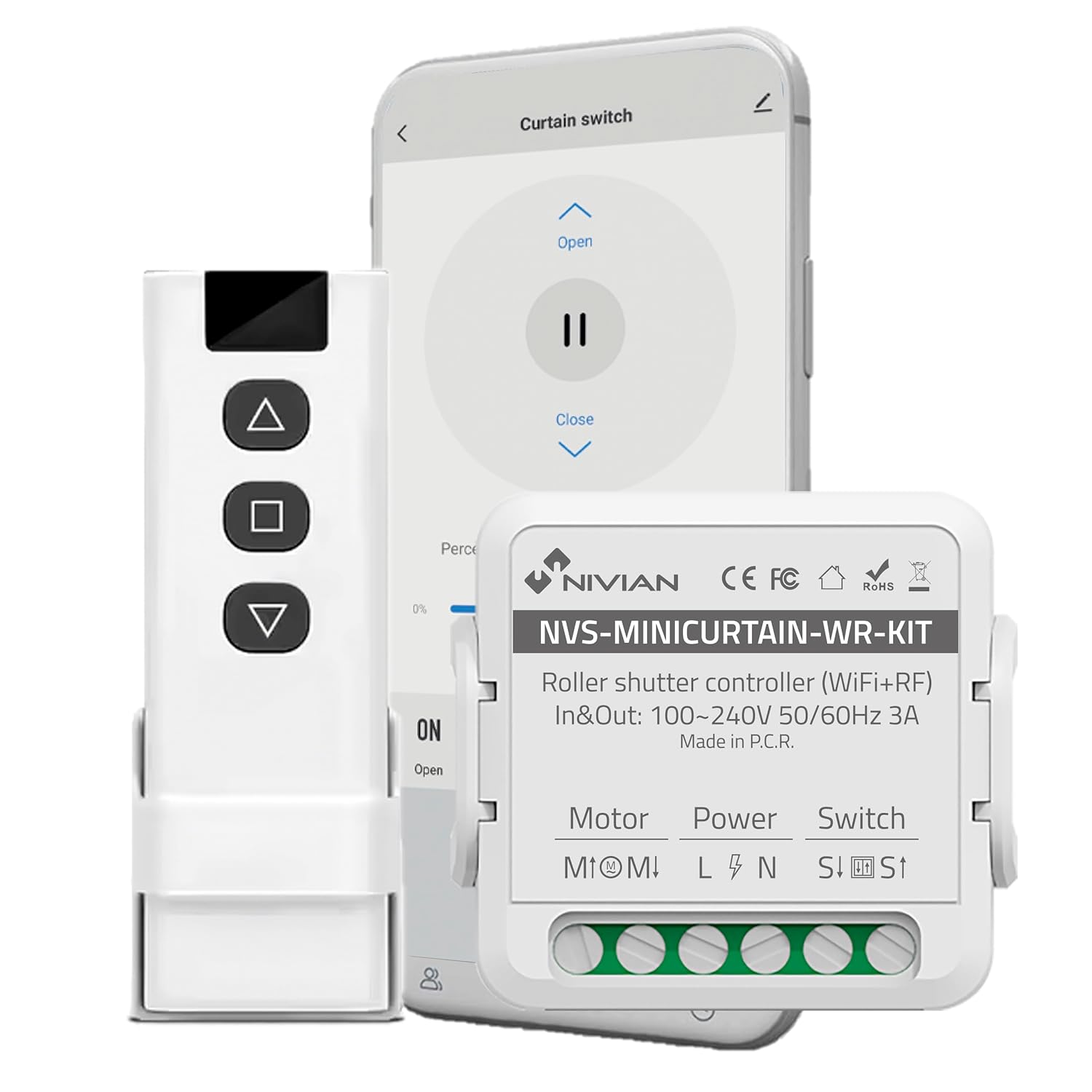
Image 3.1: Contents of the NIVIAN NVS-MINICURTAIN-WR-KIT package, showing the smart controller, RF remote, and a smartphone interface.
4. Ürün Bittiview
The NIVIAN NVS-MINICURTAIN-WR-KIT is a compact smart switch designed to control motorized roller shutters and awnings. It integrates WiFi connectivity for app control and RF for the included remote. Key features include:
- WiFi Bağlantısı: Control via Tuya Smart app from anywhere.
- RF Uzaktan Kumanda: Convenient local control with the included RF remote.
- Ses Kontrolü: Amazon Alexa ve Google Asistan ile uyumludur.
- Planlama ve Zamanlayıcılar: Automate opening and closing times.
- Akıllı Senaryolar: Create custom automation rules based on conditions.
- Enerji İzleme: Track power consumption of connected motors.
- Kompakt Tasarım: Easily integrates behind existing wall switches.

Resim 4.1: Üzeriview of the controller's features and compatibility.
5. Kurulum ve Kurulum
5.1 Kablolama Şeması
Before proceeding with installation, ensure the main power supply to the circuit is turned OFF at the breaker. This device is designed to be installed behind an existing manual wall switch for motorized blinds/awnings. The controller has terminals for Motor (M1, M2), Power (L, N), and Switch (S1, S2).

Resim 5.1: Örn.ample of the controller installed with an existing wall switch.
- Gücü Kesin: Turn off the main power supply to the circuit at your home's electrical panel.
- Erişim Kablolaması: Remove the existing wall switch plate and switch to access the wiring.
- Motor Kablolarını Bağlayın: Connect the motor's UP and DOWN wires to the M1 and M2 terminals on the controller.
- Güç Kablolarını Bağlayın: Connect the Live (L) and Neutral (N) wires from your power supply to the L and N terminals on the controller.
- Connect Switch Wires: Connect the wires from your existing manual wall switch to the S1 and S2 terminals on the controller.
- Güvenli Cihaz: Carefully place the controller inside the wall box, ensuring no wires are pinched. Reinstall the wall switch and plate.
- Gücü Geri Yükle: Ana güç kaynağını tekrar AÇIN.
5.2 App Pairing (Tuya Smart)
- İndir uygulaması: Download the "Tuya Smart" or "Smart Life" app from your smartphone's app store (iOS/Android).
- Kayıt Ol/Giriş Yap: Uygulamayı açın ve yeni bir hesap oluşturun veya halihazırda bir hesabınız varsa giriş yapın.
- Eşleştirme Moduna Girin: Power on the controller. The indicator light on the controller should blink rapidly (usually 2 times per second) to indicate it's in pairing mode. If not, press and hold the reset button (or the manual switch for 5-10 seconds) until it blinks rapidly.
- Cihaz Ekle: In the Tuya Smart app, tap the "+" icon in the top right corner to add a device. Select "Curtain Switch" or "Curtain Module" from the device list.
- WiFi'ye bağlanın: Follow the on-screen instructions to connect the device to your 2.4GHz WiFi network. Enter your WiFi password.
- Tamamlama: Once connected, the device will appear in your app. You can rename it for easier identification.
5.3 RF Remote Pairing
The included RF remote control is pre-paired with the controller. If you need to re-pair or pair additional RF remotes:
- Eşleştirme Moduna Girin: Briefly press the pairing button on the controller (or press the manual switch 4 times quickly). The indicator light will blink slowly.
- Uzaktan Kumanda Düğmesine Basın: Within 5 seconds, press any button on the RF remote you wish to pair.
- Onay: The controller's indicator light will stop blinking, confirming successful pairing.
6. Kullanım Talimatları
The NIVIAN controller offers multiple ways to operate your motorized blinds or awnings:

Image 6.1: Multiple control modes for the roller shutter controller.
6.1 Tuya Akıllı Uygulama Kontrolü
- Open the Tuya Smart app and select your roller shutter device.
- You will see options to "Open," "Close," or "Pause" the blinds.
- bir yüzdetage slider allows you to set the opening/closing position precisely.

Image 6.2: Controlling roller shutters via the Tuya Smart app.
6.2 RF Uzaktan Kumanda
- Use the "Up" button to open the blinds.
- Use the "Down" button to close the blinds.
- Use the "Stop/Pause" button to halt the blinds at any desired position.
6.3 Sesli Kontrol (Alexa/Google Asistan)
To enable voice control, link your Tuya Smart account to Amazon Alexa or Google Assistant through their respective apps. Once linked, you can use commands such as:
- "Alexa, open [Device Name] blinds."
- "Hey Google, close [Device Name] blinds."
- "Alexa, set [Device Name] blinds to 50%."
6.4 Manual Wall Switch Control
The existing manual wall switch connected to the controller will continue to function normally, allowing for traditional physical control of your blinds.
7. Smart Features and Automation
7.1 Planlama ve Zamanlayıcılar
Within the Tuya Smart app, you can set schedules for your blinds to open or close at specific times on chosen days. This is ideal for daily routines or simulating presence when away.
7.2 Smart Scenarios
Create custom automation rules (scenarios) in the Tuya Smart app. These can be triggered by various conditions:
- Weather Changes: Automatically close blinds if the weather forecast predicts strong sun or rain.
- Location Changes: Open blinds when you arrive home.
- Günün Saati: Adjust blinds based on sunrise/sunset.
- Cihaz durumu: Integrate with other smart devices (e.g., close blinds when a smart light turns on).

Image 7.1: Creating smart home automation scenarios.

Image 7.2: Simulating presence by raising and lowering blinds remotely.
7.3 Enerji İzleme
The controller provides energy consumption reports and graphs within the Tuya Smart app, allowing you to monitor and manage the power usage of your connected motors.
8. Bakım
- Temizlik: Cihazı temizlemek için kuru, yumuşak bir bez kullanın. Sert kimyasallar veya aşındırıcı temizleyiciler kullanmayın.
- Donanım Yazılımı Güncellemeleri: Periodically check the Tuya Smart app for available firmware updates to ensure optimal performance and security.
- Battery Replacement (RF Remote): If the RF remote's range or responsiveness decreases, replace its battery (type usually CR2032, check remote for specifics).
9. Sorun Giderme
| Sorun | Olası Neden | Çözüm |
|---|---|---|
| Cihaz uygulamayla eşleşmiyor. | Incorrect WiFi password, 5GHz WiFi network, device not in pairing mode. | Ensure correct 2.4GHz WiFi password. Confirm device indicator is blinking rapidly. Reset device and try pairing again. |
| Blinds not responding to app/remote. | No power to controller, incorrect wiring, RF remote battery low, WiFi disconnected. | Check power supply. Verify wiring connections. Replace RF remote battery. Check WiFi connection in app. |
| Blinds move in the wrong direction. | Motor wires (M1/M2) are reversed. | Disconnect power and swap the M1 and M2 motor wires. |
| Ses kontrolü çalışmıyor. | Tuya account not linked to Alexa/Google, incorrect device name, internet connectivity issues. | Ensure Tuya account is linked. Use the exact device name. Check internet connection. |
10. Özellikler
| Model Numarası | NVS-MINICURTAIN-WR-KIT |
| Giriş/Çıkış Hacmitage | 100-240V AC, 50/60Hz |
| Anma Akımı | 3A |
| Kablosuz Bağlantı | WiFi 2.4GHz, RF |
| Çalışma Modu | AÇIK-KAPALI-AÇIK |
| İletişim Türü | Normalde Açık |
| Bağlayıcı Türü | Tak ve Çalıştır |
| Anahtar Türü | Basmalı Düğme |
| Terminal Tipi | Vida |
| Malzeme | Akrilonitril Bütadien Stiren (ABS) |
| Boyutlar (U x G x Y) | 40x40x20 mm |
| Ağırlık | 70 gr |
| Kökeni | Çin |
11. Garanti ve Destek
NIVIAN products are designed for reliability and performance. For warranty information, technical support, or to access additional resources, please visit the official NIVIAN website veya müşteri hizmetleriyle iletişime geçin.
For tutorials and tips, visit NIVIAN on SigortatagVeri deposu or YouTube.


