1. Giriş
This manual provides essential instructions for the safe and efficient operation of your WISCENT Bluetooth Stereo System WTB-799. Please read this manual thoroughly before using the product and retain it for future reference.
The WISCENT WTB-799 is a compact home audio system featuring a CD player, Bluetooth 5.0 wireless streaming, FM radio, USB playback, and a 3.5mm AUX-in port. It delivers 40W peak power (2 x 20W RMS) through its two-way speaker system, designed for balanced sound reproduction.
2. Güvenlik Bilgileri
- Güç Kaynağı: Güç kaynağı hacmini sağlayıntage, cihaz üzerinde belirtilen değerle eşleşir.
- Havalandırma: Havalandırma açıklıklarını kapatmayın. Uygun hava akışı için ünitenin etrafında yeterli boşluk bırakın.
- Su ve Nem: Cihazı yağmur, nem veya damlayan/sıçrayan sıvılara maruz bırakmayın. Cihazın üzerine vazo gibi sıvı dolu nesneler koymayın.
- Sıcaklık: Üniteyi radyatörler, kalorifer ızgaraları, sobalar veya diğer cihazlar (dahil) gibi ısı kaynaklarından uzak tutun. amp(ısı üreten)
- Temizlik: Temizlemeden önce cihazı prizden çıkarın. Yumuşak, kuru bir bez kullanın. Sıvı temizleyiciler veya aerosol temizleyiciler kullanmayın.
- Servis: Bu ürüne kendiniz servis vermeye çalışmayın. Tüm servis işlemleri için kalifiye servis personeline başvurun.
- CD Çalar: This product contains a laser. Do not open the CD compartment while a disc is playing. Avoid direct exposure to the laser beam.
3. Paket İçeriği
Tüm eşyaları dikkatlice paketinden çıkarın ve aşağıdakilerin eksiksiz geldiğinden emin olun:
- Main Unit (Stereo System)
- 2 x Kitaplık Tipi Hoparlör
- Uzaktan Kumanda (AAA piller dahil değildir)
- AC Güç Kablosu
- 3.5 mm AUX Kablosu
- Kullanım Kılavuzu (bu belge)

4. Ürün Bittiview
4.1 Ön Panel Kontrolleri

- Güç düğmesi: Üniteyi açar veya kapatır.
- OYNAT/DURAKLAT Düğmesi: Starts or pauses playback for CD, USB, or Bluetooth.
- ATLA/AYARLA Düğmeleri (◀◀ / ▶▶): Skips tracks on CD/USB, navigates radio frequencies, or fast forwards/rewinds.
- TARAMA Düğmesi: Initiates automatic scanning for FM radio stations.
- RPT (REPEAT) Button: Cycles through repeat modes (one, all, random) for CD/USB.
- SES Düğmesi: Ana ses seviyesini ayarlar.
- EQ/FUN Button: Selects sound equalizer presets or switches input functions (CD, Bluetooth, FM, USB, AUX).
- USB Bağlantı Noktası: MP3 çalma için USB depolama aygıtlarını bağlamak amacıyla kullanılır.
- AUX-IN Jakı: Harici ses cihazlarını 3.5 mm kablo ile bağlamak için.
- Kulaklık girişi: Kulaklıkla özel dinleme için.
4.2 Arka Panel Bağlantıları
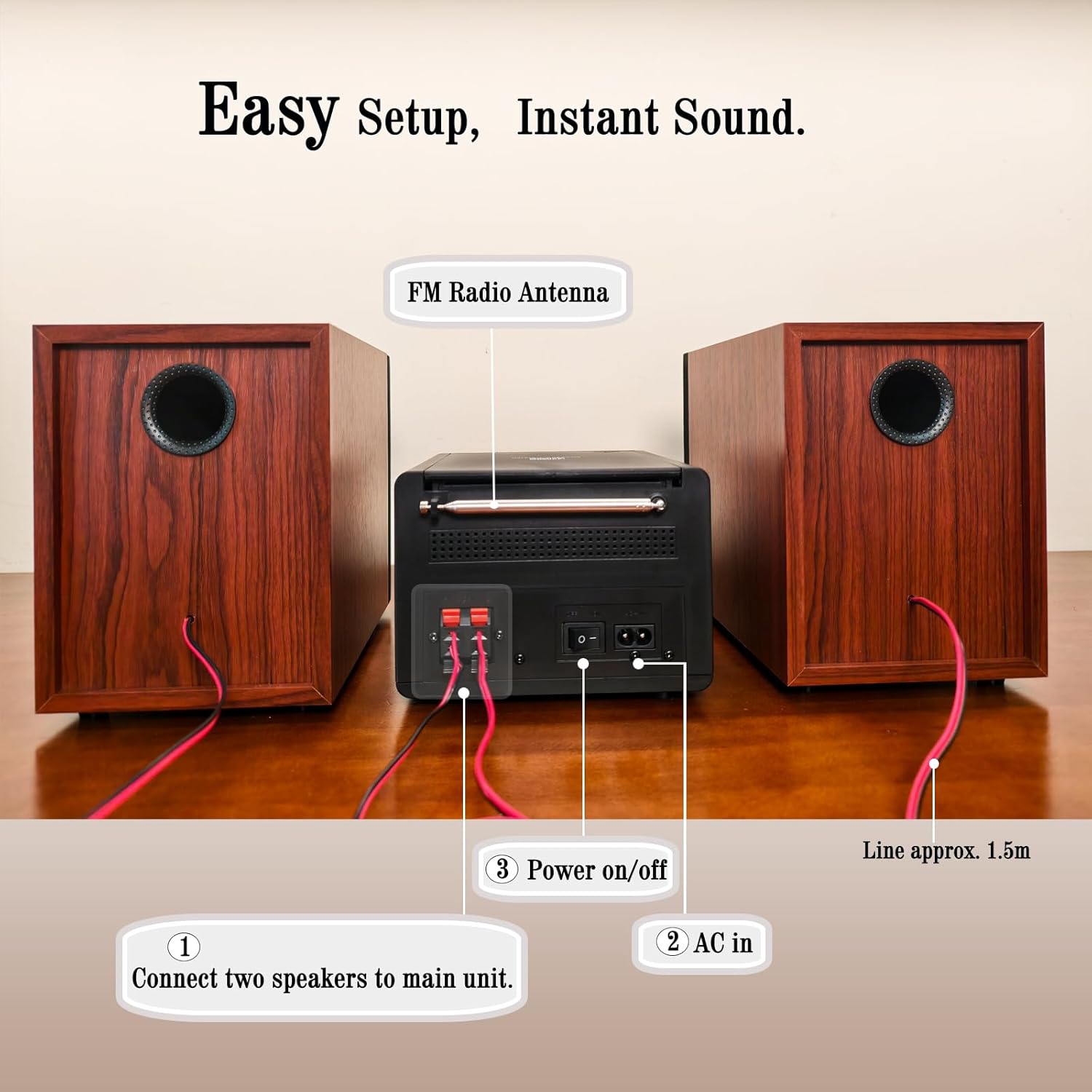
- Hoparlör Terminalleri: Connect the included bookshelf speakers.
- FM Radyo Anteni: Extend for optimal FM signal reception.
- AC GİRİŞİ: AC güç kablosunu bağlayın.
- Güç Açma/Kapama Anahtarı: Ünitenin ana güç anahtarı.
5. Kurulum
5.1 Hoparlörlerin Bağlanması
- Identify the speaker wires. Each speaker has two wires, typically red (+) and black (-).
- Connect the red wire from each speaker to the red (+) terminal on the main unit.
- Connect the black wire from each speaker to the black (-) terminal on the main unit.
- Ensure a secure connection for both speakers.
5.2 FM Anteninin Bağlanması
Extend the FM wire antenna located at the rear of the main unit for improved radio reception. Position it for the best possible signal.
5.3 Gücün Bağlanması
- Plug the AC power cable into the AC IN port on the rear of the main unit.
- AC güç kablosunun diğer ucunu standart bir duvar prizine takın.
- Ensure the main Power On/Off switch on the rear panel is in the 'ON' position.
6. Kullanım Talimatları
6.1 Güç Açma/Kapatma
Basın GÜÇ button on the front panel or the remote control to turn the unit on or off (standby mode).
6.2 Kaynak Seçimi
Basın EQ/EĞLENCE button repeatedly on the front panel or the İŞLEV button on the remote control to cycle through available input sources: CD, Bluetooth, FM Radio, USB, AUX-in.
6.3 CD Oynatma

- Open the CD compartment cover on top of the main unit.
- Place a CD (CD, CD-R, CD-RW, or MP3 CD) onto the spindle with the label side facing up.
- CD bölmesi kapağını kapatın.
- Select 'CD' mode using the EQ/EĞLENCE düğme.
- Oynatma otomatik olarak başlamalıdır. Başlamazsa, tuşuna basın. OYNAT/DURDUR düğme.
- Kullanın ATLA/AYARLA Parçalar arasında gezinmek için düğmeler.
- Basın RPT button to select repeat modes (Repeat One, Repeat All, Random Play).
6.4 Bluetooth Eşleştirme
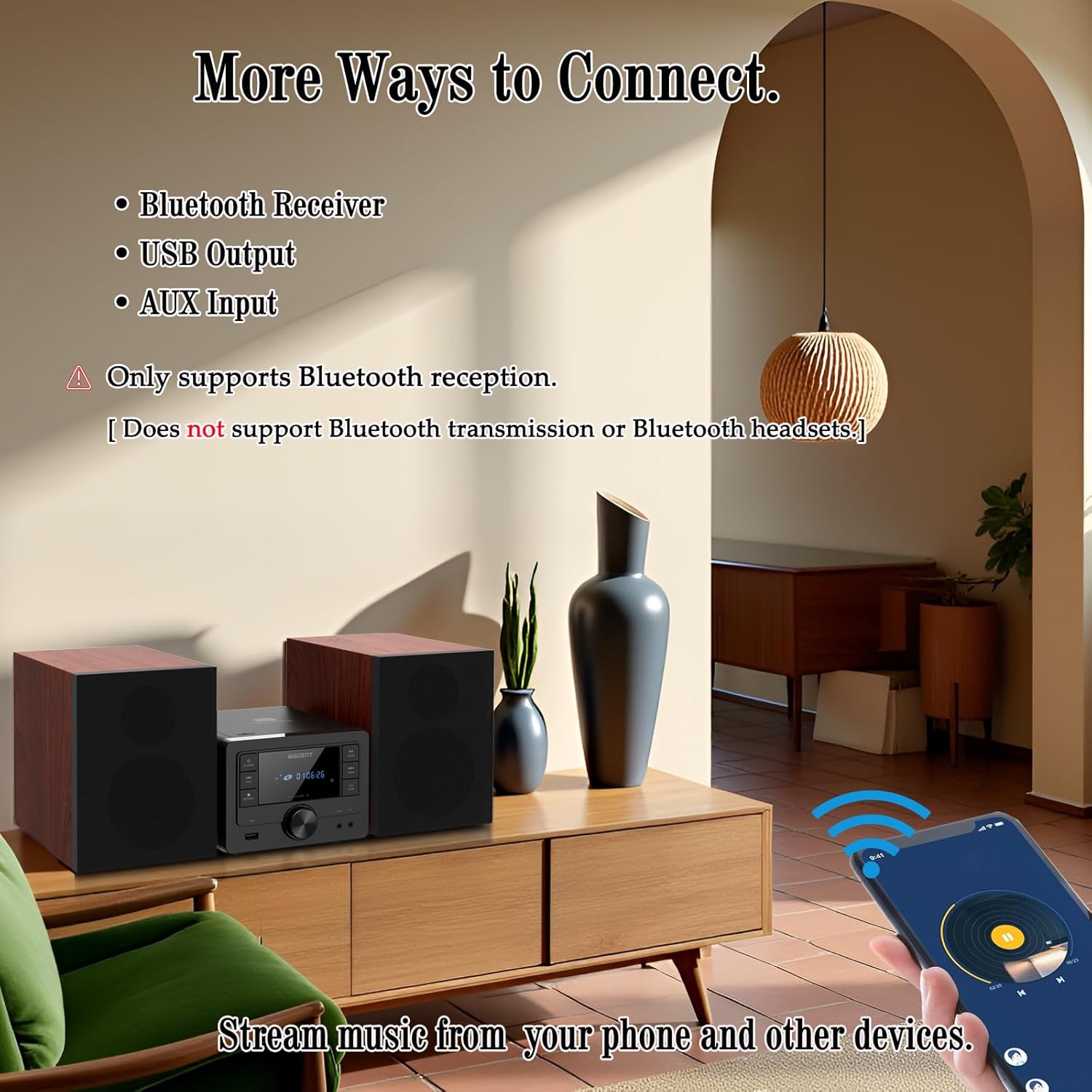
- Select 'Bluetooth' mode using the EQ/EĞLENCE button. The display will show 'BT' and flash, indicating it's in pairing mode.
- On your Bluetooth-enabled device (smartphone, tablet), go to its Bluetooth settings and enable Bluetooth.
- Arama available devices and select 'WTB-799' from the list.
- Once paired, the display will stop flashing and show 'BT' steadily.
- You can now stream audio from your device to the stereo system.
- Not: This system supports Bluetooth reception only. It cannot transmit audio to Bluetooth headphones or other Bluetooth speakers.
6.5 FM Radyo Çalışması
- Select 'FM' mode using the EQ/EĞLENCE düğme.
- Basın TARAMA Mevcut FM istasyonlarını otomatik olarak tarayıp kaydetmek için düğme.
- Kullanın ATLA/AYARLA Belirli bir frekansa manuel olarak ayarlama veya kaydedilmiş istasyonlar arasında gezinme için düğmeler.
6.6 USB Oynatma
- Insert a USB flash drive (formatted with MP3 files) into the USB port on the front panel.
- Select 'USB' mode using the EQ/EĞLENCE düğme.
- Oynatma otomatik olarak başlamalıdır. Başlamazsa, tuşuna basın. OYNAT/DURDUR düğme.
- Kullanın ATLA/AYARLA Parçalar arasında gezinmek için düğmeler.
- Basın RPT button to select repeat modes (Repeat One, Repeat All, Random Play).
6.7 AUX Girişi Bağlantısı
- Connect one end of the 3.5mm AUX cable to the AUX-IN jack on the front panel of the stereo system.
- Connect the other end of the AUX cable to the headphone jack or audio output of your external audio device (e.g., smartphone, MP3 player).
- Select 'AUX' mode using the EQ/EĞLENCE düğme.
- Harici cihazınızdan oynatmayı ve ses seviyesini kontrol edin.
6.8 Sound Settings (EQ Modes)
Basın EQ/EĞLENCE button (or EQ button on the remote) repeatedly to cycle through the available equalizer presets:
- Düz: Neutral sound profile.
- Kaynak: Enhanced bass and treble.
- Pop: Slightly boosted bass and vocals.
- Klasik: Emphasizes mid-range frequencies.
- Caz: Slightly boosted bass and treble with a warm tone.
6.9 Uzaktan Kumanda Kullanımı
The included remote control allows for convenient operation from a distance. Insert two AAA batteries (not included) into the remote control before use. Point the remote control towards the main unit's front panel sensor.
7. Bakım
- Temizlik: Cihazın dış yüzeyini temizlemek için yumuşak, kuru bir bez kullanın. Aşındırıcı temizleyiciler, cilalar veya çözücüler kullanmayın.
- CD Player Lens: CD çalma sorunları yaşarsanız, piyasada bulunan CD lens temizleyici diski kullanın.
- Depolamak: Uzun süre kullanılmadığı zaman cihazın fişini çekin ve serin, kuru bir yerde saklayın.
8. Sorun Giderme
| Sorun | Olası Neden | Çözüm |
|---|---|---|
| Güç yok | Power cable not connected; Rear power switch off; Wall outlet not active. | Check power cable connection; Ensure rear power switch is ON; Test wall outlet with another device. |
| Ses yok | Volume too low; Incorrect input source; Speakers not connected properly; Mute function active. | Increase volume; Select correct input source; Check speaker wire connections; Deactivate mute. |
| CD çalmıyor | CD inserted incorrectly; CD dirty/scratched; Incorrect source selected. | Reinsert CD label side up; Clean or replace CD; Select 'CD' source. |
| Bluetooth eşleştirmiyor | Unit not in pairing mode; Bluetooth on device off; Device too far. | Select 'Bluetooth' source (display flashes); Enable Bluetooth on your device; Move device closer to the unit. |
| Zayıf FM alımı | Anten doğru şekilde uzatılmamış/konumlandırılmamış. | Fully extend and reposition the FM antenna. |
| USB tanınmadı | USB sürücüsü doğru şekilde biçimlendirilmemiş; Uyumsuz file Türler; USB sürücü hasar görmüş. | Ensure USB is FAT32 formatted with MP3 fileFarklı bir USB bellek deneyin. |
| Uzaktan kumanda çalışmıyor | Piller bitmiş/yanlış takılmış; uzaktan kumanda ile cihaz arasında engel var. | Replace batteries (AAA); Ensure correct battery polarity; Remove obstructions. |
9. Özellikler
- Marka: WISCENT
- Modeli: WTB-799
- Bağlantı Teknolojisi: Yardımcı giriş, Bluetooth 5.0, USB
- Hoparlör Tipi: Stereo, 2-way (Woofer & Tweeter)
- Çıkış Gücü: 40W Peak (2 x 20W RMS)
- CD Uyumluluğu: CD, CD-R, CD-RW, MP3 CD
- FM Radyo Frekansı: 87.5~108MHz
- USB Bağlantı Noktası: USB 2.0 (for MP3 playback)
- Ürün Ölçüleri (Ana Ünite): 6.3" x 7.5" x 4.7" (160x190x120 mm)
- Product Dimensions (Each Speaker): 5.3" x 8.1" x 7.5" (135x205x190 mm)
- Ürün Ağırlığı: Yaklaşık 3.3 pound
- Renk: Siyah
10. Garanti ve Destek
For warranty information and technical support, please refer to the warranty card included with your product or contact the retailer where you purchased the WISCENT Bluetooth Stereo System WTB-799. You may also visit the official WISCENT webDaha fazla yardım için siteyi ziyaret edin.
Üretici: WISCENT


