1. Giriş
The ANYFAR Decoder RM-LH2522F is an advanced interface designed to integrate modern smartphone functionalities like Wireless CarPlay and Android Auto into compatible Land Rover and Jaguar vehicles. This device enhances your in-car experience by providing navigation, music, communication, and other applications directly on your vehicle's existing 10.25-inch Harman headunit screen, while retaining all original car controls.
1.1. Compatibility Notice
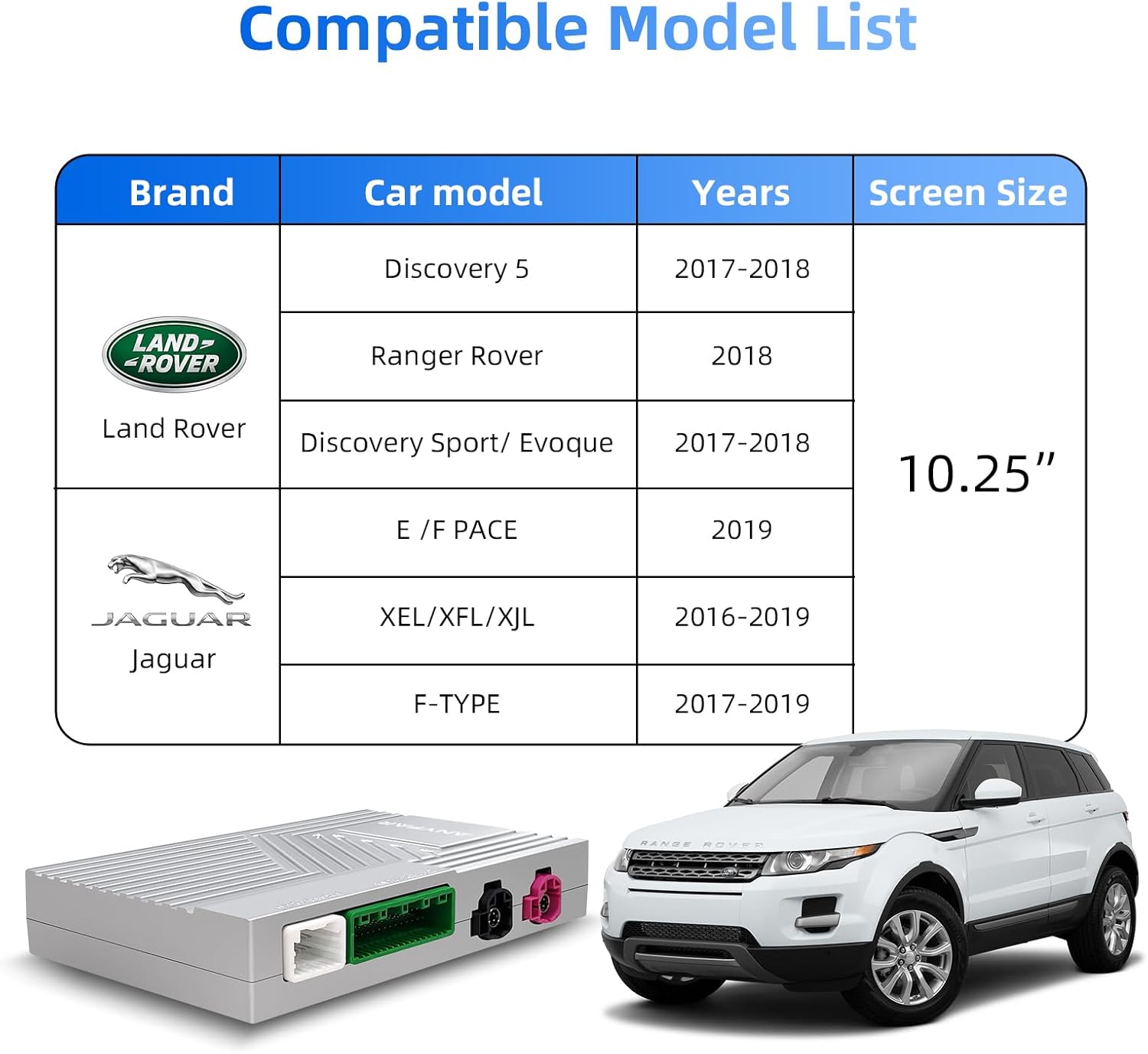
This decoder is specifically compatible with 2016–2019 Land Rover and Jaguar vehicles equipped with a Harman head unit ve bir 10.25 inç ekran. Compatible models include:
- Land Rover: Evoque (2016–2019), Discovery 5 (2016–2019)
- Jaguar: XE (2016–2019), XF (2016–2019), XJL (2016–2019), F-Type (2016–2019)
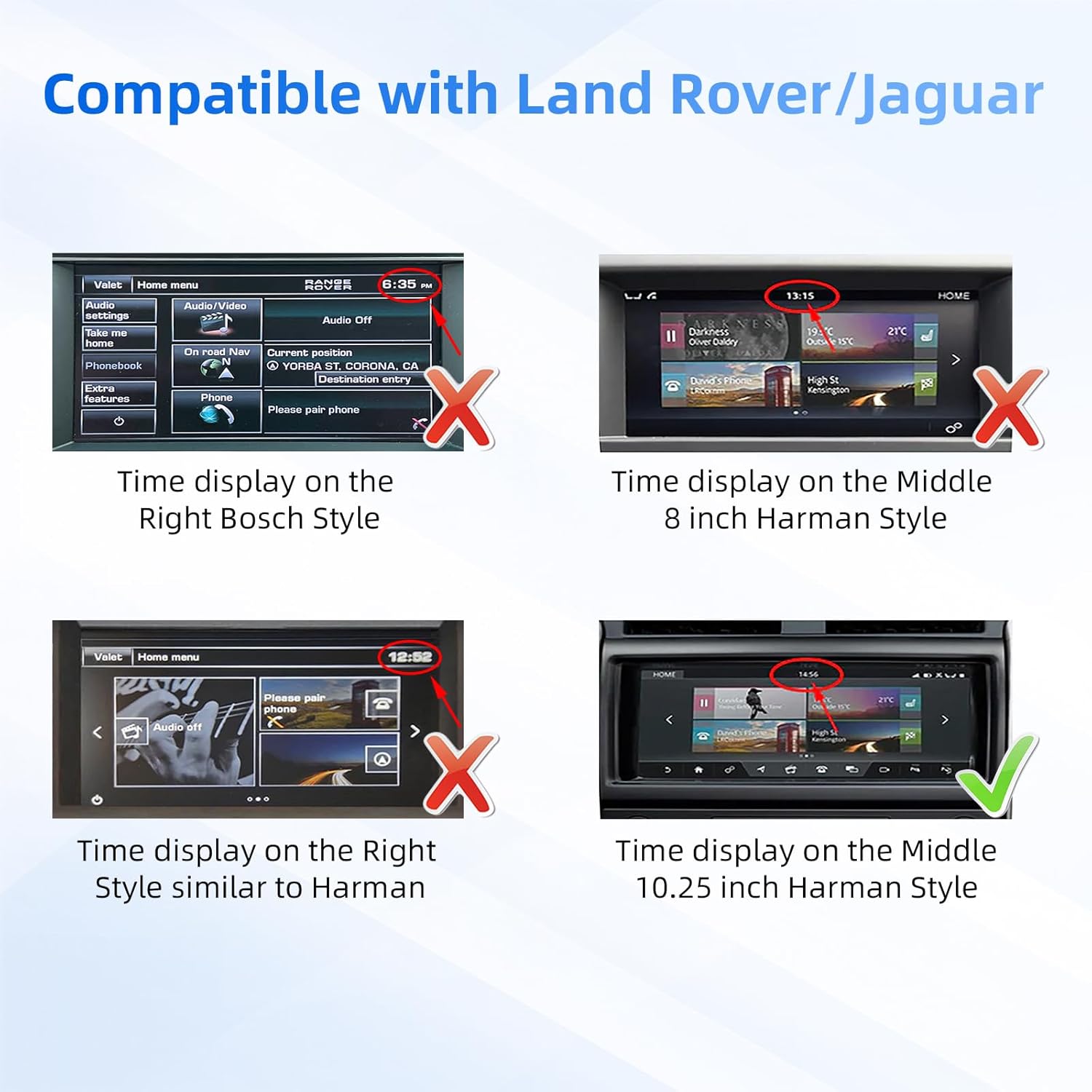
Please verify your vehicle's head unit and screen size before installation. Refer to the compatibility image below for visual guidance on screen display styles.
Resim 1.1: Visual guide for checking vehicle compatibility based on screen time display style. Ensure your screen matches the 10.25-inch Harman style shown as compatible.
2. Paket İçeriği
Before proceeding with installation, please ensure all components listed below are present in your package:
- ANYFAR Decoder Unit (RM-LH2522F)
- Güç kablosu
- Adapter Cable A
- Adapter Cable B
- Adapter Cable C
- LVDS OUT Kablosu
- LVDS IN Kablosu
- RCA & USB Cable

Resim 2.1: Üzerindeview of the ANYFAR Decoder unit with its dimensions (139mm x 92mm x 20mm) and the various cables included in the package.
3. Kurulum ve Kurulum
Installation of the ANYFAR Decoder involves connecting it to your vehicle's existing head unit. Due to the complexity of vehicle electronics, professional installation is recommended to ensure proper functionality and avoid damage to your vehicle's system.
3.1. General Installation Steps (Consult a professional for detailed guidance)
- Hazırlık: Herhangi bir elektrik işine başlamadan önce aracın kontak anahtarının kapalı ve akünün bağlantısının kesilmiş olduğundan emin olun.
- Erişim Ana Ünitesi: Carefully remove the necessary trim panels to access the rear of your vehicle's Harman head unit.
- Connect Decoder: Connect the provided power cable, adapter cables (A, B, C), LVDS IN, LVDS OUT, and RCA/USB cables to the corresponding ports on the ANYFAR Decoder unit and your vehicle's head unit wiring harness. Ensure all connections are secure.
- Secure Decoder: Mount the decoder unit in a safe, dry location within the dashboard, ensuring it does not interfere with any moving parts or vehicle components.
- Pili Yeniden Bağlayın: Tüm bağlantılar doğrulandıktan sonra, aracın aküsünü yeniden bağlayın.
- Test İşlevselliği: Turn on the vehicle and test all functions of the decoder, including CarPlay, Android Auto, Mirror Link, and original car controls.

Resim 3.1: The ANYFAR Decoder unit, showing its various connection ports for integration into the vehicle's infotainment system.
4. Kullanım Talimatları
The ANYFAR Decoder provides a range of features to enhance your driving experience. Below are instructions for using its primary functions.
4.1. Switching Between OEM and Decoder System
To switch between your vehicle's original OEM system and the ANYFAR Decoder's interface (CarPlay/Android Auto), long-press the power button or a designated button on your car's knob. The system will seamlessly transition between the two interfaces.

Resim 4.1: Illustration of switching between the vehicle's OEM system and the CarPlay/Android Auto interface by long-pressing the car knob button.
4.2. Kablosuz CarPlay ve Android Auto
The decoder supports wireless CarPlay and wireless Android Auto. Once connected, your phone's interface will appear on the car's 10.25-inch screen, allowing access to navigation, music, calls, messaging, and voice assistants without needing a physical cable connection.
- Bağlantı: Follow the on-screen prompts to pair your smartphone via Bluetooth and Wi-Fi for wireless CarPlay or Android Auto.
- İşlevsellik: Navigate using maps, stream music, make and receive calls, send messages, and use voice commands directly from your car's display.

Resim 4.2: An in-car view of the 10.25-inch screen displaying the Apple CarPlay interface, demonstrating integrated smartphone features.
4.3. Mirror Link & USB Drive Playback
The Mirror Link (AirPlay/AutoLink) feature allows you to mirror your smartphone's display onto the car screen. This enables viewing of content from apps like YouTube, Netflix, or Disney+.
- Yönlendirme Linki: Connect your phone via Wi-Fi or USB to mirror its screen.
- USB Oynatma: Use the integrated USB port to play videos or music directly from a USB drive. The USB port can also be used for charging your phone.

Resim 4.3: An illustration of the Mirror Link feature, where a smartphone's display is mirrored onto the car's screen.
4.4. Akıllı Ses Kontrolü
Utilize voice commands for hands-free operation, enhancing driving safety. The system supports voice assistants like Siri and Google Assistant.
- Etkinleştirme: Activate your voice assistant through the car's controls or by saying the wake-up phrase (e.g., "Hey Siri" or "Hey Google").
- Komutlar: Issue commands for navigation, playing music, making calls, sending messages, and more.

Resim 4.4: Examples of intelligent voice control functionality, showing interaction with Siri and Google Assistant for hands-free operation.
4.5. Orijinal Araç Kontrollerinin Korunması
The ANYFAR Decoder is designed to work seamlessly with your vehicle's existing control systems. You will retain full access to:
- Dokunmatik ekran: Continue to use the 10.25-inch touchscreen for input.
- Ses Kontrolü: Original voice control functions remain accessible.
- Physical Buttons & Knobs: All physical buttons and rotary knobs on your dashboard and steering wheel will function as before.
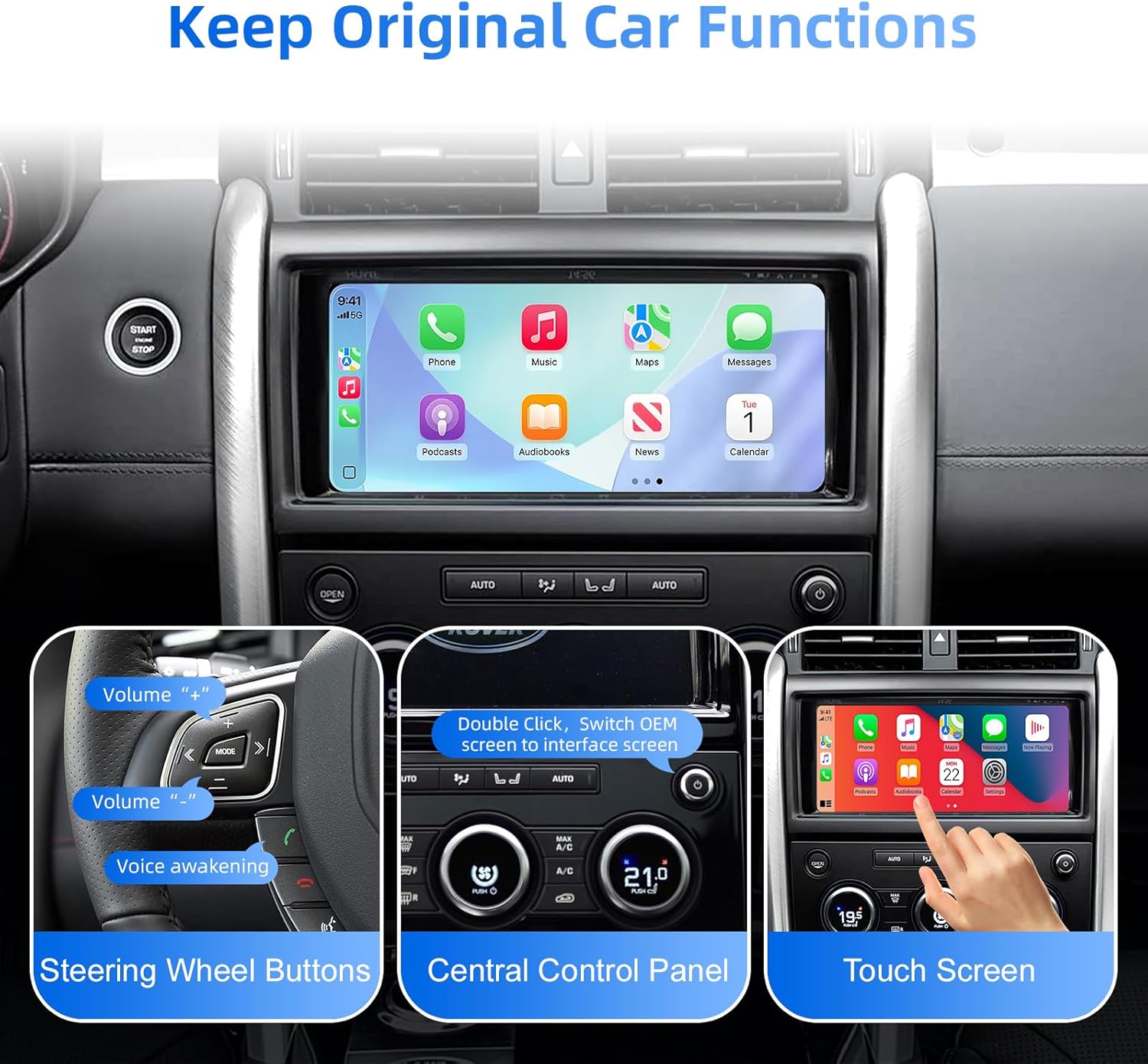
Resim 4.5: This image demonstrates that the decoder allows full retention of the vehicle's original controls, including steering wheel buttons, the central control panel, and touchscreen input.
4.6. Backup Camera Input Support
The decoder supports connecting an aftermarket backup camera or front camera. The camera feed will automatically display on the car screen when you shift into reverse, providing enhanced safety and convenience.
- Bağlantı: Connect your backup camera to the decoder via the designated wire input.
- Otomatik Ekran: Kamera view will automatically activate when the vehicle is put into reverse gear.
Resim 4.6: The vehicle's screen showing the view from a connected backup camera, complete with dynamic parking guidelines.
4.7. In-Car Hi-Fi Audio
Experience high-fidelity audio quality through the ANYFAR Decoder. Its digital transmission technology ensures uninterrupted, high-quality music playback without signal interference or audio delay, preserving the original sound quality of your car's audio system.
5. Bakım
To ensure the longevity and optimal performance of your ANYFAR Decoder, follow these general maintenance guidelines:
- Temiz tut: Regularly clean the decoder unit and surrounding areas with a soft, dry cloth. Avoid using harsh chemicals or abrasive materials.
- Nemden Kaçının: Protect the unit from water, excessive humidity, and other liquids.
- Sıcaklık Kontrolü: Do not expose the unit to extreme temperatures, either hot or cold, as this can affect its electronic components.
- Güvenli Bağlantılar: Periodically check that all cables and connections are secure and free from damage.
6. Sorun Giderme
If you encounter issues with your ANYFAR Decoder, consider the following basic troubleshooting steps:
- Güç Yok/Ekran Yok: Ensure all power cables are securely connected. Check the vehicle's fuse box for any blown fuses related to the infotainment system.
- CarPlay/Android Auto bağlantısı yok: Verify your phone's Bluetooth and Wi-Fi are enabled. Ensure the phone is properly paired with the decoder. Try restarting both your phone and the vehicle's infotainment system.
- Ses Sorunları: Check audio settings on both your phone and the car's head unit. Ensure the correct audio input source is selected on the car's system.
- Aralıklı İşlevsellik: Ensure all cables are firmly seated. Loose connections can cause intermittent issues.
- Original Controls Not Working: If original car controls are not responding, verify the decoder's connections to the head unit. A system reset (disconnecting and reconnecting the car battery) may resolve temporary software glitches.
If problems persist after attempting these steps, please contact ANYFAR customer support for further assistance.
7. Özellikler
| Özellik | Şartname |
|---|---|
| Model Numarası | RM-LH2522F |
| Marka | HERHANGİ BİR YERDE |
| Uyumlu Araçlar | 2016–2019 Land Rover & Jaguar (with Harman headunit, 10.25" screen) |
| Bağlantı Teknolojisi | USB, Wireless (Bluetooth, Wi-Fi for CarPlay/Android Auto) |
| Denetleyici Türü | Hand Control (retains original car controls) |
| Özel Özellik | Hands-Free Calling, Wireless CarPlay, Wireless Android Auto, Mirror Link, USB Playback, Backup Camera Support |
| Uyumlu Cihazlar | Akıllı telefon |
| Bağlayıcı Türü | Micro USB (for data/charging) |
| Ses Çıkışı Modu | Stereo |
| Paket Boyutları | 10.63 x 6.69 x 4.33 inç |
| Ürün Ağırlığı | 1.76 pound |
| Üretici | Huizhou Rhythm Technology Co, Ltd |
8. Garanti ve Destek
Warranty information for the ANYFAR Decoder RM-LH2522F is typically provided with your purchase documentation. Please refer to the warranty card or contact your retailer for specific details regarding coverage and duration.
For technical support, troubleshooting assistance beyond this manual, or inquiries about replacement parts, please visit the official ANYFAR website or contact their customer service department. Contact information can usually be found on the product packaging or the brand's online store page.


