1. Giriş
The Nikon ZR Cinema Camera, co-developed by Nikon and RED, is a full-frame 6K cinema camera designed for professional cinematic capture. It features REDCODE RAW (R3D NE) footage and 32-bit float audio, offering the same color space and Log curve as other RED cameras. Its compact and durable design, weighing just 1.18 lbs, integrates seamlessly with various rigs and grips. The camera includes an extra-large 4-inch DCI-P3 swiveling touchscreen monitor, eliminating the need for an external display.
This manual provides essential information for setting up, operating, and maintaining your Nikon ZR Cinema Camera.
2. Kutuda Neler Var?
- Nikon ZR Full-Frame Camera Body
- NIKKOR Z 50mm f/1.4 Prime Lens
- EN-EL15c Şarj Edilebilir Lityum İyon Pil
- USB Type-C Şarj Kablosu
- Kamera kayışı
- Kullanım Kılavuzları (bu belge)
3. Kurulum
3.1. Lensin Takılması
- Remove the body cap from the camera and the rear lens cap from the NIKKOR Z 50mm f/1.4 lens.
- Objektif üzerindeki montaj işaretini, fotoğraf makinesi gövdesindeki montaj işaretiyle hizalayın.
- Lensi yerine oturana kadar saat yönünün tersine çevirin.
3.2. Pil ve Hafıza Kartının Takılması
The Nikon ZR uses an EN-EL15c Rechargeable Li-ion Battery and CF Express Type B memory cards. Ensure the battery is fully charged before use.
- Open the battery chamber cover located on the bottom of the camera.
- Insert the EN-EL15c battery with the correct orientation until it locks into place.
- Hafıza kartı yuvası kapağını açın.
- Insert the CF Express Type B card into the designated slot until it clicks. The camera supports dual card slots for extended recording or backup.
- Her iki kapağı da güvenli bir şekilde kapatın.
3.3. İlk Açılış ve Ayarlar
- Kamerayı güç düğmesini kullanarak açın.
- Ekranda beliren yönergeleri takip ederek dili, tarihi ve saati ayarlayın.
- Familiarize yourself with the 4-inch DCI-P3 swiveling touchscreen monitor for navigation and settings adjustments.

Resim: Ön view of the Nikon ZR Cinema Camera with the NIKKOR Z 50mm f/1.4 lens attached.
Resim: Arka view of the Nikon ZR Cinema Camera, highlighting the swiveling 4-inch DCI-P3 touchscreen monitor.
4. Kameranın Çalıştırılması
4.1. Çekim Modları
The Nikon ZR offers various shooting modes for both stills and video. Use the mode dial on the top of the camera to select between Program (P), Shutter-priority (S), Aperture-priority (A), Manual (M), and User-defined settings (U1, U2, U3).
4.2. Video Kaydı
The camera supports 6K video recording at 60p and 4K at 120p. It captures REDCODE RAW (R3D NE) footage, offering extensive post-production flexibility. The industry-leading 32-bit float audio recording ensures high-quality sound capture, with support for external microphones via dedicated ports.
- Resolution & Frame Rates: Up to 6K/60p, 4K/120p, Full HD/240p.
- Kodekler: REDCODE RAW (R3D NE), N-RAW, ProRes RAW HQ, ProRes 422 HQ, H.265, H.264.
- Ses: 32-bit float (excluding H.264), 24-bit (excluding H.264), Linear PCM 48kHz, Line input.
4.3. Otomatik Odaklama Sistemi
The advanced autofocus system detects 9 subject types, ensuring sharp focus for both stills and video. This system is designed to maintain focus even with motion-heavy subjects.
4.4. DCI-P3 Monitor
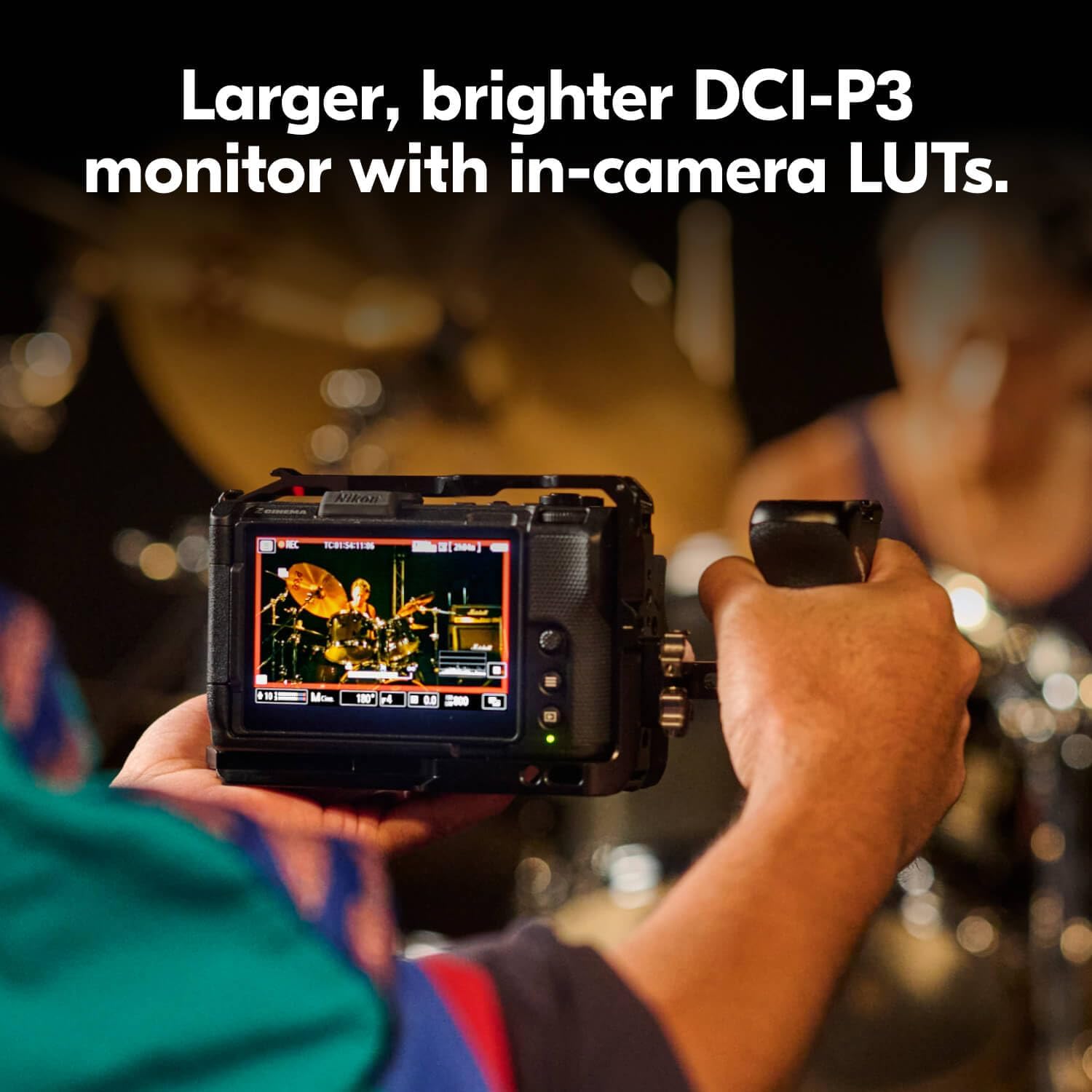
The 4-inch DCI-P3 swiveling touchscreen monitor provides a clear and accurate view senin yemeğintage, supporting in-camera LUTs for real-time monitoring of your cinematic look.

Image: The Nikon ZR Cinema Camera mounted on a rig, showcasing its 4-inch DCI-P3 monitor and compact size.

Image: A close-up of the Nikon ZR's 4-inch DCI-P3 monitor, showing a live video feed with exposure information.
5. Media Features
5.1. Ürün Bittiview Video
Video: Kısa bir ürün incelemesiview of the Nikon ZR Cinema Camera, highlighting its key features and design. This video is provided by the seller.
5.2. Nikon Z6 III Hybrid Mirrorless Camera Overview
Video: An in-depth look at the Nikon Z6 III, a hybrid mirrorless camera. While not the ZR model, it shares some core technologies and features from Nikon's Z-series lineup. This video is provided by an influencer.
5.3. Nikon Z f Camera Introduction
Video: An introduction to the Nikon Z f camera, showcasing its design and features. This video is provided by Nikon Inc.
6. Özellikler
| Özellik | Detay |
|---|---|
| Marka | Nikon |
| Model Adı | ZR 50mm Lens Kit |
| Model Numarası | 2041 |
| Foto Sensör Çözünürlüğü | 24.5 MP |
| Fotoğraf Sensörü Boyutu | Tam Çerçeve (35mm) |
| Video Çözünürlüğü | 6K |
| Dynamic Stops | 15 Duraklar |
| Bit derinliği | 12 Bit |
| Desteklenen Görüntü Formatı | REDCODE RAW (R3D NE), JPEG |
| Desteklenen File Biçim | JPEG |
| Ekran Boyutu | 4 inç |
| Görüntü Türü | LCD |
| Ekran Armatür Tipi | Eklemli |
| Flash Bellek Türü | CF Express Type B |
| Bağlantı Teknolojisi | Bluetooth, Wi-Fi |
| Donanım Arayüzü | USB Tip C |
| Video Çıkışı | HDMI |
| Ürün Ağırlığı | 2.12 Pound |
| Uyumlu Montajlar | Nikon Z |
| Lens Türü | Standard (50mm Prime) |
7. Bakım
- Keep the camera and lens clean using a soft, lint-free cloth.
- Fotoğraf makinesini aşırı sıcaklıklara, neme veya toza maruz bırakmaktan kaçının.
- Regularly check for firmware updates on the Nikon support webSitenin en iyi performansı sergilemesi ve yeni özelliklere erişimi sağlaması için.
- Store the camera in a dry, cool place, preferably in a camera bag with desiccant packs to prevent moisture buildup.
8. Sorun Giderme
8.1. Kamera Açılmıyor
- Pilin tam şarjlı olduğundan ve doğru şekilde takıldığından emin olun.
- Mümkünse, tamamen şarj edilmiş farklı bir pil kullanmayı deneyin.
- Check the USB Type-C charging cable for damage and ensure it's properly connected if attempting to charge.
8.2. Lens Error Message
- Remove the lens and reattach it, ensuring it clicks securely into place.
- Hem objektifin hem de kamera gövdesinin elektrik kontaklarını temiz, kuru bir bezle temizleyin.
- Objektifin yazılımının güncel olduğundan emin olun.
8.3. Autofocus Issues
- Check that the autofocus mode is set appropriately for your subject (e.g., Continuous-Servo AF for moving subjects).
- Otomatik odaklama sisteminin etkili bir şekilde çalışması için yeterli ışık olduğundan emin olun.
- Clean the lens elements and the camera's sensor.
9. Garanti ve Destek
The Nikon ZR Cinema Camera comes with a 1 Yıl Sınırlı Üretici Garantisi. For detailed warranty terms, service requests, or technical support, please visit the official Nikon webWeb sitesini ziyaret edin veya Nikon müşteri hizmetleriyle iletişime geçin.
Ek kaynaklar ve ürün bilgileri için şu adresi ziyaret edin: Amazon'daki Nikon Mağazası.


