1. Giriş
The DOOGEE Note56X Pro is an Android 16 smartphone designed for optimal performance and user experience. It features a sleek design, a powerful octa-core processor, a high-capacity battery, and advanced camera capabilities. This manual provides essential information for setting up, operating, and maintaining your device.

This image displays the DOOGEE Note56X Pro smartphone in light blue and black, showcasinşık profesyonel tasarımıfile and key features such as its 8.45mm ultra-thin design, 6150mAh silicon-carbon battery, integrated Gemini AI with Android 16, 128GB expandable ROM, and a 6.56-inch HD+ 90Hz display.
2. Kutuda Neler Var?
Ürün ambalajınızda tüm öğelerin mevcut olduğundan emin olun:
- 1 x DOOGEE Note56X Pro Smartphone
- 1 x Şarj Kablosu
- 1 x Şarj Cihazı
- 1 x Ekran Koruyucu (ön uygulanmış)
- 1 x SIM Card Ejection Tool
- 1 x Koruyucu Kılıf
- 1 x Ambalaj Kutusu
- 1 x Kullanım Kılavuzu
- 1 x Hizmet Kartı
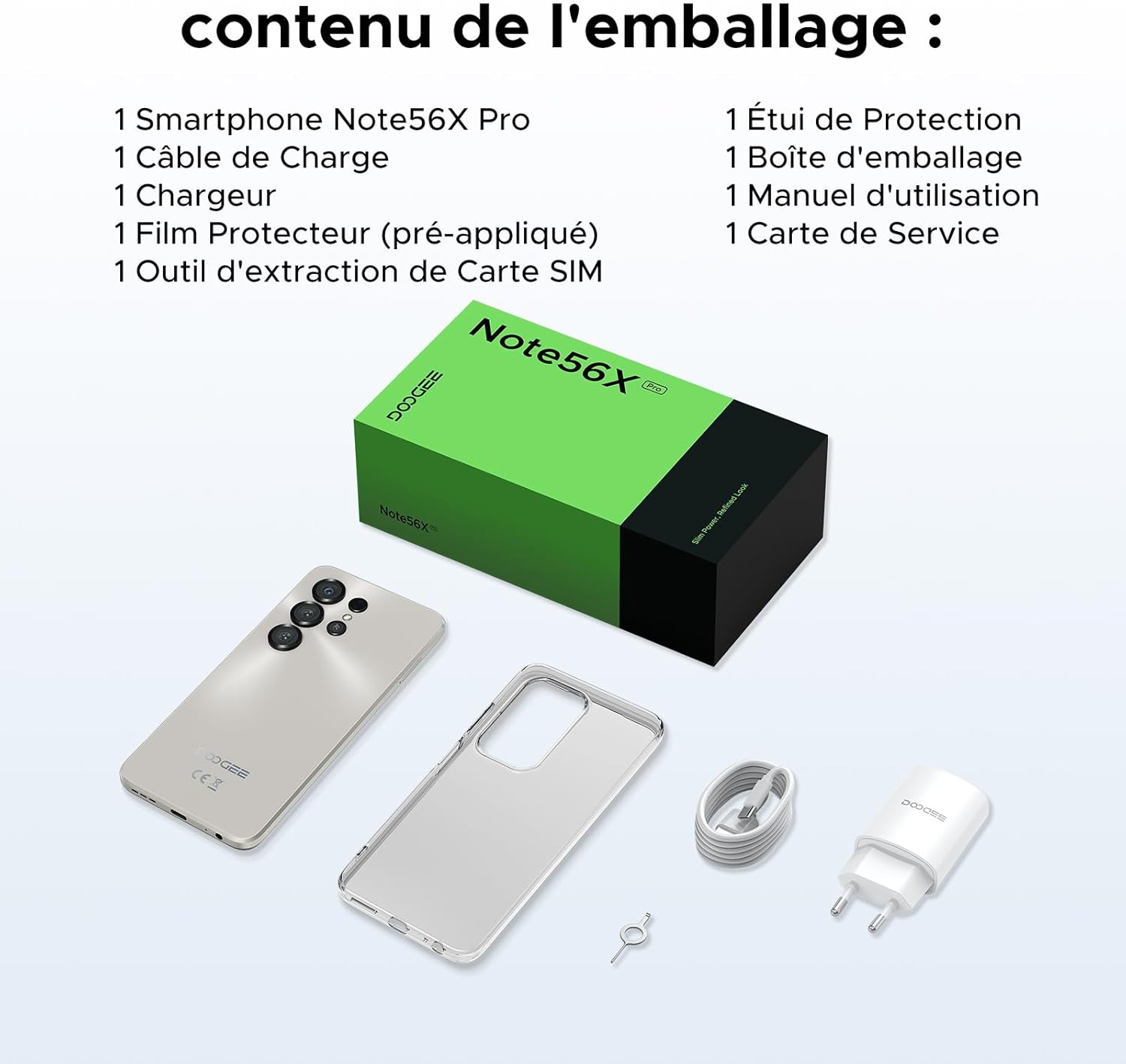
This image shows the contents included in the DOOGEE Note56X Pro packaging: the smartphone, a charging cable, a charger, a pre-applied screen protector, a SIM card ejection tool, a protective case, the packaging box, a user manual, and a service card.
3. Başlarken
3.1. SIM Kartların Takılması
The DOOGEE Note56X Pro supports Dual SIM functionality. To insert your SIM card(s):
- Cihazın yan tarafında bulunan SIM kart tepsisini bulun.
- Use the provided SIM ejection tool to open the tray.
- Nano-SIM kartınızı/kartlarınızı ve/veya microSD kartınızı altın temas noktaları aşağı bakacak şekilde tepsiye yerleştirin.
- Tepsiyi cihazla aynı hizaya gelene kadar dikkatlice yuvaya geri itin.
3.2. Açma/Kapama
- Açmak İçin: DOOGEE logosu görünene kadar Güç düğmesini basılı tutun.
- Kapatmak İçin: Ekranda güç seçenekleri görünene kadar Güç düğmesini basılı tutun, ardından "Kapat" seçeneğini seçin.
- Yeniden başlatmak: Güç seçenekleri görünene kadar Güç düğmesini basılı tutun, ardından "Yeniden Başlat"ı seçin.
3.3. İlk Kurulum
Cihazı ilk açtığınızda, ilk kurulumu tamamlamak için ekrandaki yönergeleri izleyin:
- Dilinizi seçin.
- Bir Wi-Fi ağına bağlanın.
- Google hesabınızla giriş yapın veya yeni bir hesap oluşturun.
- Ekran kilidini ayarlayın (PIN, desen, parola, parmak izi veya Face ID).
- Review ve hüküm ve koşulları kabul edin.
4. Cihazınızın Çalıştırılması
4.1. Ekran
The Note56X Pro features a 6.56-inch HD+ IPS Waterdrop display with a 90Hz refresh rate, offering smooth visuals and vibrant colors. The 90% screen-to-body ratio provides an immersive viewDeneyim.

This graphic highlights the display features of the DOOGEE Note56X Pro, including a 90Hz refresh rate for smooth visuals, support for 16.7 million colors, and a 90% screen-to-body ratio for an immersive viewDeneyim.
A brief video demonstrating the smooth gaming experience on the DOOGEE Note56X Pro's 6.56-inch HD+ 90Hz display, showing responsive gameplay.
4.2. Performans
Powered by an UNISOC T7225 Octa-Core processor, the Note56X Pro ensures fluid multitasking and efficient application launch. It comes with 32GB of RAM (4GB physical + 28GB virtual) and 128GB of internal storage, expandable up to 2TB via a TF card (sold separately).

This image presents a technical diagram of the UNISOC T7225 Octa-Core processor, highlighting its 1.8 GHz high frequency and Mali G57 ARM GPU, ensuring smooth performance for web browsing, online learning, and chats.

This graphic illustrates the memory configuration of the DOOGEE Note56X Pro, featuring 32GB RAM (4GB physical + 28GB virtual) and 128GB ROM, expandable up to 2TB with a TF card (sold separately), providing ampUygulamalar ve medya için alan.
A short video highlighting the internal components of the DOOGEE Note56X Pro, specifically the Octa-Core UNISOC T7225 processor and the 32GB RAM (4GB + 28GB virtual) and 128GB ROM configuration.
4.3. Pil
Equipped with a 6150mAh Silicon-Carbon battery, the Note56X Pro offers extended usage time and supports 5W reverse charging. The battery is designed for durability, with up to 1000 charge/discharge cycles and an estimated 4-year lifespan.

A detailed diagram showing the internal structure of the 6150mAh Silicon-Carbon battery within the DOOGEE Note56X Pro, emphasizing its extended endurance, 1000 charge/discharge cycles, 4-year lifespan, 20% reduced size, and 5W reverse charging capability.
Kısa bir video gösterimiasing the sleek design, vertical lens arrangement, ultra-thin 8.45mm body, lightweight 195g build, and available colors (Midnight Black, Glacier Blue, Titanium Grey Mist) of the DOOGEE Note56X Pro.
4.4. Kamera
Capture clear and vibrant photos with the Note56X Pro's camera system:
- Ana Kamera: 13MP with AI recognition, HDR, Pro Mode, Smile Capture, Panoramas, Burst Mode, Night Mode, and Fun Filters.
- Ön Kamera: 8MP with Beauty Mode and Portrait Mode for natural selfies.

This graphic highlights the features of the 13MP main camera on the DOOGEE Note56X Pro, including AI recognition, HDR, Pro Mode, Smile Capture, Panoramas, Burst Mode, Night Mode, and Fun Filters, illustrated with a landscape photo taken by the phone.

This image showcases the 8MP front camera features of the DOOGEE Note56X Pro, including Beauty Mode and Portrait Mode, designed to simplify photography and produce bright, natural selfies.

This graphic details the intelligent features of the Google Smart Camera on the DOOGEE Note56X Pro, such as displaying search results, text extraction and translation, homework analysis, plant and animal identification, and online search capabilities.
4.5. Bağlantı
The device supports 4G cellular networks, Wi-Fi, Bluetooth 5.0, and NFC for secure contactless payments. It also includes GPS for precise navigation and OTG functionality for connecting external devices.
4.6. Güvenlik Özellikleri
The Note56X Pro offers multiple security options to protect your data:
- Yüz Kimliği: Yüz tanıma özelliğiyle telefonunuzun kilidini açın.
- Parmak İzi Tanıma: Yan tarafa yerleştirilmiş parmak izi sensörü hızlı ve güvenli erişim sağlar.
- Standart PIN, desen ve parola seçenekleri de mevcuttur.
4.7. Operating System and AI
Running on Android 16, the Note56X Pro provides an intuitive and secure user experience. It integrates Google Gemini AI, offering intelligent assistance for various tasks.

A visual representation of the Android 16 operating system interface on the DOOGEE Note56X Pro, showcasing various application icons and a clean, intuitive user experience.

This image shows the Google Gemini AI chat interface on the DOOGEE Note56X Pro, demonstrating its capability for planning vacations, discussing current events, and practicing interview Sorular.
5. Özellikler
| Özellik | Şartname |
|---|---|
| Marka | DOOGEE |
| Model Adı | Note56X Pro |
| İşletim Sistemi | Android 16 |
| Ekran Boyutu | 6.56 inç |
| Ekran Çözünürlüğü | 720x1612 |
| Yenileme Hızı | 90 Hz |
| İşlemci | UNISOC T7225 Sekiz Çekirdekli |
| Kurulu RAM Boyutu | 32 GB (4 GB fiziksel + 28 GB sanal) |
| Bellek Depolama Kapasitesi | 128 GB (2 TB'a kadar genişletilebilir) |
| Pil Türü | Lityum-polimer |
| Pil Kapasitesi | 6150 mAh |
| Hücresel Teknoloji | 4G |
| Kablosuz Taşıyıcı | All carriers (Unlocked) |
| Bağlantı | Wi-Fi, Bluetooth 5.0, NFC |
| Özel Özellikler | Dual SIM, Integrated GPS, USB OTG Support, Face ID, Fingerprint Recognition |
| Ses Jakı | 3.5 mm |
| Ölçüler (Kalınlık) | 8.45 mm |
| Ağırlık | 195 gr |

Bir taraf view of the DOOGEE Note56X Pro, emphasizing its ultra-thin 8.45mm profile and lightweight 195g construction, designed for easy portability and comfortable handling throughout the day.

This image displays the DOOGEE Note56X Pro in its available elegant colors: Midnight Black, Titanium Grey Mist, and Glacier Blue, showcasing the aesthetic options for the device.
6. Bakım
To ensure the longevity and optimal performance of your DOOGEE Note56X Pro, follow these maintenance guidelines:
- Temizlik: Ekranı ve gövdeyi temizlemek için yumuşak, tiftiksiz bir bez kullanın. Aşındırıcı malzemelerden veya sert kimyasallardan kaçının.
- Yazılım Güncellemeleri: Regularly check for and install system updates to benefit from the latest features, security patches, and performance improvements. Go to Ayarlar > Sistem > Sistem güncellemesi.
- Pil Bakım: Aşırı sıcaklıklardan kaçının. Pilin sık sık tamamen bitmesine izin vermeyin. Optimum şarj için orijinal şarj cihazını kullanın.
- Depolama Yönetimi: Gereksiz olanları periyodik olarak temizleyin files and uninstall unused apps to free up storage space and maintain device speed.
- Koruma: Ürünle birlikte verilen koruyucu kılıfı ve ekran koruyucusunu kullanarak çizilmelere ve küçük darbelere karşı koruma sağlayın.
7. Sorun Giderme
If you encounter issues with your DOOGEE Note56X Pro, try the following solutions:
- Cihaz Açılmıyor: Pilin şarjlı olduğundan emin olun. Şarj cihazını bağlayın ve tekrar açmayı denemeden önce birkaç dakika bekleyin.
- Ekran Yanıt Vermiyor: Force restart the device by pressing and holding the Power button for about 10-15 seconds.
- Uygulamalar Çöküyor/Donuyor: Sorunlu uygulamanın önbelleğini temizleyin (Ayarlar > Uygulamalar > [Uygulama Adı] > Depolama ve önbellek > Önbelleği temizleSorun devam ederse, uygulamayı kaldırıp yeniden yükleyin.
- Zayıf Pil Ömrü: Arka planda uygulama kullanımını kontrol et (Ayarlar > Pil). Reduce screen brightness, disable unused features like Wi-Fi, Bluetooth, GPS when not needed.
- Ağ Bağlantı Sorunları: Toggle Airplane Mode on and off. Restart the device. Check SIM card insertion. Reset network settings (Ayarlar > Sistem > Sıfırlama seçenekleri > Wi-Fi, mobil ve Bluetooth'u sıfırla).
- Fingerprint/Face ID Not Working: Ensure your fingers are clean and dry for fingerprint scanning. For Face ID, ensure adequate lighting and that your face is clearly visible to the front camera. Re-register your fingerprint or face if necessary.
- Yavaş Performans: Kullanılmayan arka plan uygulamalarını kapatın. Önbelleği ve geçici dosyaları temizleyin. files. Consider a factory reset as a last resort (Ayarlar > Sistem > Sıfırlama seçenekleri > Tüm verileri sil (fabrika ayarlarına sıfırlama) - Not: Bu işlem telefonunuzdaki tüm verileri silecektir. Lütfen önce önemli bilgilerinizi yedekleyin.).
8. Garanti ve Destek
Your DOOGEE Note56X Pro comes with a 24-month warranty and a 30-day return policy. For any questions or assistance, please contact DOOGEE customer service via Amazon. Our dedicated support team is available to help you.

This image displays DOOGEE's customer service commitments: a 30-day money-back and free return guarantee, a 2-year limited warranty, and 24/7 online individual assistance.


