Ürün Bittiview
The NEEWER GP-85 Extension Rod Kit is designed for action cameras, providing an extendable pole for versatile shooting angles. It features a 1/4" top screw, a three-prong action camera adapter, and a magnetic quick-release mount for broad compatibility.
- Uyumluluk: Designed for DJI OSMO Action 5 Pro 4 3 2 Pocket 3 Creator Combo, GoPro Hero 13 12 11 10 Black, Insta360 X5 X4 X3 Ace Pro Go 3S, and AKASO Brave 8 7 EK7000 action cameras.
- Uzatılabilir Uzunluk: The telescopic pole extends up to 47.6 inches (121 cm) and folds down to 9.4 inches (23.8 cm) for portability.
- Flexible Angles: Offers 180° tilt capability for adjusting camera angles.
- Tripod Dağı: Includes a 1/4" threaded hole at the base for attaching to tripods.
- Dayanıklı Yapı: Made from high-strength plastic with non-slip textured pads for a secure grip.
Paket İçeriği
Aşağıda listelenen tüm öğelerin paketinizde bulunduğunu doğrulayın:
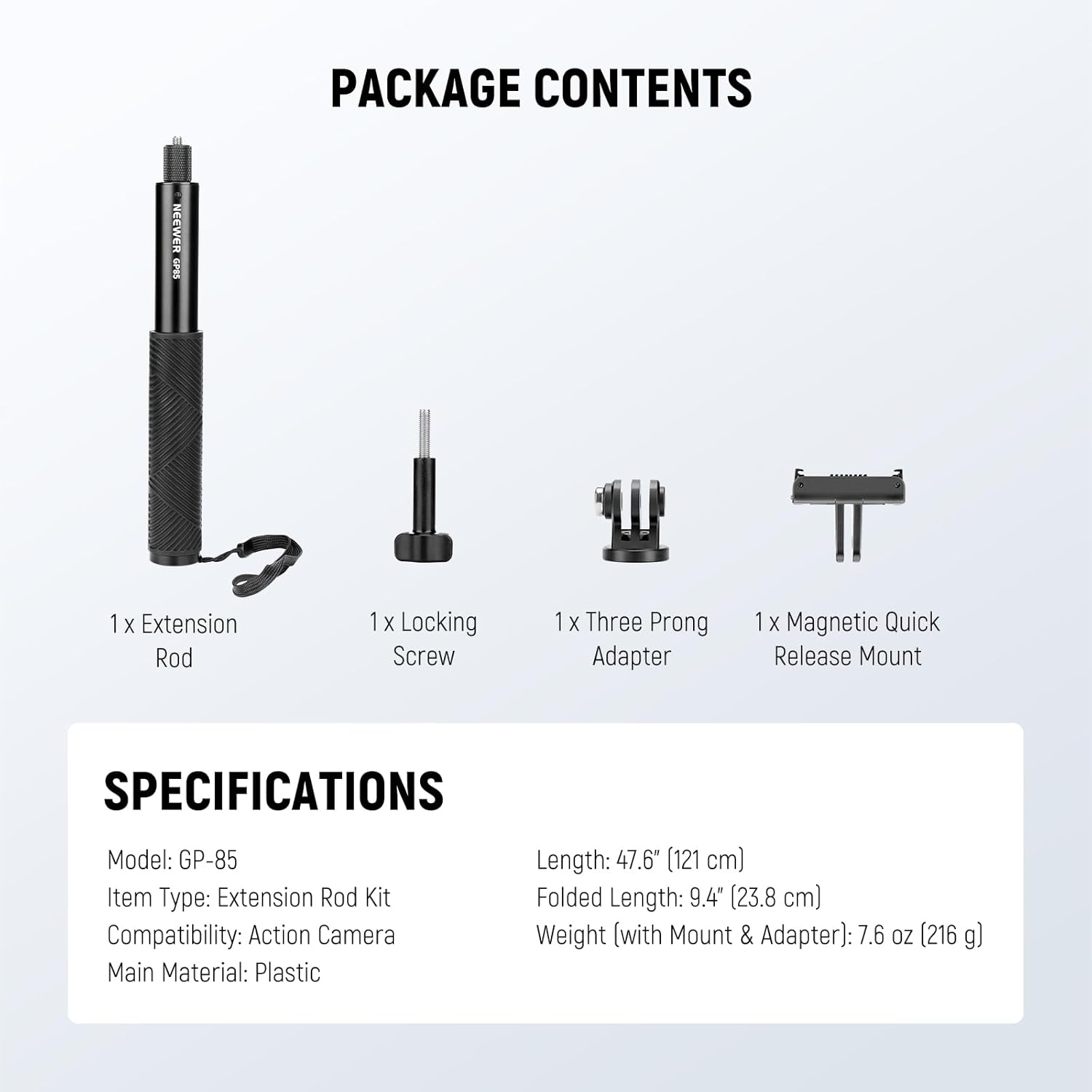
Image: The package contents include the extension rod, locking screw, three-prong adapter, and magnetic quick release mount.
- 1 x Uzatma Çubuğu
- 1 x Kilitleme Vidası
- 1 x Three-Prong Adapter
- 1 x Magnetic Quick Release Mount
Kurulum Talimatları
- Kamera Adaptörünü Takın:
Screw the three-prong action camera adapter onto the 1/4" top screw of the extension rod. Ensure it is tightened securely to prevent camera movement.

Resim: Yakın çekim view of the 1/4" top screw on the extension rod, ready for adapter attachment.
- Mount Action Camera:
Attach your action camera to the three-prong adapter using the provided locking screw. For magnetic quick release compatible cameras, use the magnetic mount.
- Optional Tripod Attachment:
If desired, attach a tripod to the 1/4" threaded hole located at the bottom of the extension rod for added stability.

Image: The extension rod mounted on a tripod, showcasing the 1/4" threaded hole at its base.
Kullanım Talimatları
- Extending and Retracting the Rod:
Gently pull the sections of the extension rod to extend it to the desired length. Push the sections back in to retract. The rod features a friction-based system to hold its position.

Image: Visual representation of the extension rod at different lengths, from 9.4 inches to 47.6 inches.
- Adjusting Camera Angle (180° Tilt):
The camera mount allows for a 180° tilt adjustment. Loosen the adjustment knob, position your camera to the desired angle, and then tighten the knob to secure it.

Image: A diagram illustrating the 180-degree tilt functionality of the camera mount on the extension rod.
- Using with Panoramic Cameras:
When using an action camera in panoramic mode, the design of this rod ensures it remains out of the camera's field of view, providing an "invisible" effect in your footage.
Bakım
- Temizlik: Wipe the extension rod with a soft, dry cloth to remove dust and debris. Avoid using harsh chemicals or abrasive materials.
- Depolamak: Store the rod in a dry, cool place away from direct sunlight and extreme temperatures. Retract the rod fully before storage to protect the telescopic mechanism.
- Denetleme: Periodically check all connections and screws for tightness. Ensure the non-slip grip pads are intact.
Sorun giderme
- Rod is difficult to extend/retract: Apply gentle, even force. If still stiff, ensure no debris is lodged in the sections. Avoid excessive force to prevent damage.
- Camera wobbles or rotates: Ensure all screws (camera to adapter, adapter to rod) are securely tightened. Check that the camera is properly seated in the adapter.
- Tripod attachment is loose: Verify that the tripod's screw is fully engaged and tightened into the 1/4" threaded hole at the base of the rod.
Özellikler
| Özellik | Detay |
|---|---|
| Örnek | GP-85 |
| Öğe Türü | Uzatma Çubuğu Kiti |
| Uyumluluk | Hareket Kamerası |
| Ana Malzeme | High-strength Plastic, Aluminum Alloy |
| Genişletilmiş Uzunluk | 47.6" (121 cm) |
| Katlanmış Uzunluk | 9.4" (23.8 cm) |
| Weight (with Mount & Adapter) | 7.6 ons (216 gr) |
| Eğim Açısı | 180° |
| Alt Konu | 1/4" |
Garanti ve Destek
For warranty information and technical support, please refer to the official NEEWER webSite üzerinden satın alabilir veya doğrudan müşteri hizmetleriyle iletişime geçebilirsiniz. Garanti talepleriniz için satın alma fişinizi saklayın.
NEEWER Resmi Webalan: www.neewer.com


