1. Giriş
The Trevi RDA 70 BR is a compact and versatile portable radio designed to provide a comprehensive listening experience. It combines traditional radio functionality with modern digital features, making it suitable for listening to music or news anywhere. This manual provides instructions for the proper setup, operation, and maintenance of your device.
2. Güvenlik Bilgileri
- Cihazı kullanmadan önce tüm talimatları dikkatlice okuyun.
- Radyoyu yağmura, neme veya aşırı sıcaklıklara maruz bırakmayın.
- Cihazı ısı kaynaklarının yakınına veya doğrudan güneş ışığına maruz bırakmaktan kaçının.
- Cihazı kendiniz sökmeyin veya tamir etmeye çalışmayın. Tüm servis işlemlerini yetkili personele yaptırın.
- Cihazı güçlü manyetik alanlardan uzak tutun.
- Use only the specified charging cable (USB Type-C) for recharging the battery.
3. Paket İçeriği
Paketin içerisinde tüm ürünlerin mevcut olduğundan emin olun:
- Trevi RDA 70 BR Portable Radio
- USB Type-C Şarj Kablosu
- Kullanım Kılavuzu (bu belge)
4. Ürün Bittiview
Familiarize yourself with the various parts and controls of your Trevi RDA 70 BR radio.

Şekil 1: Açısal ön view of the Trevi RDA 70 BR Portable Radio, showing the speaker grille, display, and main controls.
Ön Panel Kontrolleri
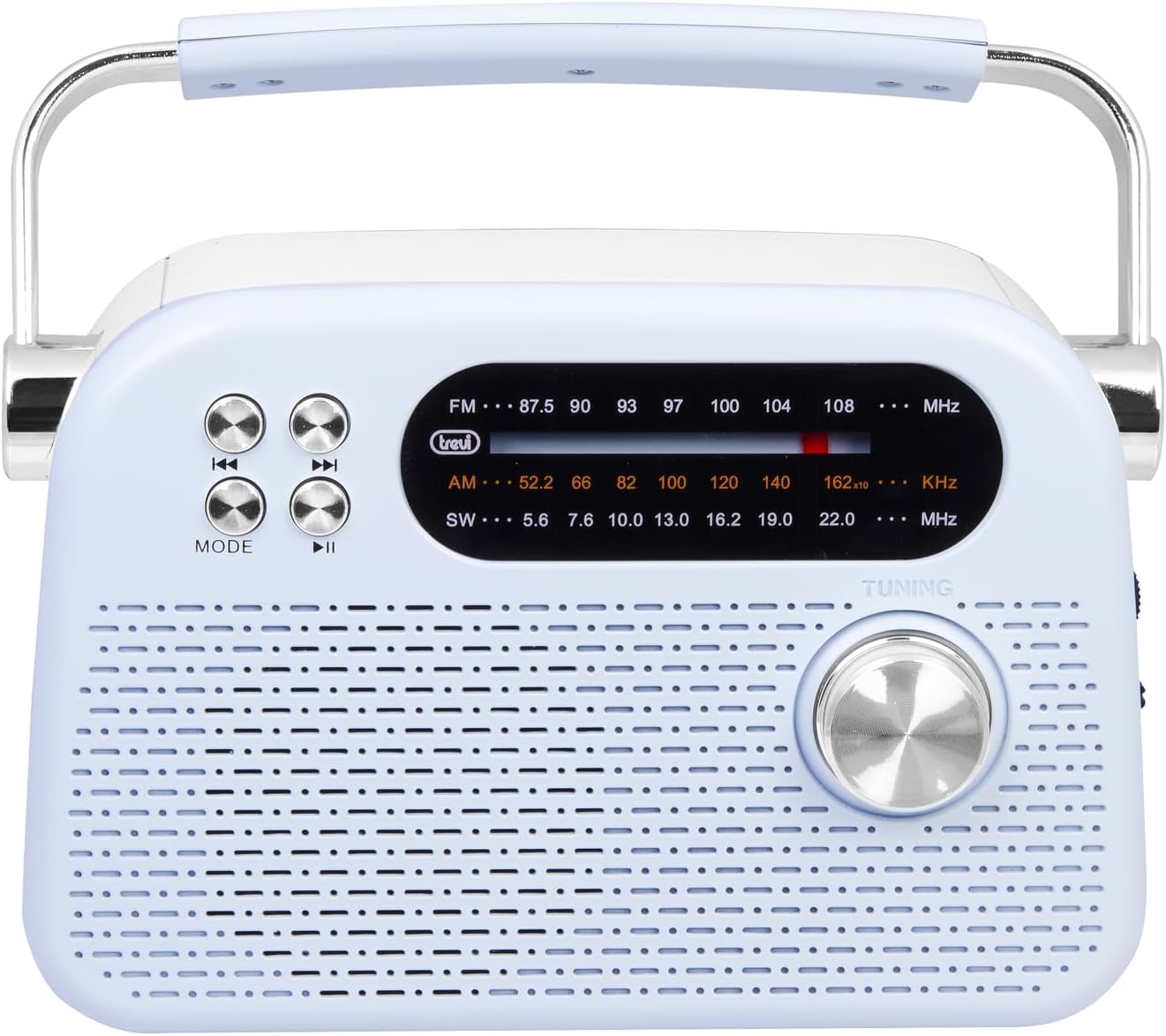
Şekil 2: Ayrıntılı ön view highlighting the display, mode button, playback controls, and tuning knob.
- Görüntülemek: Shows frequency, mode, and other information.
- MOD Düğmesi: Switches between radio bands (FM/AM/SW) and media playback modes (USB/Micro SD/Wireless).
- Playback Controls (◀◀ / ▶▶ / ▶▶): Used for skipping tracks in media mode or fine-tuning in radio mode.
- Ayar Düğmesi: For manual station tuning.
Side Panel Controls and Ports

Şekil 3: Yan view showing the power switch, volume control, USB port, Micro SD slot, and USB Type-C charging port.
- OFF/ON/Volume Knob: Turns the radio on/off and adjusts the volume level.
- DC 5V IN (USB Type-C): Dahili batarya için şarj bağlantı noktası.
- USB Bağlantı Noktası: MP3 çalmak için USB flash sürücüleri bağlamak amacıyla kullanılır.
- Micro SD Slot (TF): MP3 çalma için Micro SD kart takmak amacıyla.
- Bant Seçici Anahtar: Selects between FM, AM, and SW radio bands, and MEDIA mode for USB/Micro SD/Wireless.
Arka Panel

Şekil 4: Arka view showing the telescopic antenna and battery compartment.
- Teleskopik Anten: Extend for improved radio reception, especially for FM and SW bands.
- Pil Bölmesi: Şarj edilebilir lityum pili barındırır.
5. Kurulum
5.1 Pilin Şarj Edilmesi
- Locate the USB Type-C charging port on the side of the radio.
- Connect the provided USB Type-C cable to the radio's charging port.
- USB kablosunun diğer ucunu standart bir USB güç adaptörüne (dahil değildir) veya bilgisayarın USB portuna bağlayın.
- The charging indicator light will illuminate (if present) to show charging status.
- Once fully charged, disconnect the cable. A full charge ensures maximum portability and uninterrupted use.
5.2 Anten Ayarı
For optimal radio reception, extend the telescopic antenna fully. Adjust its direction and angle to achieve the clearest signal, especially for FM and Shortwave (SW) broadcasts.
6. Kullanım Talimatları
6.1 Güç Açma/Kapatma ve Ses Kontrolü
- Radyoyu açmak için ON, rotate the OFF/ON/Volume knob clockwise.
- Continue rotating the knob clockwise to sesi artırmak.
- Rotate the knob counter-clockwise to sesi azalt.
- Radyoyu açmak için KAPALI, rotate the knob counter-clockwise until it clicks into the OFF position.
6.2 Mod Seçimi
Kullanın Bant Seçici Anahtarı on the side panel to choose your desired mode:
- Dışişleri Bakanı: For Frequency Modulation radio stations.
- AM: İçin Amplitude Modulation radio stations.
- Türkçe: For Shortwave radio stations.
- MEDYA: For playing audio from USB, Micro SD, or Wireless (Bluetooth) sources.
6.3 Radyo Ayarlaması
- Select the desired radio band (FM, AM, or SW) using the Band Selector Switch.
- Daha iyi alım için teleskopik anteni uzatın.
- Yavaşça döndür Ayar Düğmesi on the front panel to scan for stations.
- The frequency will be displayed on the screen. Stop tuning when you find a clear station.
6.4 USB/Micro SD Playback (MP3)
- Insert a USB flash drive or a Micro SD card (with MP3 files) into the corresponding port/slot on the side panel.
- Switch the Band Selector Switch to MEDYA mode. The radio should automatically detect and begin playing MP3 files.
- Kullanın Oynatma Kontrolleri (◀◀ / ▶▶) to skip to the previous or next track.
- Kullanın Play/Pause (▶▶) Oynatmayı duraklatmak veya sürdürmek için düğmesine basın.
6.5 Kablosuz (Bluetooth) Bağlantısı
The radio supports wireless audio streaming from compatible devices.
- Switch the Band Selector Switch to MEDYA mode. The radio will enter Bluetooth pairing mode (indicated by an audible prompt or flashing indicator).
- Akıllı telefonunuzda, tabletinizde veya Bluetooth özellikli diğer cihazınızda Bluetooth'u etkinleştirin ve kullanılabilir cihazları arayın.
- Seçme "Trevi RDA 70 BR" (or similar name) from the list of devices to pair.
- Eşleştirme tamamlandıktan sonra, cihazınızdan radyoya ses akışı sağlayabilirsiniz.
- Use the playback controls on your connected device or the radio's playback controls to manage audio.
7. Bakım
- Temizlik: Radyonun dış yüzeyini temizlemek için yumuşak, kuru bir bez kullanın. Aşındırıcı temizleyiciler veya çözücüler kullanmayın.
- Depolamak: Uzun süre kullanılmadığı zamanlarda radyoyu serin, kuru bir yerde, doğrudan güneş ışığından ve aşırı sıcaklıklardan uzakta saklayın.
- Pil Bakım: To prolong battery life, avoid fully discharging the battery frequently. Recharge it regularly, even if not in constant use.
8. Sorun Giderme
| Sorun | Olası Neden | Çözüm |
|---|---|---|
| Güç yok | Battery is discharged; Power knob is OFF. | Charge the battery; Rotate the power knob to ON. |
| Zayıf radyo alımı | Anten uzatılmamış; Zayıf sinyal; Girişim. | Extend and adjust the telescopic antenna; Move the radio to a different location; Tune carefully. |
| USB/Micro SD oynatmıyor | Incorrect mode; Unsupported file biçim; Bozuk files. | Ensure Band Selector Switch is on MEDIA; Check if files are MP3 format; Try a different USB/Micro SD card. |
| Cannot connect via Wireless (Bluetooth) | Radio not in pairing mode; Bluetooth off on device; Device already connected to another unit. | Ensure radio is in MEDIA mode; Enable Bluetooth on your device; Disconnect from other devices and try again. |
9. Özellikler
| Özellik | Detay |
|---|---|
| Marka | Aşk |
| Örnek | RDA 70 BR |
| Boyutlar (U x G x Y) | 18.5x7x12.5 cm |
| Ağırlık | 600 gram |
| Güç Kaynağı | Şarj edilebilir Lityum Pil |
| Şarj Portu | USB Tip-C (DC 5V) |
| Desteklenen Radyo Bantları | FM, AM, SW |
| Medya Oynatma | USB, Micro SD (MP3 format) |
| Kablosuz Bağlantı | Evet (Bluetooth uyumlu) |
| Özel Özellikler | Taşınabilir, Şarj Edilebilir |
10. Garanti ve Destek
Garanti bilgileri ve müşteri desteği için lütfen satın alma sırasında verilen belgelere bakın veya resmi Trevi web sitesini ziyaret edin. website. Standard return policies apply for products purchased through retailers. For specific details regarding returns or defective products, consult your purchase platform's help pages.


