giriiş
This manual provides essential information for the setup, operation, maintenance, and troubleshooting of your AWOW Mini PC, Model BA7. Please read these instructions carefully before using the device.

Resim: Üzeriview of the AWOW BA7 Mini PC, highlighting its compact design and key features.
Paket İçeriği
Paketin içinde tüm öğelerin mevcut olduğundan emin olun:
- AWOW BA7 Mini PC
- Güç Adaptörü
- Montaj Vidaları
- VESA Montaj Braketi
- HDMI Kablosu
- Kullanım Kılavuzu (bu belge)

Image: Illustration of the AWOW BA7 Mini PC and its included accessories: power adapter, screws, VESA mount, HDMI cable, and user manual.
Kurulum Talimatları
- Çevre Birimlerini Bağlayın: Connect your keyboard, mouse, and monitor(s) to the appropriate ports on the Mini PC.
Resim: Ön view of the Mini PC showing the Power Button, Type-C port, USB 3.2 ports, and 3.5mm Audio Jack.

Resim: Arka view of the Mini PC showing the DC IN, DP1.2, HDMI2.0, USB 2.0 ports, and RJ45 LAN port.
- Güç Bağlantısı: Connect the power adapter to the DC IN port on the Mini PC, then plug the adapter into a power outlet.
- Güç Açık: Mini bilgisayarın ön tarafında bulunan güç düğmesine basın. Sistem açılacaktır.
- İlk kurulum: Dil, bölge, ağ bağlantısı ve kullanıcı hesabı oluşturma dahil olmak üzere Windows 11 Pro'nun ilk kurulumunu tamamlamak için ekrandaki talimatları izleyin.
- Ağ bağlantısı:
- Kablolu: Connect an Ethernet cable to the RJ45 LAN port for a stable wired connection.
- Kablosuz: During Windows setup or via Windows settings, connect to your Wi-Fi network using the built-in WiFi 6.
Kullanım Talimatları
Temel İşlemler
- Güç Açma/Kapatma: Press the power button to turn on the PC. To shut down, use the Windows Start menu options (Shut down, Restart, Sleep). A short press on the power button can put the PC to sleep. A long press (approx. 5 seconds) will force a shutdown.
- Görüntü Çıktısı: The Mini PC supports up to three 4K displays simultaneously via DP, HDMI, and USB-C. Connect your monitors and configure display settings in Windows.

Image: A user working with a triple monitor setup, demonstrating the Mini PC's multi-display capability.
- USB Bağlantısı: Utilize the USB 2.0 and USB 3.0 ports for connecting external devices such as external hard drives, USB flash drives, printers, and other peripherals. The Type-C port also supports data transfer and display output.
- Ses: Kulaklık veya hoparlörleri 3.5 mm ses jakına bağlayın.
Gelişmiş Kullanım
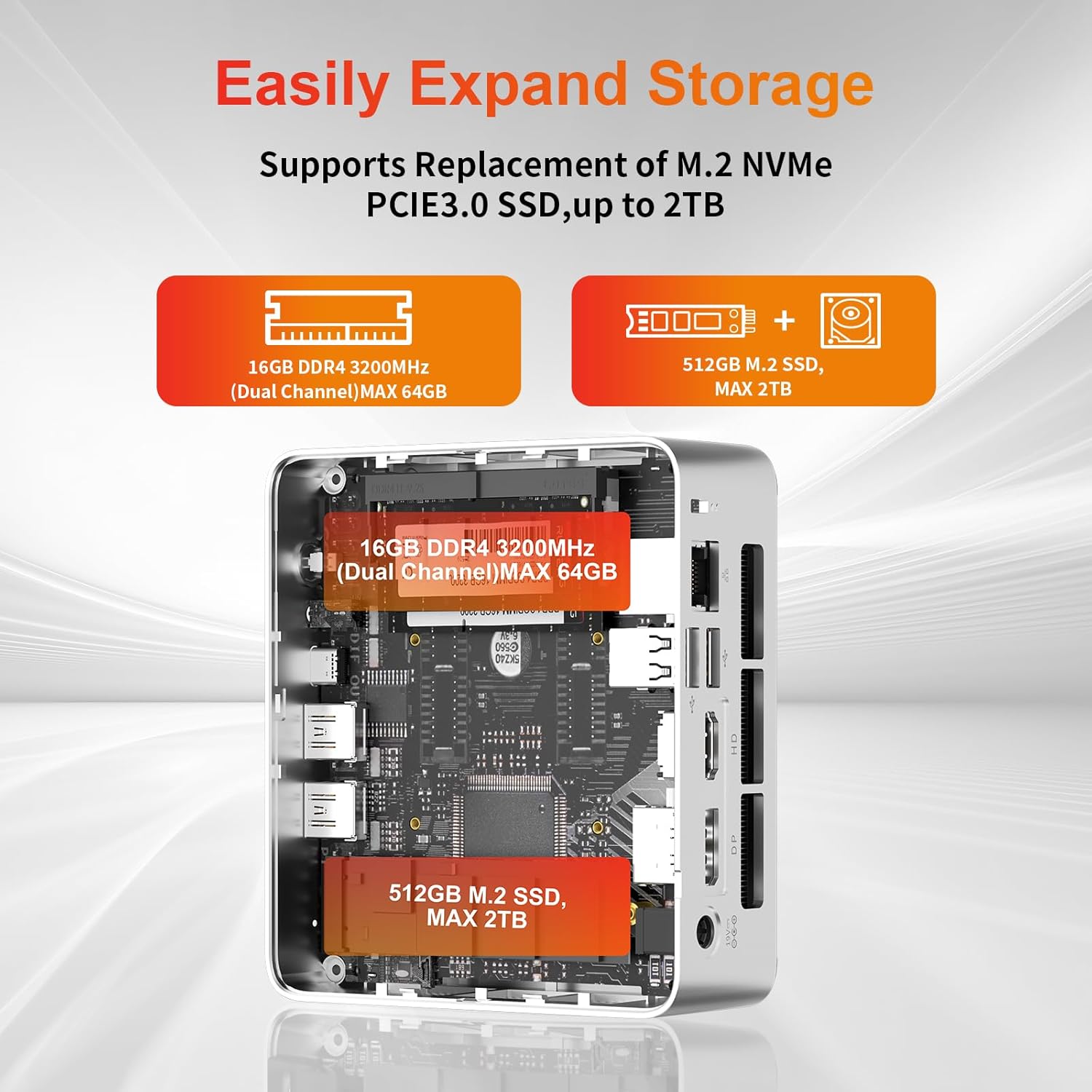
- Depolama Genişletme: The Mini PC supports replacement of the M.2 NVMe PCIe 3.0 SSD up to 2TB. It also supports memory expansion up to 64GB DDR4.

Image: Diagram illustrating the internal components and options for expanding storage (M.2 SSD up to 2TB) and RAM (DDR4 up to 64GB).
- VESA Montajı: Use the included VESA mount bracket to attach the Mini PC to the back of a compatible monitor or to a wall mount, saving desk space.
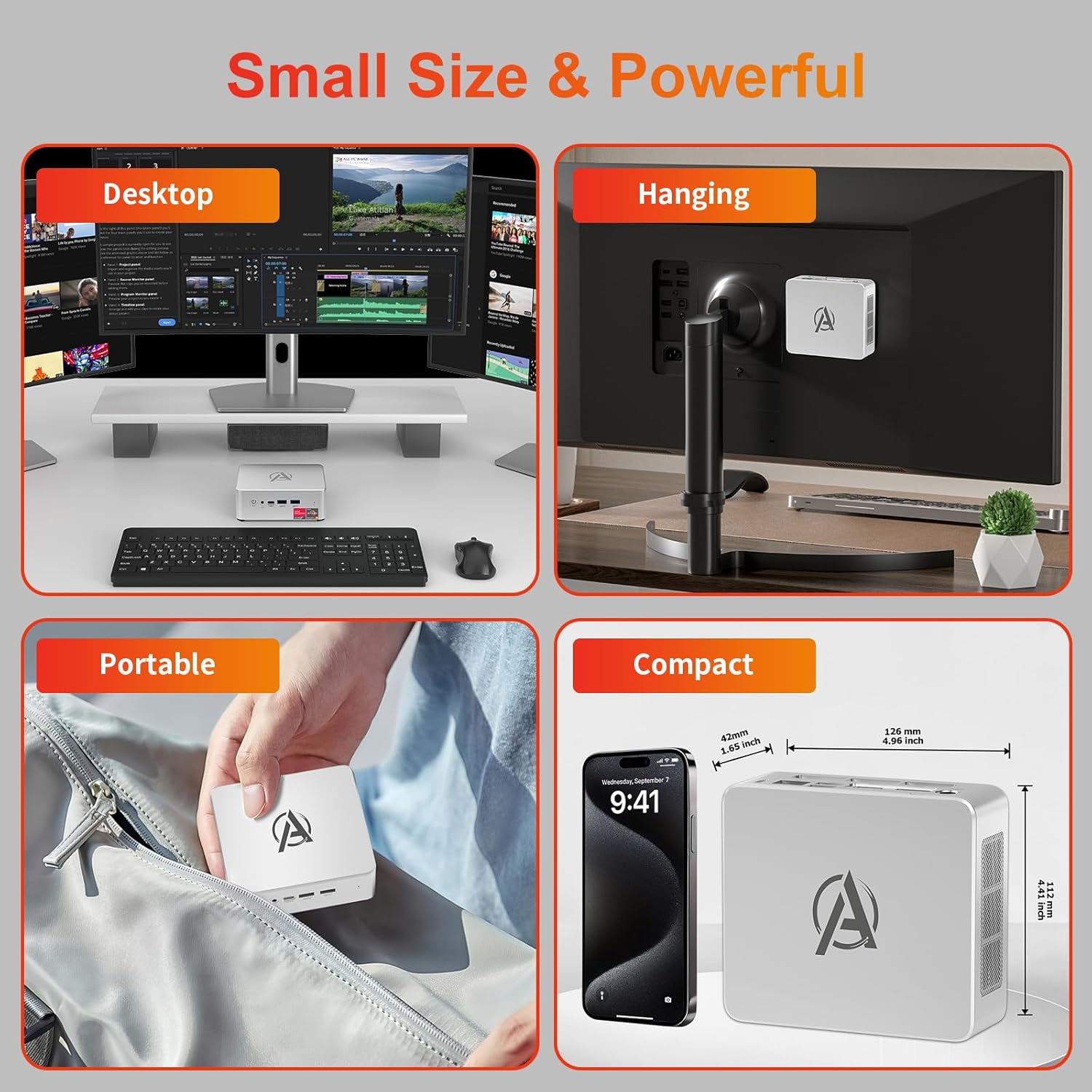
Image: Various usage scenarios for the Mini PC, including desktop, VESA-mounted behind a monitor, portable, and compact size comparison.
Bakım
- Temizlik: Use a soft, dry cloth to clean the exterior of the Mini PC. Do not use liquid cleaners or aerosols. Ensure ventilation openings are free from dust.
- Yazılım Güncellemeleri: En iyi performansı ve güvenliği sağlamak için Windows güncelleştirmelerini ve sürücü güncelleştirmelerini düzenli olarak kontrol edin ve yükleyin.
- Isı Yönetimi: Ensure the Mini PC is placed in a well-ventilated area. Avoid blocking the air vents. The intelligent cooling system is designed for low noise and efficient heat dissipation.

Image: Diagram illustrating the internal cooling fan and heat sink, showing airflow for efficient heat dissipation.
- Depolama Yönetimi: Gereksiz olanları periyodik olarak temizleyin files and applications to maintain system performance.
Sorun giderme
- Güç Yok:
- Güç adaptörünün hem mini bilgisayara hem de elektrik prizine güvenli bir şekilde bağlı olup olmadığını kontrol edin.
- Elektrik prizinin çalışır durumda olduğundan emin olun.
- Başka bir elektrik prizini deneyin.
- Görüntü yok:
- Verify that the HDMI/DP/USB-C cable is securely connected to both the Mini PC and the monitor.
- Monitörün açık olduğundan ve doğru giriş kaynağına ayarlandığından emin olun.
- Mümkünse farklı bir ekran kablosu veya monitör deneyin.
- Yavaş Performans:
- Arka planda çalışan gereksiz uygulamaları kapatın.
- Bekleyen Windows güncellemelerini veya sürücü güncellemelerini kontrol edin ve yükleyin.
- SSD'de yeterli boş alan olduğundan emin olun.
- Monitor CPU and RAM usage in Task Manager to identify resource-intensive processes.
- Ağ Bağlantı Sorunları:
- For wired connections, ensure the Ethernet cable is properly connected and the router is working.
- For Wi-Fi, check if the Wi-Fi adapter is enabled and connected to the correct network. Restart your router/modem.
- Sistem Donuyor/Çöküyor:
- Mini PC’yi yeniden başlatın.
- Ensure the system is not overheating (check ventilation).
- Run a system diagnostic or check Windows Event Viewer for error messages.
Özellikler
| Örnek | AWOW BA7 Mini PC |
| İşlemci | AMD Ryzen 5 7430U (6 Cores, 12 Threads, up to 4.3 GHz) |
| Grafikler | Entegre AMD Radeon Grafikleri |
| Veri deposu | 16 GB DDR4 (64 GB'a kadar genişletilebilir) |
| Depolamak | 512GB PCIe 3.0 M.2 SSD (Expandable up to 2TB) |
| İşletim Sistemi | Windows 11 Pro |
| Video Çıkışı | DP1.2 (4K@60Hz), HDMI2.0 (4K@60Hz), USB-C (4K@60Hz) - Supports Triple Display |
| Bağlantı | WiFi 6, Bluetooth 5.2, 1000Mbps RJ45 LAN |
| Limanlar | 2x USB 3.2, 2x USB 2.0, 1x Type-C (Full Function), 1x DP1.2, 1x HDMI2.0, 1x RJ45 LAN, 1x 3.5mm Audio Jack, 1x DC IN |
| Boyutlar | 126mm x 112mm x 42mm (yaklaşık 4.96 x 4.41 x 1.65 inç) |
| Ağırlık | 398g (yalnızca cihaz) Image: The Mini PC with its dimensions (126mm x 112mm x 42mm) and weight (398g) labeled. |
Garanti ve Destek
AWOW provides comprehensive support for its products.
- Garanti: This product includes a 12-month service period from the date of purchase, covering manufacturing defects.
- Teknik Destek: Lifetime technical support is available for all AWOW products.
- Temas etmek: For technical assistance, warranty claims, or any product-related inquiries, please visit the official AWOW websitesine gidin veya müşteri hizmetleriyle iletişime geçin.

Image: AWOW brand message emphasizing fulfillment, lifetime technical support, and 12-month service.


