giriiş
This manual provides essential information for setting up and operating your DOOGEE Fire 5 Ultra Rugged Phone. Please read it carefully to ensure proper use and to maximize the device's capabilities. The DOOGEE Fire 5 Ultra is designed for durability and performance in challenging environments, featuring robust construction, a large battery, and advanced functionalities.
Paket İçeriği
Paketin içinde tüm öğelerin mevcut olduğundan emin olun:
- DOOGEE Fire 5 Ultra Cellphone
- USB kablosu
- Şarj cihazı
- Koruyucu Film (Önceden Uygulanmış)
- Kullanıcı Kılavuzu
- Garanti Kartı
- Card Slot Opener

Image: Contents of the DOOGEE Fire 5 Ultra box, including the phone, charger, USB cable, protective film, user manual, warranty card, and card slot opener.
Video: An unboxing video of the DOOGEE Fire 5 Ultra, showcasing the phone and its accessories as they are removed from the packaging.
Temel Özelliklerview
Explore the main features and design aspects of the DOOGEE Fire 5 Ultra.
Video: A 3D animated overview of the DOOGEE Fire 5 Ultra, highlighting its rugged design, dual camping lights, and camera system.
Kurulum Kılavuzu
1. SIM Kart ve Hafıza Kartı Takılması
The DOOGEE Fire 5 Ultra supports dual Nano SIM cards and a TF card for expandable storage up to 2TB. Use the provided card slot opener to access the SIM/TF card tray.
- Telefonun yan tarafında bulunan SIM kart tepsisini bulun.
- Kart yuvası açıcısını tepsinin yanındaki küçük deliğe yerleştirin ve tepsi çıkana kadar hafifçe bastırın.
- Place your Nano SIM card(s) and/or TF card into the designated slots on the tray. Ensure proper orientation as indicated on the tray.
- Tepsiyi yerine oturana kadar dikkatlice telefona yeniden yerleştirin.
2. İlk Şarj
Before first use, fully charge your device. The phone comes with a 13000mAh battery and supports 18W fast charging.
- USB kablosunu şarj adaptörüne bağlayın.
- Şarj adaptörünü elektrik prizine takın.
- Kablo'nun USB-C ucunu telefonunuzdaki şarj portuna takın.
- Pil göstergesi %100'ü gösterene kadar telefonunuzu şarj edin.
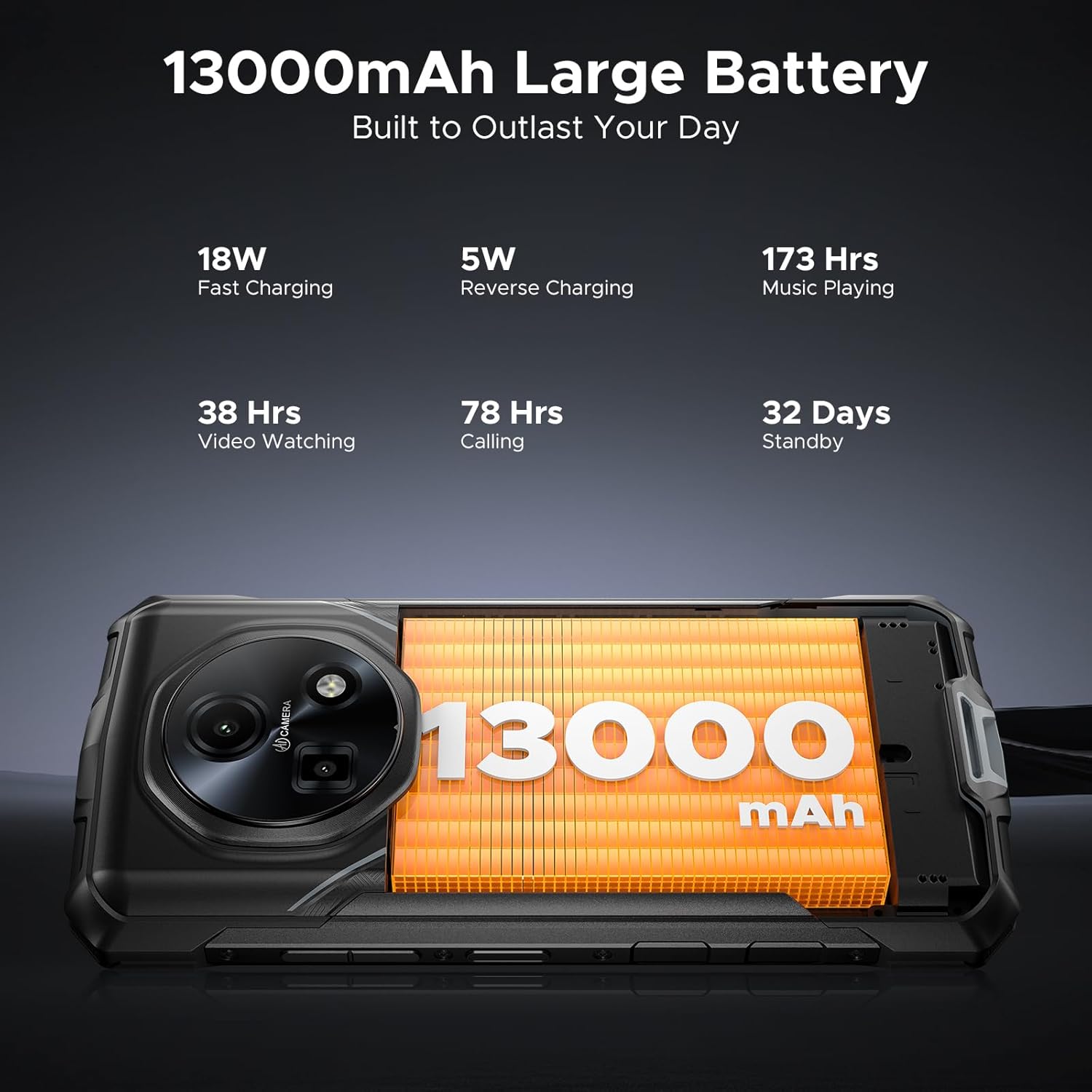
Image: Close-up of the DOOGEE Fire 5 Ultra's charging port with a USB-C cable connected.
Cihazınızı Çalıştırma
Açma/Kapama ve Ekran Kilidi
- To power on, press and hold the Power button until the DOOGEE logo appears.
- Cihazı kapatmak için Güç düğmesini basılı tutun, ardından seçenekler arasından "Kapat"ı seçin.
- To lock the screen, briefly press the Power button. To unlock, press the Power button and swipe up, or use fingerprint/face unlock.
Çift CampIşıklar
The DOOGEE Fire 5 Ultra features dual camping lights on the back, providing illumination for various situations. These lights offer three modes: illumination, strobe, and SOS.
- Etkinleştirme: Access the quick settings panel or a dedicated app to control the campışıkları yakıyor.
- Modlar: Switch between steady illumination, strobe (flashing), and SOS (Morse code for distress).
- Brightness & Timer: Adjust the brightness level and set a timer for automatic shut-off through the phone's settings or the dedicated app.

Image: The back of the DOOGEE Fire 5 Ultra showing the dual camping lights illuminated.
Video: A demonstration of the DOOGEE Fire 5 Ultra's powerful dual camping lights, showcasing their brightness and different modes.
Kamera Fonksiyonları
The phone is equipped with a 48MP AI main camera and an 8MP front camera. The camera app offers various modes for photography and video recording.
- Ana Kamera: Supports AI shooting, night mode, panorama, and 2K video recording.
- Ön Kamera: Features beauty mode for enhanced selfies and supports face unlock.
- Erişim: Ana ekrandan veya kilit ekranından Kamera uygulamasını açın.

Image: Close-up of the DOOGEE Fire 5 Ultra's rear camera module.
Ekran ve Gezinme
The 6.6-inch HD IPS display features a 90Hz refresh rate for smooth visuals.
- Navigasyon: Use standard Android gestures or on-screen navigation buttons.
- Koyu Mod: Enable Dark Mode in display settings for comfortable viewDüşük ışıkta çekim.
Video: A demonstration of the DOOGEE Fire 5 Ultra's 6.6-inch HD+ IPS display with a 90Hz refresh rate, showing smooth visuals.
Güvenlik Özellikleri
- Yan Parmak İzi Kimliği: Register your fingerprints in the Security settings for quick and secure unlocking. The sensor is located on the side of the device.
- Yüz Kimliği: Kolay kilit açma için yüz tanıma özelliğini ayarlayın.
Connectivity and Other Functions
- 4G LTE: Ensures stable cellular connectivity.
- NFC: For contactless payments and quick data transfer. Activate in Settings > Connected devices > NFC.
- OTG'li: On-The-Go functionality allows connecting USB devices like flash drives or external keyboards.
- FM Radyo: Listen to FM radio stations (may require headphones as an antenna).
Dayanıklılık ve Koruma
The DOOGEE Fire 5 Ultra is built to withstand harsh conditions, certified with industry-leading durability standards.
- IP68/IP69K Rating: This certification indicates the device is highly resistant to dust and water. It can withstand immersion in 1.5 meters of water for up to 30 minutes and is protected against high-pressure, high-temperature water jets.
- MIL-STD-810H Compliance: Tested against military standards for durability, the phone is resistant to drops, shocks, vibrations, and extreme temperatures, making it suitable for industrial job sites and outdoor adventures.

Image: The DOOGEE Fire 5 Ultra shown in various rugged scenarios, including being dropped, submerged in water, and covered in mud, illustrating its IP68/IP69K and MIL-STD-810H ratings.
Performans ve Depolama
- İşlemci: Powered by the MediaTek Helio G81 octa-core processor, providing smooth performance for daily tasks and light gaming.
- İşletim Sistemi: Runs on Android 15, offering the latest features and security updates.
- Gemini Yapay Zekası: Integrated Gemini AI optimizes performance and power efficiency based on usage patterns.
- VERİ DEPOSU: Features 32GB RAM (8GB physical + 24GB extended virtual RAM) for efficient multitasking.
- Dahili Depolama: Comes with 256GB of internal storage.
- Genişletilebilir Depolama: Supports storage expansion up to 2TB via a TF (microSD) card (sold separately).

Image: Visual representation of the MediaTek Helio G81 Octa-Core chipset and the 32GB RAM + 256GB ROM configuration.
Video: An animation highlighting the MediaTek Helio G81 Octa-Core processor and its role in the DOOGEE Fire 5 Ultra's performance.
Pil Yönetimi
The DOOGEE Fire 5 Ultra is equipped with a large 13000mAh battery, designed for extended use.
- Kapasite: 13000mAh for prolonged operation, ideal for outdoor activities or remote work.
- Hızlı Şarj: Supports 18W fast charging to reduce recharge times.
- OTG Ters Şarj: The phone can act as a power bank to charge other small devices (e.g., headphones, flashlights) using an OTG cable (not included).
Image: The DOOGEE Fire 5 Ultra displaying its 13000mAh battery capacity and charging status.
Video: A visual representation of the DOOGEE Fire 5 Ultra's 13000mAh large battery and its fast charging capabilities.
Teknik Özellikler
| Özellik | Şartname |
|---|---|
| Model Adı | Fire5 Ultra |
| Marka | DOOGEE |
| İşletim Sistemi | Android 15 |
| CPU Modeli | MediaTek Helio G81 Sekiz Çekirdekli |
| Veri deposu | 32 GB (8 GB fiziksel + 24 GB sanal) |
| Bellek Depolama Kapasitesi | 256 GB (TF kartı ile 2 TB'a kadar genişletilebilir) |
| Ekran Boyutu | 6.6 Inches HD+ IPS Display |
| Çözünürlük | 2560x1440 |
| Yenileme Hızı | 90Hz |
| Ana Kamera | 48 MP Yapay Zeka Destekli Ana Kamera |
| Ön Kamera | 8MP Ön Kamera |
| Pil Kapasitesi | 13000 Miliamp Saat |
| Şarj etme | 18W Hızlı Şarj, OTG Ters Şarj |
| Özel Özellikler | Dual SIM, Octa Core Processor, Water Resistant (IP68/IP69K), MIL-STD-810H, Dual Camping Lights (1200LM), NFC, GPS, Side Fingerprint ID, Face ID, FM Radio |
| Ürün Boyutları | 6.95 x 3.25 x 0.74 inç |
| Ürün Ağırlığı | 13.9 ons |
Sorun giderme
If you encounter issues with your DOOGEE Fire 5 Ultra, refer to the following common solutions:
- Cihaz açılmıyor: Pilin şarjlı olduğundan emin olun. Şarj cihazını bağlayın ve tekrar açmayı denemeden önce birkaç dakika bekleyin.
- Ekran tepkisiz: Try restarting the device by holding the Power button for approximately 10-15 seconds until it reboots.
- Ağ bağlantı sorunları: Check if your SIM card is properly inserted. Verify that mobile data is enabled in settings. If issues persist, contact your network provider.
- Uygulamaların çökmesi veya donması: Clear the cache of the problematic app in Settings > Apps. If the issue continues, try reinstalling the app.
- Yavaş performans: Close unnecessary background applications. Clear cached data regularly. Consider performing a factory reset if performance significantly degrades (back up your data first).
- Şarj sorunları: Ensure the USB cable and charger are securely connected and undamaged. Try a different power outlet or charger if available.
Garanti ve Destek
Your DOOGEE Fire 5 Ultra comes with a manufacturer's warranty. Please refer to the included warranty card for specific terms and conditions.
- Garanti Süresi: Typically includes a 1-year warranty service from the manufacturer.
- İade politikasi: Products purchased may be eligible for return within 30 days of receipt, subject to the retailer's return policy.
- Müşteri Hizmetleri: For technical assistance or warranty claims, please contact DOOGEE customer support. Refer to the contact information provided on the warranty card or the official DOOGEE webalan.

Image: DOOGEE's service commitment, including 1-year warranty and customer service details.


