1. Giriş
Welcome to the user manual for your new TCL 55C6K 55-inch 4K QLED Mini LED Smart Google TV. This television combines advanced display technologies like 4K resolution, QLED, and Mini LED with a high 144Hz refresh rate for exceptional visual clarity and smoothness. Enjoy immersive audio with the integrated Onkyo 2.1 Hi-Fi sound system and Dolby Atmos. Powered by Google TV, it offers a smart and intuitive user experience with access to a wide range of applications and voice control capabilities. This manual provides essential information for setup, operation, maintenance, and troubleshooting to ensure you get the most out of your television.
2. Güvenlik Bilgileri
Before operating your television, please read all instructions carefully. Keep this manual for future reference. Adhere to all warnings and instructions marked on the product.
- Güç Kaynağı: Only use the power cord supplied with the TV. Ensure the voltage yerel elektrik kaynağınıza uygundur.
- Havalandırma: Havalandırma açıklıklarını kapatmayın. Aşırı ısınmayı önlemek için TV'nin etrafında yeterli hava akışı sağlayacak boşluk bırakın.
- Su ve Nem: Televizyonunuzu yağmura veya neme maruz bırakmayın. Vazo gibi sıvı dolu nesneleri televizyonun üzerine koymayın.
- Temizlik: Temizlemeden önce televizyonun fişini çekin. Yumuşak ve kuru bir bez kullanın. Sıvı veya aerosol temizleyiciler kullanmayın.
- Atama: Televizyonunuzu sabit ve düz bir yüzeye yerleştirin. Doğrudan güneş ışığına veya ısı kaynaklarının yakınına yerleştirmekten kaçının.
- Çocuklar: Çocukların televizyona veya sehpaya tırmanmasını önlemek için onları gözetim altında tutun.
- Servis: Bu ürüne kendiniz servis vermeye çalışmayın. Tüm servis işlemleri için kalifiye servis personeline başvurun.
3. Paket İçeriği
Paketin içinde tüm öğelerin mevcut olduğundan emin olun:
- TCL 55C6K 55-inch 4K QLED Mini LED Smart Google TV
- Uzaktan kumanda
- Güç kablosu
- Kullanım Kılavuzu (bu belge)
- Garanti Kartı
- TV Sehpası Bileşenleri (varsa)
4. Kurulum
4.1 Paketin açılması
Televizyonu ambalajından dikkatlice çıkarın. Cihazın boyutu ve ağırlığı nedeniyle bu işlem için iki kişiyle çalışılması önerilir. Ambalaj malzemelerini ilerideki taşıma veya servis işlemleri için saklayın.
4.2 Stand Kurulumu / Duvara Montaj
Stand Kurulumu:
- Hasar görmesini önlemek için televizyonu ekranı aşağıya bakacak şekilde yumuşak, düz bir yüzeye (örneğin battaniye veya köpük) yerleştirin.
- Birlikte verilen vidaları kullanarak stand parçalarını TV'nin altındaki belirlenmiş yuvalara takın. Sağlam bir şekilde sabitlendiklerinden emin olun.
Duvara Montaj:
If you plan to wall mount your TV, please refer to the separate wall mount instruction manual provided with your wall mount kit. Ensure you use a VESA-compatible mount and follow all safety guidelines. Professional installation is recommended.

Figure 4.2.1: TCL 55C6K TV Dimensions
4.3 Cihazları Bağlama
Your TCL 55C6K TV offers various connectivity options. Refer to the image below for port locations.

Şekil 4.3.1: Yan View Limanlarla
- HDMI Bağlantı Noktaları (x4): Connect Blu-ray players, gaming consoles, soundbars, and other HDMI-enabled devices. Supports ARC/eARC on one port and VRR 2.1 for enhanced gaming.
- USB Bağlantı Noktası (x1): Connect USB storage devices for media playback. Supports VRR 3.0.
- RF In (x1): Connect an antenna or cable for digital broadcast reception (DVB-T/T2/S/S2).
- LAN Port (x1): Kablolu internet bağlantısı için bir Ethernet kablosu bağlayın.
- Dijital Ses Çıkışı (Optik) (x1): Connect to an external audio receiver or sound system for high-quality digital audio.
- Wifi: Built-in 5G Wi-Fi for wireless internet connectivity.
- Bluetooth: Version 5.4 for connecting wireless headphones, speakers, or other Bluetooth devices.
4.4 İlk Güç Açma
- Güç kablosunu televizyona ve ardından elektrik prizine bağlayın.
- Uzaktan kumandadaki veya televizyonun üzerindeki güç düğmesine basın.
- Ekranda gösterilen talimatları izleyerek dil seçimi, ağ bağlantısı ve Google TV hesabı kurulumu da dahil olmak üzere ilk kurulumu tamamlayın.
5. Kullanım Talimatları
5.1 Uzaktan Kumandaview
The remote control allows you to navigate the TV's features. Familiarize yourself with the buttons for power, volume, channel, input selection, and smart TV functions.
5.2 Google TV Arayüzü ve Akıllı Özellikler
Your TCL 55C6K runs on Google TV, providing a personalized and intuitive smart TV experience.
- Navigasyon: Use the directional pad and OK button on your remote to browse content and settings.
- Uygulamalar: Access pre-installed apps like Netflix, YouTube, and Amazon Prime Video. Download more apps from the Google Play Store.
- Ses Kontrolü: Use the built-in Google Assistant for voice commands. The TV supports Far Field Voice Control, allowing you to use voice commands without the remote.
- Chromecast Dahili ve AirPlay 2: Akıllı telefonunuzdan veya tabletinizden içeriği doğrudan televizyona aktarın.
- Other Smart Features: Time Shift, EPG (Electronic Program Guide), Recording, Sleep Timer, OSD Multi-language, Favorite Channel List, Channel Editor, PVR (Personal Video Recorder), Parental Control.
5.3 Resim Ayarları
Optimize edin viewing experience with various picture settings.
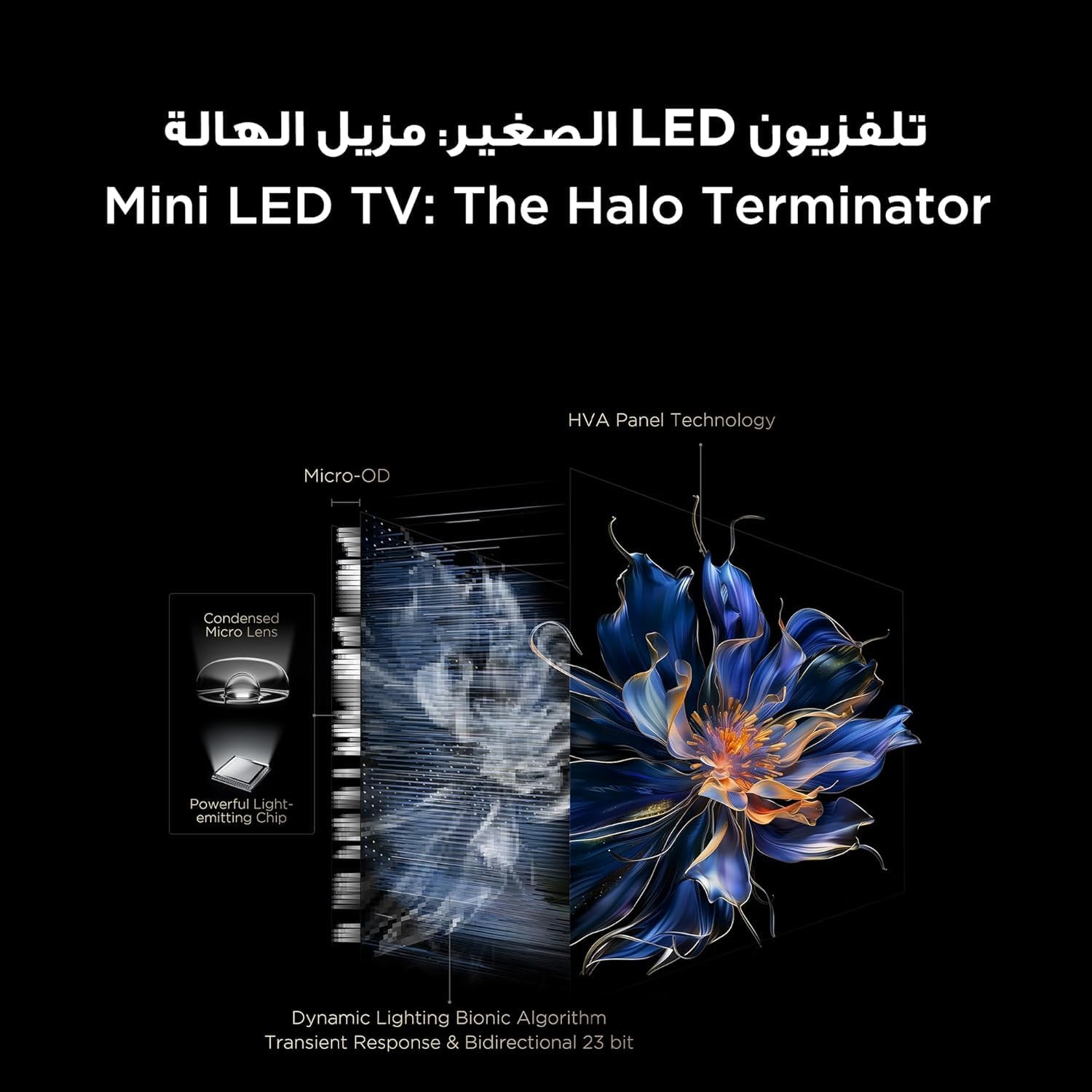
Figure 5.3.1: TV Feature Overview
- Resim Modları: Standard, Sports, Filmmaker Mode, Film, Game, Smart Game.
- HDR Teknolojisi: Supports Dolby Vision IQ, HDR 10+, and HLG for enhanced contrast and color.
- QLED Ekran: Enjoy over a billion hues of vivid color with 93% DCI-P3 color space.
- Mini LED Backlight: Precise dimming zones for deep blacks and high brightness.
- - Hareket Tahmini, Daha akıcı, hızlı hareket eden sahneler için Hareket Telafisi.
- iMax Contrast Enhancer: Improves contrast for a more dynamic picture.
- Renk Sıcaklığı: Adjust between Normal, Cool, and Warm settings.

Figure 5.3.2: QLED Color Technology

Figure 5.3.3: Mini LED Technology
5.4 Ses Ayarları
Experience rich and immersive audio with your TV's advanced sound system.
- Ses Teknolojisi: Features Dolby Atmos and DTS Virtual X for multi-dimensional sound.
- Onkyo 2.1 Hi-Fi Audio: Integrated Onkyo sound system with 10W x 2 speakers and a 20W subwoofer for powerful and clear audio.
- Ses Modları: Dynamic, Standard, Film, Music, Voice, Game, Sports.

Figure 5.4.1: Onkyo 2.1 Sound System
5.5 Oyun Özellikleri
The TCL 55C6K is designed for an enhanced gaming experience.
- 144 Hz Doğal Yenileme Hızı: Enjoy ultra-smooth motion for fast-paced games.
- VRR (Değişken Yenileme Hızı): Ekranın yenileme hızını oyunun kare hızıyla senkronize ederek ekran yırtılmasını ve takılmasını ortadan kaldırır.
- FreeSync Premium Pro: Provides fluid, tear-free gameplay at peak performance.
- ALLM (Otomatik Düşük Gecikme Modu): Oyun konsolu algılandığında TV'yi otomatik olarak düşük gecikme moduna geçirir ve giriş gecikmesini azaltır.
- Oyun Yöneticisi: A dedicated suite of gaming features for optimal performance.

Figure 5.5.1: 144Hz Native Refresh Rate
6. Bakım
6.1 TV'nizin Temizlenmesi
- Ekran: Ekranı yumuşak, tiftiksiz bir bezle nazikçe silin. İnatçı lekeler için hafifçe silin.ampBezi suyla veya özel bir ekran temizleyiciyle (TV ekranları için güvenli olduğundan emin olun) ıslatın ve nazikçe silin. Asla sıvıyı doğrudan ekrana püskürtmeyin.
- Çerçeve: TV çerçevesini ve sehpasını silmek için yumuşak ve kuru bir bez kullanın.
- Temizlemeden önce mutlaka televizyonun fişini prizden çekin.
6.2 Yazılım Güncellemeleri
Your TV may receive software updates to improve performance and add new features. It is recommended to keep your TV connected to the internet to receive these updates automatically. You can also manually check for updates in the TV's settings menu.
7. Sorun Giderme
Televizyonunuzda sorunlarla karşılaşırsanız, aşağıdaki yaygın sorunlara ve çözümlere bakın:
| Sorun | Olası Çözüm |
|---|---|
| Güç yok | Check if the power cable is securely connected to the TV and the power outlet. Ensure the power outlet is working. Try a different outlet. |
| Görüntü yok, ancak ses mevcut | Giriş kaynağını kontrol edin. Bağlı cihazın açık ve düzgün çalıştığından emin olun. Farklı bir HDMI kablosu deneyin. |
| Ses yok ama görüntü var | Check the volume level and mute status. Ensure external audio devices are connected correctly and powered on. Check audio output settings on the TV. |
| Uzaktan kumanda çalışmıyor | Pilleri değiştirin. Uzaktan kumanda ile televizyonun kızılötesi sensörü arasında herhangi bir engel olmadığından emin olun. |
| Ağ bağlantı sorunları | Yönlendiricinizi ve modeminizi yeniden başlatın. Wi-Fi şifrenizi kontrol edin. Mümkünse kablolu Ethernet bağlantısı deneyin. |
| Görüntü kalitesi sorunları (örneğin, bulanık, bozuk) | Check the source resolution. Adjust picture settings (brightness, contrast, sharpness). Ensure the TV's software is up to date. |
If the problem persists after trying these solutions, please contact TCL customer support or your retailer for further assistance.
8. Özellikler
Detailed technical specifications for the TCL 55C6K TV:
| Özellik | Şartname |
|---|---|
| Ekran Boyutu | 55 inç |
| Çözünürlük | 3840 x 2160 (4K Ultra HD) |
| Ekran Teknolojisi | QLED Mini LED |
| En Boy Oranı | 16:9 |
| ViewAçı | 178 derece |
| Yenileme Hızı | 144Hz (Native) |
| VRR Support | 144Hz, FreeSync Premium Pro |
| HDR Desteği | Dolby Vision IQ, HDR 10+, HLG |
| Dahili Bellek | 32 GB |
| İşletim Sistemi | Google televizyon |
| Ses Sistemi | Onkyo 2.1 Hi-Fi Audio |
| Ses Çıkış Gücü | 2 x 10W (speakers) + 20W (subwoofer) |
| Ses Teknolojisi | Dolby Atmos, DTS Virtual X |
| HDMI Bağlantı Noktaları | 4 (ARC/eARC, VRR 2.1 compatible) |
| USB Bağlantı Noktaları | 1 (VRR 3.0 compatible) |
| Bağlantı | Wi-Fi 5G, Bluetooth 5.4, LAN, RF In, Digital Audio Out (Optical) |
| Güç Kaynağı | 220-240V / 50-60Hz |
| Güç Tüketimi (Çalışırken) | 220W |
| Güç Tüketimi (Bekleme) | 0.5W |
| Dimensions (without stand, WxHxD) | 1229x713x55.9 mm |
| Dimensions (with stand, WxHxD) | 1229x776x297 mm |
| Net ağırlığı | 12.4 kilo |
| Brüt ağırlık | 16.3 kilo |
| Menşei ülke | Mısır |
9. Garanti ve Destek
9.1 Garanti Bilgileri
Your TCL 55C6K television comes with a 2-year full free warranty from the date of purchase. Please refer to the warranty card included in your package for detailed terms and conditions. Keep your proof of purchase for warranty claims.
9.2 Müşteri Desteği
For technical assistance, troubleshooting beyond this manual, or warranty service, please contact TCL customer support. You can find contact information on the warranty card or the official TCL website for your region. When contacting support, please have your TV model number (55C6K) and serial number ready.


