1. Giriş
This manual provides detailed instructions for the installation, operation, and maintenance of your MINCO M4A Tuya WiFi Smart Thermostat. This device is designed to control gas boiler heating systems, offering precise temperature management and smart home integration via Tuya WiFi connectivity. Please read this manual thoroughly before installation and use to ensure safe and efficient operation.
2. Güvenlik Bilgileri
- Elektriksel Güvenlik: Installation must be performed by a qualified electrician in accordance with local electrical codes. Always disconnect power before installation or maintenance.
- Cilttage: Termostatın hacmini kontrol edintage rating matches your power supply (AC100-240V).
- Çevre: Do not install the thermostat in areas with high humidity, direct sunlight, or extreme temperatures.
- Çocuklar: Cihazı çocukların erişemeyeceği yerde saklayınız.
- Kullanım Amacı: This thermostat is designed for controlling gas boiler heating systems only. Do not use it for other applications.
3. Ürün Bittiview
The MINCO M4A Smart Thermostat provides intelligent control over your heating system. It features a clear display, touch controls, and WiFi connectivity for remote management via the Tuya Smart app.
3.1 Temel Özellikler
- Akıllı Kontrol: Remote control via mobile app (Tuya Smart).
- Voice Linkage: Eller serbest kullanım için sesli asistanlarla uyumludur.
- Programlanabilir: Time-sharing programming for energy saving.
- Energy Consumption Statistics: Monitor and manage energy usage.
- Kolay Kurulum: Single fire wire power supply, no complex wiring for certain setups.
3.2 Termostat Bileşenleri

Image showing both white and black versions of the MINCO M4A thermostat alongside a smartphone displaying the Tuya Smart app interface. This illustrates the device's appearance and its remote control capability.
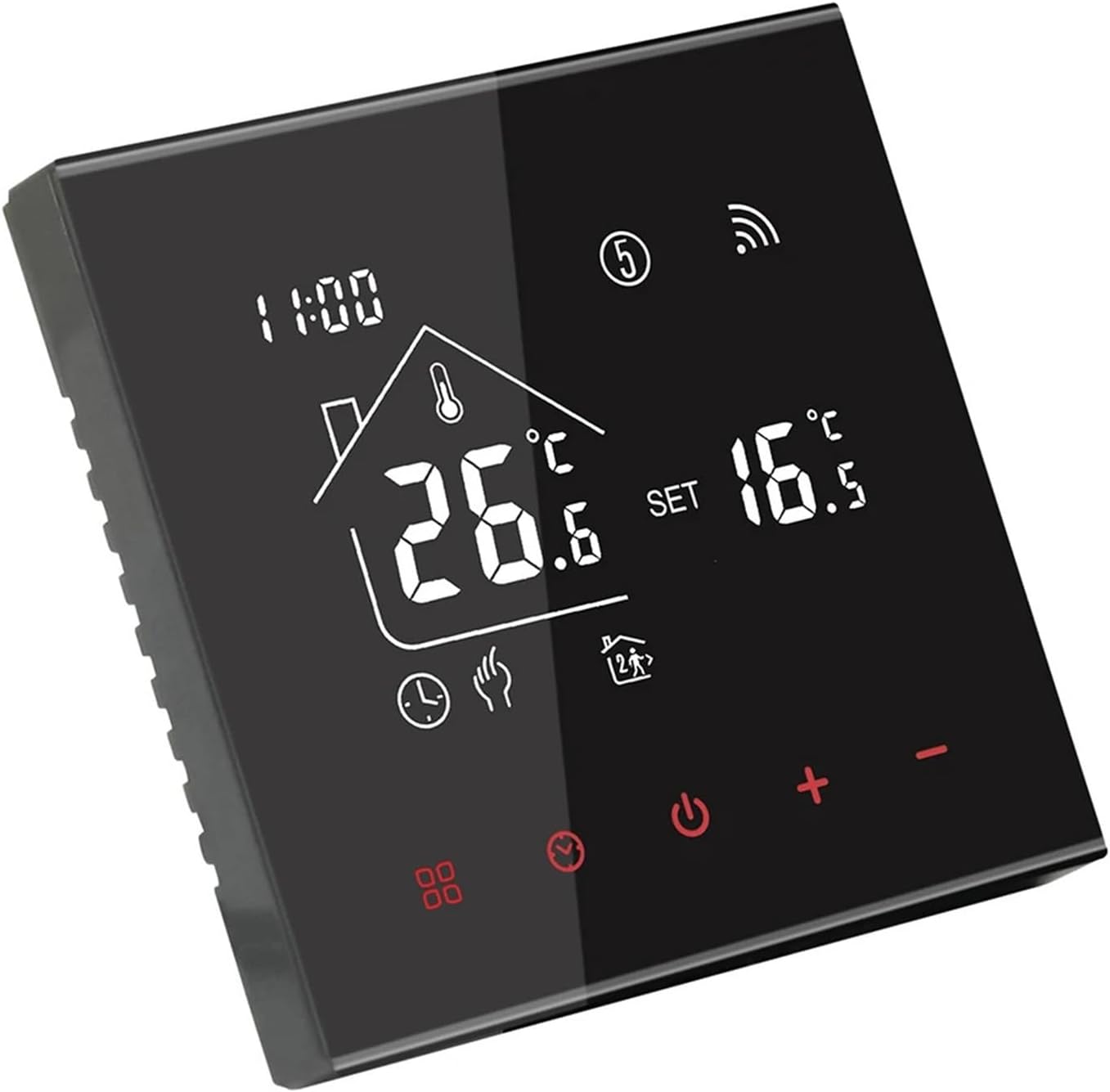
Açılı view of the black MINCO M4A Smart Thermostat, highlighting its sleek design and digital display showing current temperature (26.6°C) and set temperature (16.5°C).

Açılı view of the white MINCO M4A Smart Thermostat, showcasing its clean aesthetic and digital display with temperature readings.
The thermostat features a large LCD display for clear temperature readings and settings, along with intuitive touch buttons for control. The WiFi icon indicates connectivity status, and various mode icons show the current operating state.
4. Kurulum
4.1 Elektrik Tesisatı
UYARI: Disconnect all power to the heating system at the main circuit breaker before beginning installation. Failure to do so may result in electrical shock or equipment damage.
- Montaj: Choose a suitable location on an interior wall, away from drafts, direct sunlight, and heat sources. The recommended installation height is approximately 1.5 meters (5 feet) from the floor.
- Kablolama: Refer to the wiring diagrams below for proper connection. Ensure all connections are secure. This model is designed for gas boiler systems.
- Secure the Thermostat: Mount the thermostat base to the wall using screws. Connect the display unit to the base.
- Gücü Geri Yükle: Kurulum tamamlandıktan ve tüm bağlantılar doğrulandıktan sonra ısıtma sistemine güç verin.

Detailed diagram showing the dimensions (86mm x 86mm front, 14mm depth, 27mm back box depth) and wiring terminals for the black MINCO M4A thermostat. The wiring diagram indicates connections for AC100-240V power (L, N) and boiler control (NO, NC, L7, L8).

Detailed diagram showing the dimensions (86mm x 86mm front, 14mm depth, 27mm back box depth) and wiring terminals for the white MINCO M4A thermostat. The wiring diagram indicates connections for AC100-240V power (L, N) and boiler control (NO, NC, L7, L8).
Wiring Terminal Legend:
- L: Live Wire (AC100-240V)
- N: Neutral Wire (AC100-240V)
- HAYIR: Normally Open (Boiler Control)
- Kuzey Karolina: Normally Closed (Boiler Control)
- L7, L8: Auxiliary connections (refer to specific boiler manual if applicable)
4.2 App Pairing (Tuya Smart)
- İndir uygulaması: Akıllı telefonunuzun uygulama mağazasından (iOS veya Android) “Tuya Smart” veya “Akıllı Yaşam” uygulamasını indirin.
- Kayıt Ol/Giriş Yap: Hesap oluşturun veya mevcut hesabınıza giriş yapın.
- Cihaz Ekle: In the app, tap the "+" icon to add a new device. Select "Small Home Appliances" > "Thermostat" or search for "Thermostat".
- Eşleştirme Moduna Girin: On the thermostat, press and hold the WiFi icon or a designated button (refer to on-screen instructions if available) until the WiFi indicator on the thermostat starts blinking rapidly.
- WiFi'ye bağlanın: Follow the in-app instructions to connect the thermostat to your 2.4GHz WiFi network. Ensure your phone is also connected to the same 2.4GHz network during pairing.
- Cihaz Eklendi: Once successfully paired, the app will confirm the device has been added. You can then rename the thermostat for easy identification.
5. Operasyon
5.1 Temel Kontroller
- Güç Açma/Kapatma: Güç tuşuna baş (⏻) Termostatı açmak veya kapatmak için.
- Sıcaklık Ayarı: Use the "+" and "-" buttons to increase or decrease the desired set temperature. The display will show both the current room temperature and the set temperature.
- Mod Seçimi: Press the mode button (often represented by a fan or gear icon) to cycle through available modes (e.g., Manual, Auto/Program).
5.2 Advanced Features (via Tuya Smart App)
- Uzaktan kumanda: Adjust temperature, change modes, and power on/off from anywhere using the Tuya Smart app.
- Planlama: Set up daily or weekly heating schedules to automatically adjust temperatures based on your routine, optimizing comfort and energy savings.
- Ses Kontrolü: Integrate with Amazon Alexa or Google Assistant for voice commands (e.g., "Alexa, set living room thermostat to 22 degrees").
- Sahne Otomasyonu: Create smart scenes within the Tuya app to automate thermostat behavior based on other smart devices or conditions (e.g., "Turn on heating when outdoor temperature drops below 10°C").
- Enerji İzleme: View historical energy consumption data to identify patterns and further optimize usage.
6. Bakım
- Temizlik: Termostatın ekranını silin veasinYumuşak, kuru bir bezle silin. Aşındırıcı temizleyiciler, çözücüler kullanmayın veya doğrudan cihaza püskürtmeyin.
- Kullanıcı Tarafından Bakımı Yapılabilecek Parça Yok: The thermostat contains no user-serviceable parts. Do not attempt to open or repair the device yourself.
- Yazılım Güncellemeleri: Ensure your Tuya Smart app and thermostat firmware are kept up-to-date for optimal performance and security. Updates are typically managed through the app.
7. Sorun Giderme
| Sorun | Olası Neden | Çözüm |
|---|---|---|
| Termostat açılmıyor. | Elektrik yok; yanlış kablolama. | Check circuit breaker. Verify wiring connections (L, N) are correct and secure. Consult a qualified electrician if unsure. |
| Isıtma sistemi yanıt vermiyor. | Incorrect wiring to boiler; thermostat in wrong mode; boiler issue. | Ensure boiler control wires (NO, NC) are correctly connected. Check thermostat mode (e.g., Manual, Auto). Verify boiler is operational. |
| Wi-Fi'ye bağlanılamıyor. | Incorrect WiFi password; 5GHz network; thermostat too far from router; pairing mode not active. | Ensure correct 2.4GHz WiFi network and password. Move thermostat closer to router. Re-enter pairing mode on thermostat. |
| Sıcaklık ölçümü yanlış. | Termostatın hava akımlarına veya ısı kaynaklarına maruz kalması. | Mümkünse termostatın yerini değiştirin. Sensörü etkileyen dış etkenlerin olmadığından emin olun. |
| Uygulama kontrolü çalışmıyor. | Thermostat offline; app issues; internet connectivity problems. | Check if thermostat WiFi icon is solid. Restart app. Check home internet connection. |
8. Özellikler
- Modeli: M4A Gas Boiler 3A H
- Güç Kaynağı: AC100-240V
- Mevcut Yük: 3A (for Gas Boiler)
- Bağlantı: Kablosuz (2.4GHz)
- Sıcaklık Sensörü: NTC
- Sıcaklık Doğruluğu: ±0.5°C
- Set-point Range: 5-35°C
- Boyutlar: 86mm x 86mm x 14mm (front panel)
- Kurulum: Wall-mounted (standard 60mm back box)
- Ürün Ağırlığı: 1.76 ons (yaklaşık 50g)
- Üretici: Tang Xiaoli Electronic Commerce Shenzhen
9. Garanti ve Destek
This product comes with a standard manufacturer's warranty. For specific warranty terms and conditions, please refer to the documentation provided with your purchase or contact your retailer. For technical support, troubleshooting assistance, or inquiries regarding your MINCO M4A Smart Thermostat, please contact the seller or manufacturer directly.
Üretici: Tang Xiaoli Electronic Commerce Shenzhen


