1. Giriş
Satın aldığınız için teşekkür ederizasing the Monster S350 Bluetooth Speaker. This portable wireless speaker features a touch screen, Bluetooth 6.0 connectivity, and support for TF cards, offering a versatile audio experience. This manual provides detailed instructions for setup, operation, maintenance, and troubleshooting to ensure optimal performance and longevity of your device.
2. Güvenlik Bilgileri
- Hoparlörü aşırı sıcaklıklara, doğrudan güneş ışığına veya yüksek neme maruz bırakmayın.
- Hoparlörü düşürmekten veya sert darbelere maruz bırakmaktan kaçının.
- Hoparlörü sudan ve diğer sıvılardan uzak tutun.
- Hoparlörü kendiniz sökmeye, tamir etmeye veya değiştirmeye çalışmayın. Gerekirse yetkili servis personeliyle iletişime geçin.
- Yalnızca verilen şarj kablosunu veya sertifikalı bir eşdeğerini kullanın.
- Pilleri yerel yönetmeliklere uygun şekilde imha edin. Yakmayın.
3. Paket İçeriği
Lütfen paketi aşağıdaki öğeler açısından kontrol edin:
- Monster S350 Bluetooth Speaker
- USB Şarj Kablosu
- Kullanıcı Kılavuzu
4. Ürün Bittiview
Familiarize yourself with the components of your Monster S350 speaker.

Şekil 4.1: Ön view of the Monster S350 Bluetooth Speaker, showcasing its retro design and touch screen.

Şekil 4.2: Close-up of the speaker's top controls, illustrating the long press function for power and swipe gestures for volume adjustment.
Kontroller ve Bağlantı Noktaları:
- Güç/Ses Düğmesi: Long press to turn on/off. Swipe up to increase volume, swipe down to decrease volume.
- Dokunmatik Ekran: For navigation, settings, and displaying information.
- TF Kart Girişi: Yerel müzik çalma için bir TF (microSD) kartı takın.
- USB-C Şarj Portu: Hoparlörü şarj etmek için.
5. Kurulum
5.1 Hoparlörü Şarj Etme
- USB şarj kablosunu hoparlörün USB-C bağlantı noktasına bağlayın.
- Kablonun diğer ucunu bir USB güç adaptörüne (dahil değildir) veya bir bilgisayarın USB portuna bağlayın.
- The charging indicator on the screen will show the charging status. A full charge typically takes approximately 2-3 hours.
5.2 Açma/Kapatma
- Açmak İçin: Long press the Power/Volume knob until the screen lights up.
- Kapatmak İçin: Long press the Power/Volume knob until the screen turns off.
5.3 Bluetooth Eşleştirme
Pair your Monster S350 with a Bluetooth-enabled device.
- Ensure the speaker is powered on and within range of your Bluetooth device (e.g., smartphone, tablet).
- Bluetooth cihazınızda Bluetooth'u etkinleştirin ve mevcut cihazları arayın.
- Bulunan cihazlar listesinden "Monster S350"yi seçin.
- Eşleştirme işlemi tamamlandıktan sonra, hoparlör başarılı bir bağlantı olduğunu belirtecek ve ses çalmaya başlayabilirsiniz.

Şekil 5.1: The speaker displaying its Bluetooth connection status alongside a smartphone's Bluetooth settings.
5.4 TF Kart Oynatma
TF (microSD) karttan doğrudan müzik çalın.
- Hoparlörün kapalı olduğundan emin olun.
- Insert a TF card (up to 32GB, formatted to FAT32) into the TF card slot until it clicks into place.
- Power on the speaker. The speaker will automatically detect the TF card and switch to local music playback mode, or you can select it from the touch screen menu.

Şekil 5.2: Demonstrating the insertion of a TF card into the speaker's dedicated slot for local music playback.
6. Kullanım Talimatları
6.1 Temel Ses Çalma
- Oynat/Duraklat: Tap the play/pause icon on the touch screen.
- Sonraki Parça: Swipe right on the touch screen or tap the next track icon.
- Önceki parça: Swipe left on the touch screen or tap the previous track icon.
- Ses Kontrolü: Swipe up on the Power/Volume knob to increase volume, swipe down to decrease volume. Alternatively, adjust volume via the connected Bluetooth device.
6.2 Dokunmatik Ekranın Kullanımı
The full-color touchscreen display allows for intuitive navigation and access to various features.
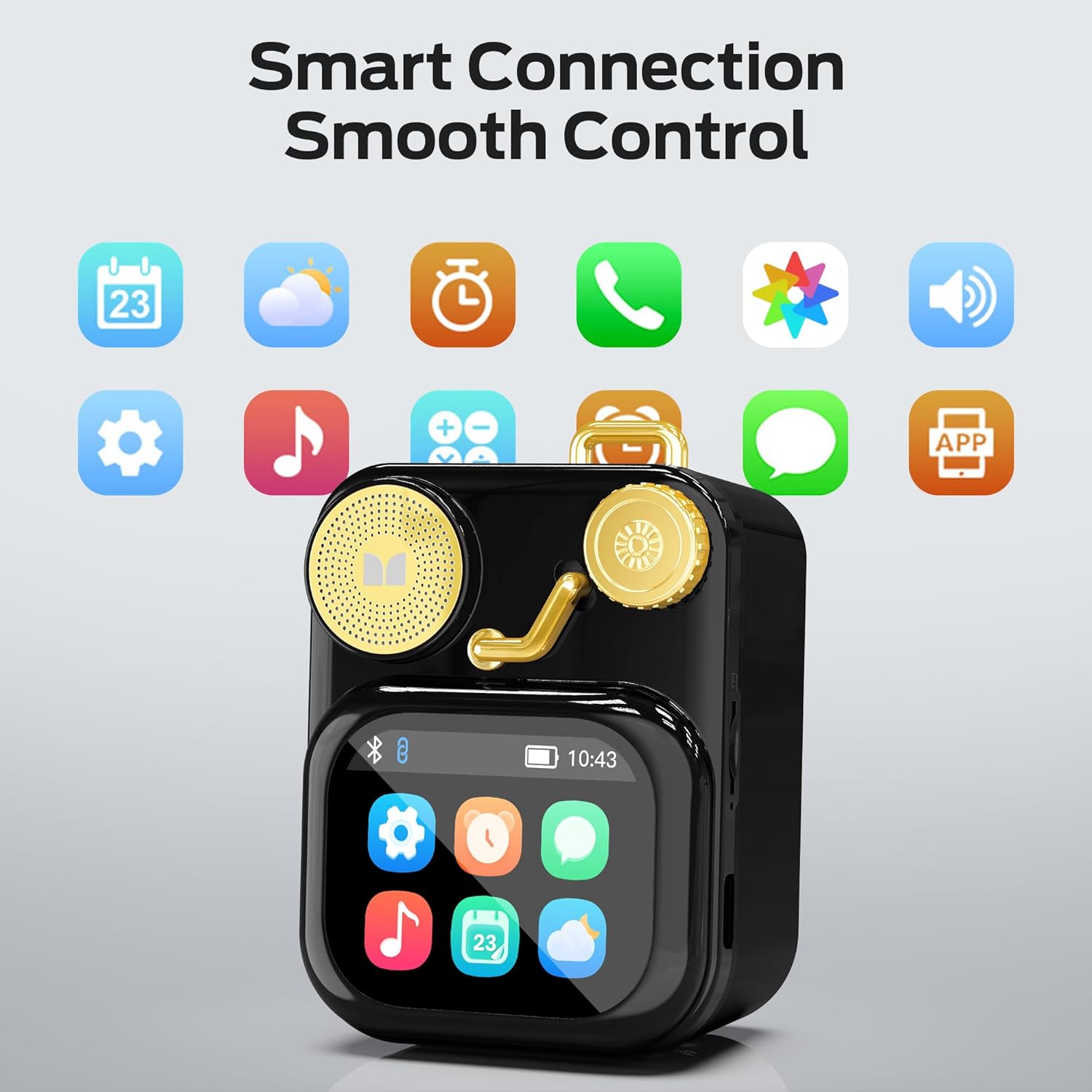
Şekil 6.1: The speaker's touch screen displaying various application icons for smart features.
- Navigasyon: Swipe left/right or up/down to browse through menus and options.
- Seçim: Seçmek için bir simgeye veya seçeneğe dokunun.
- Ayarlar: Access system settings, Bluetooth options, display preferences, and more through the settings icon.
6.3 Akıllı Özellikler
When connected to a compatible smartphone via Bluetooth and the companion app (if available), the speaker can display various smart features:

Şekil 6.2: Examples of smart features displayed on the speaker's screen, including notifications, weather, lyrics, and Bluetooth call information.
- Mobil Bildirimler: Receive alerts for messages and other app notifications.
- Şarkı Bilgileri: Display song titles and artist information during playback.
- Alarmlar: Set and manage alarms directly from the speaker.
- Hava Durumu Güncellemeleri: View Gerçek zamanlı hava durumu bilgisi.
- Beyaz Gürültü: Access soothing white noise sounds for relaxation.
7. Bakım
7.1 Temizlik
- Wipe the speaker's surface with a soft, dry, lint-free cloth.
- Yüzeye zarar verebileceğinden aşındırıcı temizleyiciler, alkol veya kimyasal çözücüler kullanmayın.
- Bağlantı noktalarını toz ve kirden arındırın.
7.2 Depolama
- Hoparlörü serin, kuru ve doğrudan güneş ışığından ve aşırı sıcaklıklardan uzak bir yerde saklayın.
- If storing for an extended period, charge the battery to approximately 50% every three months to preserve battery life.
8. Sorun Giderme
If you encounter issues with your Monster S350 speaker, refer to the following solutions:
| Sorun | Olası Neden | Çözüm |
|---|---|---|
| Hoparlör açılmıyor. | Pil bitmiş. | Sağlanan USB kablosunu kullanarak hoparlörü şarj edin. |
| Hoparlörden ses gelmiyor. | Ses seviyesi çok düşük veya tamamen kapalı. Cihaz eşleştirilmemiş. | Increase speaker volume. Ensure Bluetooth device is paired and playing audio. |
| Bluetooth üzerinden eşleştirme yapılamıyor. | Speaker is not in pairing mode. Device is out of range. Interference. | Ensure speaker is on and Bluetooth is enabled. Move devices closer. Turn off other Bluetooth devices. |
| TF card music not playing. | Card not inserted correctly. Unsupported file format. Corrupted card. | Reinsert TF card. Ensure music files are in a supported format (e.g., MP3). Try a different TF card. |
| Akıllı özellikler çalışmıyor. | Not connected to companion app. App issues. | Ensure the speaker is connected to the companion app on your smartphone. Check app permissions and updates. |
9. Özellikler
Technical details of the Monster S350 Bluetooth Speaker:
- Model Adı: S350
- Marka: Canavar
- Malzeme: Metal
- Renk: Siyah
- Ürün Ölçüleri: 12.5D x 10.5G x 5.4Y Santimetre (yaklaşık 4.9 x 4.1 x 2.1 inç)
- Ürün Ağırlığı: 160 gram (yaklaşık 0.35 pound)
- Bağlantı Teknolojisi: Bluetooth 6.0
- Hoparlör Maksimum Çıkış Gücü: 10 Watt
- Ses Çıkış Modu: Stereo
- Montaj Tipi: Masaüstü
- Pil: 1 Lityum İyon pil (dahil)
- TF Kart Desteği: Yes (up to 32GB, FAT32 format recommended)

Şekil 9.1: Diagram illustrating the internal woofer for deep bass and tweeter for crisp highs, contributing to the speaker's audio quality.
10. Garanti ve Destek
For warranty information or technical support, please refer to the documentation included with your purchase or contact Monster customer service. Keep your proof of purchase for warranty claims.
Müşteri Hizmetleri İletişim: Please visit the official Monster website or refer to your product packaging for the most current support contact information.


