1. Üzeriview
The Element 32-inch 720p HD Xumo Smart TV offers reliable performance and smart functionality in a compact design. Ideal for smaller spaces such as kitchens, dorm rooms, guest rooms, or offices, this television combines a clear HD display with a versatile smart platform and modern connectivity options.
Key features include a 720p resolution display, a 120Hz effective refresh rate for smooth motion, and the integrated Xumo OS for access to numerous streaming applications and free live channels. Connectivity is robust with multiple HDMI ports, USB, LAN, Bluetooth, and Apple AirPlay support. The TV also comes with a voice remote for convenient navigation.
2. Kutuda Neler Var?
Upon unboxing your Element 32-inch Xumo Smart TV, please ensure all the following components are present:
- 32-inch Element Xumo TV
- Voice Remote + 2 AAA batteries
- TV Stand & Screws
- Hızlı Başlangıç Kılavuzu

Image: The contents of the TV box, showing the 32-inch television, its remote control, two stand feet, and a bag of screws for assembly. Dimensions of the TV are also displayed.
3. Kurulum
3.1 TV Sehpasının Takılması
- Çizilmeleri önlemek için televizyonunuzu ekranı alta gelecek şekilde yumuşak ve temiz bir yüzeye dikkatlice yerleştirin.
- Her bir ayaklığı, televizyonun altındaki ilgili vida delikleriyle hizalayın.
- Secure each stand foot using the provided screws. Ensure they are tightened firmly but do not overtighten.
- Televizyonu dikkatlice kaldırın ve sabit, düz bir yüzeye yerleştirin.
Alternatively, the TV supports VESA mounting for wall installation (wall mount hardware sold separately).
3.2 Güç Bağlantısı
Connect the power cord to the TV's power input and then plug it into a standard electrical outlet. A pilot light on the TV will indicate that it is receiving power.
3.3 Initial Setup (Xumo OS)
TV ilk açıldığında, ilk kurulum sürecinde size rehberlik edecektir. Bu adımlar şunları içerir:
- Dil Seçimi: Tercih ettiğiniz dili seçin.
- Ağ bağlantısı: Connect the TV to your home Wi-Fi network or via an Ethernet cable.
- Xumo OS Account Setup: Follow on-screen prompts to set up or log in to your Xumo OS account. This is necessary to access smart features and apps.
- Kanal Tarama: If connecting an antenna, the TV will scan for available channels.

Image: The Element 32-inch Xumo Smart TV is shown on a wooden TV stand, displaying its smart interface with various streaming app icons.
4. Bağlantılar
The Element Xumo Smart TV provides a variety of ports for connecting external devices:
- HDMI Bağlantı Noktaları (3): Connect high-definition devices such as Blu-ray players, gaming consoles, or cable/satellite boxes. One HDMI port supports eARC (enhanced Audio Return Channel) for simplified audio connections to compatible soundbars or AV receivers.
- USB Bağlantı Noktası (1): USB depolama aygıtlarını bağlayın. view Fotoğraflara bakabilir, müzik çalabilir veya videolar izleyebilirsiniz.
- LAN (Ethernet) Bağlantı Noktası: Kablolu internet bağlantısı için.
- Audio Out (Optical) / Headphone Jack: Harici ses sistemlerini veya kulaklıkları bağlamak için.
- Composite Input / Analog Tuner: For connecting older devices or an antenna.
5. TV'nizi Çalıştırma
5.1 Uzaktan Kumanda
The included voice remote allows for intuitive control of your TV. It features dedicated buttons for popular streaming services and a microphone for voice commands.
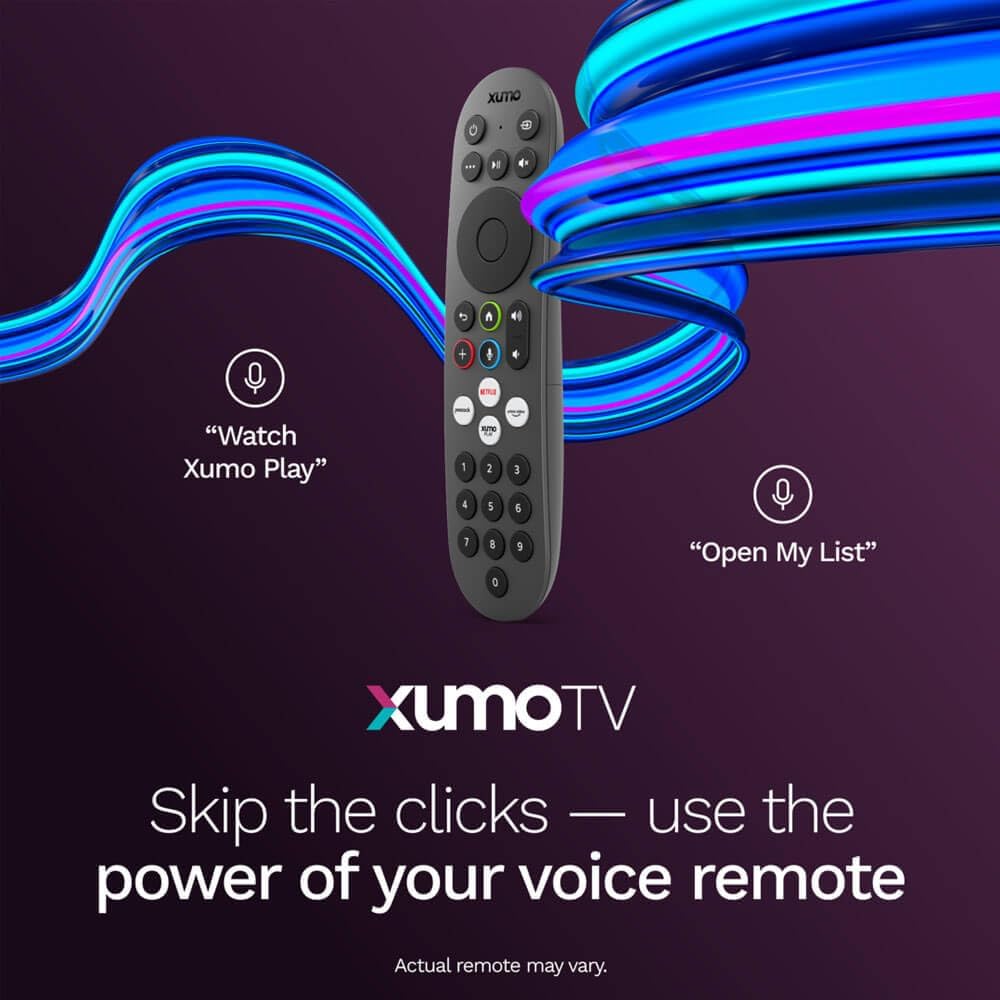
Image: A close-up of the Element Xumo Smart TV voice remote, highlighting its various buttons including a microphone for voice commands and quick access buttons for streaming services.
5.2 Smart Features & Streaming (Xumo OS)
The Xumo OS provides access to over 250 preloaded apps and more than 750 free live channels. You can:
- Arama İçeriği: Use the unified search function to find content across all your installed apps.
- Listem: Curate your personal watchlist for easy access to your favorite shows and movies.
- Free On-Demand Libraries: Explore a wide selection of free on-demand content.
- Ses Kontrolü: Use the voice remote to navigate, search, and control your TV hands-free.

Image: The Xumo TV interface showing a selection of popular streaming applications and content recommendations.
5.3 Görüntü ve Ses Ayarları
Your TV delivers a crisp 720p HD display with a 120Hz effective refresh rate, minimizing motion blur for clear visuals. Dolby Audio processing enhances the sound experience. You can adjust picture and sound settings via the TV's menu to suit your preferences.
- Resim Modları: Select from various preset picture modes (e.g., Standard, Vivid, Movie, Sports) or customize settings like brightness, contrast, and color.
- Ses Modları: Choose from different sound modes (e.g., Standard, Music, Movie, Speech) or adjust bass and treble levels.
5.4 Apple AirPlay & Home Support
Seamlessly stream content or mirror your screen from your iPhone, iPad, or Mac directly to your Element TV using Apple AirPlay. With Apple Home support, you can integrate your TV into your Apple smart home ecosystem for convenient control.
6. Bakım
To ensure the longevity and optimal performance of your Element Xumo Smart TV, follow these maintenance guidelines:
- Ekranın Temizlenmesi: Ekranı yumuşak, kuru ve tüy bırakmayan bir bezle nazikçe silin. İnatçı lekeler için, hafifçe silin.ampBezi su veya ekrana özel bir temizleme solüsyonuyla yıkayın (asla doğrudan ekrana püskürtmeyin).
- Kabinin Temizlenmesi: Televizyon sehpasını temizlemek için yumuşak, kuru bir bez kullanın. Aşındırıcı temizleyiciler veya çözücüler kullanmaktan kaçının.
- Havalandırma: Televizyonunuzun arkasındaki havalandırma deliklerinin aşırı ısınmayı önlemek için kapatılmadığından emin olun.
- Kullanılmadığında Gücü Kapatma: Enerji tasarrufu sağlamak ve kullanım ömrünü uzatmak için televizyonu kullanılmadığı zamanlarda kapatın.
7. Sorun Giderme
If you encounter any issues with your Element Xumo Smart TV, refer to the following common troubleshooting tips:
- Güç Yok: Güç kablosunun hem televizyona hem de elektrik prizine sağlam bir şekilde takılı olduğundan emin olun. Prizin çalışır durumda olduğundan emin olun.
- Görüntü/Ses Yok: Verify that the correct input source is selected. Check all cable connections (HDMI, antenna, etc.) for secure fit.
- Uzaktan Çalışmıyor: Uzaktan kumandadaki AAA pilleri değiştirin. Uzaktan kumanda ile TV'nin kızılötesi sensörü arasında herhangi bir engel olmadığından emin olun.
- Ağ Bağlantı Sorunları: Restart your Wi-Fi router. Check the TV's network settings to ensure it's connected to the correct network and the password is entered correctly.
- Smart App Problems: Try restarting the app. If the issue persists, clear the app's cache or reinstall it. Ensure your TV's software is up to date.
For persistent issues, please contact Element customer support.
8. Özellikler
| Özellik | Şartname |
|---|---|
| Model Numarası | E300AE32C |
| Ekran Boyutu | 32 inç |
| Ekran Çözünürlüğü | 720p (1366x768) |
| Yenileme Hızı | 60 Hz (120Hz Effective) |
| En Boy Oranı | 1.78:1 |
| İşletim Sistemi | Xumo OS |
| Bağlantı | 3x HDMI (1x eARC), 1x USB, LAN (Ethernet), Optical Audio Out, Headphone Jack, Composite Input, Wi-Fi, Bluetooth |
| Özel Özellikler | Bezel-Less Design, Built-In Speaker, Voice Remote, Apple AirPlay & Home Support |
| TV with Stand Dimensions (W x H x D) | 28.8" x 19.2" x 7.0" |
| TV without Stand Dimensions (W x H x D) | 28.8" x 17.0" x 2.7" |
| Ürün Ağırlığı | 8.8 Pound |
9. Garanti ve Destek
The Element 32-inch 720p HD Xumo Smart TV comes standard with a 2 Yıllık Üretici GarantisiBu garanti, normal kullanım koşullarındaki malzeme ve işçilik kusurlarını kapsar. Garanti talepleriniz için lütfen satın alma belgenizi saklayın.
For technical support, warranty inquiries, or further assistance, please refer to the contact information provided in your Quick Start Guide or visit the official Element Electronics webalan.


