1. Giriş
Thank you for choosing the Pisichen 24 inch Touch Screen Gaming Monitor. This manual provides essential information for setting up, operating, and maintaining your monitor. Please read it thoroughly before use to ensure optimal performance and safety.
This monitor features a 24-inch QHD (2560x1440P) display with a 165Hz refresh rate, 2ms response time, and 10-point projected capacitive touchscreen functionality. It supports FreeSync and HDR, offering a vibrant and responsive visual experience for both gaming and professional applications.

Image: The Pisichen 24-inch 2K 165Hz Touch Screen Monitor highlighting its key features like HDR, IPS Panel, and 10-point Touch.
2. Paket İçeriği
Kurulum işlemine başlamadan önce, lütfen pakette tüm bileşenlerin mevcut olduğundan emin olun:
- Pisichen 24 inch Touch Screen Monitor
- Monitör Standı (Taban ve Boyun)
- DP Kablosu
- HDMI Kablosu
- USB B Touch Cable
- USB CC Kablosu
- DC Güç Adaptörü
- Kullanım Kılavuzu (bu belge)
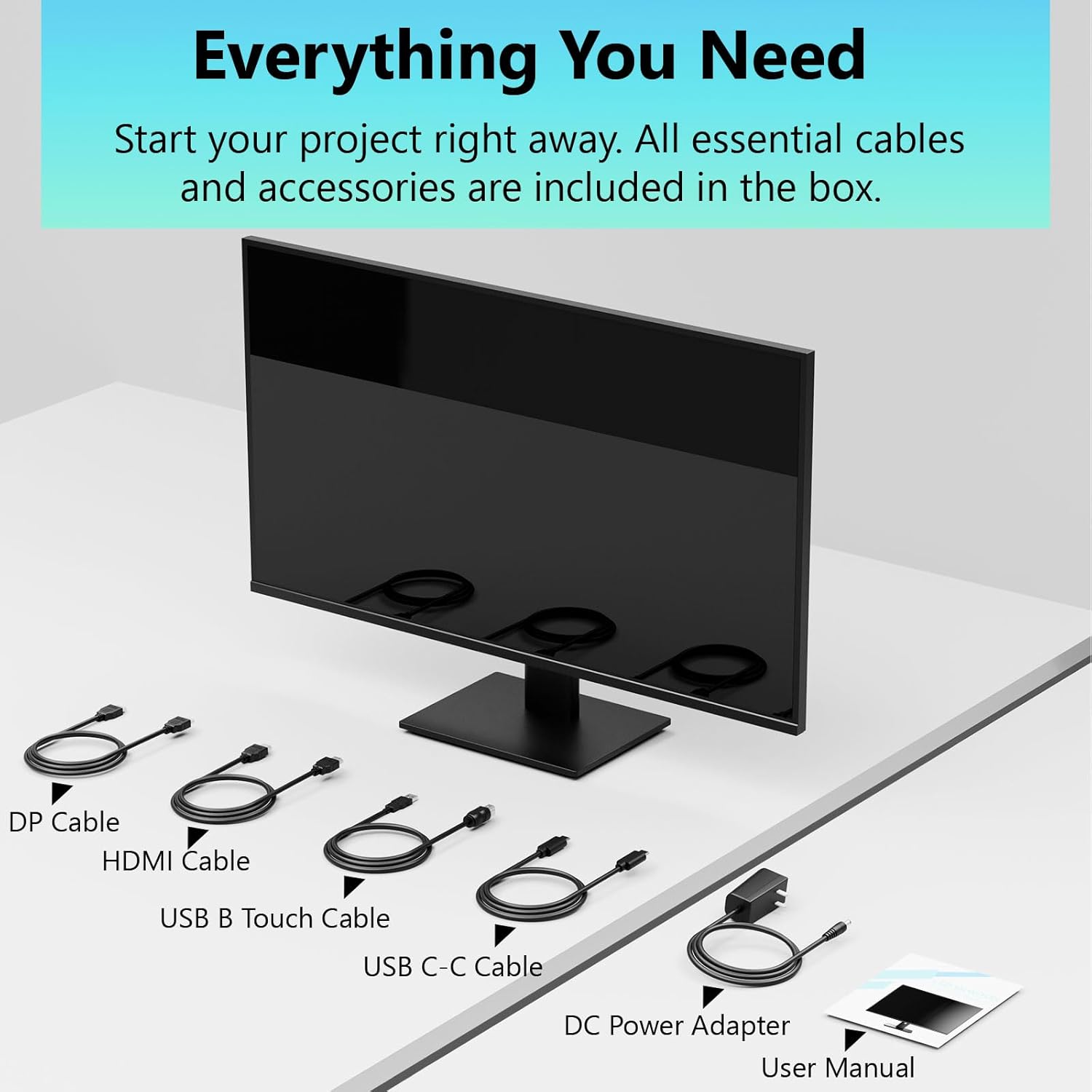
Image: All essential cables and accessories included in the box for the monitor setup.
3. Kurulum Talimatları
3.1 Standın Montajı
- Monitörü ambalajından dikkatlice çıkarın ve çizilmeyi önlemek için yumuşak, temiz bir yüzeye yüzü aşağı bakacak şekilde yerleştirin.
- Standın boyun kısmını monitörün arka paneline takın.
- Birlikte verilen vidaları kullanarak sehpa tabanını sehpa boynuna sabitleyin.
- Monitörü dik konumda yerleştirmeden önce tüm bağlantıların sağlam olduğundan emin olun.
3.2 VESA Montajı (İsteğe bağlı)
This monitor supports VESA mounting. If you plan to use a VESA-compatible arm or wall mount, remove the stand and attach the VESA mount according to the mount's instructions. The VESA pattern is typically 75x75mm or 100x100mm (refer to specifications for exact details).
3.3 Cihaza Bağlanma
The monitor offers multiple connectivity options:
- HDMI: HDMI kablosunun bir ucunu monitörün HDMI portuna, diğer ucunu ise bilgisayarınızın HDMI çıkışına bağlayın.
- Ekran Bağlantı Noktası (DP): DisplayPort kablosunun bir ucunu monitörün DisplayPort bağlantı noktasına, diğer ucunu ise bilgisayarınızın DisplayPort çıkışına bağlayın.
- USB Tip-C: For compatible devices, connect the USB C-C cable to the monitor's USB Type-C port and your device's USB Type-C port. This single cable can transmit video, data, and power (charging).
- USB Type-B (for Touch Functionality): To enable the touch screen feature, connect the USB B Touch Cable from the monitor's USB Type-B port to an available USB Type-A port on your computer.

Image: The monitor's rear panel with various connectivity options, including HDMI, DisplayPort, and USB-C ports.
3.4 Güç Bağlantısı
Connect the DC Power Adapter to the monitor's power input port, then plug the adapter into a power outlet.
3.5 Initial Power On and Touch Compatibility
Press the power button on the monitor. The display should light up. If no image appears, ensure all cables are securely connected and the correct input source is selected on the monitor (via the OSD menu).
For touch functionality, ensure the USB B Touch Cable is connected to your computer. Touch compatibility may vary by operating system and device. Most Windows PCs support multi-touch. For Mac devices, single-touch click is generally supported, but multi-touch may require specific drivers or configurations. Game consoles (PS3/4/5, Xbox, Steam Deck) and some other devices (Fire TV, Apple products like iPhone/iPad) typically do not support touch functionality.

Image: A compatibility chart illustrating which devices support multi-touch or single-touch, and which devices do not support touch functionality with the monitor.
4. Kullanım Talimatları
4.1 Güç Açma/Kapatma
Monitörü açmak veya kapatmak için monitör üzerinde bulunan güç düğmesine basın. Güç gösterge ışığı monitörün durumunu gösterecektir.
4.2 Ekran Üstü Görüntüleme (OSD) Menüsü
The OSD menu allows you to adjust various monitor settings. Use the control buttons (usually located on the back or bottom of the monitor) to navigate the menu. Common menu options include:
- Resim Ayarları: Brightness, Contrast, Sharpness, Color Temperature, HDR mode.
- Görüntü ayarları: Aspect Ratio, Input Source selection (HDMI, DP, USB-C).
- Oyun Ayarları: FreeSync, Response Time (Overdrive), Crosshair.
- Ses Ayarları: Volume (if internal speakers or audio output are present).
- Sistem Ayarları: Dil, OSD Şeffaflığı, Fabrika Ayarlarına Sıfırla.
4.3 Dokunmatik Ekran İşlevselliği
The monitor supports 10-point multi-touch, allowing for intuitive interaction directly on the screen. Ensure the USB B Touch Cable is connected to your computer for this feature to work.
- Tek Dokunuş: Sol tıklamaya eşdeğer.
- Bas ve basılı tut: Sağ tıklamaya eşdeğer.
- Yakınlaştırmak için sıkıştırma: Yakınlaştırmak veya uzaklaştırmak için iki parmağınızı kullanın.
- Tokatlamak: Navigate through content or scroll.

Image: A user interacting with the monitor's touch screen, highlighting its precision and responsiveness for creative tasks.
4.4 Ergonomik Ayarlamalar
The monitor stand allows for tilt adjustments to achieve the most comfortable viewing and touch angle. Gently adjust the screen to your preferred position.
4.5 Göz Bakımı Özellikleri
The monitor includes advanced eye-comfort features such as Flicker-Free technology and Low Bluelight mode to reduce eye strain during prolonged use. These settings can typically be adjusted within the OSD menu.

Image: Visual representation of the monitor's advanced eye-comfort features, including Flicker-Free and Low Bluelight technologies.
5. Bakım
5.1 Monitörün Temizlenmesi
- Temizlemeden önce daima monitörü kapatın ve güç kablosunu çıkarın.
- Hafifçe yumuşak, tüy bırakmayan bir bez kullanın.ampSu veya yumuşak, aşındırıcı olmayan bir ekran temizleyicisi ile temizleyin.
- Temizleyiciyi doğrudan ekrana püskürtmeyin. Önce bir beze uygulayın.
- Ekran yüzeyine zarar verebileceğinden, benzen, tiner, amonyak bazlı temizleyiciler veya aşındırıcı malzemeler kullanmaktan kaçının.
5.2 Depolama
When storing the monitor for an extended period, ensure it is powered off, unplugged, and stored in a cool, dry place away from direct sunlight and extreme temperatures. Use the original packaging if available for best protection.
6. Sorun Giderme
Monitörünüzde sorunlarla karşılaşırsanız, aşağıdaki genel sorun giderme adımlarına bakın:
- Güç Yok: Güç adaptörünün hem monitöre hem de çalışan bir elektrik prizine güvenli bir şekilde bağlı olduğundan emin olun. Güç gösterge ışığının yanıp yanmadığını kontrol edin.
- Görüntü/Sinyal Yok:
- Verify that the video cable (HDMI, DP, or USB-C) is securely connected to both the monitor and your computer.
- Monitörün OSD menüsünde doğru giriş kaynağının seçildiğinden emin olun.
- Bilgisayarınızın ekran ayarlarını kontrol ederek monitörün algılandığından ve etkinleştirildiğinden emin olun.
- Dokunmatik Olmayan İşlevsellik:
- Confirm the USB B Touch Cable is connected from the monitor to your computer.
- Check your computer's device manager to see if the touch screen driver is installed and functioning correctly.
- Refer to the "Initial Power On and Touch Compatibility" section for device-specific limitations.
- Titreyen veya Bozuk Görüntü:
- Video kablosunda hasar veya gevşek bağlantı olup olmadığını kontrol edin.
- Farklı bir video kablosu veya bağlantı noktası deneyin.
- Bilgisayarınızın ekran ayarlarından yenileme hızını ayarlayın.
- Ölü Pikseller: A small number of bright or dark pixels are common in LCD/LED technology and are not considered a defect unless they exceed manufacturer specifications.
Bu adımları denedikten sonra sorun devam ederse lütfen müşteri desteğiyle iletişime geçin.
7. Özellikler
| Özellik | Şartname |
|---|---|
| Marka | Pisichen |
| Model Numarası | 24IN165HZ-QHD |
| Ekran Boyutu | 23.8 inç |
| Çözünürlük | QHD Wide 1440p (2560 x 1440) |
| En Boy Oranı | 16:9 |
| Yenileme Hızı | 165 Hz |
| Tepki Süresi | 2 Milisaniye |
| Görüntü Türü | LED IPS |
| Parlaklık | 400 Kandela (cd/m²) |
| Kontrast Oranı | 3000:1 |
| ViewAçı | 178 Derece |
| Renk Gamı | %99 |
| Picture Quality Enhancement | Yüksek Çözünürlüklü (HDR) |
| Uyarlanabilir Senkronizasyon | Serbest Senkronizasyon |
| Bağlantı Teknolojisi | DisplayPort, HDMI, USB Type-C, USB Type-B |
| Ek Özellikler | Tilt Adjustment, 10-Point Touchscreen |
| Ürün Boyutları (D x G x Y) | 0.75"D x 21.5"G x 12.7"Y |
| Ürün Ağırlığı | 5.38 Kilogram |
| Renk | Siyah |
8. Garanti Bilgileri
This product comes with a 1-year limited warranty from the date of purchase. The warranty covers manufacturing defects and workmanship under normal use. It does not cover damage caused by misuse, accidents, unauthorized modifications, or external factors. Please retain your proof of purchase for warranty claims.
9. Müşteri Desteği
For technical assistance, warranty claims, or further inquiries, please contact Pisichen customer support. You may find contact information on the official Pisichen websitenizden veya perakendeciniz aracılığıyla.
Ek kaynaklar ve ürün bilgileri için şu adresi ziyaret edin: Pisichen Store on Amazon.


