giriiş
Welcome to the user manual for your SWOFY D08 Android 13 MP3 Player. This device is designed to provide a versatile and high-quality portable audio and video experience. Featuring an Android 13 operating system, Bluetooth 5.0, dual-band Wi-Fi, and a 4-inch touchscreen, the D08 allows you to enjoy music, videos, and various applications with ease. Please read this manual carefully to ensure proper setup, operation, and maintenance of your device.
Paket İçeriği
Başlamadan önce lütfen paketinizde tüm öğelerin mevcut olduğundan emin olun:
- SWOFY D08 MP3 Player (160GB)
- USB C Tipi Kablo
- Kablolu Kulaklık
- Kullanıcı Kılavuzu
Cihaz Bittiview
Familiarize yourself with the physical components of your SWOFY D08 MP3 Player.

Resim: Ön ve yan view of the SWOFY D08 MP3 Player, showcasing its 4-inch touchscreen and physical buttons.
- 4 inç HD Dokunmatik Ekran: Main interface for interaction.
- Güç Düğmesi: Cihazın yan tarafında bulunur ve cihazı açıp kapatmak, uyku modundan çıkarmak/uyandırmak için kullanılır.
- Ses Düğmeleri: Ses çıkış seviyesini ayarlayın.
- USB-C Bağlantı Noktası: Şarj ve veri aktarımı için.
- 3.5 mm Kulaklık Girişi: Kablolu ses çıkışı için.
- MicroSD Kart Yuvası: Genişletilebilir depolama için.
- Dahili Hoparlör: Kulaklık kullanmadan ses oynatmak için.
Kurmak
1. Cihazın Şarj Edilmesi
Before first use, fully charge your SWOFY D08 MP3 Player. Connect the provided USB Type-C cable to the device's USB-C port and the other end to a USB power adapter (not included) or a computer's USB port. The battery indicator on the screen will show charging status.

Image: The SWOFY D08 MP3 Player displaying a 100% battery charge icon, indicating a full charge. The image also highlights the 2000mAh battery capacity and estimated usage times: 60 hours standby, 20 hours music, 6 hours video, and 3-4 hours charging time.
- Tam şarj genellikle 3-4 saat sürer.
- The 2000mAh battery provides up to 35 hours of continuous music playback or 10 hours of 1080p video viewIng.
2. Açma/Kapama
- Açmak İçin: Press and hold the Power button on the side of the device until the screen lights up.
- Kapatmak İçin: Güç tuşuna basılı tutun, ardından ekrandaki seçeneklerden "Kapat" seçeneğini seçin.
- Uyumak/Uyanmak: Briefly press the Power button to put the device into sleep mode or wake it up.
3. İlk Kurulum ve Wi-Fi Bağlantısı
Upon first power-on, follow the on-screen prompts to complete the initial setup, including language selection and Wi-Fi connection.
- From the home screen, tap the "Settings" icon.
- Select "Network & internet".
- Wi-Fi'yi "Açık" konumuna getirin.
- İstediğiniz Wi-Fi ağını listeden seçin.
- İstenirse ağ şifresini girin, ardından "Bağlan"a dokunun.

Image: The SWOFY D08 MP3 Player's home screen, displaying a grid of application icons including Spotify, Pandora, Audible, FM Radio, Play Store, and Chrome, illustrating the Android 13 OS interface.
4. Expanding Storage with a MicroSD Card
The device comes with 32GB internal storage and a 128GB microSD card. You can expand storage further up to 1TB using an additional microSD card.
- Cihazın yan tarafında bulunan microSD kart yuvasını bulun.
- microSD kartı yerine oturana kadar yavaşça yuvasına yerleştirin. Kartın doğru yönde takıldığından emin olun.
- Çıkarmak için, kartı hafifçe içeri doğru itin, kendiliğinden dışarı fırlayacaktır.
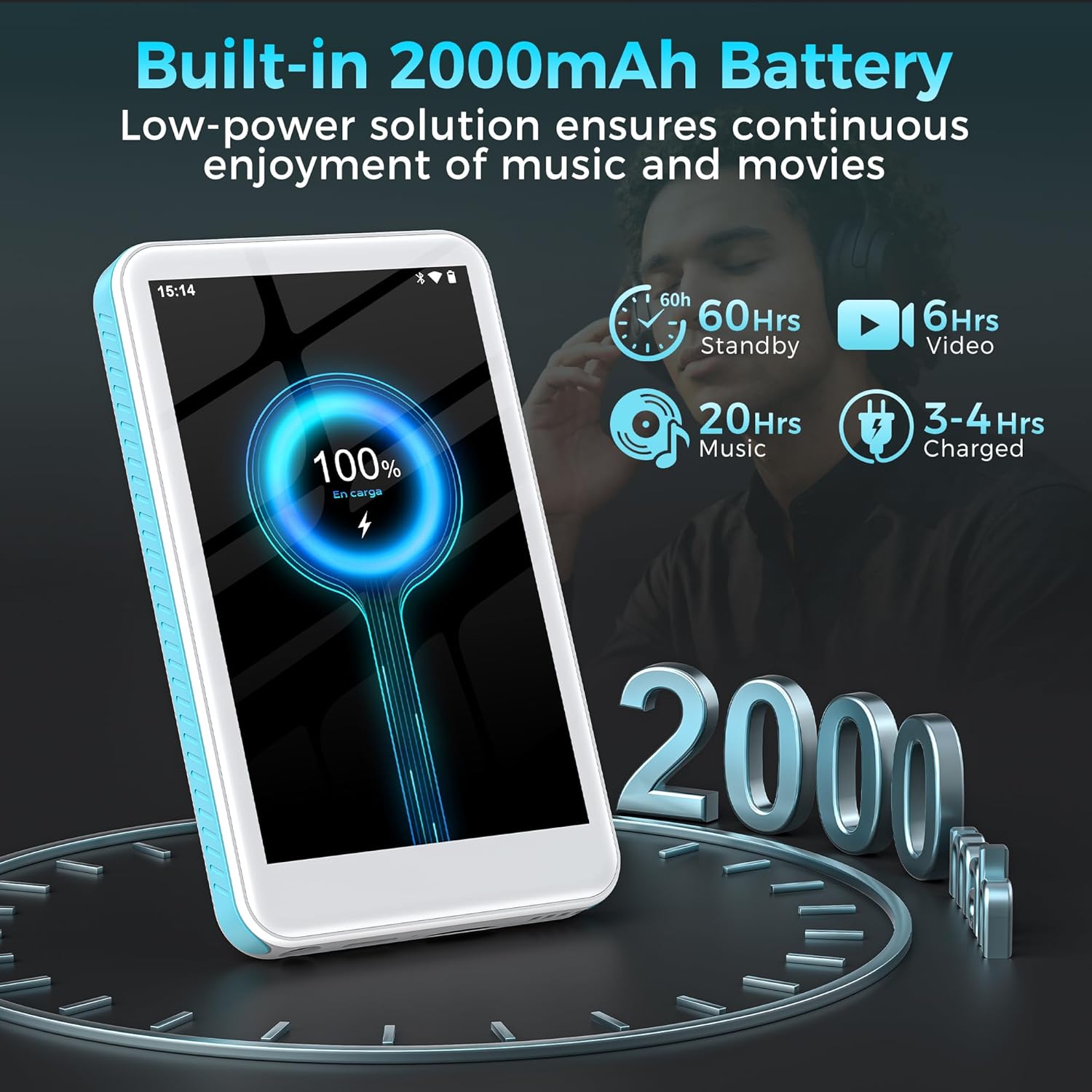
Image: The SWOFY D08 MP3 Player with a 1TB microSD card being inserted into its slot, illustrating the device's expandable storage capability. The image also highlights the 160GB total storage capacity.
Kullanım Talimatları
1. Arayüzde Gezinme
The SWOFY D08 uses an Android 13 operating system with a 4-inch touchscreen. Swipe left/right to navigate between home screens, tap icons to open apps, and swipe down from the top for quick settings and notifications.
2. Müzik Çalma
The device supports various audio formats including MP3, FLAC, WAV, AAC, APE, DSD, M4A, and OGG. Use the pre-installed music player app or download your preferred streaming apps from the Play Store.
- Müzik Ekleme: Connect the player to your computer using the USB-C cable. The player will appear as a removable storage device. Drag and drop your music files into the "Music" folder.
- Müzik Çalma: Open the music player app. You can browse music by artist, album, genre, or create custom playlists.
- Ekolayzer: Access the built-in equalizer within the music app settings to customize bass and treble levels.

Image: The SWOFY D08 MP3 Player displaying a music playback screen with album art, song title "Crazy Dream", and playback controls. This illustrates the user interface for audio playback.
3. Video Oynatma
The D08 supports 1080p HD video playback and is compatible with formats such as RM, AVI, RMVB, FLV, MP4, DAT, MKV, MPG, MOV, and TS. Use the pre-installed video player app.
- Adding Videos: Connect the player to your computer and transfer video files to the "Videos" folder.
- Playing Videos: Open the video player app and select your desired video.

Image: The SWOFY D08 MP3 Player displaying a video playback screen with a high-definition image from a movie, highlighting its 1080p HD video capabilities and 4.0-inch IPS screen.
4. Bluetooth Bağlantısı
Connect your D08 to Bluetooth headphones, speakers, or car stereos using Bluetooth 5.0 for wireless audio.
- Ensure Bluetooth is enabled on your D08 (Settings > Connected devices > Bluetooth).
- Bluetooth aksesuarınızı eşleştirme moduna getirin.
- On the D08, tap "Pair new device" and select your accessory from the list.
- İstendiğinde eşleştirmeyi onaylayın.

Image: The SWOFY D08 MP3 Player displaying a music playback screen with icons indicating Bluetooth connectivity to headphones, a portable speaker, and a car audio system, demonstrating its versatile wireless pairing capabilities.
5. Diğer Özellikler
- FM Radyo: Access the FM Radio app to listen to local radio stations.
- Ses Kaydedici: Use the built-in voice recorder for memos or lectures.
- E-kitap Okuyucu: Read e-books using compatible apps.
- Play Store: Download and install additional applications like Spotify, Pandora, Audible, and more.
Bakım
1. Cihazınızı Temizleme
- Use a soft, lint-free cloth to clean the screen and body of the player.
- Avoid using abrasive cleaners, alcohol, or solvents, as these can damage the finish.
- Bağlantı noktalarını toz ve kalıntılardan uzak tutun.
2. Pil Bakımı
- To prolong battery life, avoid exposing the device to extreme temperatures (hot or cold).
- Do not allow the battery to fully discharge frequently. Charge it when the battery level is low.
- Cihazı uzun süre saklayacaksanız, saklamadan önce yaklaşık %50'ye kadar şarj edin.
3. Yazılım Güncellemeleri
Periodically check for software updates to ensure optimal performance and access to new features. Go to Settings > System > System update.
Sorun giderme
Cihaz Açılmıyor
- Ensure the device is sufficiently charged. Connect it to a power source and wait a few minutes before attempting to power on.
- Zorla yeniden başlatmayı gerçekleştirmek için Güç düğmesini en az 10-15 saniye basılı tutun.
Cannot Connect to Wi-Fi or Bluetooth
- Ensure Wi-Fi/Bluetooth is enabled in Settings.
- Restart the device and your router/Bluetooth accessory.
- For Wi-Fi, verify the password. For Bluetooth, ensure the accessory is in pairing mode and within range.
- Ağı/cihazı unutun ve yeniden bağlanmayı deneyin.
Audio/Video Playback Issues
- Kontrol et file format compatibility (refer to Specifications section).
- Ses seviyesinin tamamen kısılmadığından veya çok düşük ayarlanmadığından emin olun.
- Try playing a different file to determine if the issue is with a specific file.
- If using headphones, ensure they are properly connected or paired.
Device is Slow or Unresponsive
- Gereksiz arka plan uygulamalarını kapatın.
- Sık kullanılan uygulamaların önbelleğini temizleyin (Ayarlar > Uygulamalar > [Uygulama Adı] > Depolama ve önbellek > Önbelleği temizle).
- Cihazı yeniden başlatın.
- Sorunlar devam ederse, fabrika ayarlarına sıfırlamayı düşünün (Note: This will erase all data. Back up important fileİlk önce. Settings > System > Reset options > Erase all data (factory reset)).
Özellikler
| Model Adı | D08 |
| İşletim Sistemi | Android 13 |
| İşlemci | 8 çekirdekli 2.0GHz |
| Veri deposu | 3 GB |
| Dahili Depolama | 32GB (with included 128GB microSD card for 160GB total) |
| Genişletilebilir Depolama | MicroSD kart ile 1 TB'a kadar |
| Pil | 2000mAh Lityum Polimer |
| Görüntülemek | 4-inch HD Touchscreen, 480*800P Resolution, IPS |
| Bağlantı | Bluetooth 5.0, Dual-Band Wi-Fi, USB-C |
| Ses Biçimleri | MP3, FLAC, WAV, AAC, APE, DSD, M4A, OGG |
| Video Formatları | RM, AVI, RMVB, FLV, MP4, DAT, MKV, MPG, MOV, TS |
| Özel Özellikler | Built-In Speaker, Equalizer, FM Radio, Voice Recorder, E-book Reader, Play Store support |
| Boyutlar | 5.83 x 5.83 x 0.75 inç |
| Ağırlık | 7.4 ons |
Garanti ve Destek
Your SWOFY D08 MP3 Player comes with a standard manufacturer's warranty. Please refer to the warranty card included in your package for specific terms and conditions. For technical support, troubleshooting assistance, or warranty claims, please contact SWOFY customer service through the retailer where you purchased the product or visit the official SWOFY webalan.
Ek kaynaklar ve sık sorulan sorular için lütfen şu adresi ziyaret edin: SWOFY Store on Amazon.
Önemli Güvenlik Bilgileri
- Cihazı kendiniz sökmeyin, onarmayın veya değiştirmeyin.
- Cihazı suya, neme veya aşırı sıcaklıklara maruz bırakmaktan kaçının.
- Yalnızca onaylı şarj cihazlarını ve aksesuarları kullanın.
- Cihazı ve pilini yerel yönetmeliklere uygun şekilde sorumlu bir şekilde atın.


