1. Giriş
This manual provides essential information for the proper setup, operation, and maintenance of your NIMO 15.6 inch Laptop Computer. Please read this manual thoroughly before using your device to ensure optimal performance and longevity. Keep this manual for future reference.
2. Ürün Bittiview
2.1. Laptop Components
The NIMO 15.6 inch Laptop features a Full HD display, a backlit keyboard, and an integrated fingerprint reader for secure access. It is powered by an AMD Ryzen 5 3500U processor and runs on Windows 11.

Şekil 2.1: Ön view of the NIMO 15.6 inch Laptop, showcasinEkran ve klavye düzeni.
2.2. Bağlantı Noktaları ve Konnektörler
Your NIMO laptop is equipped with various ports for comprehensive connectivity, allowing you to connect peripherals and external devices.

Figure 2.2: Expanded Connectivity Options. This image illustrates the location and type of ports available on the laptop, including Type-C (Charge Only), USB 3.0, HDMI, Type-C (Full Function), Charge LED, Micro SD Reader, USB 2.0, USB 3.0, Headphone Combo, and Kensington Lock.
- C Tipi (Sadece Şarj): Güç girişi için.
- USB 3.0: Yüksek hızlı veri aktarımı için.
- HDMI: Harici ekranlara bağlanmak için.
- C Tipi (Tam Fonksiyonlu): Supports Power Delivery (PD), DisplayPort (DP), and data transfer.
- Şarj LED'i: Şarj durumunu gösterir.
- Mikro SD Kart Okuyucu: For reading Micro SD cards.
- USB 2.0: Standart USB aygıtları için.
- USB 3.0: Yüksek hızlı veri aktarımı için.
- Headphone Combo: Ses çıkışı ve mikrofon girişi için.
- Kensington kilidi: Fiziksel güvenlik için.
3. Kurulum
3.1. İlk Şarj
Before first use, connect the laptop to a power outlet using the provided 65W PD Type-C charger. The Charge LED indicator will illuminate. Allow the battery to charge fully.

Figure 3.1: Type-C 65W PD Charger. This image highlights the versatility of the 65W Power Delivery charger, capable of charging the laptop, tablets, and smartphones, reducing cable clutter.
3.2. Açma
Open the laptop lid. Press the power button located on the keyboard deck. The laptop will boot up, and you will be guided through the Windows 11 initial setup process.
3.3. Windows 11 Kurulumu
Follow the on-screen instructions to configure your Windows 11 operating system. This includes selecting your region, language, connecting to a Wi-Fi network, and setting up your user account.
4. Kullanım Talimatları
4.1. Klavye ve Giriş
The laptop features a backlit keyboard for comfortable typing in various lighting conditions, a responsive touchpad, and a numeric keypad for data entry.

Figure 4.1: Effortless Typing in Any Environment. This image demonstrates the backlit keyboard, touchpad, fingerprint reader, and numeric keypad, enhancing user experience and productivity.
- Arkadan Aydınlatmalı Klavye: Basın Fn key and the appropriate function key (usually F3 or F4, indicated by a keyboard icon) to adjust the backlight brightness or turn it on/off.
- Dokunmatik yüzey: Use the touchpad for navigation. Supports multi-touch gestures for scrolling, zooming, and other functions.
- Sayısal tuş takımı: Provides dedicated number keys for efficient data entry.
4.2. Parmak İzi Tanıma
The integrated fingerprint reader allows for secure and quick login. Set up your fingerprint in Windows Settings under 'Sign-in options'.
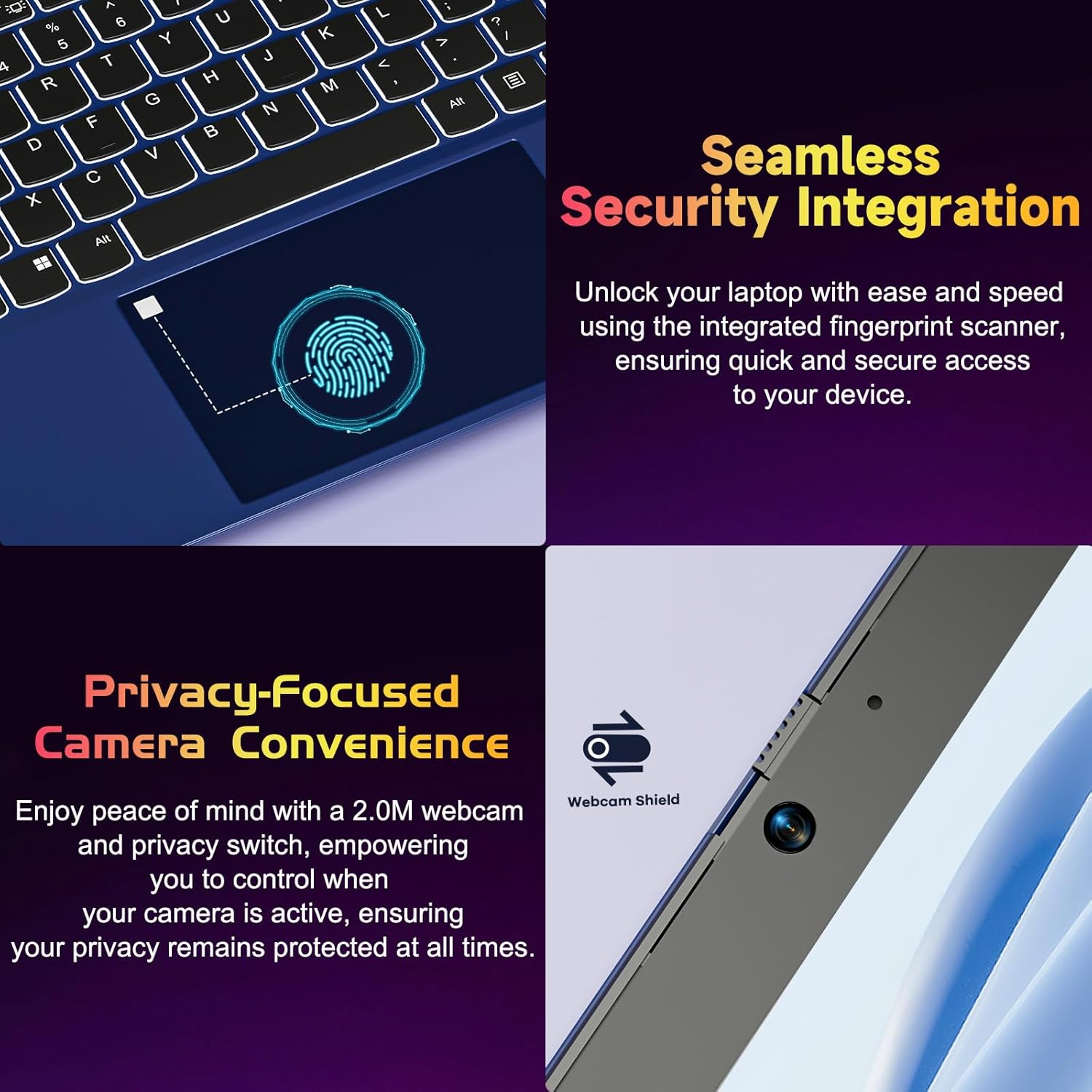
Figure 4.2: Seamless Security Integration and Privacy-Focused Camera. This image highlights the fingerprint scanner for quick and secure access, and the 2.0MP webcam with a physical privacy switch for enhanced user privacy.
4.3. Ekran Özellikleri
The 15.6 inch Full HD (1920 x 1080 Pixel) IPS display offers vivid visuals and a wide viewing angle. The 180° lay-flat hinge allows for flexible screen positioning, ideal for sharing content.

Figure 4.3: Vivid Full HD Display. This image emphasizes the laptop's 15.6-inch Full HD (1920x1080) IPS display, offering bright visuals and eye protection.

Figure 4.4: 180° Lay-Flat Hinge. This image illustrates the laptop's ability to lay flat, expanding usage scenarios and facilitating content sharing.
4.4. Webcam Privacy
The laptop includes a 2.0MP webFiziksel gizlilik anahtarına sahip kamera (Webcam Shield). Slide the switch to cover the camera lens when not in use to ensure your privacy.
5. Bakım
- Temizlik: Ekranı ve dış yüzeyi temizlemek için yumuşak, tiftiksiz bir bez kullanın. İnatçı lekeler için hafifçe silin.ampBezi su veya ekran temizleyici ile silin. Sert kimyasallardan kaçının.
- Pil Bakım: Pil ömrünü uzatmak için pili sık sık tamamen boşaltmaktan kaçının. Dizüstü bilgisayarınızı uzun süre kullanmayacaksanız serin ve kuru bir yerde saklayın.
- Yazılım Güncellemeleri: En iyi performansı ve güvenliği sağlamak için Windows işletim sisteminizi ve sürücülerinizi düzenli olarak güncelleyin.
- Depolama Genişletme: The laptop supports dual DDR4 SO-DIMM slots and M.2 NVMe SSD for memory and storage expansion. Consult a qualified technician for upgrades.
6. Sorun Giderme
6.1. Güç Sorunları
- Dizüstü bilgisayar açılmıyor: Ensure the laptop is charged. Connect the charger and wait a few minutes before attempting to power on again.
- Pil şarj olmuyor: Verify the charger is properly connected to both the laptop and the power outlet. Try a different outlet.
6.2. Ekran Sorunları
- Ekran boş: Check if the laptop is powered on. Try adjusting screen brightness using the function keys. If an external monitor is connected, ensure it is properly configured.
6.3. Performans Sorunları
- Dizüstü bilgisayar yavaş: Close unnecessary applications. Check for background processes consuming high resources. Ensure sufficient free storage space. Consider performing a system scan for malware.
6.4. Bağlantı Sorunları
- Wi-Fi bağlanmıyor: Wi-Fi'nin etkinleştirildiğinden emin olun. Yönlendiricinizi ve dizüstü bilgisayarınızı yeniden başlatın. Windows'taki ağ ayarlarını kontrol edin.
7. Özellikler
| Özellik | Detay |
|---|---|
| Marka | NIMO |
| Model Adı | NIMO N152R |
| Ekran Boyutu | 15.6 inç |
| Ekran Çözünürlüğü | 1920 x 1080 Piksel (Full HD) |
| İşlemci | AMD Ryzen 5 3500U (3.7 GHz, 4 Cores, 8 Threads) |
| Veri deposu | 8 GB DDR4 (Yükseltilebilir) |
| Bellek Hızı | 3200 MHz |
| Sabit Sürücü | 256 GB SSD (Upgradable M.2 NVMe) |
| Grafik Eş İşlemcisi | AMD Integrated graphics (Vega) |
| İşletim Sistemi | Windows 11 |
| Kablosuz Tip | 802.11abg |
| USB Bağlantı Noktaları | 1x USB 2.0, 2x USB 3.0, 2x USB-C (1x Charge Only, 1x Full Function) |
| HDMI Bağlantı Noktası | Evet |
| Mikro SD Okuyucu | Evet |
| Ortalama Pil Ömrü | 5 Saat |
| Ürün Ağırlığı | 3.8 pound (1.72 kg) |
| Ürün Boyutları | 14.07 x 8.98 x 0.76 inç |
| Renk | Gül |
| Arka Webkam Çözünürlüğü | 2 MP |
8. Garanti ve Destek
Your NIMO laptop comes with a 2-year warranty, covering manufacturing defects and hardware malfunctions under normal use. Additionally, a 90-day free return policy is provided.

Figure 8.1: After-Sales Support. This image outlines the 2-year warranty, 90-day return policy, and professional customer service available for NIMO products.
8.1. Destek ile İletişime Geçme
For technical assistance, warranty claims, or product-related questions, please contact the NIMO U.S.-based support team. Contact information can typically be found on the official NIMO website veya ürün ambalajı.
9. Güvenlik Bilgileri
Cihazınızda yaralanma veya hasar oluşmasını önlemek için aşağıdaki güvenlik önlemlerine uyun:
- Dizüstü bilgisayarınızı aşırı sıcaklıklara, doğrudan güneş ışığına veya yüksek neme maruz bırakmayın.
- Dizüstü bilgisayarınızın üzerine ağır nesneler koymaktan kaçının.
- Use only the provided charger or a compatible 65W PD Type-C charger.
- Dizüstü bilgisayarınızı kendiniz sökmeye veya onarmaya çalışmayın. Yetkili servis personeline başvurun.
- Elektrik çarpmasını veya hasarı önlemek için sıvıları dizüstü bilgisayardan uzak tutun.
- Dizüstü bilgisayarı kullanırken aşırı ısınmayı önlemek için yeterli havalandırma sağlayın.


