giriiş
This manual provides instructions for the Brydge 10.9 MAX+ Wireless Keyboard Case. This product is designed to enhance your iPad experience by providing a physical keyboard with a multi-touch trackpad and a protective case. Please read this manual thoroughly before use to ensure proper operation and care.
Uyumluluk
The Brydge 10.9 MAX+ Wireless Keyboard Case is compatible with the following iPad models:
- iPad 10th Generation (Model Numbers: A2696, A2757, A2777)
- iPad A16 (11th Generation) (Model Numbers: A3354, A3355, A3356)
Önemli: This keyboard case is not designed for use with iPad Air, iPad Pro, iPad 9th Gen, or older iPad models.
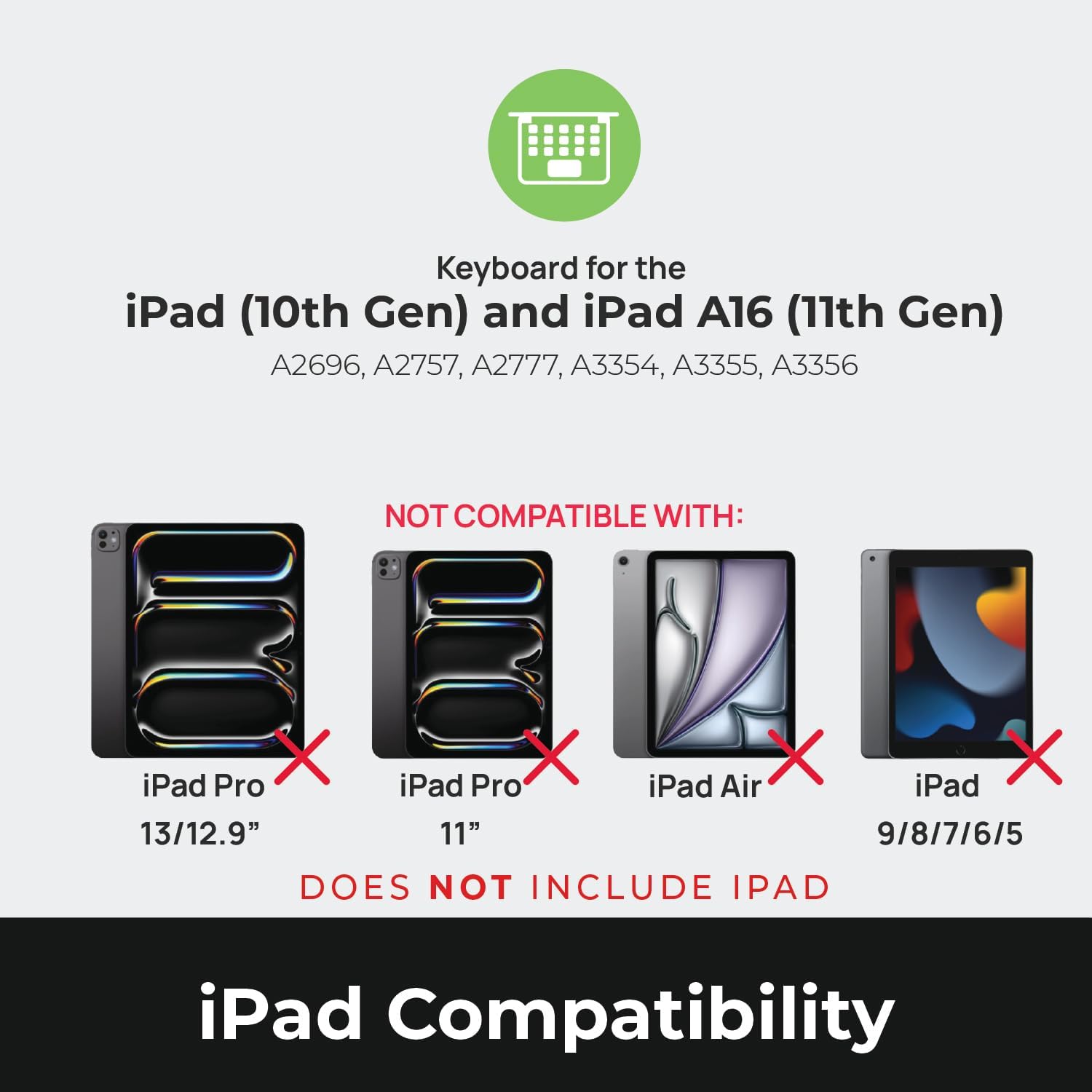
Image: Compatibility chart showing supported iPad models (10th Gen, A16 11th Gen) and incompatible models (iPad Pro 13/12.9", iPad Pro 11", iPad Air, iPad 9/8/7/6/5).
Kutuda Neler Var?
Paketleri açtığınızda tüm eşyaların mevcut olduğundan emin olun:
- 1 x Brydge 10.9 MAX+ Wireless Keyboard
- 1 x Çıkarılabilir Manyetik Geçmeli Kılıf
- 1 x Kullanım Kılavuzu (bu belge)
Note: An iPad and USB-C charging cable are not included. The USB-C cable typically comes with your iPad.

Image: Depiction of the box contents, including the keyboard, case, and user manual.
Kurulum Talimatları
1. Attaching Your iPad to the SnapFit Case
- Carefully align your iPad with the SnapFit Case.
- Gently press the iPad into the case until it is securely seated. The case is designed for a snug fit to provide protection.
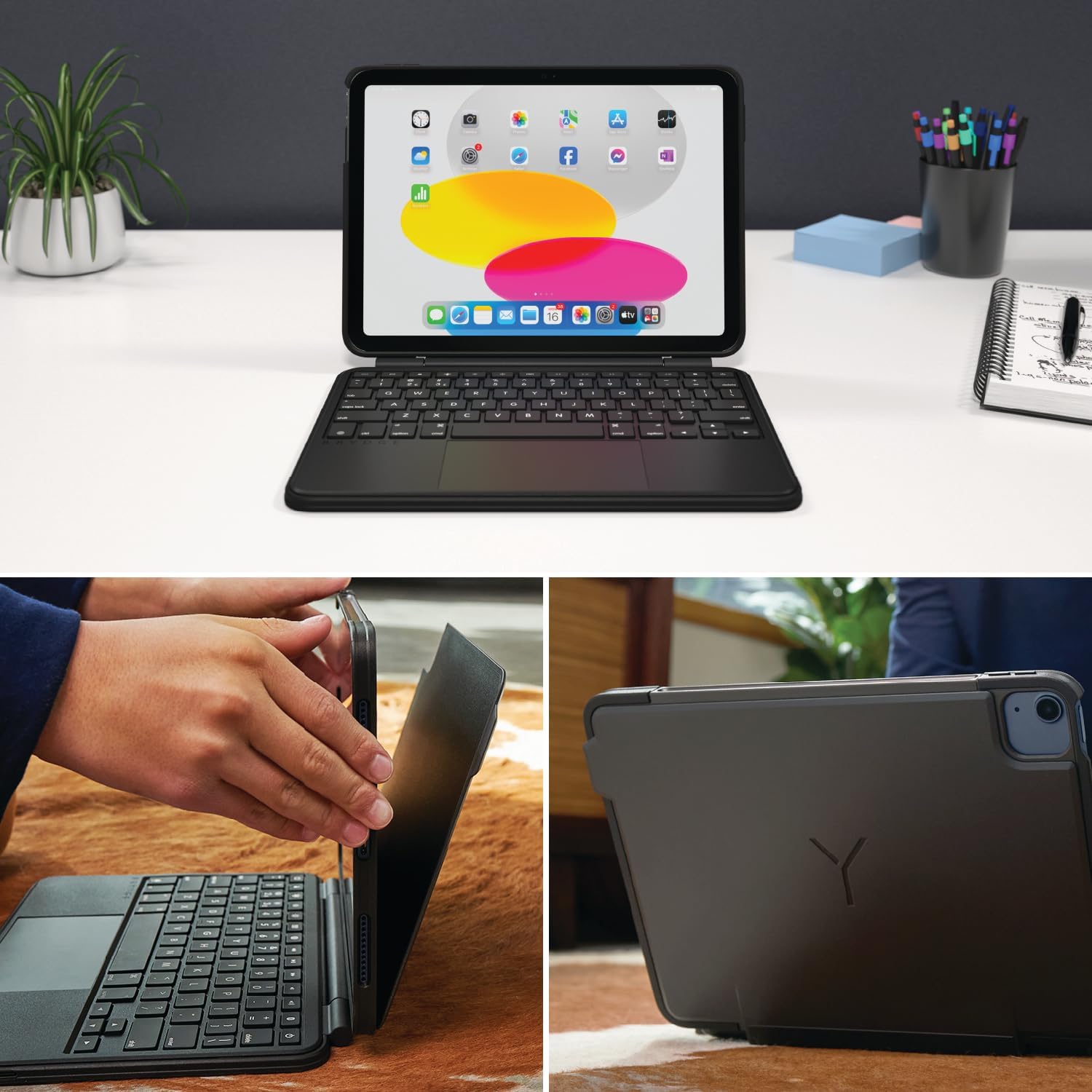
Image: Shows the process of attaching the iPad to the SnapFit case and the case attached to the keyboard.
2. Connecting the Case to the Keyboard
The SnapFit Case features a magnetic back cover that securely attaches to the Brydge keyboard. Simply align the back of the cased iPad with the magnetic area on the keyboard base until it snaps into place.
3. Klavyeyi Şarj Etme
Before first use, it is recommended to fully charge the keyboard. Use a USB-C cable (not included) to connect the keyboard's charging port to a power source. The charging port is typically located on the side or back of the keyboard.
4. Bluetooth Eşleştirme
- Klavyenin şarjlı ve açık olduğundan emin olun.
- iPad'inizde şuraya gidin: Ayarlar > Bluetooth.
- Bluetooth’u açın.
- The Brydge keyboard should appear in the "Other Devices" list. Tap on its name to connect.
- If prompted, enter the pairing code displayed on your iPad using the Brydge keyboard, then press Girmek.
The keyboard features Instant-On™ Connectivity via Bluetooth 5.0, providing a quick and stable connection once paired.

Image: Illustrates the keyboard's Bluetooth 5.0 and Instant-On connectivity features.
Kullanım Talimatları
Klavye İşlevleri
- Arkadan Aydınlatmalı Tuşlar: The keyboard features adjustable backlit keys with 3 brightness levels. Use the dedicated function keys (usually located in the top row) to cycle through brightness settings or turn the backlight off.
- Fonksiyon Tuşları: The top row of keys provides quick access to iPadOS functions such as Home, Search, Brightness, Media Controls, and Volume.
Çoklu Dokunmatik İzleme Paneli
The integrated multi-touch trackpad supports various iPadOS gestures for navigation and interaction. Refer to your iPad's settings for a full list of supported gestures.
- Tıklama: Tıklama işlemi gerçekleştirmek için dokunmatik yüzeye basılı tutun.
- Kaydırma: Yukarı veya aşağı kaydırmak için iki parmağınızı kullanın.
- Yakınlaştır: Yakınlaştırmak veya uzaklaştırmak için iki parmağınızla sıkıştırın.
- Uygulama Değiştirici: Swipe up with three fingers to open the App Switcher.
- Ana Ekran: Swipe up with one finger from the bottom edge to return to the Home Screen.

Image: Highlights the detachable magnetic SnapFit case and the native multi-touch trackpad.
Ayarlama ViewAçılar
The keyboard allows for a screen rotation of up to 135 degrees, enabling various viewYazma, çizme veya medya tüketimi için uygun açılar.

Image: Displays key features including up to 3-month battery life, 3 levels of backlit keys, and 0-130° viewaçıları.
Pil Ömrü
The keyboard offers up to 3 months of battery life on a single charge, depending on usage and backlight settings. To conserve battery, the keyboard will enter sleep mode after a period of inactivity.
Bakım
- Temizlik: Yumuşak bir d kullanınamp, lint-free cloth to clean the keyboard and case. Avoid abrasive cleaners or solvents.
- Depolamak: Uzun süre kullanılmadığı zamanlarda klavyenin tamamen şarj olduğundan emin olun ve serin, kuru bir yerde saklayın.
- Pil Bakım: Pil ömrünü uzatmak için klavyenin pilini sık sık tamamen boşaltmaktan kaçının. Pil göstergesi düşük olduğunda şarj edin.
Sorun giderme
Klavye Bluetooth üzerinden bağlanmıyor.
- Klavyenin şarjlı olduğundan emin olun.
- iPad'inizde Bluetooth'un etkinleştirildiğinden emin olun.
- iPad'inizin Bluetooth ayarlarından cihazı unutun ve yeniden eşleştirmeyi deneyin.
- Hem iPad'inizi hem de klavyenizi yeniden başlatın.
Trackpad Not Responding or Moving Erratically
- Ensure the keyboard is fully charged. Low battery can affect trackpad performance.
- Clean the trackpad surface with a soft, dry cloth to remove any debris or smudges.
- Bluetooth bağlantısını kesin ve yeniden bağlayın.
- Check for any firmware updates for the Brydge keyboard via the Brydge Connect App (if available).
Tuşlar Yanıt Vermiyor
- Confirm the keyboard is powered on and connected via Bluetooth.
- Tuşların altında herhangi bir fiziksel engel olup olmadığını kontrol edin.
- Belirli tuşlar çalışmıyorsa, klavyeyi ve iPad'i yeniden başlatmayı deneyin.
Özellikler
| Model Numarası | BRY8042 |
| Ürün Boyutları | 10"U x 7.65"G x 0.8"Y (10 x 7.65 x 0.8 inç) |
| Ürün Ağırlığı | 1.85 pound |
| Bağlantı Teknolojisi | Bluetooth 5.0 |
| Klavye Açıklaması | Kablosuz |
| Özel Özellikler | Backlit, Rechargeable, Multi-Touch Trackpad, Detachable Magnetic SnapFit Case |
| Renk | Siyah |
| Malzeme | Polikarbonat, Termoplastik Poliüretan (TPU) |
| Pil | 1 Nonstandard Battery (included), up to 3 months battery life |
| ViewAçı | 135 dereceye kadar |
Garanti ve Destek
This product is subject to a standard return policy, typically 30 days from the date of purchase for refunds or replacements. For specific warranty details, please refer to the documentation provided with your purchase or contact Brydge customer support.
For technical assistance, troubleshooting, or warranty claims, please visit the official Brydge support website or contact their customer service department. Contact information can usually be found on the Brydge webyerinde veya ambalaj malzemelerinde.
Not: Koruma planları ayrıca satın alınabilir.


