giriiş
This manual provides comprehensive instructions for the Baseus 30000mAh 65W Power Bank and the Nomos Win Air 12-in-1 Docking Station. Please read this manual carefully before using the products to ensure proper operation, optimal performance, and longevity. Keep this manual for future reference.

Image: The Baseus 30000mAh 65W Power Bank and the Nomos Win Air 12-in-1 Docking Station shown together. The power bank is a rectangular device with a digital display, and the docking station is a compact, vertical unit with multiple ports.
Baseus 30000mAh 65W Power Bank Overview
The Baseus 30000mAh 65W Power Bank is a high-capacity portable charger designed for fast charging of various devices, including laptops, tablets, and smartphones. It features multiple output ports and a digital display for monitoring battery status.
Temel Özellikler:
- 30000mAh Kapasite: Birden fazla şarj için uzun süreli güç sağlar.
- 65W Güç Dağıtımı (PD): Supports fast charging for compatible laptops and devices.
- Dijital gösterge: Gerçek zamanlı pil yüzdesini gösterirtage ve şarj durumu.
- Çoklu Bağlantı Noktaları: Çok yönlü şarj için USB-C ve USB-A bağlantı noktalarıyla donatılmıştır.

Image: A visual representation of the 30000mAh power bank's charging capacity for various devices, including iPhone 16, Samsung Galaxy S24 Ultra, Steam Deck, and iPad Pro.

Image: The 65W USB-C power bank connected to a MacBook Pro 13", illustrating its fast charging capability to reach 50% in 56 minutes.

Image: A diagram showing the universal compatibility of the power bank with various laptops (HP, MacBook, Dell), phones (iPhone 12-16 series, Samsung Galaxy S20-S24 series), and other devices (Steam Deck, Switch, AirPods).
Baseus Nomos Win Air 12-in-1 Docking Station Overview
The Baseus Nomos Win Air 12-in-1 Docking Station is a versatile hub designed to expand the connectivity of your laptop, providing multiple ports for peripherals, external displays, and network access. It supports dual 4K monitor output and high-speed data transfer.
Temel Özellikler:
- 12'ü 1 arada Genişletme: Integrates various ports for comprehensive connectivity.
- Dual 4K HDMI: Supports two external monitors with up to 4K resolution at 60Hz.
- 10 Gbps USB Bağlantı Noktaları: High-speed USB-C and USB-A ports for rapid data transfer.
- Gigabit-Ethernet: Provides stable and fast wired network connection.
- PD 100W Input: Allows for power delivery to the connected laptop (power adapter not included).

Image: A clean desk setup featuring the compact Baseus docking station connected to a laptop and dual external monitors, emphasizing its ability to reduce cable clutter.
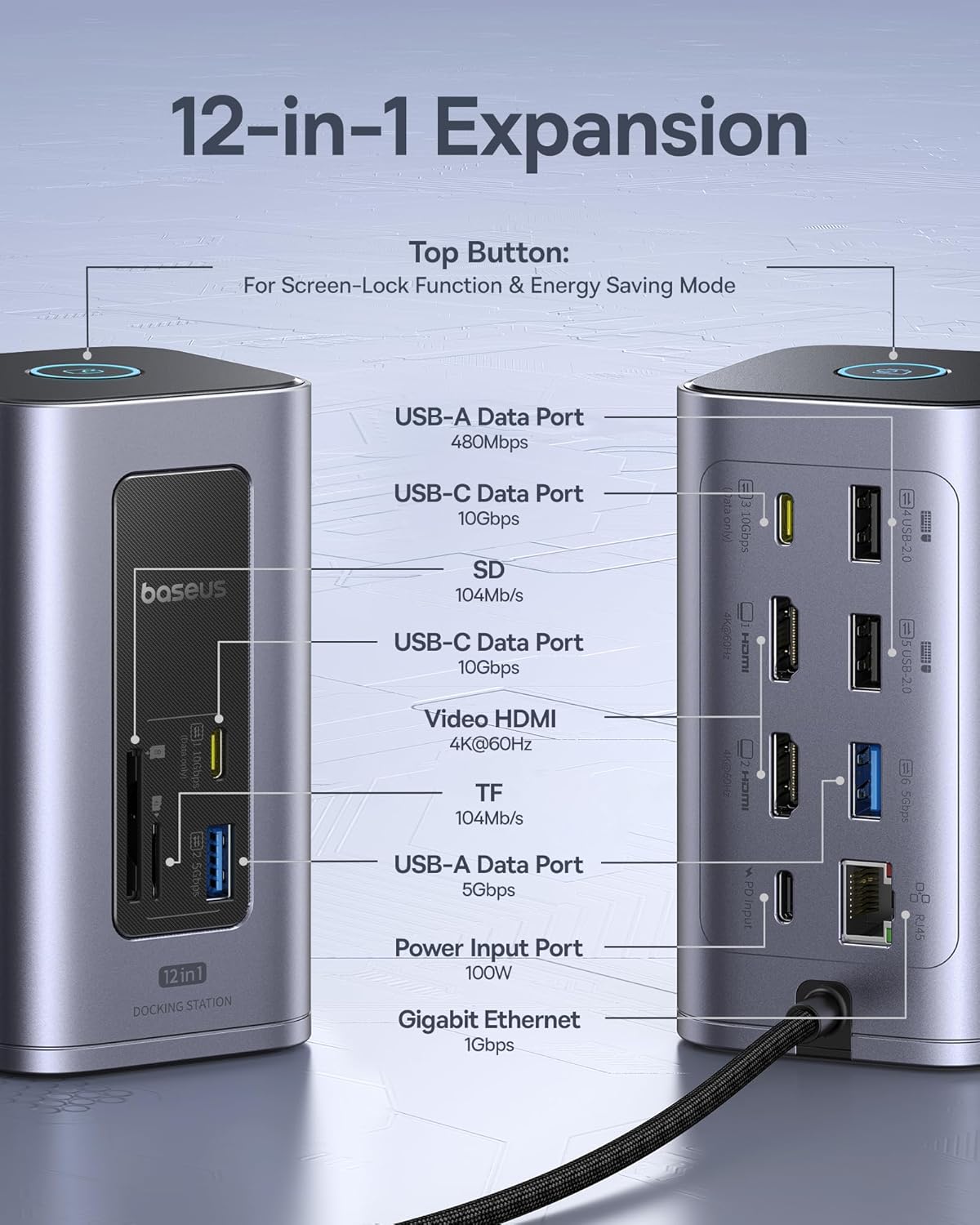
Image: A detailed diagram highlighting the various ports on the 12-in-1 docking station, including USB-A, USB-C, SD/TF card slots, HDMI, Ethernet, and Power Input, along with their specifications.
Setup: Baseus 30000mAh 65W Power Bank
İlk Şarj:
- Connect the included USB-C to C cable to the power bank's input port.
- Connect the other end of the cable to a compatible USB-C wall charger (not included) with at least 65W output for optimal charging speed.
- The digital display will show the charging progress. Charge the power bank fully before first use.
Pil Seviyesinin Kontrol Edilmesi:
Press the power button once to activate the digital display and view mevcut pil yüzdesitage.
Setup: Baseus Nomos Win Air 12-in-1 Docking Station
Connecting to Your Laptop:
- Connect the integrated USB-C cable from the docking station to a compatible USB-C port on your laptop. Ensure your laptop's USB-C port supports video output (DisplayPort Alternate Mode) and Power Delivery for full functionality.
- For power delivery to your laptop, connect a USB-C power adapter (up to 100W, not included) to the "PD Input" port on the docking station.
Connecting External Displays:
- Connect your HDMI monitors to the HDMI ports on the docking station using HDMI cables.
- Adjust display settings on your laptop (e.g., extend, duplicate) as needed.
- Note: For macOS, dual monitors will display the same content (mirror mode) due to system limitations.
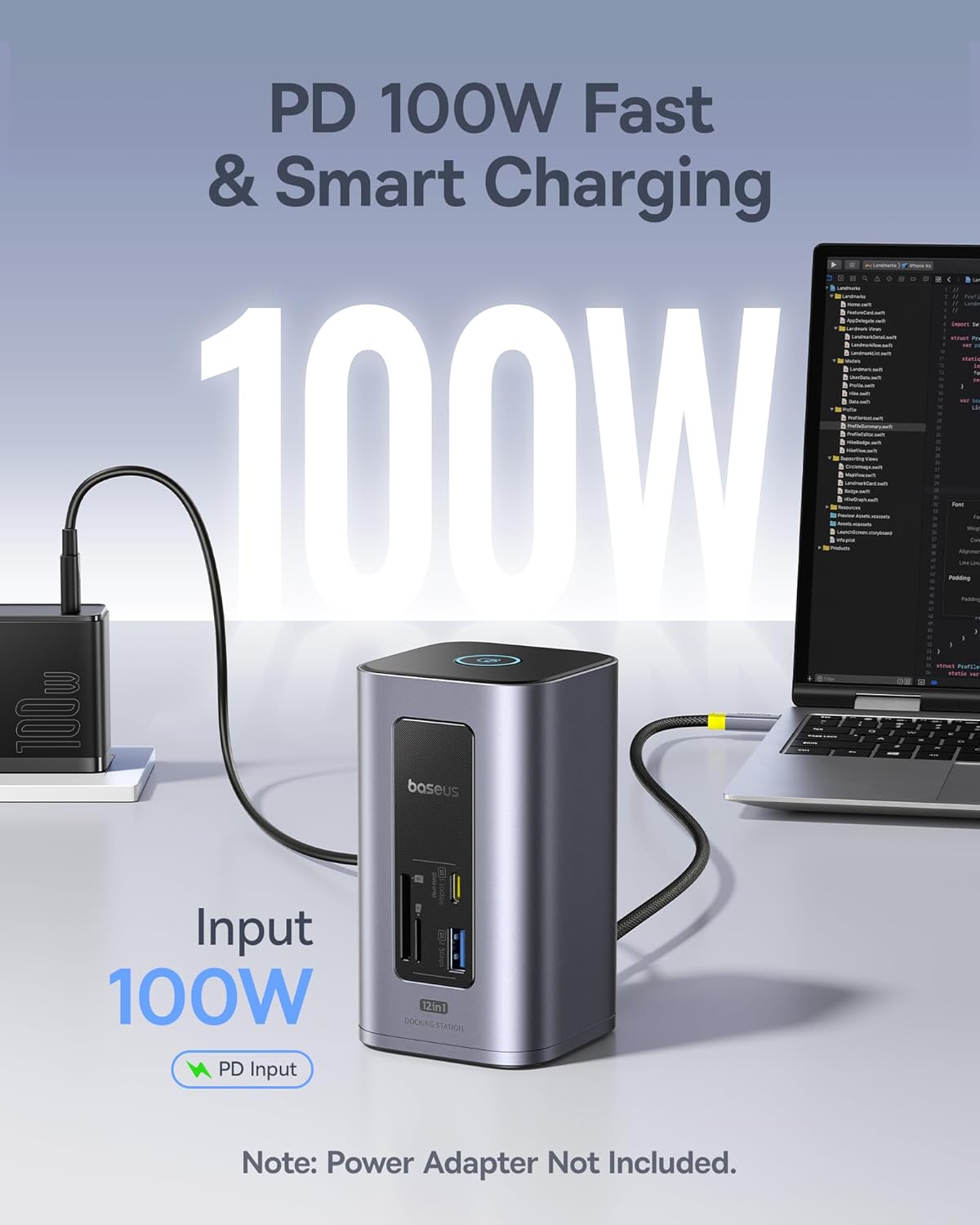
Image: The docking station connected to a laptop, with a 100W power adapter plugged into its PD Input port, demonstrating power delivery to the laptop. Note that the power adapter is sold separately.
Operating: Baseus 30000mAh 65W Power Bank
Şarj Cihazları:
- Connect your device's charging cable to the appropriate output port (USB-C or USB-A) on the power bank.
- The power bank will automatically begin charging your device. The digital display will show the remaining battery level.
- Şarj işlemini durdurmak için cihazınızın bağlantısını kesmeniz yeterlidir.
Eşzamanlı Şarj:
The power bank supports charging multiple devices simultaneously. The total output power will be distributed among the connected devices.
Operating: Baseus Nomos Win Air 12-in-1 Docking Station
USB Bağlantı Noktalarını Kullanma:
Connect USB peripherals such as keyboards, mice, external hard drives, or flash drives to the available USB-A (5Gbps, 10Gbps) and USB-C (10Gbps) data ports.

Image: A visual demonstrating the high-speed data transfer capabilities of the docking station, showing a 20GB file transferring in 20 seconds via 10Gbps ports and 50 seconds via 5Gbps ports.
Using Card Readers:
Insert SD or TF (MicroSD) cards into the corresponding slots for data access. The card readers support speeds up to 104MB/s.
Ethernet Bağlantısı:
Connect an Ethernet cable to the Gigabit Ethernet port for a stable and high-speed wired internet connection.
Screen-Lock Function & Energy Saving Mode:
Press the top button on the docking station to activate the screen-lock function or engage energy-saving mode, depending on your system's configuration.

Image: A user working at a desk with a laptop connected to the docking station, which in turn is connected to two external 4K monitors, demonstrating the dual display capability. A note indicates that macOS will show the same content on both external displays.
Bakım
- Keep both products away from water, moisture, and extreme temperatures.
- Cihazları düşürmekten veya sert darbelere maruz bırakmaktan kaçınınız.
- Clean the surfaces with a soft, dry cloth. Do not use harsh chemicals or abrasive cleaners.
- Store the products in a cool, dry place when not in use.
- For the power bank, recharge it at least once every three months to maintain battery health if not used regularly.
Sorun giderme
Power Bank Issues:
- Cihaz şarj olmuyor: Ensure the power bank is charged. Check cable connections and try a different cable or port. Verify your device is compatible with the power bank's output specifications.
- Yavaş şarj oluyor: Ensure you are using a fast-charging compatible cable and your device supports fast charging. For the power bank itself, use a 65W or higher PD charger for optimal input speed.
Docking Station Issues:
- Harici monitörde görüntü yok: Ensure your laptop's USB-C port supports DisplayPort Alternate Mode. Check HDMI cable connections. Try restarting your laptop. Verify monitor input source is set correctly.
- No power delivery to laptop: Ensure a compatible USB-C PD power adapter (up to 100W) is connected to the docking station's PD Input port. Verify your laptop supports USB-C PD.
- USB aygıtları tanınmıyor: Ensure devices are properly connected. Try different USB ports. Restart your laptop.
- Ethernet not working: Check the Ethernet cable connection. Ensure your laptop's network settings are configured correctly.
- macOS dual monitor issue: As noted, macOS typically mirrors displays through a single MST hub like this docking station. This is a system limitation, not a product defect.
Özellikler
Baseus 30000mAh 65W Power Bank:
| Kapasite | 30000mAh |
| Maksimum Çıkış Gücü | 65W (USB-C PD) |
| Giriş Gücü | Up to 65W (USB-C PD) |
| Limanlar | USB-C (Giriş/Çıkış), USB-A (Çıkış) |
| Görüntülemek | Digital Battery Percentage |
Baseus Nomos Win Air 12-in-1 Docking Station:
| Örnek | Nomos Win Air (12-in-1) |
| HDMI Bağlantı Noktaları | 2 x 4K@60Hz |
| USB-C Veri Bağlantı Noktaları | 1 x 10 Gb/sn |
| USB-A Veri Bağlantı Noktaları | 1 x 10Gbps, 1 x 5Gbps, 3 x 480Mbps |
| Ethernet Bağlantı Noktası | 1 x Gigabit (1Gbps) |
| Kart Okuyucu | SD & TF (104MB/s) |
| Güç Girişi | PD 100W (USB-C) |
Garanti ve Destek
Baseus products are covered by a limited warranty. For detailed warranty information, technical support, or customer service inquiries, please refer to the official Baseus webLütfen web sitesini ziyaret edin veya yerel distribütörünüzle iletişime geçin. Garanti talepleri için satın alma belgenizi saklayın.
Official Baseus Webalan: www.baseus.com


