1. Giriş
This manual provides detailed instructions for the proper setup, operation, and maintenance of your Facmogu AK-50 Bluetooth Stereo Audio Amplifier. Please read this manual thoroughly before using the device to ensure optimal performance and safety. The AK-50 is designed to deliver clear, powerful stereo sound with versatile connectivity options for various audio sources.
2. Güvenlik Talimatları
- Güç kaynağı hacmini sağlayıntage, ünitede belirtilen gereksinimleri karşılamaktadır.
- Üniteyi yağmura, neme veya aşırı sıcaklıklara maruz bırakmayın.
- Üniteyi ısı kaynaklarının yakınına veya doğrudan güneş ışığına maruz bırakmayın.
- C'yi açmayınasing; tüm servis işlemlerini kalifiye personele yaptırın.
- Cihazı çocuklardan uzak tutunuz.
- Şimşekli fırtınalar sırasında veya uzun süre kullanılmadığında elektriği kesin.
3. Paket İçeriği
Paketin içinde tüm öğelerin mevcut olduğundan emin olun:
- AK50 Audio Ampkaldırıcı x1
- Uzaktan Kumanda x1
- FM Anteni x1
- Kullanıcı Kılavuzu x1
- Power Cord (1 Meter) x1
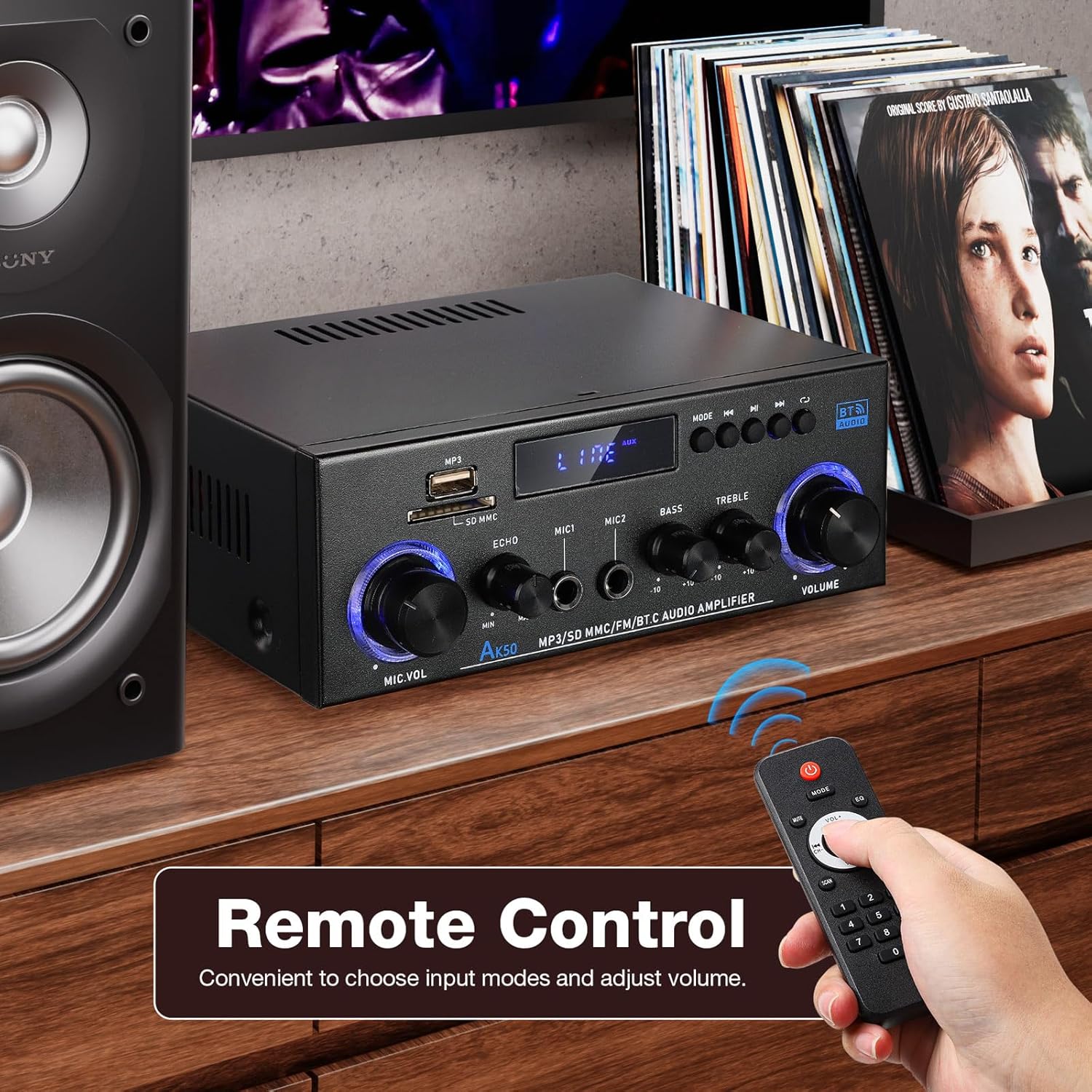
Figure 3.1: Package contents of the AK-50 ampcankurtaran.
4. Ürün Bittiview
4.1 Ön Panel

Figure 4.1: Front Panel Controls and Inputs.
- USB Bağlantı Noktası: USB bellekten oynatma için.
- SD/MMC Kart Yuvası: For SD/MMC card playback.
- Function Display Window: Geçerli modu ve ayarları gösterir.
- MP3/FM Control Buttons: Play/Pause, Next/Previous Track, Mode selection.
- MIC VOL (Microphone Volume): Bağlı mikrofonların ses seviyesini ayarlar.
- YANKI: Mikrofonlar için yankı efektini ayarlar.
- MIC1/MIC2 Input: Mikrofonlar için 6.35 mm jak girişleri.
- BAS: Düşük frekanslı ses çıkışını ayarlar.
- TİZ: Yüksek frekanslı ses çıkışını ayarlar.
- SES: Main volume control for all audio output.
4.2 Arka Panel

Şekil 4.2: Arka Panel Bağlantıları.
- AUX Audio Input (RCA L/R): Connect external audio devices via RCA cables.
- Line Audio Signal Output (RCA L/R): Output audio signal to another amplifier veya kayıt cihazı.
- FM KARINCA: FM anteni için bağlantı noktası.
- Speaker System 4Ω-16Ω (Left/Right Channel Output): Connect passive speakers using speaker wire. Observe polarity.
- DC Input 12V/5A: Power input for 12V DC power supply.
- AC Güç Girişi: Connect the AC power cord (90-240V, 50-60Hz).
- Güç düğmesi: Döner ampLifier AÇIK/KAPALI.
5. Kurulum
5.1 Hoparlör Bağlantısı
- Sağlamak amplifier kapalı.
- Connect your passive speakers to the "Speaker System 4Ω-16Ω" terminals on the rear panel.
- Match the positive (+) terminal of the amplifier to the positive (+) terminal of the speaker, and the negative (-) to the negative (-). Use appropriate speaker wire.
5.2 Güç Bağlantısı
- Connect the supplied AC power cord to the "AC Power Input" on the rear panel.
- Güç kablosunun diğer ucunu uygun bir duvar prizine takın.
5.3 FM Anten Bağlantısı
- Connect the FM antenna to the "FM ANT" port on the rear panel.
- Daha iyi sinyal alımı için anteni uzatın.
5.4 Audio Source Connection (AUX)
- To connect an external audio device (e.g., CD player, TV, computer) via RCA, use an RCA cable.
- Connect one end of the RCA cable to the audio output of your device and the other end to the "AUX Audio Input" (L/R) on the amplifier'in arka paneli.
6. Kullanım Talimatları
6.1 Açma/Kapatma
Flip the "POWER ON/I" switch on the rear panel to turn the amplifier on or off. The front display will illuminate when powered on.
6.2 Volume, Bass, and Treble Control
- SES: Rotate the large knob on the right of the front panel to adjust the master volume.
- BAS: Rotate the "BASS" knob to increase or decrease low-frequency sounds.
- TİZ: Rotate the "TREBLE" knob to increase or decrease high-frequency sounds.
6.3 Giriş Seçimi
Press the "MODE" button on the front panel or the remote control to cycle through available input sources: Bluetooth (BT), USB, SD, FM, and AUX.
7. Bağlantı
7.1 Bluetooth Bağlantısı
- Değiştir amplifier to Bluetooth mode using the "MODE" button. The display will show "BT".
- Mobil cihazınızda Bluetooth'u etkinleştirin ve mevcut cihazları arayın.
- Select "AK-50" from the list of devices to pair.
- Eşleştirme tamamlandıktan sonra, cihazınızdan ses akışını sağlayabilirsiniz ampcankurtaran.

Figure 7.1: Bluetooth connectivity with a smartphone. Maintain a distance of 16.4ft/5m without obstructions for optimal connection.
Video 7.1: A demonstration of the Facmogu AK-50 Bluetooth Stereo Audio Amplifier, showcasinTasarımı ve özellikleri.
7.2 USB/SD Kart Oynatma
- Insert a USB drive or SD/MMC card into the respective slot on the front panel.
- Değiştir amplifier to USB or SD mode using the "MODE" button. The amplifier will automatically detect and play audio files.
- Use the MP3/FM control buttons to navigate tracks (Next/Previous) and Play/Pause.
7.3 AUX Girişi
After connecting an external audio source to the rear AUX input (as described in Section 5.4), switch the amplifier to AUX mode using the "MODE" button. Play audio from your connected device.
7.4 FM Radyo
- FM anteninin doğru şekilde bağlı olduğundan emin olun.
- Değiştir amplifier to FM mode using the "MODE" button.
- Use the MP3/FM control buttons to scan for and select radio stations.
8. Karaoke Fonksiyonu
The AK-50 amplifier features two microphone inputs for karaoke use.
- Connect up to two microphones to the MIC1 and MIC2 inputs on the front panel.
- Adjust the microphone volume using the "MIC VOL" knob.
- Use the "ECHO" knob to add a reverberation effect to the microphone audio.

Şekil 8.1: Kullanımı amplifier for karaoke with dual microphone inputs.
9. Uzaktan Kumanda
The included remote control allows for convenient operation of the ampuzaktan daha lifli.
- Güç: Döner ampkaldırıcı açık/kapalı.
- Mod: Cycles through input sources (BT, USB, SD, FM, AUX).
- Hacim +/-: Ana ses seviyesini ayarlar.
- Oynat/Duraklat, Sonraki/Önceki: Controls media playback in USB/SD/Bluetooth modes.
- EQ: Selects equalizer presets (if available).
- Sayı tablosu: Direct track selection for USB/SD.

Figure 9.1: Remote control for the AK-50 ampcankurtaran.
10. Sorun Giderme
| Sorun | Olası Neden | Çözüm |
|---|---|---|
| Güç yok | Güç kablosu bağlı değil; Güç anahtarı kapalı; Priz arızalı. | Check power cord connection; Turn power switch ON; Test outlet with another device. |
| Ses çıkışı yok | Incorrect input selected; Volume too low; Speaker wires loose/incorrectly connected; Faulty audio source. | Select correct input mode; Increase volume; Check speaker wire connections and polarity; Test with a different audio source. |
| Bluetooth bağlanmıyor | Amplifier not in BT mode; Device Bluetooth off; Device too far; Interference. | Anahtar amplifier to BT mode; Enable Bluetooth on your device; Move device closer to amplifier (within 5m); Reduce interference. |
| USB/SD kart oynatılmıyor | Incorrect mode; Unsupported file format; Corrupted media; Card/drive not inserted correctly. | USB/SD moduna geçin; Emin olun. files are MP3 or supported format; Try a different USB/SD card; Reinsert media. |
| Zayıf FM alımı | Anten bağlı değil veya uzatılmamış; Sinyal zayıf. | Connect and extend FM antenna; Reposition antenna for better signal. |
11. Özellikler
| Özellik | Şartname |
|---|---|
| Model Numarası | A50803-MG-US |
| Marka | fakmogu |
| Bağlantı Teknolojisi | Bluetooth |
| Kablosuz İletişim | Bluetooth |
| Ses Çıkışı Modu | Stereo |
| Hoparlör Empedansı | 4-16Ω |
| Güç Girişi | AC 90-240V, 50-60Hz / DC 12V/5A |
| Malzeme | Metal |
| Ürün Ağırlığı | 1.98 pound (0.9 kg) |
| Paket Boyutları | 8.5 x 8.11 x 3.82 inç (21.6 x 20.6 x 9.7 cm) |
| Dahil Bileşenler | AK50 Audio Ampcankurtaran |
| Montaj Tipi | Masa Üstü Montaj |
12. Bakım
- Temizlik: Cihazın dış yüzeyini temizlemek için yumuşak ve kuru bir bez kullanın. ampLifier. Sıvı temizleyiciler veya aerosoller kullanmayın.
- Depolamak: Uzun süre kullanılmayacaksa, saklayın amplifier in a cool, dry place, away from direct sunlight and moisture.
- Havalandırma: Ensure proper ventilation around the unit to prevent overheating. Do not block the ventilation openings.
13. Garanti ve Destek
For warranty information or technical support, please refer to the contact details provided with your purchase or visit the official Facmogu website. Herhangi bir garanti talebi için satın alma belgeniz olarak satın alma makbuzunuzu saklayın.


