1. Giriş
This manual provides essential information for the safe and efficient operation of your TOPTRO Quadra Projector. Please read this manual thoroughly before using the projector and retain it for future reference. The TOPTRO Quadra Projector is designed to deliver a high-quality visual and audio experience with its advanced features and smart capabilities.
2. Güvenlik Bilgileri
- Havalandırma açıklıklarını kapatmayın. Aşırı ısınmayı önlemek için projektörün etrafında yeterli hava akışı sağlayın.
- Elektrik çarpması veya yangın riskini önlemek için projektörü yağmur veya neme maruz bırakmayın.
- Yalnızca projektörle birlikte verilen güç adaptörünü kullanın.
- l olduğunda projektör merceğine doğrudan bakmaktan kaçının.amp Parlak ışık gözlere zarar verebileceğinden, ışık açık bırakılmalıdır.
- Düşmesini önlemek için projektörü sabit ve düz bir yüzeye yerleştirin.
- Projektörü kendiniz sökmeye veya onarmaya çalışmayın. Tüm servis işlemlerini yetkili personele yaptırın.
3. Paket İçeriği
Paketin içinde tüm öğelerin mevcut olduğundan emin olun:
- 1 x TOPTRO Quadra Projector
- 1 x HDMI Kablosu
- 1 x Kullanım Kılavuzu
- 1 x Uzaktan Kumanda
4. Ürün Bittiview
Familiarize yourself with the main components and interfaces of your TOPTRO Quadra Projector.
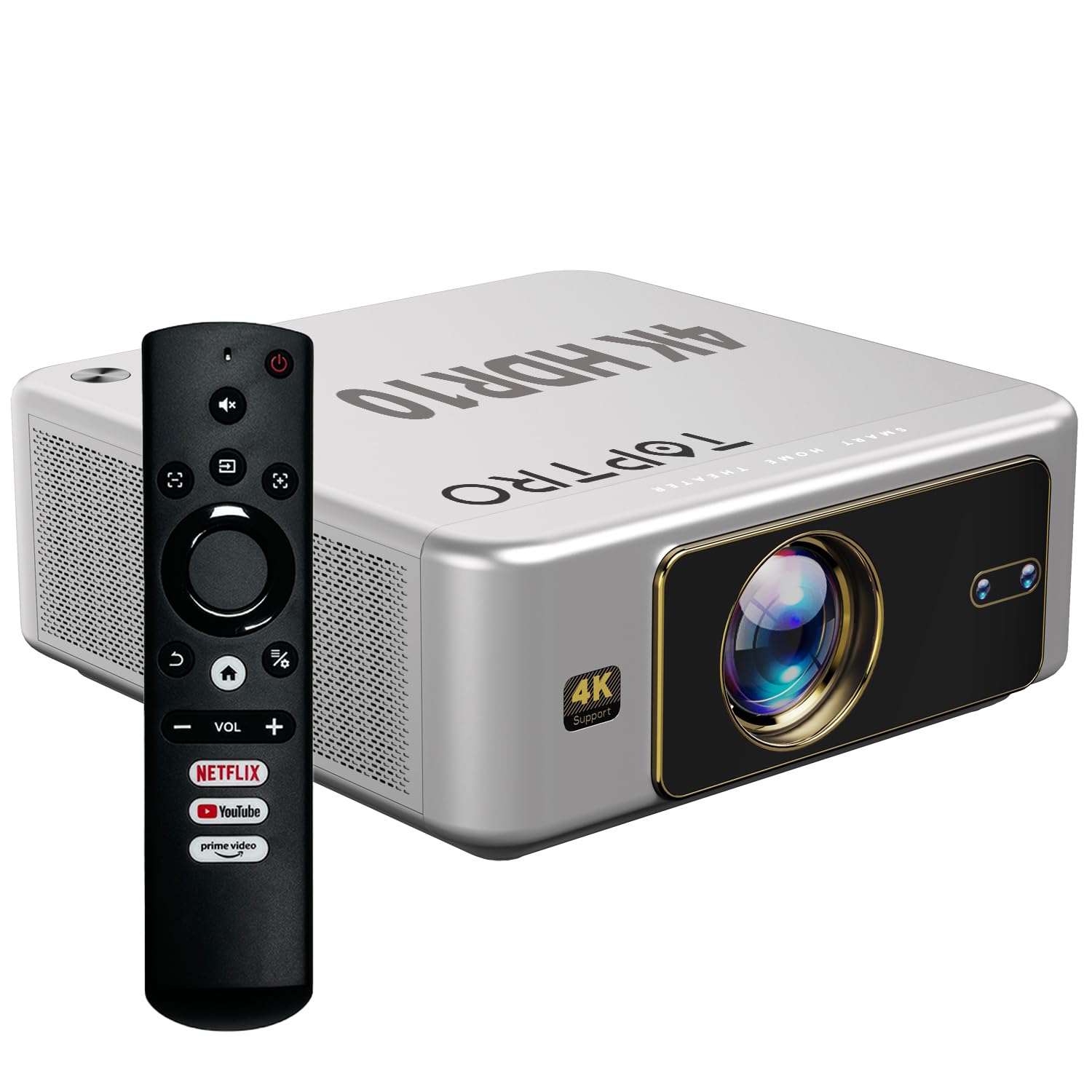
Şekil 4.1: Ön view of the TOPTRO Quadra Projector with included remote control.

Figure 4.2: Rear panel of the projector displaying the power input, audio jack, HDMI ports, and USB ports.
5. Kurulum
5.1 Placement and Projection Size
Position the projector on a stable surface. The TOPTRO Quadra Projector supports a maximum screen size of 300 inches. Adjust the distance from the wall or screen to achieve your desired image size.

Figure 5.1: Recommended projection distances for different screen sizes.
5.2 Güç Bağlantısı
- Güç kablosunu projektörün güç giriş portuna bağlayın.
- Güç kablosunun diğer ucunu uygun bir elektrik prizine takın.
5.3 İlk Açılış ve Temel Ayarlar
- Projektörünüzü veya uzaktan kumandanızı açmak için güç düğmesine basın.
- Upon first use, the projector may guide you through initial setup steps, including language selection and network connection.
5.4 Odak ve Trapez Düzeltme
The TOPTRO Quadra Projector features AI-powered automatic focus and keystone correction. This system automatically adjusts the image for optimal clarity and shape.
- Otomatik odaklama: The projector will automatically adjust the image sharpness.
- Otomatik Kilit Taşı: The projector will automatically correct trapezoidal distortion to ensure a rectangular image.
- Auto Obstacle Avoidance & Screen Fit: The projector can detect obstacles and adjust the image to fit the screen area.
If automatic adjustments are not satisfactory, manual adjustments can be made through the settings menu. Navigate to the 'Display & Sound' settings to access these options.

Figure 5.2: Automatic image correction features.
6. Operasyon
6.1 Kullanıcı Arayüzü ve Gezinme
The TOPTRO Quadra Projector runs on a Net-Flix Certified Linux OS, providing a user-friendly interface. Use the remote control to navigate through menus and select applications.

Figure 6.1: Home screen with pre-installed streaming applications.
6.2 Bağlantı
The projector offers various connectivity options for external devices.
- HDMI: Connect your laptop, MacBook, Blu-ray player, TV sticks, TV boxes, or gaming consoles (e.g., PS4) using the dual HDMI ports. The projector supports HDMI CEC and HDMI EARC for enhanced audio return channel functionality.
- USB BAĞLANTI: Two USB ports are available for connecting pendrives or hard disks to play media filedoğrudan s.
- 3.5 mm Ses Çıkışı: Connect external headphones or speakers for a personalized audio experience.
- Wifi: Utilize the 6th Gen Dual Band Wi-Fi (2.4 GHz + 5 GHz) for internet access and streaming.
- Bluetooth 5.2: Connect Bluetooth speakers, headphones, or other compatible audio devices. The projector also supports two-way Bluetooth, allowing it to function as a Bluetooth speaker.
- Miracast: Wirelessly mirror your screen from compatible devices.

Figure 6.2: Connectivity options for external devices.
6.3 Ekran Ayarları
Adjust image quality and display features through the 'Display & Sound' menu.
- Resim Modu: Select from various preset picture modes (e.g., Vivid) or customize settings like brightness, contrast, and color.
- 4K HDR10+ Support: The projector plays true 4K resolution HDR10+ videos, offering enhanced contrast and color depth.
- MEMC (Hareket Tahmini, Hareket Telafisi): This technology improves video smoothness and clarity, especially for fast-moving scenes, by interpolating frames.

Figure 6.3: MEMC technology for smoother visuals.
6.4 Ses Ayarları
Manage audio output and formats via the 'Display & Sound' menu.
- Dolby Atmos & Dolby Digital Plus: The projector supports these advanced audio technologies for immersive sound.
- eARC Modu: Enable eARC for high-quality audio return from compatible devices.
- Çıktı Biçimi: Select the appropriate audio output format (e.g., Auto, PCM, Passthrough, Dolby Digital, Dolby Digital Plus) based on your connected audio system.

Figure 6.4: Immersive audio with Dolby Atmos support.
7. Bakım
Doğru bakım, projektörünüzün uzun ömürlü olmasını ve en iyi performansı göstermesini sağlar.
- Lens Temizliği: Projeksiyon merceğini, optik yüzeyler için özel olarak tasarlanmış, yumuşak ve tüy bırakmayan bir bezle nazikçe silin. Aşındırıcı malzemelerden veya sert kimyasallardan kaçının.
- Dış Temizlik: Projektörün dış yüzeyini temizlemek için yumuşak, kuru bir bez kullanın.
- Toz Önleme: The TOPTRO Quadra Projector features a fully sealed optical engine, which helps prevent dust, dirt, and moisture from entering the light path. This design reduces the need for frequent internal cleaning and maintains consistent image quality.
8. Sorun Giderme
Projeksiyon cihazınızla ilgili sorunlarla karşılaşırsanız, aşağıdaki yaygın sorunlar ve çözümlerine göz atın:
| Sorun | Olası Neden | Çözüm |
|---|---|---|
| Resim görüntülenmiyor | Incorrect input source selected; loose HDMI/USB connection; power issue. | Verify input source in settings; check cable connections; ensure projector is powered on. |
| Ses yok | Volume too low or muted; incorrect audio output setting; external audio device not connected properly. | Adjust volume; check 'Sound output' settings; ensure external speakers are connected and powered. |
| Görüntü bulanık veya bozuk | Focus or keystone correction issues; projector not placed correctly. | Allow auto-focus/keystone to complete. If issues persist, manually adjust focus and keystone in 'Display & Sound' settings. Ensure the projector is perpendicular to the screen. |
| Uzaktan kumanda çalışmıyor | Batteries are low or depleted; remote not pointed at IR receiver; obstruction. | Pilleri değiştirin; projektörün kızılötesi alıcısına net bir görüş hattı olduğundan emin olun. |
| Fan sesi fark ediliyor. | Normal operation; projector is working hard; ventilation blocked. | Ensure adequate ventilation around the projector. Fan noise is a normal part of projector operation, especially during high-performance tasks. |
9. Özellikler
Key technical specifications of the TOPTRO Quadra Projector:
| Özellik | Detay |
|---|---|
| Marka | TOPTRO |
| Model Adı | TOPTRO Quadra Projector 4K HDR10+ Dolby |
| Ürün Boyutları | 24x20x10 cm |
| Ürün Ağırlığı | 2 kilo |
| Donanım Arayüzü | 3.5mm Audio, Bluetooth 5.2, Dual HDMI (CEC, EARC), Dual USB |
| Uyumlu Cihazlar | Gaming Console, Laptop, Smartphone, Speaker, Television |
| Özel Özellikler | Dolby Atmos - Dolby Digital Plus, 4K HDR 10+/HLG, Net-Flix Certified Linux OS, 2GB RAM, 32GB ROM, Auto Focus & Keystone, Native 1080p Full HD & True 4K Support, 32000 Lumens Brightness (2600 ANSI), 15W Big Speakers, HDMI ARC, Dual HDMI, Built-in Apps, Dual 5G & 2.4G WiFi 6, Bluetooth, WiFi Display, Electronic Focus & 6D Electronic correction, Fully Sealed Optical Engine, MEMC |
| Ekran Teknolojisi | LCD |
| Görüntü parlaklığı | 32000 Lümen (2600 ANSI) |
| Görüntü Kontrast Oranı | 22000:1 |
| En Boy Oranı | 16:9 |
| Native Screen Resolution | 1920x1080 (Tam HD) |
| Desteklenen Çözünürlük | 3840 x 2160 Piksele Kadar (4K) |
| Yenileme Hızı | 60 Hz |
| Lamp Hayat | 50000 Saat |
| Form Faktörü | Taşınabilir |
| Montaj Tipi | Tavan Montajı |
| Menşei ülke | Çin |
10. Garanti ve Destek
For warranty information, technical support, or service inquiries, please contact TOPTRO Projectors India using the details below:
- E-posta: support@toptro.in or sreeprojectors@gmail.com
- Whatsapp: 8341888860
- Webalan: toptro.in
Please have your product model number (Quadra 4K HDR10+ Dolby) and purchase details ready when contacting support.


