1. Ürün Bittiview
The Vormooi V15 is a compact and portable digital voice recorder designed for high-quality audio capture in various environments, including lectures, meetings, and classes. It features a large internal storage capacity and advanced noise reduction technology.
Temel Özellikler:
- Massive 64GB built-in memory: Stores up to 750 hours of voice recordings in WAV and MP3 formats.
- Kompakt ve Taşınabilir Tasarım: Ultra ince profile (0.25 x 1.3 x 2.2 inches) and lightweight (0.7 ounces) for maximum portability.
- Uzun Ömürlü Şarj Edilebilir Pil: Provides extended recording sessions.
- Yapay Zeka Gürültü Azaltma: Equipped with an intelligent 2155P AI chip for enhanced noise cancellation and pure recording.
- Voice-Activated Recording (VAR): Intelligently skips silent passages to save memory and time.
- Basit İşlem: Tek tuşla kayıt ve kaydetme.
- Evrensel Uyumluluk: Connects via USB Type-C to Windows and macOS computers.

Image: Key features of the Vormooi V15 recorder, including its recording capacity, memory, and battery life.
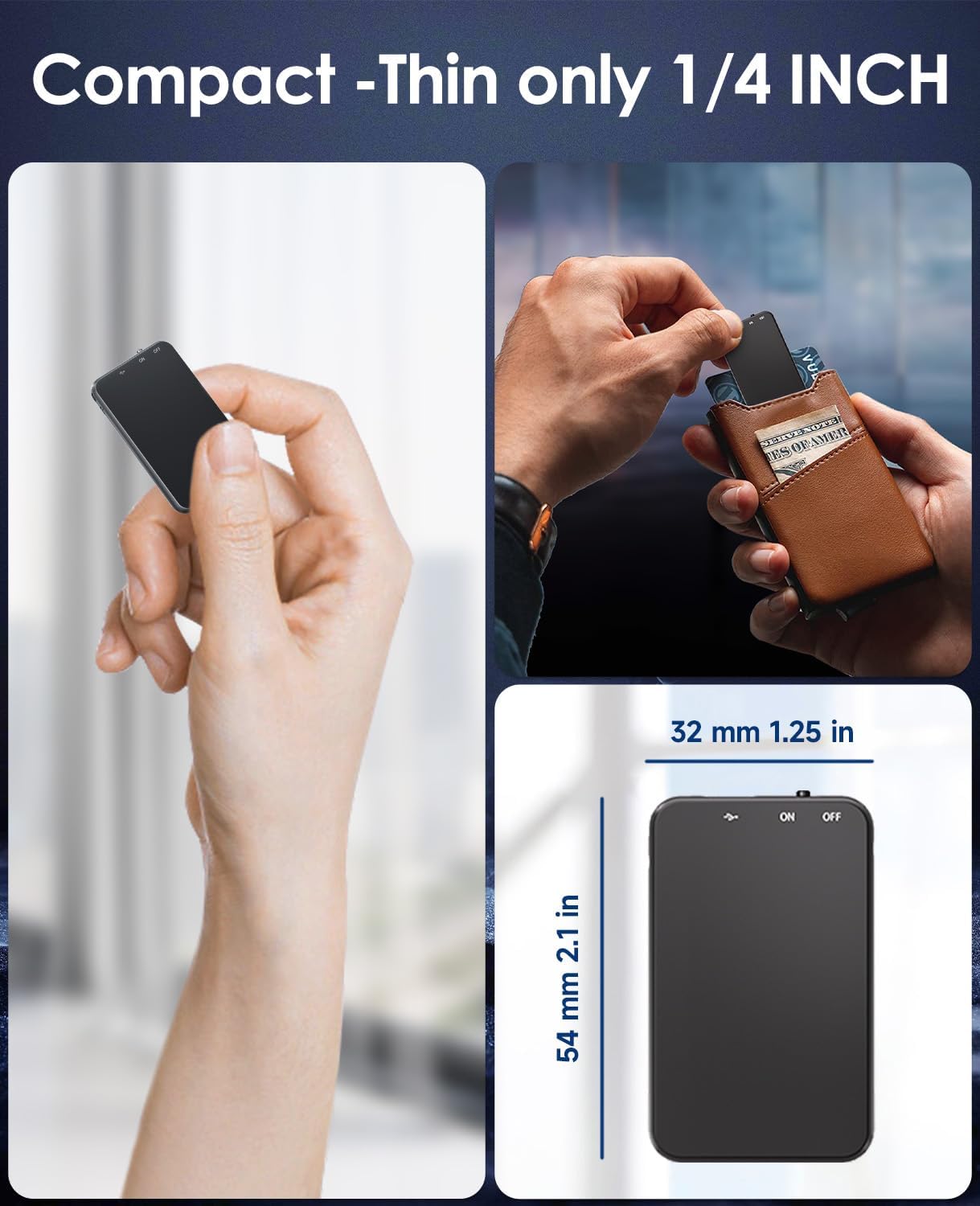
Image: Demonstrates the compact and thin design of the Vormooi V15, showing its small dimensions and portability.

Image: Illustrates the advanced AI noise cancellation technology and supported recording formats (MP3, WAV) of the V15 recorder.
2. Paket İçeriği
Paketi açtığınızda lütfen tüm ürünlerin mevcut ve iyi durumda olduğundan emin olun:
- 1 x Vormooi V15 Digital Voice Recorder
- 1 adet USB Type-C Kablo (şarj ve veri aktarımı için)
- 1 x Kullanım Kılavuzu (bu belge)
3. Kurulum
3.1 Cihazı Şarj Etme
Before first use, fully charge the Vormooi V15 recorder. Connect the included USB Type-C cable to the recorder's Type-C port and the other end to a USB power adapter (not included) or a computer's USB port. The indicator light will show charging status.
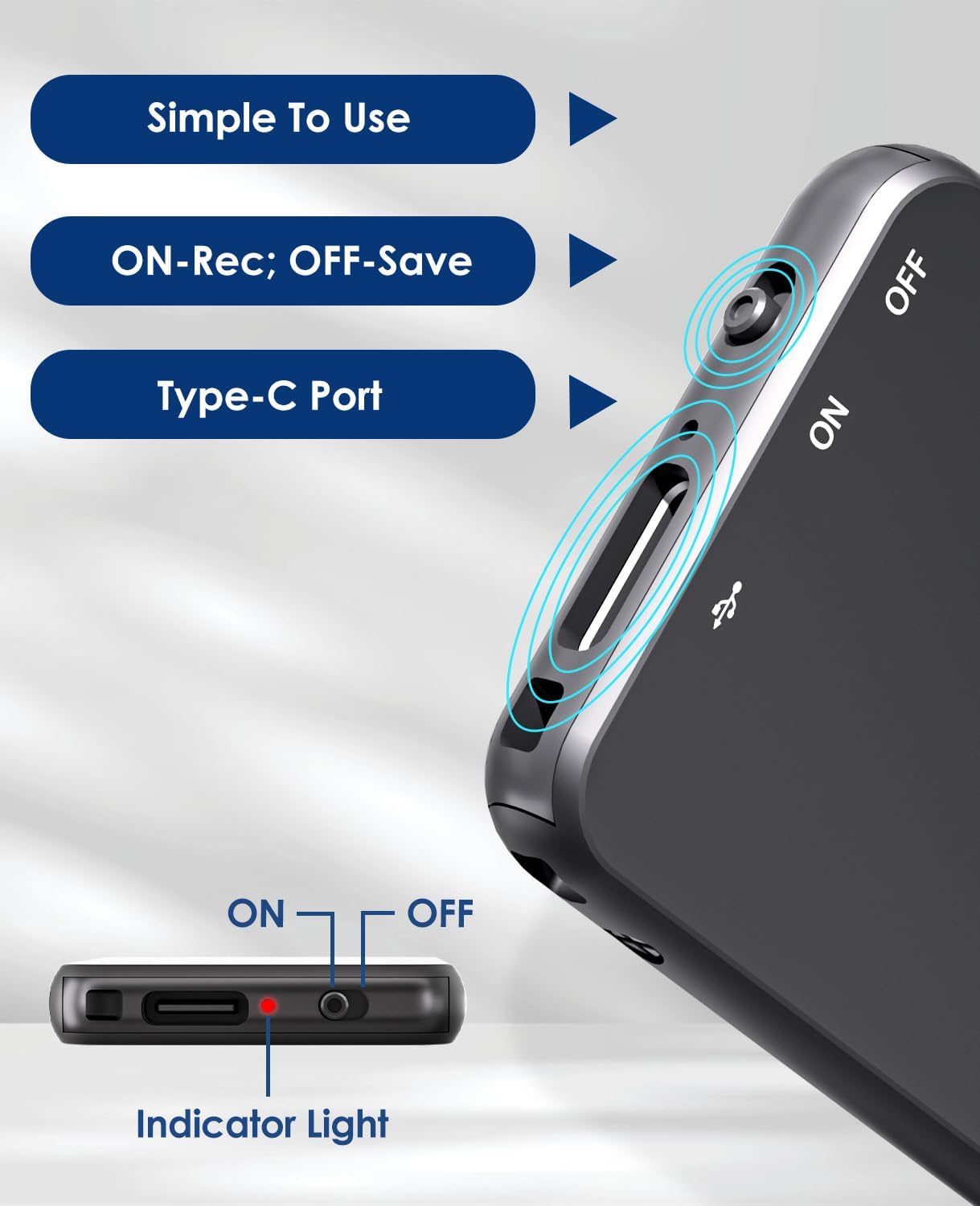
Image: Details of the recorder's side, highlighting the ON/OFF switch, Type-C port, and indicator light for simple operation.
3.2 Açma/Kapatma
To power on the device, slide the ON/OFF switch to the "ON" position. To power off, slide it to the "OFF" position. The indicator light will briefly illuminate.
4. Kullanım Talimatları
4.1 Ses Kaydetme
To start recording, simply slide the ON/OFF switch to the "ON" position. The device will automatically begin recording. The indicator light may flash or change color to indicate recording status. To stop recording and save the fileAnahtarı "KAPALI" konumuna getirin.
4.2 Voice-Activated Recording (VAR)
The V15 features a voice-activated recording function. When enabled, the recorder will automatically pause recording during periods of silence and resume when sound is detected, optimizing memory usage. The sensitivity of the voice activation can be adjusted (though specific instructions for adjustment are not provided in the product images, it's a common feature).

Image: Depicts the Voice-Activated Recording (VAR) feature, illustrating how it saves memory by skipping silent blanks and showing different sensitivity levels.
4.3 Aktarma FileBilgisayara
Connect the Vormooi V15 to your computer using the provided USB Type-C cable. The device will appear as a removable storage device (like a USB drive). You can then drag and drop your recorded audio files (MP3 or WAV format) to your computer. The device is compatible with Windows and macOS operating systems.

Image: Shows the Type-C connection and compatibility with Windows, Mac, and Linux operating systems for easy file Aktar.
4.4 Oynatma
While the device supports playback, specific controls for direct playback (e.g., built-in speaker, headphone jack) are not detailed in the provided information. Typically, playback is done by connecting headphones to the device's headphone jack (if available) or by transferring files to a computer and playing them there.
Note: The product specifications mention "Headphones Jack: 1", confirming the presence of a jack for direct playback.
5. Bakım
- Temizlik: Cihazı temizlemek için yumuşak ve kuru bir bez kullanın. Sıvı temizleyiciler veya çözücüler kullanmayın.
- Depolamak: Kayıt cihazını serin, kuru bir yerde, doğrudan güneş ışığından ve aşırı sıcaklıklardan uzakta saklayın.
- Pil Bakım: Pil ömrünü uzatmak için, pili sık sık tamamen boşaltmaktan kaçının. Cihazı uzun süre kullanmasanız bile düzenli olarak şarj edin.
- Veri Yedekleme: Regularly back up important recordings to your computer to prevent data loss.
6. Sorun Giderme
- Cihaz açılmıyor: Pilin şarjlı olduğundan emin olun. Bir güç kaynağına bağlayın ve tekrar deneyin.
- Kaydedilemiyor: Check if the memory is full. Transfer fileBilgisayarınızda yer açmak için s'ye tıklayın.
- Kayıt kalitesi düşük: Ensure the microphone is not obstructed. Reduce background noise. Check if AI Noise Reduction is functioning.
- Cihaz bilgisayar tarafından tanınmadı: Try a different USB port or cable. Ensure the device is powered on. Restart your computer.
- Cihazın sıfırlanması: If the device becomes unresponsive, locate the small "RESET" hole (often requiring a pin or paperclip) and gently press it to restart the device.

Resim: Ön ve arka views of the V15, indicating the location of the reset button and overall dimensions.
7. Özellikler
| Özellik | Detay |
|---|---|
| Model Numarası | V15 |
| Depolama Kapasitesi | 64 GB |
| Kayıt Kapasitesi | 750 saate kadar |
| Kayıt Formatları | WAV, MP3 |
| Ürün Boyutları | 0.25 x 1.3 x 2.2 inç (0.25"D x 1.3"G x 2.2"Y) |
| Ürün Ağırlığı | 0.705 ons (20 Gram) |
| Pil Türü | Lithium-ion (1 A battery included) |
| Pil Ömrü | 40-50 saat (yaklaşık) |
| Şarj Portu | USB Tip-C |
| Mikrofon | Dahili |
| Kulaklık Girişi | 1 |
| Uyumlu Cihazlar | Windows/macOS Computer |
| Üretici | Vormooi |
8. Garanti ve Destek
For warranty information and technical support, please refer to the documentation included with your purchase or visit the official Vormooi webSite. Satın alma belgenizi garanti talepleriniz için saklayın.
For further assistance, you may contact Vormooi customer service through their official channels. Details are typically found on the product packaging or the brand's official online presence.
9. Amaçlanan Kullanım
The Vormooi V15 Digital Voice Recorder is intended for personal and professional audio recording purposes, including but not limited to:
- Recording lectures and academic presentations.
- Documenting business meetings and conferences.
- Conducting interviews.
- Capturing personal memos and ideas.

Resim: Eskiamples of typical usage scenarios for the V15 recorder, such as in classes, interviews, meetings, and for personal notes.


