giriiş
Welcome to your MangoKit SR10 Smart WiFi Internet Radio. This manual provides detailed instructions for setting up, operating, and maintaining your device. The SR10 offers a versatile listening experience with Internet Radio, Podcast playback, Bluetooth streaming, and FM radio capabilities, all controllable via the device or the OKTIV app.
Kutuda Neler Var?
- MangoKit SR10 Smart WiFi Internet Radio
- Kullanıcı Kılavuzu
- Hızlı Başlangıç Kılavuzu
- Güç Kaynağı
- USB-C Kablosu
Ürün Bittiview
The MangoKit SR10 is designed for comprehensive audio entertainment. It features a color display, intuitive controls, and multiple connectivity options.
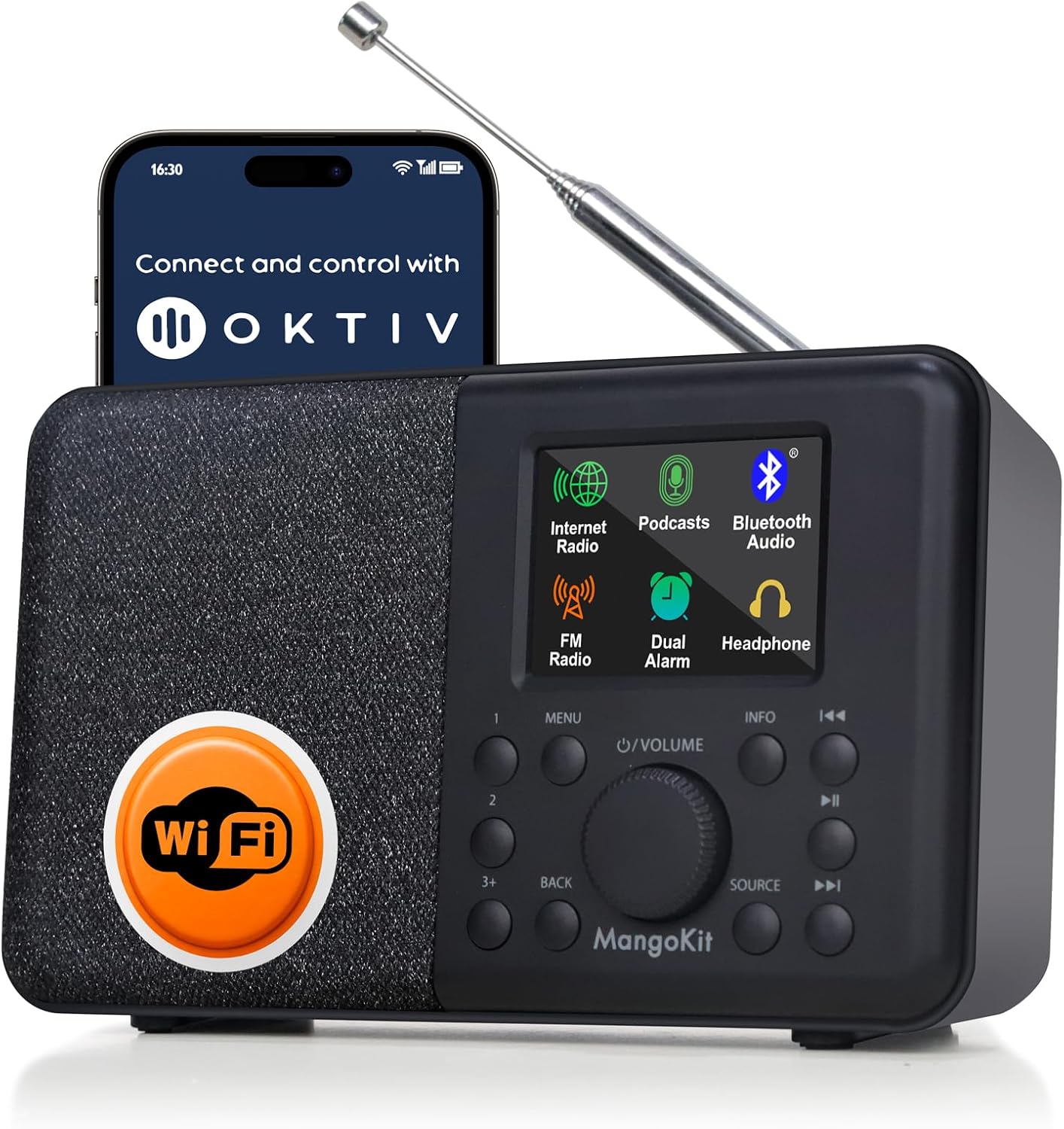
Figure 1: MangoKit SR10 Smart WiFi Internet Radio with its control app displayed on a smartphone.
Temel Özellikler:
- Internet Radio & Podcast & FM: Access over 30,000 internet radio stations, podcasts, and local FM broadcasts.
- Bluetooth Akışı: Connect your smartphone or tablet wirelessly via Bluetooth 5.0.
- OKTIV App Control: Manage all functions remotely using the dedicated OKTIV application.
- Etkileyici Konuşmacı: Delivers clear, balanced audio with adjustable EQ for bass and treble.
- Dual Alarms & Sleep Timer: Set two independent alarms with various wake-up options and a sleep timer.
- Mains & Battery Powered: Operates on AC power or 4xAA batteries (not included) for portable use.
- Kulaklık Bağlantı Noktası: For private listening without disturbing others.
- TFT Renkli Ekran: Provides clear menu navigation and information display.
- Teleskopik Anten: 360-degree rotating antenna for optimal FM signal reception.
Kurmak
1. Açma
- Şebeke Gücü: Connect the included power adapter to the DC IN port on the back of the radio and then to a wall outlet.
- Pil Gücü: For portable use, insert 4xAA batteries (not included) into the battery compartment. Ensure correct polarity.
- Basın Güç radyoyu açmak için düğmeye basın.
2. Initial Network Connection (for Internet Radio/Podcast)
- Upon first power-on, the radio will guide you through the network setup.
- Seçme "Network Wizard" Menüden.
- Radyo, kullanılabilir Wi-Fi ağlarını tarayacaktır. Listeden ağınızı seçin.
- Enter your Wi-Fi password using the rotary dial and buttons. Confirm your selection.
- Bağlantı kurulduktan sonra, radyo bir onay mesajı gösterecektir.

Figure 2: The SR10 radio displaying its various modes, including Internet Radio and Bluetooth.
Kullanım Talimatları
1. Mod Seçimi
Basın KAYNAK button to cycle through available modes: Internet Radio, Podcast, Bluetooth, and FM Radio.
2. İnternet Radyosu
- Seçme "Internet Radio" mod.
- Kullanın MENÜ button and rotary dial to browse stations by location, genre, or search.
- Press the rotary dial to select a station.
- Ön ayarlar: To save a station, UZUN BASINÇ one of the preset buttons (1, 2, or 3+). To recall a saved station, KISA BASIN the corresponding preset button.

Figure 3: The SR10's clear display showing an internet radio station.
3. Podcast Player
- Seçme "Podcast" mod.
- Browse or search for podcasts using the MENÜ button and rotary dial.
- Select a podcast episode to play. The device supports bookmarking and follow functions.
4. Bluetooth Akışı
- Seçme "Bluetooth" mod. Radyo eşleştirme moduna girecektir.
- On your smartphone or tablet, enable Bluetooth and search for "MangoKit SR10".
- Select the device to pair. Once connected, you can stream audio from your device to the radio.

Figure 4: The SR10 connected to a smartphone via Bluetooth for audio streaming.
5. FM Radyo
- Seçme "FM Radio" mod.
- En iyi sinyal alımı için teleskopik anteni uzatın ve ayarlayın.
- Kullanın Ayarlama buttons (left/right arrows) to manually tune or UZUN BASINÇ to auto-scan for stations.
- Ön ayarlar: Similar to Internet Radio, UZUN BASINÇ a preset button to save, KISA BASIN to recall.
6. Alarmlar ve Uyku Zamanlayıcısı
- Çift Alarm: Access alarm settings via the MENÜ. Set two independent alarms with options for weekday/weekend, gradual volume, and wake-up source (Internet Radio, FM, or buzzer).
- Uyku Zamanlayıcısı: Set a timer for the radio to automatically turn off after a specified duration.
- Uyuklama: Press any button (except Power) when an alarm sounds to activate snooze.

Figure 5: The SR10 radio functioning as a bedside alarm clock.
7. OKTIV App Control
- İndir OKTIV App Akıllı telefonunuzun uygulama mağazasından.
- Ensure your smartphone and the SR10 radio are connected to the same Wi-Fi network.
- Open the OKTIV App and follow the on-screen instructions to connect to your SR10 radio.
- The app allows wireless control of modes, presets, volume, and other settings.

Figure 6: Controlling the SR10 radio wirelessly using the OKTIV app.
Bakım
- Temizlik: Radyonun yüzeyini temizlemek için yumuşak, kuru bir bez kullanın. Aşındırıcı temizleyiciler veya çözücüler kullanmayın.
- Depolamak: When not in use for extended periods, store the radio in a cool, dry place. Remove batteries if using battery power.
- Anten Bakımı: Hasar görmemesi için teleskopik anteni nazikçe tutun.
Sorun giderme
| Sorun | Olası Çözüm |
|---|---|
| Güç yok | Check power adapter connection. Ensure batteries are correctly inserted and charged if using battery power. |
| Wi-Fi'ye bağlanılamıyor | Ensure correct Wi-Fi password. Check router is on and within range. Try restarting the radio and router. |
| Internet radio buffering/dropping | Check Wi-Fi signal strength. Move radio closer to router. Ensure sufficient internet bandwidth. |
| Zayıf FM alımı | Teleskopik anteni tamamen açın ve ayarlayın. Radyoyu farklı bir yere taşımayı deneyin. |
| Bluetooth eşleştirme sorunları | Ensure radio is in Bluetooth mode. Make sure no other device is currently connected. Restart Bluetooth on your source device. |
| Ses yok | Check volume level. Ensure headphones are not plugged in if expecting speaker output. |
Özellikler
| Özellik | Detay |
|---|---|
| Model Numarası | SR10 |
| Ürün Boyutları | 6.89"U x 2.13"G x 4.17"Y (17.5 x 5.4 x 10.6 cm) |
| Ürün Ağırlığı | 1.4 pound (0.64 kg) |
| Bağlantı Teknolojisi | Bluetooth, USB, Wi-Fi |
| Tuner Teknolojisi | FM |
| Güç Kaynağı | Mains and Battery Powered (4xAA batteries, not included) |
| Özel Özellikler | Smart WIFI & Internet Radio, Podcast, OKTIV APP Control, Portable FM Radio, Bluetooth 5.0 Speaker, Dual Alarms, Color Display |
Garanti ve Destek
For warranty information and technical support, please refer to the official MangoKit website or contact their customer service. Details can typically be found on the product packaging or the manufacturer's webalan.
Resmi Ürün Videosu
Video 1: Bittiview of the MangoKit SR10 Smart WiFi Internet Radio, highlighting its features and connectivity options.


