giriiş
Welcome to the OUKITEL C3 Cell Phone user manual. This guide provides essential information to help you set up, operate, and maintain your new smartphone. Please read this manual thoroughly to ensure proper usage and to maximize your device's potential.
Kutuda Neler Var?
OUKITEL C3 paketini açtığınızda aşağıdaki öğeleri bulmalısınız:
- 1x OUKITEL C3 Cell Phone
- 1 adet 10W Şarj Cihazı
- 1x Veri Kablosu
- 1x Telefon Kılıfı
- 1x Kullanım Kılavuzu

Image: Contents of the OUKITEL C3 package, including the phone, charger, data cable, phone case, and manual.
Video: An unboxing demonstration of the OUKITEL C3 Cell Phone, showing the phone and its included accessories.
Ürün Bittiview
The OUKITEL C3 is a 4G Android smartphone featuring a 6.52-inch waterdrop screen, a 5000mAh battery, and a dual-camera system. It is designed for everyday communication and multimedia use.
Temel Özellikler:
- Görüntülemek: 6.52-inch HD Waterdrop Screen (540x1200 resolution, 450nit brightness)
- İşlemci: Unisoc T310
- Hafıza: 16GB RAM (4GB fixed + 12GB virtual) + 64GB ROM, expandable up to 1TB via TF card
- Pil: 5000mAh with 10W fast charging and OTG reverse charging support
- Kameralar: 13 MP Ana Kamera, 5 MP Ön Kamera
- İşletim Sistemi: Android 14
- Bağlantı: 4G Dual SIM, Bluetooth 5.0, Wi-Fi, GPS, GLONASS, Beidou, Galileo
- Güvenlik: Yüz Kimliği
- Boyutlar: 9.3 mm kalınlık, 198 g ağırlık
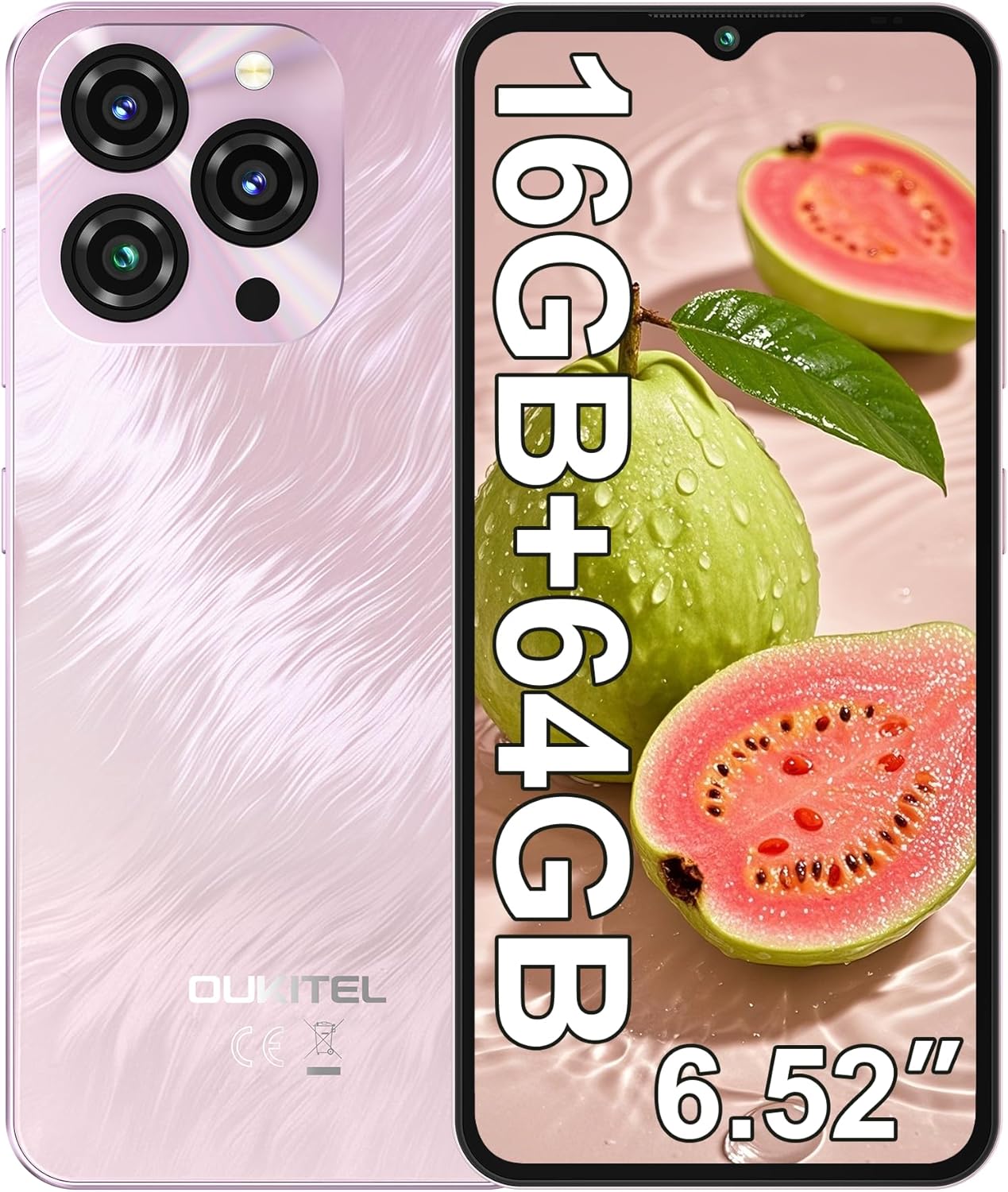
Image: The OUKITEL C3 Cell Phone, showcasinTasarımı ve kamera modülü.

Image: Close-up of the OUKITEL C3's 6.52-inch waterdrop display, highlighting its visual quality.

Image: Visual representation of the OUKITEL C3's slim 9.3mm thickness and 198g weight.
Kurmak
1. SIM Kart ve TF Kart Takılması
The OUKITEL C3 supports dual Nano SIM cards or one Nano SIM card and one TF (microSD) card for expanded storage.
- Telefonun yan tarafında bulunan SIM kart tepsisini bulun.
- Kutu içerisinde bulunan SIM kart çıkarma aletini tepsinin yanındaki küçük deliğe yerleştirin ve tepsi çıkana kadar hafifçe itin.
- Place your Nano SIM card(s) and/or TF card into the designated slots on the tray. Ensure the gold contacts face downwards and the cards are correctly oriented.
- Carefully reinsert the tray into the phone until it is flush with the device's side.

Image: Diagram showing the SIM card tray, 3.5mm audio jack, and USB-C port on the OUKITEL C3.
2. İlk Güç Açma ve Kurulum
- Press and hold the Power button (located on the right side of the phone) until the OUKITEL logo appears.
- Dilinizi seçmek, bir Wi-Fi ağına bağlanmak ve Google hesabınızı kurmak için ekrandaki talimatları izleyin.
- You will also be guided through setting up security features like Face ID during this process.
3. Cihazın Şarj Edilmesi
Before first use, it is recommended to fully charge your OUKITEL C3.
- Connect the USB data cable to the 10W charger.
- Şarj cihazını elektrik prizine takın.
- Kablo ucunun USB-C kısmını telefonunuzun altındaki şarj portuna takın.
- Ekranda bulunan pil ikonu şarj durumunu gösterecektir.

Image: Illustration of the OUKITEL C3's 5000mAh battery and charging process.
Kullanım Talimatları
1. Temel Gezinme (Android 14)
Your OUKITEL C3 runs on Android 14, offering an intuitive user experience.
- Ana Ekran: Ana ekranlar arasında geçiş yapmak için sola veya sağa kaydırın. Widget'ları, duvar kağıtlarını ve ayarları özelleştirmek için boş bir alana dokunup basılı tutun.
- Uygulama Çekmecesi: Yüklü tüm uygulamalara erişmek için ekranın altından yukarı doğru kaydırın.
- Bildirimler ve Hızlı Ayarlar: için ekranın üst kısmından aşağı doğru kaydırın. view Bildirimlere ve hızlı ayar geçişlerine (Wi-Fi, Bluetooth, vb.) erişim.
- Son Uygulamalar: Swipe up from the bottom and hold (or tap the square navigation button if enabled) to see recently used applications.

Image: The OUKITEL C3 displaying the Android 14 operating system interface with various applications.
2. Kamera Kullanımı
The OUKITEL C3 is equipped with a 13MP main camera and a 5MP front camera.
- Ana ekranınızdan veya uygulama çekmecenizden "Kamera" uygulamasını açın.
- Switch between the front and rear cameras using the camera switch icon.
- Fotoğraf çekmek için deklanşöre dokunun.
- Explore different modes like Video, Portrait, or Panorama if available in the camera app.

Image: Visual detailing of the OUKITEL C3's 13MP main camera and 5MP front camera capabilities.
3. Bağlantı
- Wifi: Mevcut ağlara bağlanmak için Ayarlar > Ağ ve İnternet > Wi-Fi'ye gidin.
- Bluetooth: Go to Settings > Connected devices > Bluetooth to pair with Bluetooth devices like headphones or speakers.
- KÜRESEL KONUMLAMA SİSTEMİ: Location services are enabled by default. You can manage them in Settings > Location. The phone supports GPS, GLONASS, Beidou, and Galileo for accurate positioning.
- OTG'li: The OUKITEL C3 supports USB On-The-Go (OTG), allowing you to connect USB devices like flash drives or keyboards using an OTG adapter (sold separately).
4. Yüz Tanıma
Face ID provides a convenient and secure way to unlock your phone.
- Ayarlar > Güvenlik ve gizlilik > Cihaz kilidini açma > Yüz tanıma kilidini açma seçeneğine gidin.
- Follow the on-screen instructions to register your face. Ensure good lighting and hold the phone at eye level.
- Kayıt işlemi tamamlandıktan sonra, ön kameraya bakarak telefonunuzun kilidini açabilirsiniz.
Bakım
1. Pil Bakımı
- Telefonunuzu aşırı sıcaklıklara maruz bırakmaktan kaçının.
- En iyi şarj performansı ve güvenliği için yalnızca verilen şarj cihazını ve kabloyu kullanın.
- Uzun süreli saklama için pili yaklaşık %50'ye kadar şarj edin ve cihazı kapatın.
2. Yazılım Güncellemeleri
Telefonunuzun en yeni özelliklere, güvenlik yamalarına ve performans iyileştirmelerine sahip olduğundan emin olmak için düzenli olarak yazılım güncellemelerini kontrol edin ve yükleyin.
- Ayarlar > Sistem > Sistem güncellemesi'ne gidin.
- Tap "Check for update" and follow the instructions if an update is available.
3. Cihazınızı Temizleme
- Ekranı ve telefonun arkasını silmek için yumuşak, tiftiksiz bir bez kullanın.
- Sert kimyasallar veya aşındırıcı malzemeler kullanmaktan kaçının.
- İnatçı lekeler için hafifçeampBezi suyla veya elektronik cihazlar için tasarlanmış bir ekran temizleyiciyle silin.
Sorun giderme
| Sorun | Olası Çözüm |
|---|---|
| Telefon açılmıyor. | Pilin şarjlı olduğundan emin olun. Şarj cihazını bağlayın ve tekrar açmayı denemeden önce birkaç dakika bekleyin. |
| Cannot make or receive calls/texts. |
|
| Uygulamalar yavaş çalışıyor veya donuyor. |
|
| Pil çabuk bitiyor. |
|
| Face ID çalışmıyor. |
|

Image: Important information regarding OUKITEL C3's carrier compatibility, specifically T-Mobile support.
Özellikler
| Özellik | Detay |
|---|---|
| Model Adı | OUKITEL C3 |
| İşletim Sistemi | Android 14 |
| Görüntülemek | 6.52 Inches HD Waterdrop Screen, 540 x 1200 Resolution, 60 Hz Refresh Rate |
| Veri deposu | 16 GB (4GB fixed + 12GB virtual) |
| Dahili Depolama (ROM) | 64 GB |
| Genişletilebilir Depolama | TF kart aracılığıyla 1 TB'a kadar depolama alanı. |
| Ana Kamera | 13 MP |
| Ön Kamera | 5 MP |
| Pil Kapasitesi | 5000 mAh |
| Şarj etme | 10W Fast Charging, Supports OTG Reverse Charging |
| Bağlantı | 4G Cellular Technology, Bluetooth 5.0, Wi-Fi |
| Navigasyon | GPS, GLONASS, Beidou, Galileo |
| Ses Jakı | 3.5 mm |
| SIM Kart Türü | Çift Nano SIM |
| Boyutlar | 9.3mm kalınlık |
| Ağırlık | 198 gram (yaklaşık 14.9 ons) |
| Supported Carrier | T-Mobile (Does not support Metro PCS, AT&T, Verizon) |
Video: Bir fazlaview of the OUKITEL C3 Cell Phone's main features and specifications.
Garanti ve Destek
For warranty information and technical support, please refer to the warranty card included in your product package or visit the official OUKITEL webSite. Satın alma belgenizi garanti talepleriniz için saklayın.
İletişim Bilgileri: Please refer to the contact details provided in your product documentation or on the OUKITEL official webMüşteri hizmetleri ve destek sitesi.