giriiş
This manual provides detailed instructions for the setup, operation, and maintenance of your HTC N15 Wireless Clip On Earbuds. Please read this manual thoroughly before using the product to ensure proper function and longevity.
Paket İçeriği
Ürün paketinizde tüm öğelerin mevcut olduğunu doğrulayın:
- 1 Pair HTC N15 Clip On Earbuds
- 1 Şarj Kutusu
- 1 USB-C Şarj Kablosu
- 1 Quick Start Guide (Basic Operations)
Ürün Bittiview
The HTC N15 Wireless Clip On Earbuds feature an open-ear design for situational awareness and a lightweight, secure fit. They come with a compact charging case for extended use.
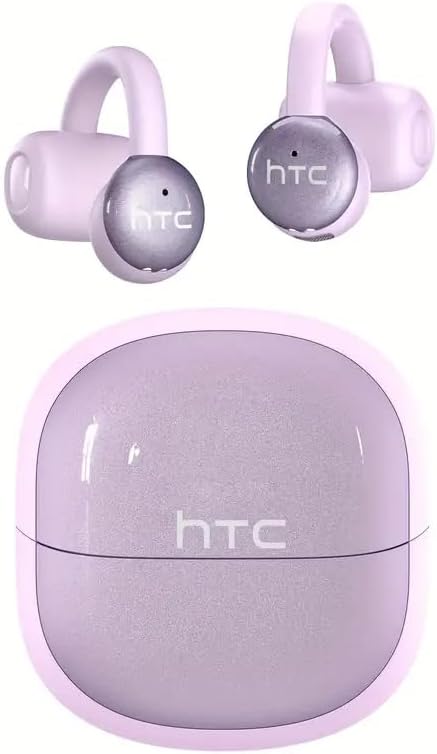
Image: HTC N15 Wireless Clip On Earbuds and Charging Case.

Image: The HTC N15 earbuds and charging case, highlighting battery life features such as 1.5 hours fast charging, 24 hours with the charge case, 8 hours on a single charge, and a Type-C charge port.
Kulaklıkları ve Kutuyu Şarj Etme
Before first use, fully charge the earbuds and charging case. The charging case provides additional power for on-the-go charging.
- Kasanın Şarj Edilmesi: Connect the provided USB-C cable to the charging port on the case and a power source. The indicator lights on the case will show the charging status.
- Kulaklıkların Şarj Edilmesi: Place the earbuds into the charging case. Ensure they are correctly seated. The earbuds will begin charging automatically.
A single charge provides approximately 8 hours of playback. The charging case extends total playtime to about 22 hours. Fast charging allows for quick power replenishment.

Image: Visual representation of the HTC N15 earbuds' battery life: 8 hours on a single charge, 24 hours with the charging case, and 1.5 hours for fast charging.
Kurulum ve Eşleştirme
The HTC N15 earbuds utilize Bluetooth 6.0 technology for a stable and low-latency connection. They are compatible with iOS and Android devices.
- Güç Açık: Şarj kutusunu açın. Kulaklıklar otomatik olarak açılacak ve eşleştirme moduna girecektir.
- Bluetooth'u etkinleştirin: Cihazınızda (akıllı telefon, tablet, dizüstü bilgisayar) Bluetooth'u etkinleştirin.
- Cihaz seç: In your device's Bluetooth settings, search for 'HTC NE15' and select it to pair.
- Onay: Once paired, a voice prompt will confirm the connection.

Image: A diagram illustrating the 'Upgraded Bluetooth 6.0 Technology' with a comparison to Bluetooth 5.3 and 5.4, emphasizing low latency and fast connection.

Image: The HTC N15 earbuds and charging case shown with various compatible devices including notebooks, TVs, desktops, watches, phones, and iPads, demonstrating flexible connectivity. A phone screen displays 'HTC NE15 Connected'.
Operating Instructions (Touch Control)
The HTC N15 earbuds feature smart touch controls on both earbuds for easy management of calls and music playback.
- Çağrıyı Cevapla/Sonlandır: Kulaklıkların her birine bir kez tıklayın.
- Çağrıyı Reddet: Kulaklıklardan birini 2 saniye basılı tutun.
- Müziği Oynat/Duraklat: Kulaklıklardan birine çift tıklayın.
- Önceki Şarkı: Sol kulaklığa üç kez tıklayın.
- Sonraki Şarkı: Sağ kulaklığa üç kez tıklayın.
- Sesi aç: Sağ kulaklığa bir kez tıklayın.
- Sesi kıs: Sol kulaklığa bir kez tıklayın.
- Sesli Asistan: Sol kulaklığı 2 saniye basılı tutun.
- Oyun Modu: Sağ kulaklığı 2 saniye basılı tutun.

Image: A diagram illustrating the touch control functions for the HTC N15 earbuds, showing actions for answering/ending calls, rejecting calls, playing/pausing music, skipping tracks, adjusting volume, activating voice assistant, and enabling game mode.
Giyme Talimatları
The HTC N15 earbuds feature an ergonomic open-ear clip design for a secure and comfortable fit, allowing you to remain aware of your surroundings.
- Identify L/R: Confirm the left (L) and right (R) earbuds.
- Konumlandırma: Confirm the direction of the earbud.
- Klipsle: Gently clip the earbud onto the thinnest part of your ear by sliding it down.
- ayarlayın: Adjust the earbud tip to align with your ear canal for optimal sound and comfort.
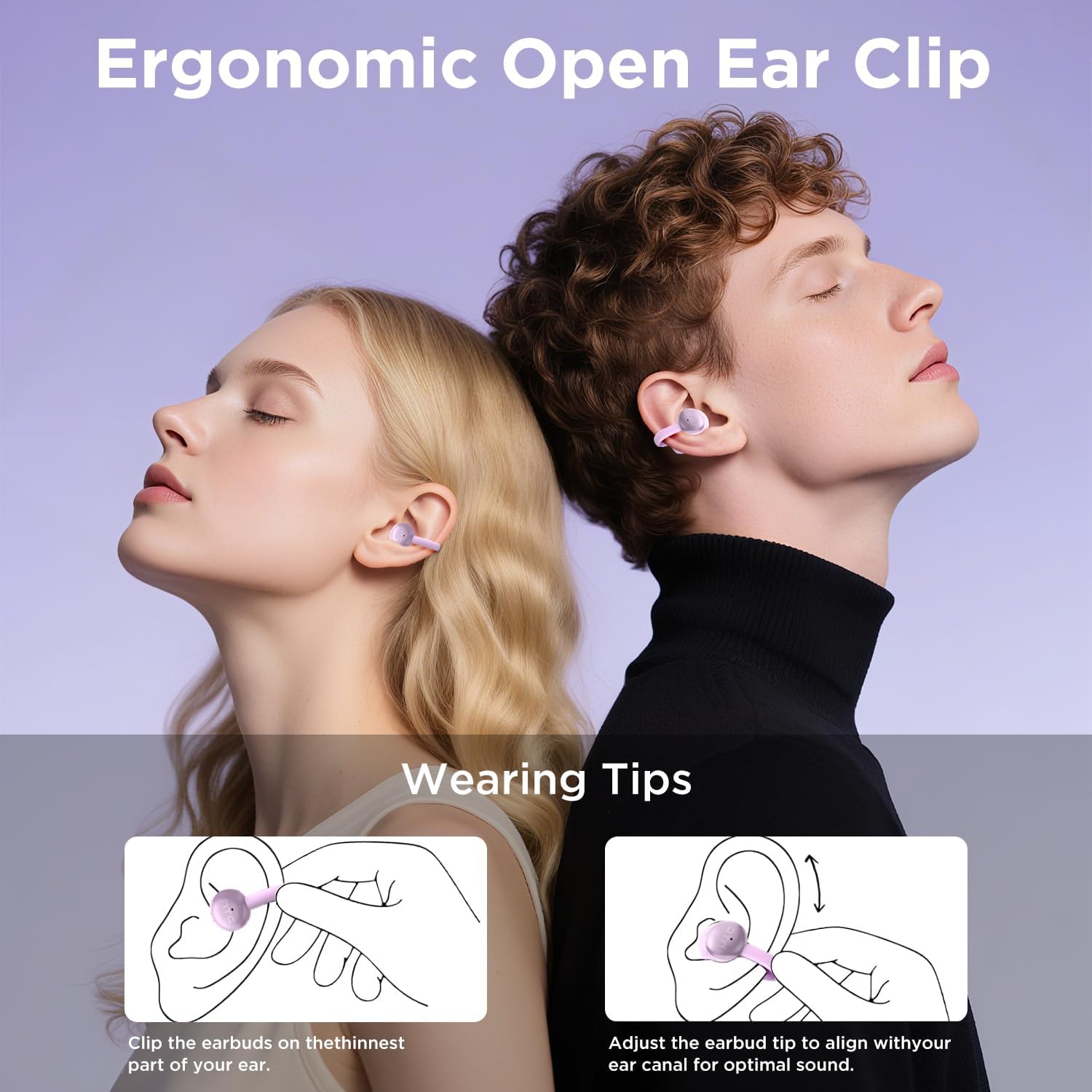
Image: A visual guide demonstrating the ergonomic open-ear clip design and wearing tips for the HTC N15 earbuds, showing how to clip them onto the ear and adjust for optimal sound.

Image: The HTC N15 earbuds emphasizing 'All-Day Comfort' with features like '4.7g Super Light' and a 'Flexible C-Bridge Design' for a secure fit.

Image: A four-step visual guide titled 'HOW TO WEAR?' showing how to correctly position and adjust the HTC N15 earbuds on the ear.
Bakım
To ensure the longevity and optimal performance of your HTC N15 earbuds, follow these maintenance guidelines:
- Temizlik: Kulaklıklarınızı ve şarj kutusunu düzenli olarak yumuşak ve kuru bir bezle silin. Sert kimyasallar veya aşındırıcı malzemeler kullanmaktan kaçının.
- Suya Dayanıklılık: The earbuds are IPX4 sweatproof, meaning they are resistant to splashes and sweat. Do not submerge them in water or expose them to heavy rain.
- Depolamak: Kullanmadığınız zamanlarda kulaklıklarınızı toz ve hasardan korumak için şarj kutusunda saklayın.
- Sıcaklık: Kulaklıkları aşırı sıcaklıklara (sıcak veya soğuk) veya uzun süre doğrudan güneş ışığına maruz bırakmaktan kaçının.
Sorun giderme
If you encounter issues with your HTC N15 earbuds, refer to the following common solutions:
- Kulaklıklar eşleşmiyor: Her iki kulaklığın da şarjlı ve eşleştirme modunda olduğundan emin olun. Cihazınızın Bluetooth'unu kapatıp tekrar açın, ardından tekrar eşleştirmeyi deneyin.
- Ses yok veya ses seviyesi düşük: Check the volume levels on both your device and the earbuds. Ensure the earbuds are correctly positioned in your ears. Due to the open-ear design, you may need to increase the volume slightly in noisy environments.
- Kulaklıkların düşmesi: Ensure you are wearing the earbuds correctly as per the wearing instructions. Adjust the clip and earbud tip for a snug fit.
- Dokunmatik kontroller tepki vermiyor: Parmaklarınızın temiz ve kuru olduğundan emin olun. Kulaklıkları tekrar kutusuna yerleştirip tekrar çıkararak yeniden başlatmayı deneyin.
- Şarj sorunları: Verify the USB-C cable and power source are working. Ensure the earbuds are properly seated in the charging case.
Özellikler
| Özellik | Detay |
|---|---|
| Model Adı | HTC NE15 |
| Bağlantı Teknolojisi | Kablosuz (Bluetooth 6.0) |
| Kulaklık Şekli | Açık Kulak |
| Kontrol Yöntemi | Dokunmak |
| Pil Ömrü (Kulaklıklar) | 8 Saat (tek şarj) |
| Toplam Oynanma Süresi (Kılıflı) | 22 Saat |
| Su Direnç Seviyesi | IPX4 (Terlemeye Dayanıklı) |
| Malzeme | Plastik, Silikon |
| Ürün Ağırlığı | 4.6 ons |
| Uyumlu Cihazlar | Cellphones, Tablets |
| UPC | 768649989703 |
Ürün Videosu
Video: Kutudan çıkarma ve genel bakışview of the HTC Wireless Clip On Earbuds N15 Bluetooth 6.0. This video demonstrates the product packaging, contents, and the physical appearance of the earbuds and charging case.
Garanti ve Destek
HTC provides customer support for its products. For any questions or assistance, please refer to the contact information provided with your purchase or visit the official HTC support webalan.
Müşteri Desteği: 7*24 Live Chat Support is available for assistance with your HTC N15 earbuds.
Garanti talepleri için lütfen satın alma belgenizi saklayın.


