giriiş
Satın aldığınız için teşekkür ederizasing the Matbip Multi-Platform Wireless Gaming Controller. This controller is designed to enhance your gaming experience across various platforms, including Nintendo Switch, Android, iOS, and PC. It features advanced functions such as TURBO burst, macro programming, customizable RGB lighting, and HD vibration, providing precise control and immersive feedback. Please read this manual carefully before use to ensure proper operation and to fully utilize all features.
Ürün Bittiview
Familiarize yourself with the various components and buttons of your Matbip controller.
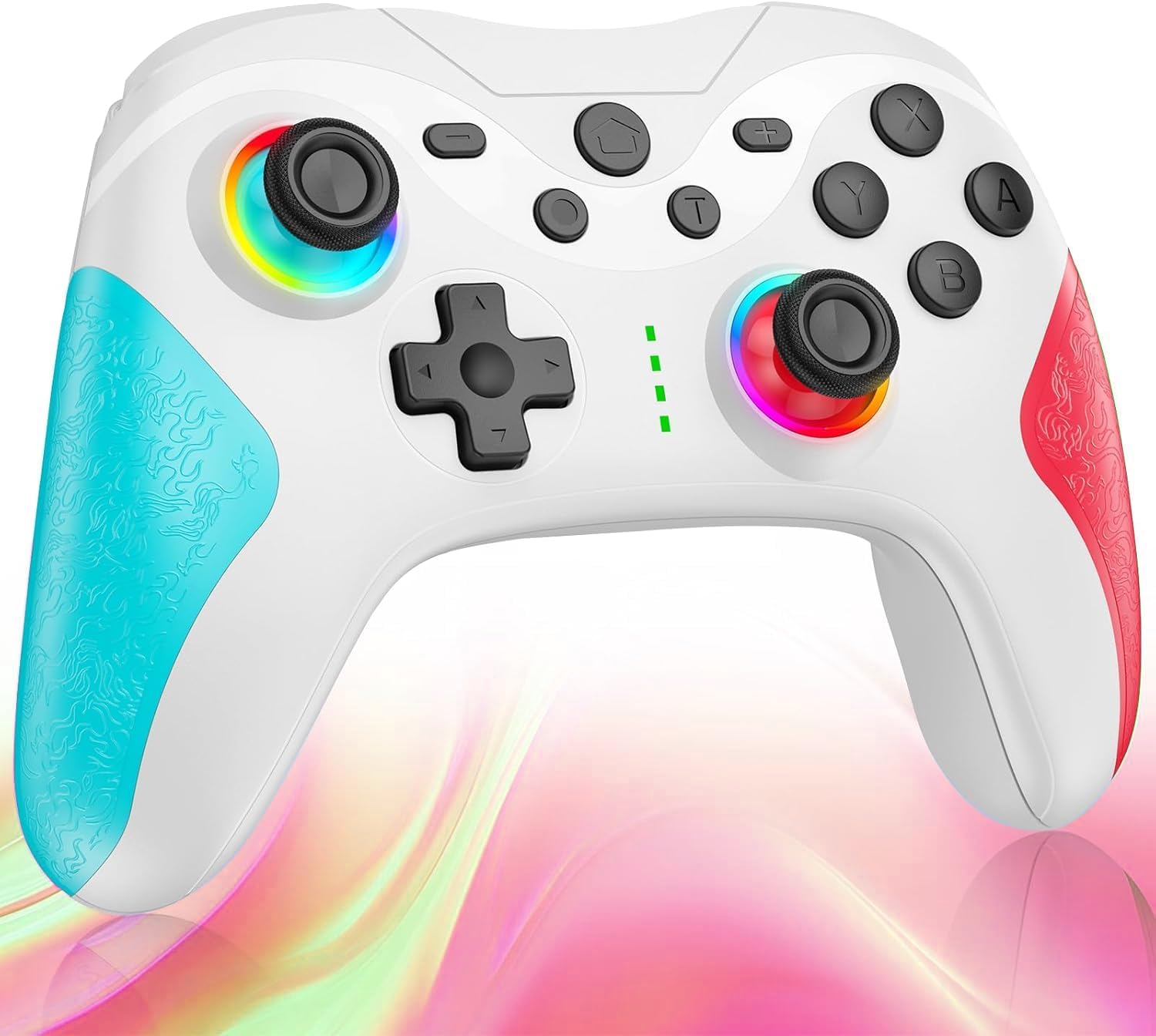
Resim: Ön view of the Matbip Multi-Platform Wireless Gaming Controller. It features a white body with blue textured grips on the left and red textured grips on the right. The joysticks are illuminated with a rainbow RGB light. Standard buttons (A, B, X, Y), a D-pad, and central function buttons (Home, Plus, Minus, T) are visible.
Temel Bileşenler:
- Sol/Sağ Joystick'ler: For directional control, with customizable RGB lighting.
- Yön Düğmesi: Hassas yönlendirme girişi için.
- Eylem Düğmeleri (A/B/X/Y): Standart oyun giriş tuşları.
- Shoulder Buttons (L/R/ZL/ZR): Top-mounted trigger and bumper buttons.
- Geri Düğmeleri: Additional programmable buttons on the rear for strategic gameplay.
- Ana menü tuşu: Sistem ana ekranına geri döner.
- Artı (+) / Eksi (-) Butonları: System-specific function buttons.
- T Button (TURBO): Activates and manages the TURBO burst function.
- Şarj Portu: Şarj için USB-C bağlantı noktası.
- Gösterge Işıkları: Bağlantı durumunu ve pil seviyesini görüntüleyin.
Kurmak
1. Kontrol Cihazının Şarj Edilmesi
Before first use, fully charge the controller. Connect the provided USB-C cable to the controller's charging port and the other end to a USB power source (e.g., console, PC, or USB wall adapter). The indicator lights will show charging status and turn off when fully charged.
2. Cihazlarla Eşleştirme
The controller supports Bluetooth wireless connection across multiple platforms.
Nintendo Switch için:
- On the Switch HOME Menu, select Kontrolörler > Tutma Yerini/Sırayı Değiştir.
- Basılı tutun Ana sayfa düğmesi on the Matbip controller for 3-5 seconds until the indicator lights flash rapidly.
- Once paired, the indicator light(s) on the controller will remain solid.
For Android/iOS Devices:
- Android veya iOS cihazınızda Bluetooth'u etkinleştirin.
- Basılı tutun Ana sayfa düğmesi on the Matbip controller for 3-5 seconds until the indicator lights flash rapidly.
- On your device's Bluetooth settings, select the controller (e.g., "Matbip Controller") from the list of available devices to pair.
PC (Windows) için:
- Ensure your PC has Bluetooth enabled. Go to Ayarlar > Cihazlar > Bluetooth ve diğer cihazlar.
- Tıklamak Bluetooth veya başka bir cihaz ekleyin > Bluetooth.
- Basılı tutun Ana sayfa düğmesi on the Matbip controller for 3-5 seconds until the indicator lights flash rapidly.
- Select the controller from the list of devices to pair.
Kullanım Talimatları
TURBO Burst Function:
The TURBO function allows for rapid, automatic button presses, ideal for combat games.
- To activate TURBO: Basılı tutun T düğmesi, then press the desired action button (e.g., A, B, X, Y, L, R, ZL, ZR). The button will now continuously activate when held down.
- TURBO hızını ayarlamak için: Tutarken T düğmesi, taşı right joystick up or down to cycle through 3 different burst speeds.
- To deactivate TURBO: Basılı tutun T düğmesi, then press the same action button again.
Makro İşlevi:
Program a sequence of button presses to a single back button for complex actions.
- Specific instructions for macro programming will be detailed in the full manual. Generally, this involves entering a programming mode, pressing the sequence, and assigning it to a back button.
Özelleştirilebilir RGB Aydınlatma:
The joysticks feature 9-color RGB lighting to enhance your gaming atmosphere.
- To change RGB color/mode: Press a specific button combination (e.g., T + Left Joystick click) to cycle through different colors and lighting effects.
HD Vibration Adjustment:
Adjust the intensity of the HD vibration feedback to your preference (4 levels).
- Titreşimi ayarlamak için: Press a specific button combination (e.g., T + D-Pad Up/Down) to cycle through the 4 vibration levels.
Jiroskop Sensörü:
The high-precision gyro sensor enables intuitive motion control in supported games.
- The gyro sensor is automatically active when connected to a compatible device (e.g., Nintendo Switch) and used in games that support motion controls.
Sleep Wake-up Function:
The controller supports waking up your Nintendo Switch console from sleep mode.
- When the Switch is in sleep mode, simply press the Ana sayfa düğmesi on the controller to wake it up and reconnect.
Bakım
Düzenli bakım, kontrol cihazınızın uzun ömürlü olmasını ve en iyi performansı göstermesini sağlar.
- Temizlik: Kumandayı silmek için yumuşak, kuru bir bez kullanın. İnatçı kirler için hafifçe kurulayın.ampBezi suyla yıkayın. Sert kimyasallar veya aşındırıcı temizleyiciler kullanmayın.
- Depolamak: Kumanda cihazını serin, kuru ve doğrudan güneş ışığından, aşırı sıcaklıklardan ve nemden uzak bir yerde saklayın.
- Pil Bakım: Avoid fully discharging the battery frequently. If storing for a long period, charge the controller to about 50% every few months.
- Damlalardan Kaçının: Kumanda cihazını düşmelere ve darbelere karşı koruyun; bu tür önlemler iç bileşenlere zarar verebilir.
Sorun giderme
If you encounter issues with your controller, please refer to the following common solutions:
| Sorun | Olası Çözüm |
|---|---|
| Kumanda açılmıyor. | Ensure the controller is charged. Connect it to a power source using the USB-C cable. |
| Controller does not pair. | Ensure Bluetooth is enabled on your device. Make sure the controller is in pairing mode (flashing lights). Try restarting both the controller and the device. |
| Giriş gecikmesi veya bağlantı kesilmesi. | Ensure there are no strong wireless interferences nearby. Move closer to the device. Re-pair the controller. |
| Düğmeler veya joystickler çalışmıyor. | Try resetting the controller (refer to the full manual for reset instructions, usually a small pinhole button). Ensure no debris is obstructing the buttons. |
| Titreşim özelliği çalışmıyor. | Check if vibration is enabled in the game or system settings. Adjust the vibration intensity on the controller. |
Özellikler
| Özellik | Detay |
|---|---|
| Ürün Boyutları | 10x15x6.5 cm |
| Ağırlık | 300 gr |
| Bağlantı | Bluetooth Kablosuz |
| Uyumluluk | Nintendo Switch, Android, iOS, PC (Windows) |
| Özel Özellikler | TURBO Burst, Macro Function, 9-Color RGB Lighting, 4-Level HD Vibration, Gyro Sensor, Back Buttons, Sleep Wake-up |
| ASIN | B0FHWRK7CQ |
| Yayın tarihi | 16 Temmuz 2025 |
Garanti ve Destek
Matbip is committed to providing high-quality products and customer satisfaction. This product comes with a standard manufacturer's warranty. For detailed warranty information, please refer to the documentation included with your purchase or contact Matbip customer support.
If you require further assistance, have questions, or encounter issues not covered in this manual, please contact our customer support team. A Japanese instruction manual is included with the product to ensure ease of use for first-time users.
İletişim Bilgileri: Please refer to the packaging or the official Matbip webEn güncel müşteri desteği iletişim bilgileri için siteyi ziyaret edin.


