1. Giriş
Satın aldığınız için teşekkür ederizasing the Moukey MAMP3 2.0 Channel Stereo AmpBu kılavuz, cihazınızın güvenli ve verimli çalışması için gerekli bilgileri içermektedir. Lütfen kullanmadan önce dikkatlice okuyun ve ileride başvurmak üzere saklayın.
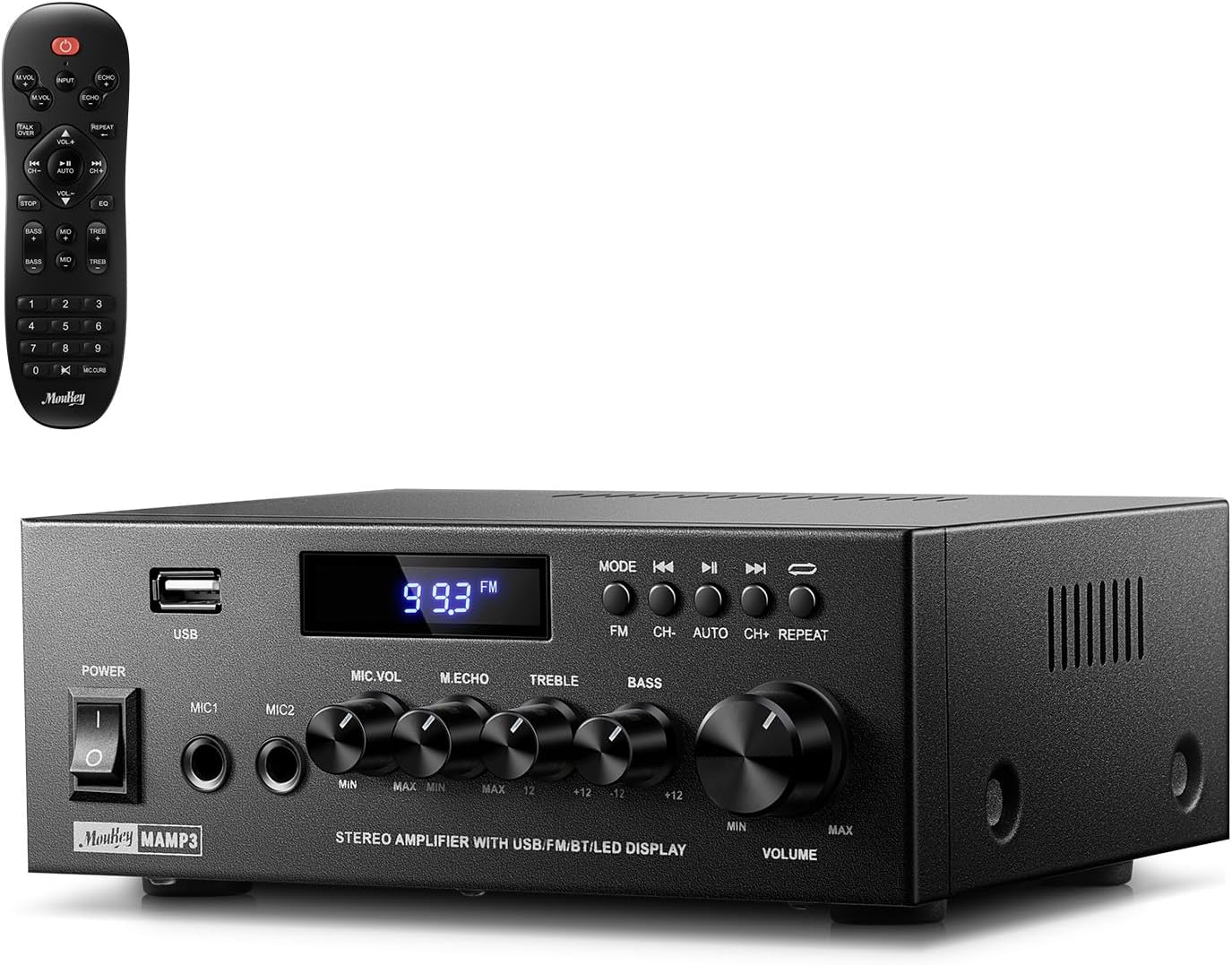
Image 1.1: The Moukey MAMP3 amplifier and its remote control.
2. Güvenlik Talimatları
- Çalıştırmadan önce tüm talimatları okuyun ampcankurtaran.
- Tut amplifier away from water, moisture, and extreme temperatures.
- Havalandırma açıklıklarını kapatmayın. Ünitenin etrafında yeterli hava akışı olduğundan emin olun.
- Yalnızca üniteyle birlikte verilen güç adaptörünü kullanın.
- Cihazı kendiniz tamir etmeye veya değiştirmeye çalışmayın. Tüm servis işlemlerini yetkili personele yaptırın.
- Disconnect the power cord from the outlet if the unit will be unused for extended periods.
3. Ürün Bittiview
3.1 Temel Özellikler
- 2.0 Channel Stereo Audio Output
- Bluetooth 5.3 for stable wireless connection
- Multiple Audio Inputs: RCA, USB, FM Radio, 2 Microphone Inputs
- Full-function Remote Control with EQ adjustments
- Customizable Treble, Midrange, and Bass controls
- Memory function for mode, volume, and EQ settings
- 300 Watts Peak Power Output
3.2 Ön Panel Kontrolleri ve Göstergeleri

Resim 3.1: Ön Panel Düzeni
- Güç düğmesi: Üniteyi açar veya kapatır.
- MIC1/2: 6.35 mm mikrofon giriş jakları.
- Mikrofon Ses Düğmesi: Bağlı mikrofonların ses seviyesini ayarlar.
- Yankı Düğmesi: Mikrofonlar için yankı efektini ayarlar.
- Tiz Düğme: Yüksek frekanslı ses çıkışını ayarlar.
- Bas Düğmesi: Düşük frekanslı ses çıkışını ayarlar.
- Müzik Ses Düğmesi: Main volume control for all audio sources.
- USB girişi: Ses çalma için USB depolama aygıtlarını bağlamak amacıyla kullanılır.
- LED ekran: Shows current mode, track information, or FM frequency.
- MOD Düğmesi: Switches between input sources (BT, Aux, CD, USB, FM).
- Önceki Düğme: Skips to the previous track (USB/BT) or FM station.
- Oynat/Duraklat Düğmesi: Plays or pauses audio (USB/BT).
- Sonraki düğmesi: Skips to the next track (USB/BT) or FM station.
- Tekrar Düğmesi: Repeats current track or all tracks (USB).
3.3 Arka Panel Bağlantıları

Resim 3.2: Arka Panel Bağlantıları
- FM Anten Girişi: Radyo yayını almak için kutu içeriğinde bulunan FM antenini bağlayın.
- SES GİRİŞİ (RCA): Connect external audio sources like CD/DVD players using RCA cables.
- AUDIO OUTPUT (Speaker Terminals): Connect passive speakers. Ensure correct polarity (+ to + and - to -).
- POWER AC INPUT: Güç kablosunu bir AC prizine bağlayın.
4. Kurulum
4.1 Paketin açılması
Dikkatlice çıkarın amplifier and all accessories from the packaging. Verify that all items listed in the 'What's in the Box' section are present.
4.2 Hoparlörleri Bağlama
OnlaraAMP3 amplifier supports two passive speakers. Connect your speakers to the SES ÇIKIŞI terminals on the rear panel. Ensure that the positive (+) terminal on the amplifier connects to the positive (+) terminal on your speaker, and the negative (-) terminal on the amplifier connects to the negative (-) terminal on your speaker. Incorrect polarity can affect sound quality.

Image 4.1: Speaker Connection Diagram
4.3 Ses Kaynaklarını Bağlama
The amplifier offers multiple input options:
- RCA Girişi: Use RCA cables to connect devices such as CD players, DVD players, or other audio equipment to the SES GİRİŞİ Arka panelde jaklar bulunmaktadır.
- USB Girişi: USB flash sürücüyü sürücüye takın USB girişi on the front panel for direct audio playback.
- Bluetooth: Pair your Bluetooth-enabled device (smartphone, tablet, laptop) wirelessly.
- FM Radyo: Birlikte verilen FM antenini bağlayın. FM Anten Girişi on the rear panel for radio reception. Extend the antenna for optimal signal.
- Mikrofon Girişleri: En fazla iki mikrofonu bağlayın. MIC1/2 jacks on the front panel for karaoke or public address.

Image 4.2: Available Signal Inputs
4.4 Güç Bağlantısı
Güç kablosunu prize bağlayın POWER AC INPUT on the rear panel and then plug it into a standard AC power outlet.
5. Kullanım Talimatları
5.1 Güç Açma/Kapatma
Basın Güç Anahtarı ön panelde açmak için amplifier on or off. The LED display will illuminate when the unit is powered on.
5.2 Giriş Seçimi
Basın MOD button on the front panel or the remote control to cycle through the available input sources: Bluetooth (BT), Auxiliary (Aux), CD, USB, and FM radio. The selected mode will be shown on the LED display.
5.3 Ses Kontrolü
Büyük olanı döndür Music Volume Knob on the front panel clockwise to increase volume and counter-clockwise to decrease it. Volume can also be adjusted using the remote control.
5.4 Ekolayzır (EQ) Ayarı
Adjust the sound characteristics using the Tiz Düğme Ve Bas Düğmesi on the front panel. The remote control also provides dedicated buttons for Treble, Midrange, and Bass adjustments. The amplifier will automatically save your preferred EQ settings.
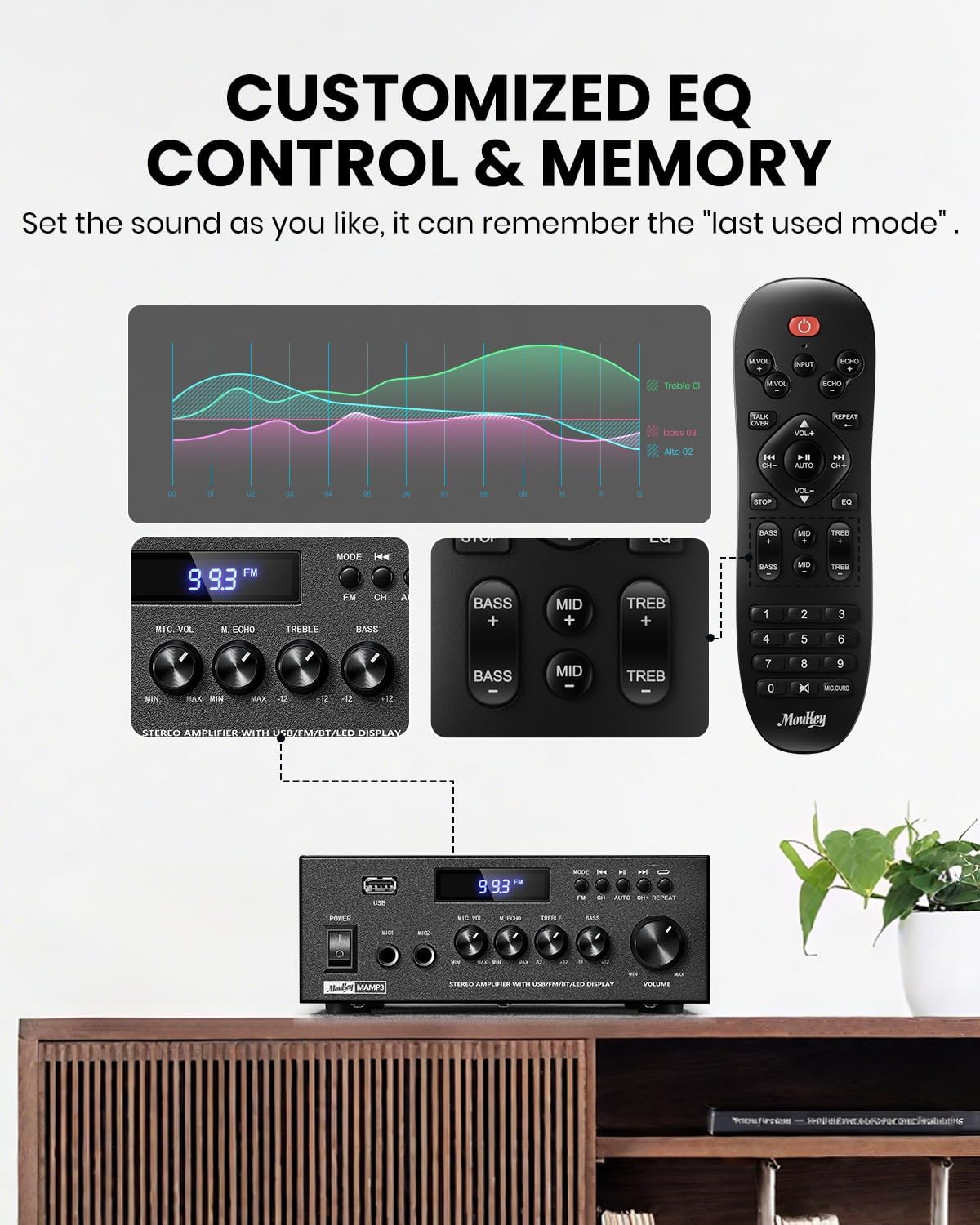
Image 5.1: Customizable EQ Control
5.5 Mikrofon Kontrolleri
If microphones are connected, use the Mikrofon Ses Düğmesi to adjust their output level and the Yankı Düğmesi to add an echo effect. The remote control also features a 'Talkover' function.
5.6 Bluetooth Çalışması
- Basın MOD button until "BT" appears on the LED display. The amplifier is now in Bluetooth pairing mode.
- On your mobile device, enable Bluetooth and search for "Moukey MAMP3".
- Select "Moukey MAMP3" to pair. Once connected, you will hear a confirmation tone.
- Artık cihazınızdaki sesleri şu şekilde oynatabilirsiniz: ampcankurtaran.

Image 5.2: Bluetooth Pairing
5.7 FM Radyo Çalışması
- Basın MOD LED ekranda "FM" görünene kadar düğmeye basın.
- Otomatik tarama: Press the "AUTO" button on the remote to automatically scan and save available FM stations.
- Manuel Ayarlama: Use the number pad on the remote control to directly enter the desired FM frequency (e.g., for 101.1 MHz, enter 1011).
- Kullanın Öncesi Ve Sonraki buttons to navigate between saved stations or fine-tune frequencies.
5.8 USB Oynatma
MP3 veya WAV ses dosyası içeren bir USB flash sürücü takın. files içine USB girişi. amplifier will automatically switch to USB mode and begin playback. Use the Öncesi, Oynat/Duraklat, Ve Sonraki buttons to control playback. The Tekrarlamak Bu düğme, mevcut parçayı veya tüm parçaları tekrarlamanıza olanak tanır.
5.9 Uzaktan Kumanda
The included full-function remote control allows for convenient operation from a distance. It provides control over input selection, volume, EQ settings (treble, midrange, bass), microphone echo, and talkover functions across all input modes.

Image 5.3: Upgraded Remote Control Functionality
6. Bakım
- Temizlik: Cihazın dış yüzeyini temizlemek için yumuşak ve kuru bir bez kullanın. ampDaha yüksek kalitede temizleyiciler veya çözücüler kullanmayın.
- Havalandırma: Ensure that the ventilation openings are free from dust and debris to prevent overheating.
- Depolamak: Uzun süre kullanılmayacaksa, saklayın ampSerin, kuru bir yerde, doğrudan güneş ışığından ve aşırı sıcaklıklardan uzakta saklayın.
7. Sorun Giderme
| Sorun | Olası Neden | Çözüm |
|---|---|---|
| Güç yok | Güç kablosu bağlı değil; Elektrik prizi arızalı; Elektrik anahtarı kapalı. | Ensure power cord is securely connected; Test outlet with another device; Turn power switch on. |
| Ses çıkışı yok | Volume too low; Incorrect input selected; Speaker wires loose/incorrectly connected; Audio source issue. | Increase volume; Select correct input mode; Check speaker wire connections and polarity; Verify audio source is playing. |
| Bluetooth bağlanmıyor | Amplifier not in BT mode; Device too far; Device already connected to another unit; Interference. | Anahtar amplifier to BT mode; Move device closer; Disconnect from other devices; Reduce interference. |
| Zayıf FM alımı | Anten bağlı değil veya yanlış konumlandırılmış; Sinyal zayıf. | Connect and adjust FM antenna position; Try auto-scan or manual tuning for stronger stations. |
| USB oynatma sorunları | Desteklenmiyor file format; USB drive not formatted correctly; USB drive capacity too large. | Emin olmak files are MP3/WAV; Format USB drive to FAT32; Use USB drives 32GB or less. |
8. Özellikler
| Özellik | Şartname |
|---|---|
| Model Numarası | MAMP3 |
| Çıkış Gücü | 300 Watt (Tepe) |
| Kanallar | 2.0 Stereo |
| Bağlantı Teknolojisi | Auxiliary, Bluetooth 5.3, FM, USB |
| Uyumlu Cihazlar | Smartphone, Tablet, Laptop, Computer, Speakers, CD/DVD Player |
| Bağlayıcı Türü | RCA, USB, 2 Mic input |
| Ses Çıkışı Modu | Stereo |
| Ürün Boyutları | 15.5 x 18.0 x 7.1 cm (6.1"D x 7.1"G x 2.8"Y) |
| Ürün Ağırlığı | 2.14 pound (0.97 kg) |
| Renk | Siyah |
8.1 Kutuda Neler Var?
- Moukey MAMP3 Ampcankurtaran
- Uzaktan Kumanda
- FM Anteni
- Kullanıcı Kılavuzu
- Güç Adaptörü
9. Garanti ve Destek
9.1 Garanti Bilgileri
Moukey products are designed and manufactured to the highest quality standards. This product is covered by a limited warranty against defects in materials and workmanship. Please refer to the warranty card included with your purchase for specific terms and conditions, or visit the official Moukey webayrıntılı garanti bilgileri için site.
9.2 Müşteri Desteği
If you encounter any issues or have questions regarding your Moukey MAMP3 amplifier, please contact our customer support team. You can find contact information on the official Moukey websiteniz veya satın alma platformunuz aracılığıyla.
Webalan: www.moukey.com (Örnample link, please refer to actual product documentation)
E-posta: support@moukey.com (Örnamp(E-posta için lütfen ürünün gerçek dokümanına bakın.)


