1. Giriş
This manual provides essential information for the safe and effective use of your FLEXISPOT V9-Max-AR Exercise Bike with 2D Desktop. Please read all instructions carefully before assembly and operation. Retain this manual for future reference.
Önemli Güvenlik Bilgileri
- Her kullanımdan önce tüm parçaların güvenli bir şekilde sabitlendiğinden emin olun.
- 300 poundluk maksimum ağırlık tavsiyesini aşmayın.
- Egzersiz bisikleti çalışırken çocukları ve evcil hayvanları bisikletten uzak tutun.
- Herhangi bir yeni egzersiz programına başlamadan önce bir doktora danışın.
- Use the product on a stable, level surface.
2. Ürün Bittiview ve Bileşenler
The FLEXISPOT V9-Max-AR is a versatile exercise bike designed for indoor use, featuring an integrated 2D adjustable desktop. It combines a stationary bike with a functional workspace, allowing for simultaneous exercise and productivity.

Figure 2.1: User operating the FLEXISPOT V9-Max-AR Exercise Bike with the desktop in use.
Key features include an 8-level quiet magnetic resistance system, an LCD display for tracking workout metrics, and a robust design supporting up to 300 lbs. The adjustable seat and desktop accommodate various user heights and preferences.
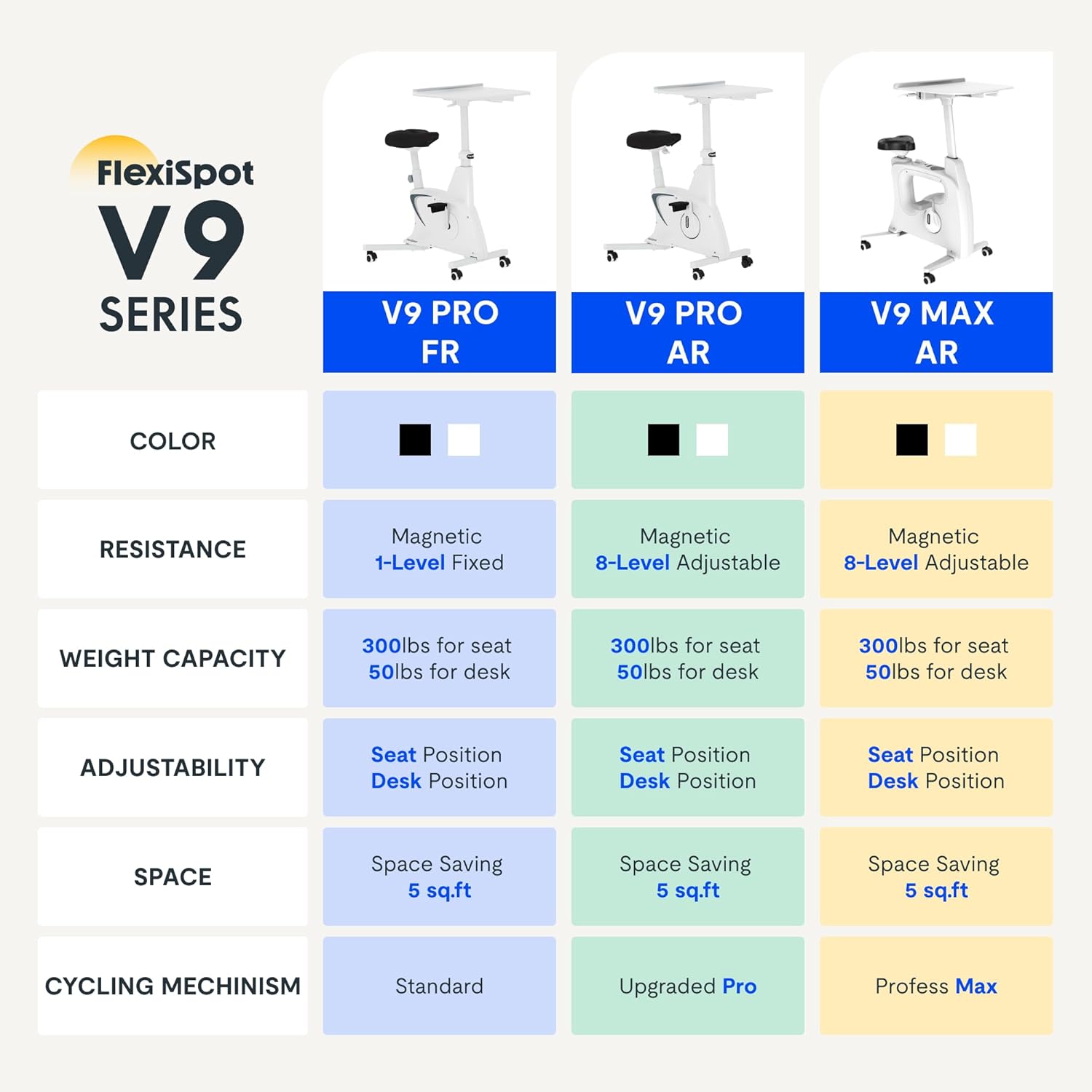
Figure 2.2: Comparison of FlexiSpot V9 series models, highlighting features like resistance and adjustability.
Ana bileşenler:
- Main Frame with Flywheel and Resistance Mechanism
- Ayarlanabilir Koltuk
- Adjustable Desktop
- Pedallar
- LCD Display Console
- Taşıma Tekerlekleri
3. Kurulum ve Montaj
The FLEXISPOT V9-Max-AR is designed for quick and straightforward assembly, typically requiring about 10 minutes.
Montaj Adımları:
- Tüm bileşenleri paketinden çıkarın ve paketleme listesine göre kontrol edin.
- Attach the front and rear stabilizers to the main frame using the provided screws.
- Install the pedals, ensuring the left pedal is tightened counter-clockwise and the right pedal clockwise.
- Mount the seat post and seat onto the main frame, securing them firmly.
- Attach the desktop support column to the main frame.
- Secure the desktop to its support column.
- Insert batteries into the LCD display (batteries not included) and connect the sensor wire.
- Ensure all screws and connections are tightened before first use.

Figure 3.1: Illustration of adjustable components for personalized setup.
4. Kullanım Talimatları
Adjusting Seat and Desktop:
- Oturma Yüksekliği: Use the quick-release lever located on the seat post to adjust the seat to a comfortable height. Ensure your leg has a slight bend at the knee when the pedal is at its lowest point.
- Desktop Height: The desktop can be adjusted vertically. Locate the adjustment lever beneath the desktop and raise or lower the desktop to your desired working height.
- Desktop Depth: The desktop can also be adjusted horizontally (forward/backward) to optimize your working posture.
Direnç Seviyeleri:
The V9-Max-AR features 8 levels of quiet magnetic resistance. Rotate the resistance knob, located below the desktop, clockwise to increase resistance and counter-clockwise to decrease it.

Figure 4.1: LCD display and resistance control knob.
LCD Ekranın Kullanımı:
The built-in LCD display monitors your workout statistics. It tracks:
- Zaman
- Hız
- Mesafe
- Yakılan Kaloriler
- Total Distance Covered (Odometer)
- Dönme Hızı
Press the button on the display to cycle through different metrics or hold it to reset values (refer to display specific instructions for exact operation).
Using the 2D Desktop:
The spacious desktop (20" x 22.8") is designed to hold a laptop, notebook, mobile phone, or water cup. It provides a stable surface for working or entertainment while exercising.

Figure 4.2: Desktop in use for studying or working.
Taşınabilirlik:
Equipped with movable silent wheels, the exercise bike can be easily relocated within your home or office. Simply tilt the bike and roll it to your desired position.
5. Bakım
Regular maintenance ensures the longevity and optimal performance of your FLEXISPOT V9-Max-AR Exercise Bike.
- Temizlik: Wipe down the bike regularly with a damp bez ve yumuşak deterjan kullanın. Aşındırıcı temizleyicilerden veya çözücülerden kaçının.
- Denetleme: Periodically check all bolts, nuts, and moving parts for tightness. Tighten any loose components immediately.
- Yağlama: No specific lubrication is required for the magnetic resistance system.
- Depolamak: Bisikleti kuru, serin ve doğrudan güneş ışığından ve aşırı sıcaklıklardan uzak bir yerde saklayın.
6. Sorun Giderme
This section addresses common issues you might encounter with your exercise bike.
| Sorun | Olası Neden | Çözüm |
|---|---|---|
| LCD ekran çalışmıyor | Piller bitmiş veya yanlış takılmış. | Replace batteries (AAA, not included) or ensure correct polarity. |
| Unstable or wobbly bike | Gevşek cıvatalar veya düz olmayan yüzey. | Check and tighten all assembly bolts. Ensure the bike is on a flat, stable surface. |
| Direnç değişmiyor | Direnç mekanizması sorunu. | Ensure the resistance knob is properly engaged. If the issue persists, contact customer support. |
| Gıcırdama veya alışılmadık sesler | Gevşek parçalar veya sürtünme. | Inspect all connections and tighten any loose parts. Ensure no foreign objects are interfering with moving parts. |
7. Özellikler
Detailed specifications for the FLEXISPOT V9-Max-AR Exercise Bike:
- Modeli: V9-Max-AR (Exercise Bike with Desk)
- Marka: ESNEKLİK
- Renk: Siyah
- Direnç Mekanizması: Manyetik
- Direnç Seviyesi Sayısı: 8
- Maksimum Ağırlık Öneri: 300 Pound
- Ürün Boyutları (D x G x Y): 37.6" x 23.2" x 47.2"
- Masaüstü Boyutları: Yaklaşık 20" x 22.8"
- Minimum Height (Seat): 29.6 inç
- Maximum Height (Overall): 47.2 Inches (desktop height can go up to 47.2")
- Güç Kaynağı: Pedal gücüyle çalışan (elektrikli olmayan)
- Tahrik Sistemi: Kemer
- Özellik: Adjustable Seat, Adjustable Desktop
- Önerilen Kullanımlar: Kapalı
- Space Occupied: Yaklaşık 5 ft²

Şekil 7.1: Ürün boyutları.
8. Garanti ve Destek
FLEXISPOT is committed to providing quality products and customer satisfaction.
- İade: Bu ürün 30 gün içinde kolayca iade edilebilir. Ayrıntılar için lütfen satın alma platformunuzun iade politikasına bakın.
- Garanti: For specific warranty terms and conditions, please refer to the official FLEXISPOT websiteye gidin veya doğrudan müşteri destekleriyle iletişime geçin.
- Müşteri Desteği: For any questions, assistance, or troubleshooting not covered in this manual, please contact FLEXISPOT customer support. Contact information can typically be found on the manufacturer's website veya satın alma belgeleriniz.
9. Ek Bilgiler
While no specific official product videos were provided in the product data, users may find helpful assembly or usage guides on the manufacturer's official website or their authorized channels. Always ensure the source is official for accurate information.


