1. Giriş
Thank you for choosing the DWVO 52 Inch Ceiling Fan with Dimmable Light. This manual provides essential information for the safe installation, operation, and maintenance of your new ceiling fan. Please read these instructions thoroughly before installation and retain them for future reference.

Resim 1.1: Üzeriview of the DWVO 52 Inch Ceiling Fan. This image displays the fan's overall design, including its five black blades, central light fixture with a gold accent ring, and flush mount canopy.
2. Güvenlik Bilgileri
UYARI: Yangın, elektrik çarpması veya kişisel yaralanma riskini azaltmak için her zaman şu temel önlemlere uyun:
- Fanınızı kurmadan önce tüm talimatları ve güvenlik bilgilerini dikkatlice okuyun ve saklayın.
- All wiring must be in accordance with national and local electrical codes. Consult a qualified electrician if you are unfamiliar with wiring.
- Before installation, disconnect power by turning off the circuit breakers at the main fuse box.
- Ensure the installation site can support the fan's weight (approximately 12.1 pounds).
- Hasarlı güç kabloları veya fişlerle vantilatörü çalıştırmayın.
- Fan kanatlarının yoluna nesneler koymaktan kaçının.
- Do not attempt to repair or modify the fan yourself. Contact customer support for assistance.
3. Paket İçeriği
Verify that all components listed below are included in your package. If any parts are missing or damaged, please contact DWVO customer service.
- Motor Muhafazası Komplesi
- Fan Kanatları (5)
- Işık Kiti Montajı
- Remote Control with Wall Mount Holder
- Montaj Braketi
- Donanım Paketi (vidalar, kablo bağlantı somunları, rondelalar)
- Kullanım Kılavuzu
4. Özellikler
| Özellik | Şartname |
|---|---|
| Marka | DWVO |
| Model Adı | MADWVz9zor |
| Boyut | 52 inç |
| Renk | Black Gold New |
| Malzeme | Akrilonitril Bütadien Stiren (ABS) |
| Motor Tipi | DC Tersinir Motor |
| Netage | 25 watt (vantilatör motoru) |
| Işık Kaynağı Türü | Entegre LED |
| Hafif Vattage | 18W |
| Renk Sıcaklığı | 3000K (Sıcak Beyaz), 4500K (Doğal Beyaz), 6000K (Soğuk Beyaz) |
| Kontrol Yöntemi | Uzaktan kumanda |
| Hız Sayısı | 6 |
| Montaj Tipi | Dağı Flush |
| Ürün Boyutları | 52"U x 52"G x 12"Y |
| Ürün Ağırlığı | 12.12 Pound |

Image 4.1: Dimensional diagram of the 52-inch ceiling fan, showing key measurements for length, width, and height from the ceiling.
5. Kurulum ve Kurulum
5.1 Ön Kurulum
- Sigortadan elektriği kesin.
- Ensure the electrical box is securely mounted and capable of supporting the fan's weight.
- Unpack all components and lay them out on a soft surface to prevent scratches.
5.2 Montaj Braketinin Kurulumu
- Attach the mounting bracket to the outlet box using the screws provided. Ensure it is firmly secured.
5.3 Kablolama
- Connect the household supply wires to the fan wires according to the wiring diagram in the manual. Typically, black to black (live), white to white (neutral), and green/bare copper to green (ground).
- Tüm kablo bağlantılarını kablo somunlarıyla sabitleyin.
5.4 Fan Kanatlarının Takılması
- Carefully attach each fan blade to the motor housing using the provided screws. Ensure all screws are tightened securely.
5.5 Işık Kiti Kurulumu
- Connect the light kit wires to the corresponding wires from the fan motor assembly.
- Aydınlatma kitini fan motoru gövdesinin altına sabitleyin.
- Install the light diffuser by twisting or snapping it into place.
6. Kullanım Talimatları
Your DWVO ceiling fan is controlled by a remote control. Familiarize yourself with its functions for optimal use.
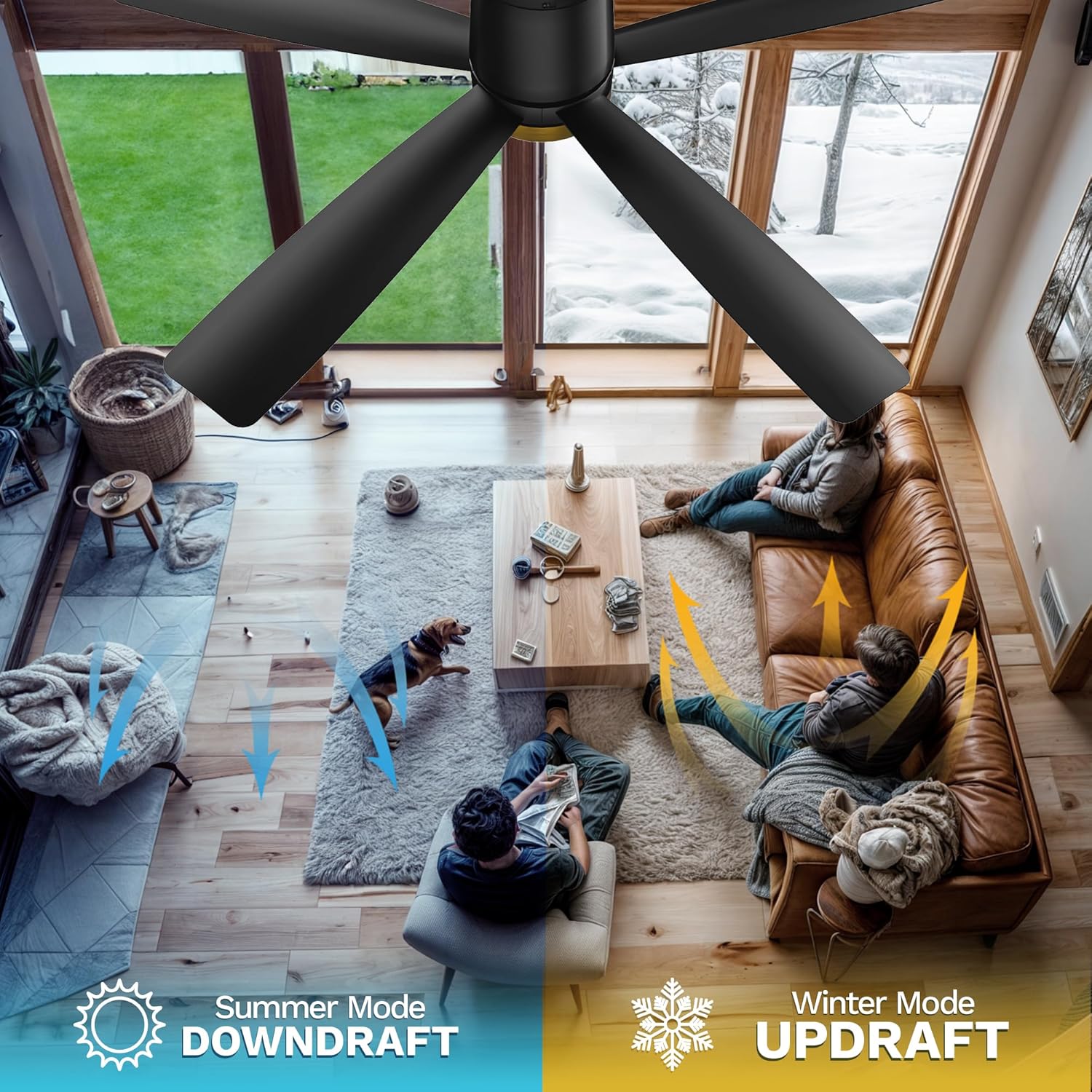
Image 6.1: The remote control for the DWVO ceiling fan, showing its various buttons for fan and light operation.
6.1 Uzaktan Kumanda İşlevleri
- Güç Düğmesi: Vantilatörü ve ışığı açar/kapatır.
- Fan Hızı Düğmeleri (1-6): Adjusts fan speed from 1 (lowest) to 6 (highest).
- Işık Açma/Kapama Düğmesi: Toggles the light on or off independently of the fan.
- Renk Sıcaklığı Düğmesi: Cycles through 3000K (Warm White), 4500K (Natural White), and 6000K (Cool White). The fan retains the last used color temperature setting.
- Zamanlayıcı Düğmeleri (1 Saat, 2 Saat, 4 Saat, 8 Saat): Seçilen süre sonunda fanın otomatik olarak kapanmasını sağlar.
- Forward/Reverse Rotation Button: Mevsimsel kullanıma bağlı olarak fan kanatlarının yönünü değiştirir.
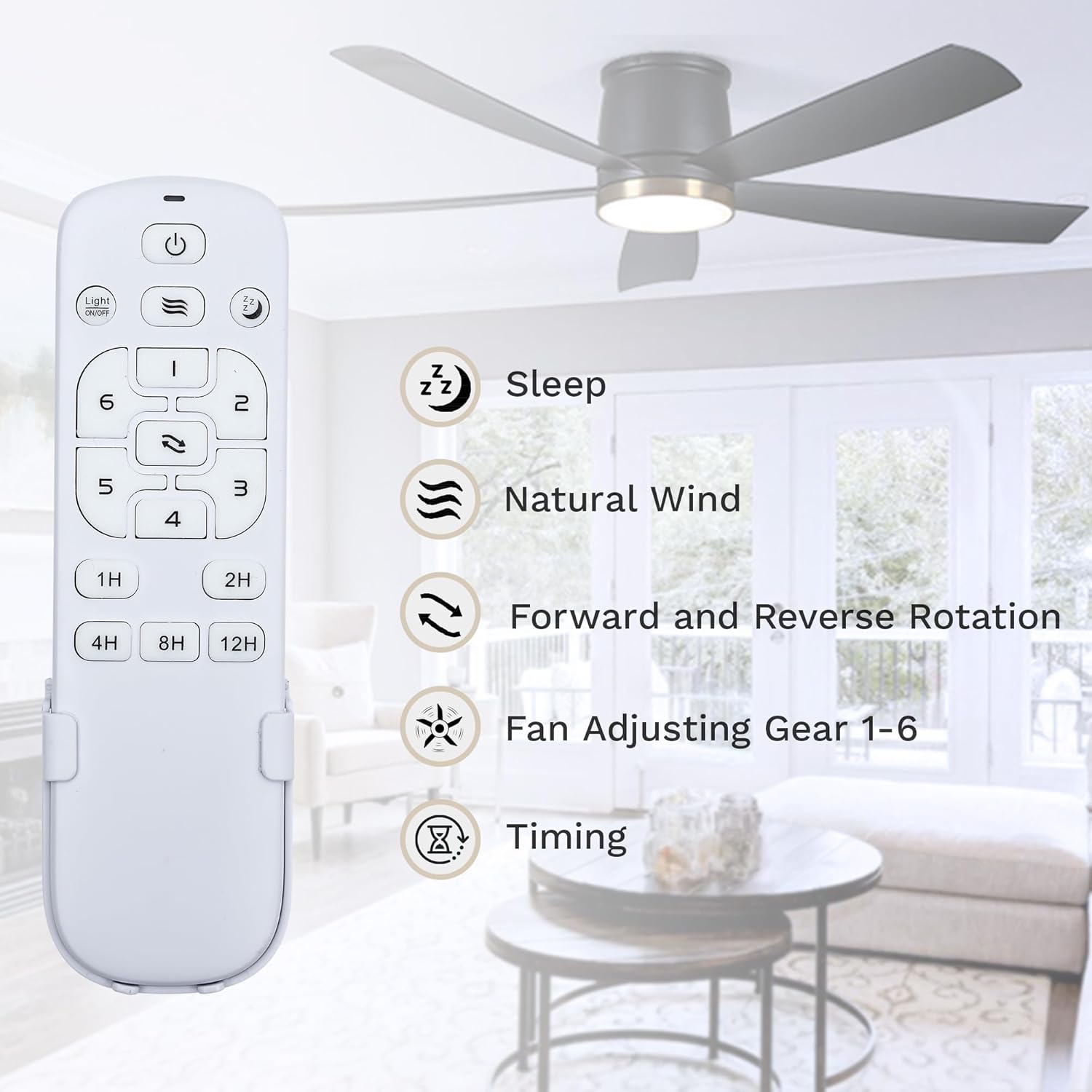
Resim 6.2: Ayrıntılı view of the remote control, highlighting the functions of each button, including sleep mode, natural wind, forward/reverse rotation, fan speed adjustment, and timing settings.
6.2 Adjustable Light & Timer
The integrated LED light offers three distinct color temperatures to suit your preference and environment. Press the light button to cycle through 3000K, 4500K, and 6000K. The fan's memory function will recall the last selected color temperature when turned on again.
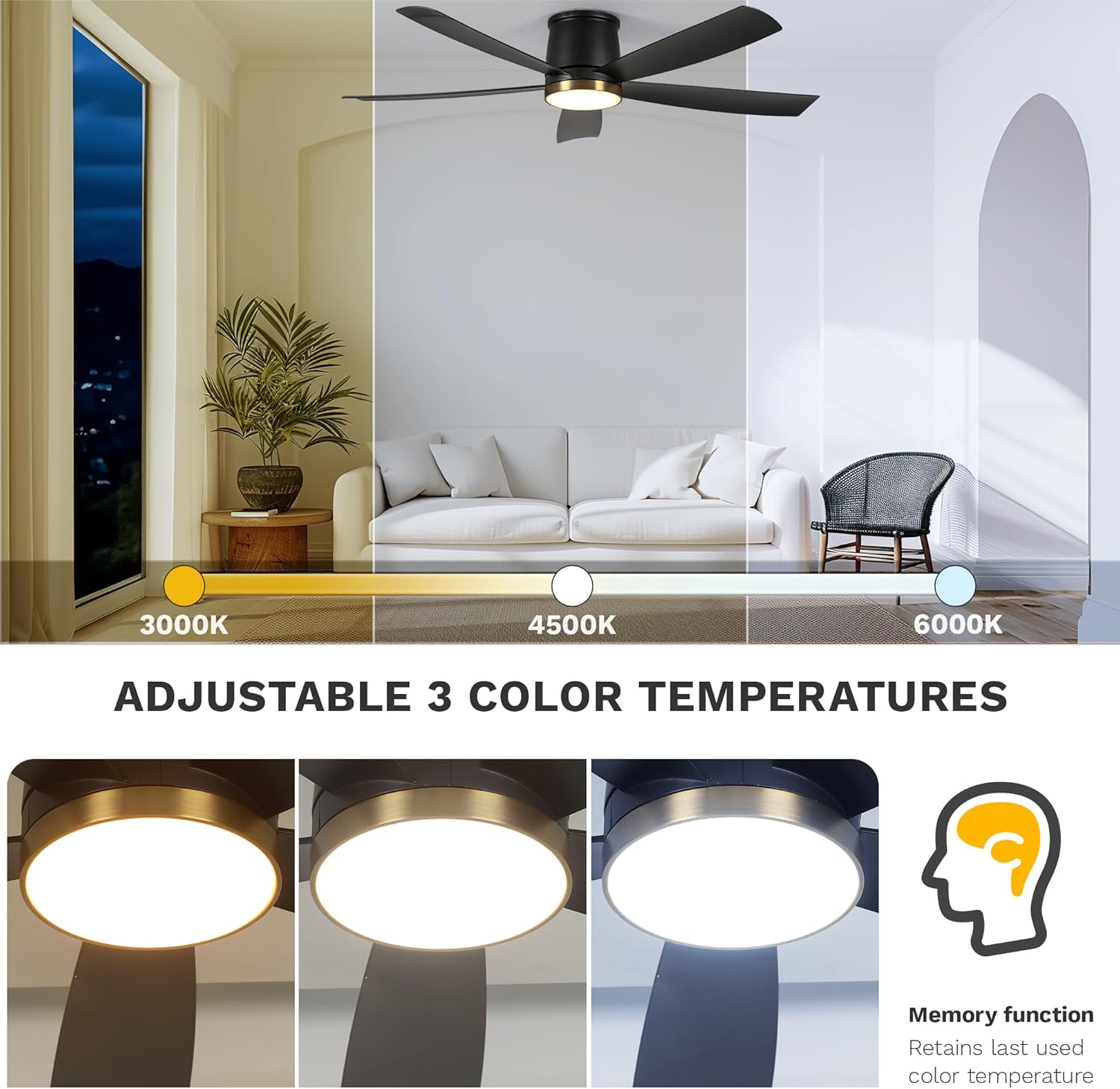
Image 6.3: Visual representation of the three adjustable color temperatures (3000K, 4500K, 6000K) and the memory function that retains the last used setting.
Utilize the timer function (1H, 2H, 4H, 8H) to automatically shut off the fan after a set period, ideal for sleeping or when leaving a room.

Image 6.4: Illustrates the quiet operation of the DC motor (below 35dB) and the available timer settings (1h, 2h, 4h, 8h, 12h max).
6.3 Reversible Seasonal Mode
The DC reversible motor allows for year-round use. Press the forward/reverse button on the remote to change blade direction:
- Yaz Modu (Saat yönünün tersine): Creates a downdraft, producing a cooling breeze.
- Kış Modu (Saat yönünde): Creates an updraft, circulating warm air trapped near the ceiling.

Image 6.5: The DWVO ceiling fan installed in a modern living room setting, demonstrating its aesthetic integration.

Image 6.6: Depicts the six fan speed levels, suggesting appropriate uses for different activities like sleeping/reading (Level 1-2), fun/parties (Level 3-4), and fitness/sports (Level 5-6).
7. Bakım
7.1 Temizlik
- Temizliğe başlamadan önce mutlaka elektrik şalterinden elektriği kesin.
- Yumuşak bir d kullanınamp Pervane kanatlarını ve motor gövdesini silmek için bir bez kullanın. Aşındırıcı temizleyiciler veya çözücüler kullanmayın.
- Periodically check for dust accumulation on the blades and light diffuser to maintain optimal performance and light output.
7.2 Işık Kaynağı Değişimi
The LED light source is integrated and designed for long-term use. If the light fails, please contact DWVO customer support for assistance. Do not attempt to replace the LED module yourself.
8. Sorun Giderme
If you experience issues with your fan, refer to the common problems and solutions below. If the problem persists, contact customer support.
| Sorun | Olası Neden | Çözüm |
|---|---|---|
| Fan başlamıyor | No power supply; Loose wiring; Remote control battery low/dead. | Check circuit breaker; Verify all wire connections; Replace remote control battery. |
| Fan gürültülü | Loose screws on blades or mounting bracket; Fan not balanced. | Tighten all screws; Ensure blades are securely attached; Check for blade balance. |
| Işık çalışmıyor | Loose wiring; LED module failure; Remote control issue. | Check light kit wiring; Contact customer support for LED replacement; Replace remote control battery. |
| Uzaktan kumanda çalışmıyor | Battery dead; Remote not paired (if applicable); Obstruction. | Replace battery; Refer to remote pairing instructions (if provided separately); Ensure clear line of sight to fan receiver. |
9. Garanti ve Destek
9.1 Garanti Bilgileri
This DWVO ceiling fan comes with a 1 yıllık garanti from the date of purchase. This warranty covers manufacturing defects in materials and workmanship under normal use. It does not cover damage resulting from improper installation, misuse, accidents, or unauthorized repairs.
9.2 Müşteri Desteği
For technical assistance, warranty claims, or to order replacement parts, please contact DWVO customer support. Have your model number (MADWVz9zor) and purchase date available when contacting support.
You can visit the official DWVO store for more information: DWVO Store on Amazon


