giriiş
This manual provides detailed instructions for the setup, operation, and maintenance of your SPYPOINT FORCE-PRO 30 Megapixel 4K Trail Camera. Designed for outdoor monitoring, this camera captures high-resolution photos and videos, making it ideal for wildlife observation and security. Please read this manual thoroughly to ensure proper use and optimal performance of your device.
Paket İçeriği
Verify that all items listed below are present in your package. If any items are missing or damaged, please contact SPYPOINT customer support.
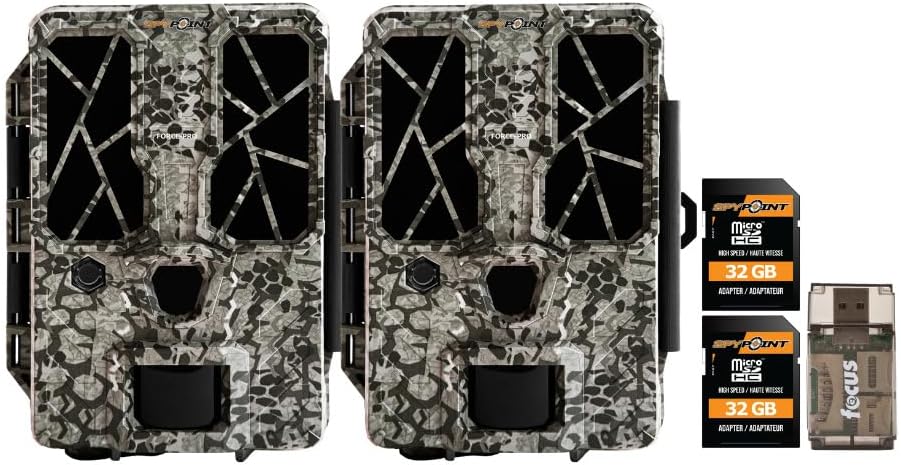
- 2 x SPYPOINT FORCE-PRO 30 Megapixel Trail Camera
- 2 x SPYPOINT MicroSD 32GB Ultra High Speed Class 10 Memory Card
- 1 x Focus All-In-One High Speed Card Reader

Ürün Bittiview
The SPYPOINT FORCE-PRO is a robust trail camera designed for reliable performance in outdoor environments. It features advanced imaging capabilities and user-friendly controls.
Temel Özellikler
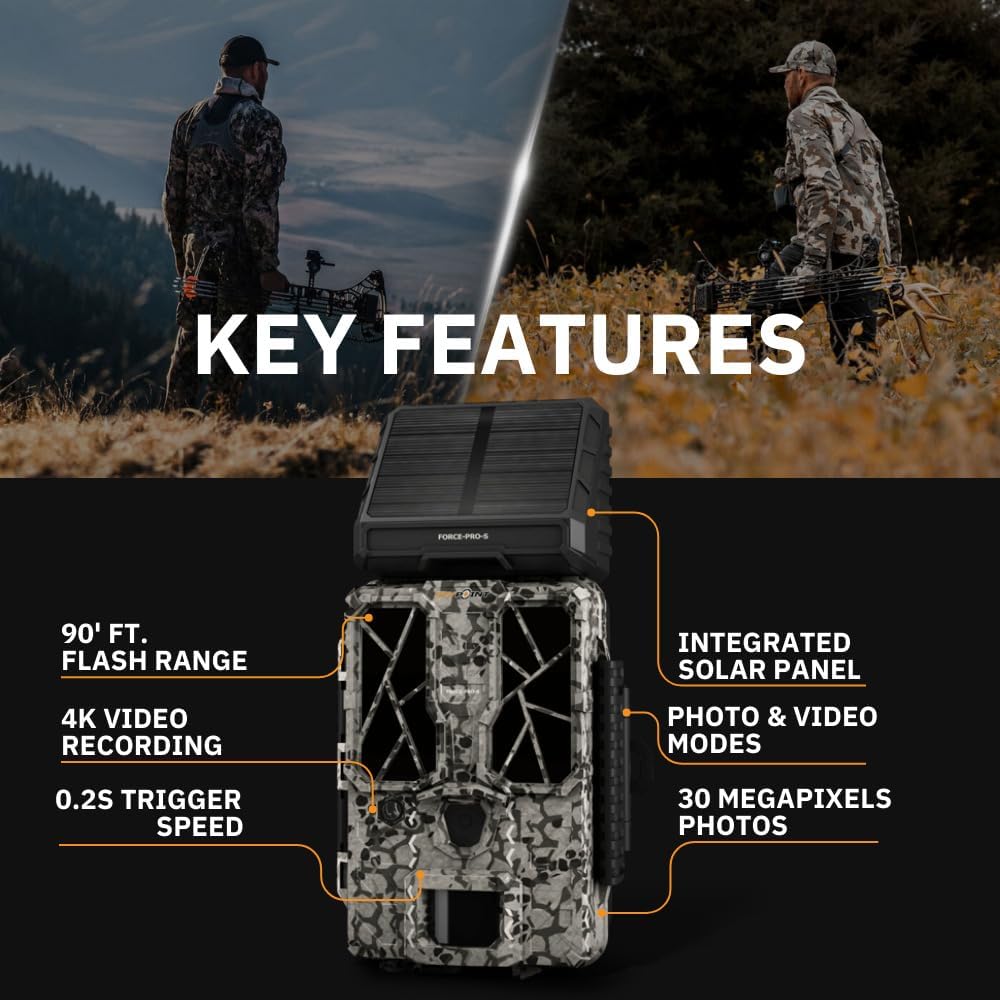
- Yüksek Çözünürlük: 30 Megapixel photos and 4K video recording with sound.
- Hızlı Tetikleme Hızı: Ani hareketleri yakalamak için ultra hızlı 0.2 saniyelik tetikleme hızı.
- Geniş Algılama Aralığı: 110-foot detection range.
- Powerful Flash: 90-foot flash range with 54 LEDs for clear night images.
- Entegre Güneş Paneli: For extended battery life and reduced maintenance.
- Dual-SIM Cellular: Automatically connects to the best available network for reliable transmission (if cellular model).



Kurmak
1. Güç Kaynağı Kurulumu
The FORCE-PRO camera is equipped with an integrated solar panel for charging its internal battery. For initial setup or extended use without sufficient sunlight, an external power source can be used.
- Dahili Pil: Ensure the camera's internal battery is charged. The integrated solar panel will charge it during daylight hours.
- Harici Güç (Opsiyonel): If using an external 12V power source (not included), connect it to the camera's 12V jack.
2. MicroSD Kart Takma
A MicroSD card is required to store photos and videos. Two 32GB MicroSD cards are included in this bundle.
- Kamerada MicroSD kart yuvasını bulun.
- Altın renkli kontaklar kameranın arkasına bakacak şekilde MicroSD kartı yerine oturana kadar takın.
- Çıkarmak için, kart fırlayana kadar hafifçe bastırın.
3. İlk Güç Açma ve Temel Yapılandırma
- Turn the camera ON using the power switch.
- Follow the on-screen prompts (if available) or refer to the camera's menu for initial settings such as date, time, and language.
- Format the MicroSD card through the camera's menu for optimal performance.
4. Kameranın Montajı
The camera can be mounted using a strap, tripod, or other compatible mounting accessories. While specifications mention 'Tabletop Mount', for outdoor use, secure mounting is crucial.
- Net bir görüş sağlayan bir konum seçin. view İstenilen izleme alanının.
- Ensure the camera is securely fastened to prevent movement from wind or animals.
- Position the camera to avoid direct sunlight into the lens, which can cause overexposure.
Kullanım Talimatları
Kamera Modları
- Fotoğraf Modu: Tetiklendiğinde hareketsiz görüntüler yakalar.
- Video Modu: Tetiklendiğinde video klipler kaydeder.
- Fotoğraf + Video Modu: Önce fotoğraf, ardından video kaydı alır.
Ayarların Düzenlenmesi
Access the camera's menu using the built-in screen and navigation buttons to customize settings:
- Çözünürlük: Select desired photo (up to 30MP) and video (up to 4K) resolution. Higher resolutions consume more storage.
- Tetik Gecikmesi: Ardışık tetiklemeler arasındaki gecikmeyi ayarlayın.
- Hassasiyet: Adjust the motion sensor sensitivity to suit the environment and avoid false triggers.
- Çalışma Saatleri: Define specific times the camera should be active.
- Tarih/Saat Stamp: Enable or disable the date and time overlay on images/videos.
Veri Alma
- MicroSD Kart: Remove the MicroSD card from the camera and insert it into the included Focus All-In-One High Speed Card Reader. Connect the card reader to a computer to access files.
- SPYPOINT Uygulaması: For cellular models, use the SPYPOINT mobile application to view and manage captured media remotely. The app also allows for camera settings adjustments and firmware updates.
Bakım
- Temizlik: Regularly clean the camera lens and housing with a soft, dry cloth. Avoid abrasive materials or harsh chemicals.
- Pil Kontrolü: Monitor battery levels, especially during periods of low sunlight. The integrated solar panel helps maintain charge, but supplemental charging may be needed.
- Donanım Yazılımı Güncellemeleri: Periodically check for and install firmware updates via the SPYPOINT app or webSitenin en iyi performansı sergilemesi ve yeni özelliklere erişimi sağlaması için.
- Depolamak: Kullanılmadığı zamanlarda kamerayı serin, kuru ve doğrudan güneş ışığından uzak bir yerde saklayın.
Sorun giderme
- Camera Not Triggering: Check motion sensor sensitivity, ensure no obstructions, and verify battery level.
- Düşük Görüntü/Video Kalitesi: Clean the lens, check resolution settings, and ensure proper lighting conditions.
- Güç Sorunları: Ensure the internal battery is charged or an external power source is properly connected. Check for any damage to power cables.
- MicroSD Kart Hataları: Reformat the MicroSD card (backing up data first) or try a different card. Ensure the card is properly inserted.
- Connectivity Problems (Cellular Models): Verify cellular signal strength in the camera's location. Check your SPYPOINT app for data plan status.
Özellikler
| Özellik | Şartname |
|---|---|
| Örnek | FORCE-PRO |
| Fotoğraf Çözünürlüğü | 30 Megapiksel |
| Video Çözünürlüğü | 4K |
| Tetik Hızı | 0.2 saniye |
| Algılama Aralığı | 110 feet |
| Flaş Menzili | 90 feet |
| LED'ler | 54 |
| Güç Kaynağı | Integrated Solar Panel, Corded Electric (external 12V option) |
| Bağlantı | USB, Wired (for data transfer), Cellular (for remote management) |
| Malzeme | Plastik |
| Suya Dayanıklılık | Su geçirmez |
| Odak Türü | Otomatik Odaklama |
| UPC | 196271434986 |
Garanti ve Destek
For warranty information, technical support, or service inquiries, please refer to the official SPYPOINT webSitelerini ziyaret edin veya doğrudan müşteri hizmetleri departmanıyla iletişime geçin. Garanti talepleri için satın alma belgenizi saklayın.
CASUS NOKTASI Webalan: www.spypoint.com