giriiş
The Google Pixel 10 is an advanced Android smartphone designed for everyday use, featuring the powerful Google Tensor G5 chip, an exceptional camera system, and integrated Gemini AI capabilities. This manual provides essential information for setting up, operating, maintaining, and troubleshooting your device.
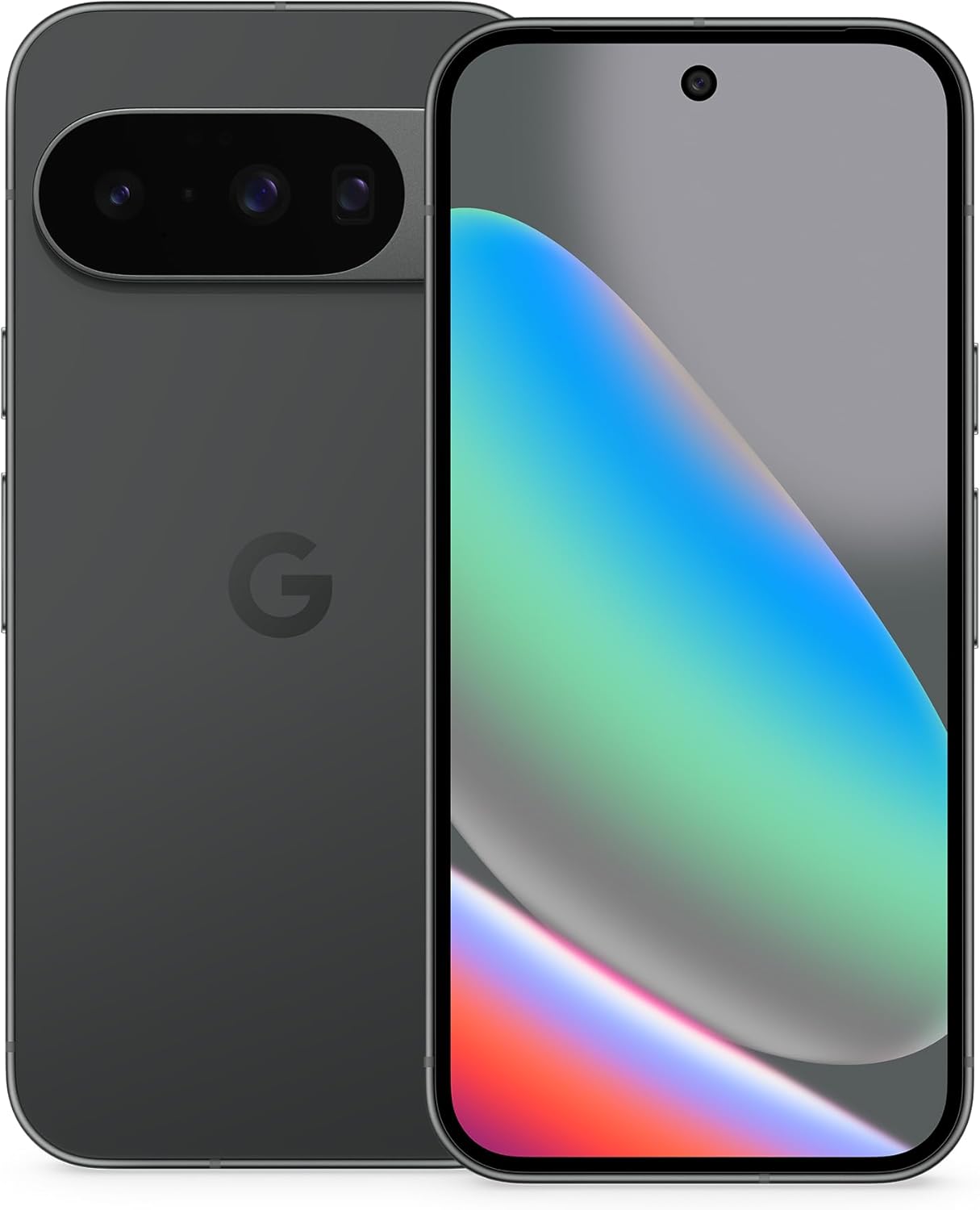
Figure 1: Google Pixel 10 in Obsidian. The device features a sleek design with a prominent camera bar on the rear and a full-screen display on the front.
Kutuda Neler Var?
- Cep Telefonu
- USB kablosu
- Garanti Kitapçığı

Figure 2: The Google Pixel 10 box contents, showing the Pixel 10 with eSIM and a 1m USB-C to USB-C cable. A Support, Safety & Warranty Booklet is also included but not pictured.
Kurmak
1. İlk Güç Açma
- Cihazın sağ tarafında bulunan Güç düğmesine, Google logosu görünene kadar basılı tutun.
- Dilinizi, bölgenizi seçmek ve bir Wi-Fi ağına bağlanmak için ekrandaki talimatları izleyin.
2. Veri Transferi
If you are switching from an old phone, the Pixel 10 offers a seamless data transfer process. Follow the on-screen instructions to transfer your apps, photos, contacts, and other data. This process typically takes about 20 minutes.

Figure 3: The Pixel 10 facilitates easy switching from previous devices, allowing users to text high-res images and react with emoji to iPhone users.
3. SIM Card / eSIM Activation
The Pixel 10 supports eSIM technology, allowing you to activate your cellular plan digitally without a physical SIM card. You can also store multiple numbers. Consult your carrier for eSIM activation instructions.
Figure 4: The Pixel 10 is eSIM-only, enabling digital plan switching and storage of multiple numbers.
4. Güvenlik Ayarları
Set up your preferred security method: fingerprint unlock, face recognition, PIN, or password. These measures protect your device and data.
Kullanım Talimatları
1. Gezinme
- Jestler: Ana sayfaya gitmek için aşağıdan yukarıya doğru kaydırın, son uygulamalar için yukarı kaydırıp basılı tutun, geri gitmek için sol veya sağ kenardan kaydırın.
- Düğmeler: Use the power button for screen on/off and long-press for power options. Volume buttons control media and call volume.
2. Ekran
The 6.3-inch Actua display offers a 120 Hz refresh rate for smooth scrolling and a peak brightness of 3,000 nits for clear visibility even in direct sunlight.

Figure 5: The Pixel 10 receives 7 years of Pixel Drops, ensuring continuous new features and updates.
Kamera Özellikleri
The Pixel 10 features an upgraded triple rear camera system, designed to capture high-quality photos and videos in various conditions.
1. Triple Rear Camera System
- Ana Lens: 50 MP wide-angle for detailed shots.
- Ultra geniş açılı lens: 13 MP for expansive landscape and group photos.
- Telefoto Mercek: New 5x optical zoom, with up to 20x Super Res Zoom for distant subjects.

Figure 6: The Pixel 10's new 5x telephoto lens offers up to 20x Super Res Zoom for capturing distant details.
2. Night Sight
Capture crisp, clear photos in low-light settings without the need for a flash.

Figure 7: Night Sight feature enables brilliant photos from dusk to dawn, even in challenging low-light conditions.
3. Camera Coach
Receive intelligent suggestions to improve your photos, helping you frame shots and adjust settings for optimal results.

Figure 8: Camera Coach assists in snapping your best pictures, including features like Auto Best Take for group photos and intelligent reframing suggestions.
4. Ön Kamera
The front camera is ideal for high-quality selfies and video calls.
AI Özellikleri
The Google Pixel 10 integrates advanced AI capabilities, powered by Gemini, to enhance productivity and creativity.
1. Gemini Yapay Zeka Asistanı
- İkizler Canlı: Engage in natural, free-flowing conversations with Gemini. Use your camera to ask questions about your surroundings or brainstorm ideas across apps.
- Magic Cue: This feature proactively suggests relevant information and actions based on your activities, such as flight info when calling an airline.

Figure 9: Gemini Live allows you to share your camera view and talk through what's around you, providing instant information.

Figure 10: Magic Cue proactively suggests relevant information and actions, such as flight details when calling an airline.
Durability & Display
- Çizilmeye Karşı Dayanıklılık: The Pixel 10 is designed with scratch-resistant Corning Gorilla Glass Victus 2.
- Su ve Toz Koruması: An IP68 rating ensures protection against water and dust.
- Gerçek Ekran: The 6.3-inch Actua display offers a 120 Hz refresh rate and 3,000-nit peak brightness for excellent visibility in various lighting conditions.

Figure 11: The Pixel 10 is designed for durability with scratch-resistant glass and IP68 water and dust protection, ensuring it holds up against spills and tumbles.
Pil ve Şarj
- Pil Ömrü: Enjoy 24+ hours of battery life with typical usage.
- Hızlı Şarj: The device supports fast-charging capabilities.
- Kablosuz Şarj: Pixelsnap wireless charging (Qi2-certified) is supported.
Bağlantı
- Kablosuz: Bluetooth, NFC, and Wi-Fi connectivity are standard.
- Carrier Flexibility: As an unlocked Android phone, it offers the flexibility to change carriers and choose your own data plan, working with major carriers like Google Fi, Verizon, T-Mobile, and AT&T.
Software & Updates
The Pixel 10 runs on Android 16 and benefits from 7 years of Pixel Drops, ensuring your phone receives regular software updates and new features over time.
Özellikler
| Özellik | Detay |
|---|---|
| Model Adı | Piksel 10 |
| İşletim Sistemi | Android 16 |
| CPU Modeli | Google Tensör G5 |
| Veri deposu | 12 GB |
| Bellek Depolama Kapasitesi | 128 GB |
| Ekran Boyutu | 6.3 inç |
| Çözünürlük | 1440x3120 |
| Yenileme Hızı | 120 Hz |
| Pil Kapasitesi | 4970 mAh |
| Telefon Konuşma Süresi | 30 Saat |
| Su ve Toz Dayanımı | IP68 |
| Ürün Boyutları | 6 x 2.8 x 0.3 inç |
| Ürün Ağırlığı | 6.9 ons |
Bakım
- Yazılım Güncellemeleri: En iyi performans ve güvenliği sağlamak için sistem güncellemelerini düzenli olarak yükleyin.
- Temizlik: Ekranı ve gövdeyi temizlemek için yumuşak, tiftiksiz bir bez kullanın. Sert kimyasallardan kaçının.
- Pil Bakım: To prolong battery life, avoid extreme temperatures and fully discharging the device frequently.
Sorun giderme
1. Screen Unresponsiveness
If the screen becomes unresponsive, try restarting the device. Press and hold the Power button for approximately 20 seconds until the device restarts. Ensure your GPU drivers are up to date via system updates.
2. Lagging Performance
If the phone experiences lag, especially with multiple apps or browser tabs open, try closing unused applications, clearing app caches, and restarting the device. Regular software updates often include performance improvements.
3. Bluetooth Bağlantı Sorunları
If Bluetooth turns on automatically or has connectivity issues, check Bluetooth settings and ensure it is configured as desired. Restarting the device can often resolve minor connectivity glitches.
Garanti ve Destek
Your Google Pixel 10 comes with a manufacturer's warranty. Please refer to the included Warranty Booklet for detailed terms and conditions. For additional support, visit the official Google support website veya müşteri hizmetleriyle iletişime geçin.


