1. Giriş
This manual provides detailed instructions for setting up, operating, maintaining, and troubleshooting your GMKtec G10 Mini PC. Please read this manual thoroughly before using your device to ensure optimal performance and longevity.
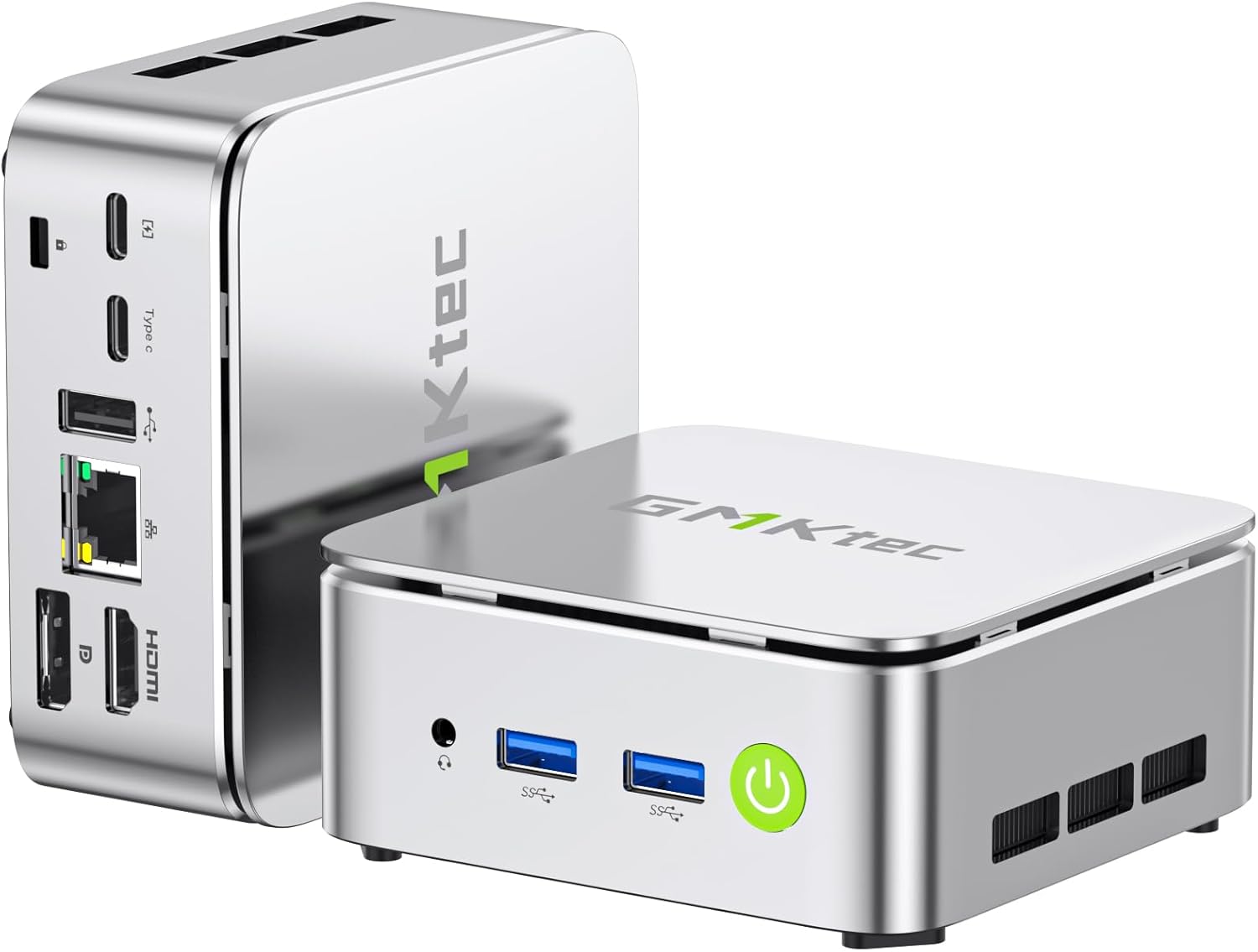
Resim: Ön ve arka view of the GMKtec G10 Mini PC, highlighting its compact design and various ports.
2. Ürün Bittiview
The GMKtec G10 Mini PC is a compact and powerful computing solution designed for various tasks, from everyday office work to multimedia entertainment. It features an AMD Ryzen 5 3500U processor, ample memory, and flexible storage options.
2.1 Temel Özellikler
- High-Performance AMD Ryzen 5 3500U: Equipped with a 4-core, 8-thread processor with a max boost clock of 3.7GHz, offering robust performance for multitasking and light editing.
- Üçlü Ekran Çıkışı: Supports up to three simultaneous 4K displays via HDMI 2.1, DisplayPort 1.4, and USB-C (DP Alt Mode).
- Genişletilebilir Depolama: Includes a 256GB NVMe SSD and supports expansion up to 16TB (8TB x 2) via additional M.2 slots.
- AmpBellek: Comes with 16GB DDR4 RAM (8GB x 2) and is expandable up to 64GB across two SO-DIMM slots.
- Yüksek Hızlı Bağlantı: Features 2.5G wired LAN, Wi-Fi 5, and Bluetooth 5.0 for stable and fast network connections.
- Compact & Quiet Design: Palm-sized form factor with an efficient, silent cooling fan, ideal for space-constrained or quiet environments.
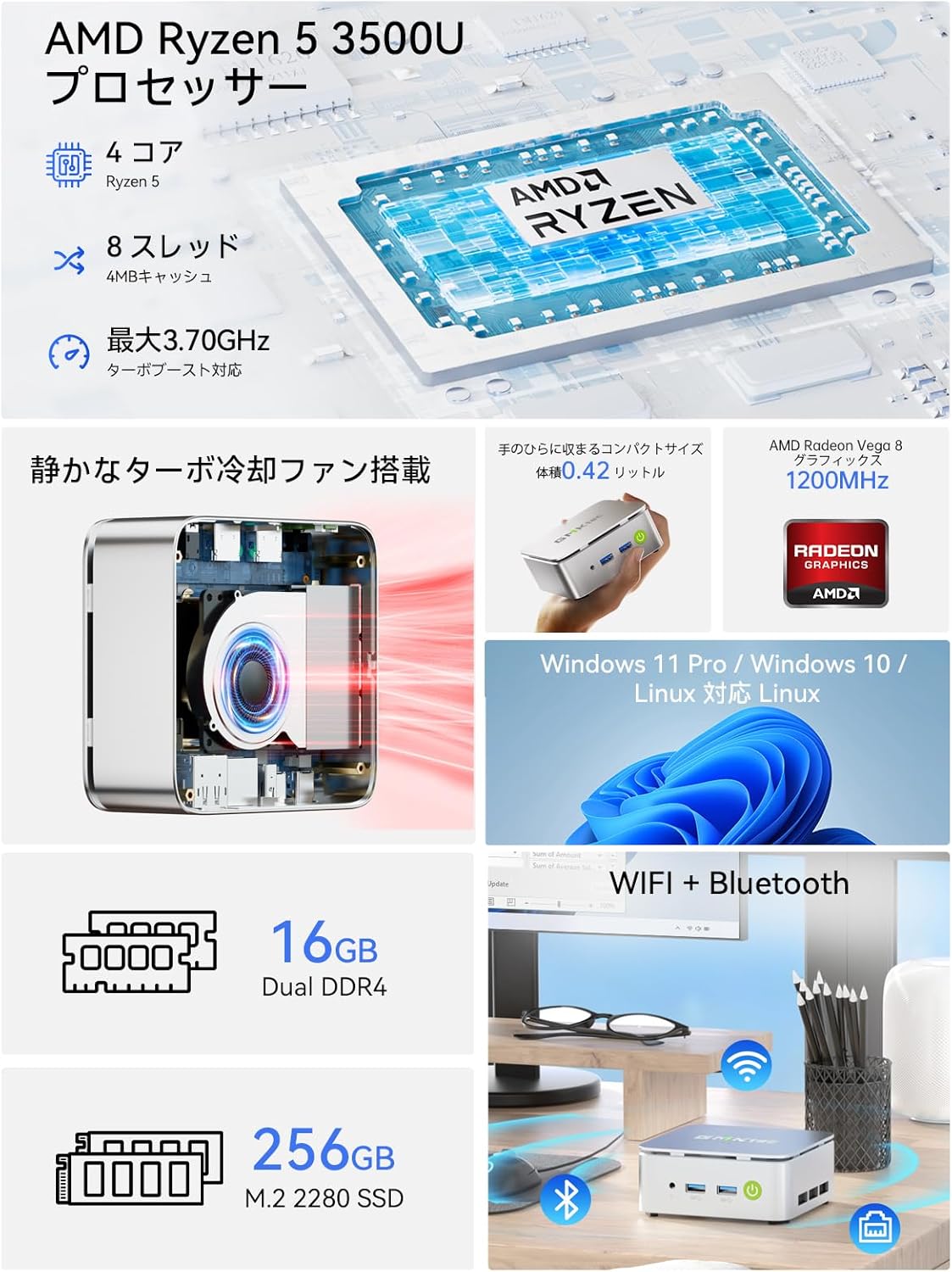
Resim: Bir overview of the GMKtec G10 Mini PC's main features, including its AMD Ryzen 5 3500U processor, 16GB DDR4 RAM, 256GB SSD, compact size, quiet turbo cooling fan, and support for Windows 11 Pro/Windows 10/Linux.
2.2 İşlemci ve Grafikler
The GMKtec G10 is powered by an AMD Ryzen 5 3500U processor, featuring 4 cores and 8 threads, with a maximum boost clock of 3.7GHz. It integrates Radeon Vega 8 Graphics, providing capable performance for daily tasks and multimedia.

Image: A close-up of the AMD Ryzen 5 3500U processor, detailing its core count, thread count, cache size, and maximum clock speed.
2.3 Bağlantı Noktaları ve Bağlantı
The Mini PC offers a comprehensive set of ports for connecting various peripherals and displays:
- Ön Portlar: 3.5mm Audio Jack, USB 3.2 Gen1 x 2, Power Button.
- Arka Portlar: Kensington Lock, Type-C (PD dedicated), USB 2.0 x 1, Type-C (DP / Data / PD compatible), 2.5G Gigabit LAN (RJ45) x 1, HDMI 2.1 (4K@60Hz), DisplayPort 1.4 (4K@60Hz).
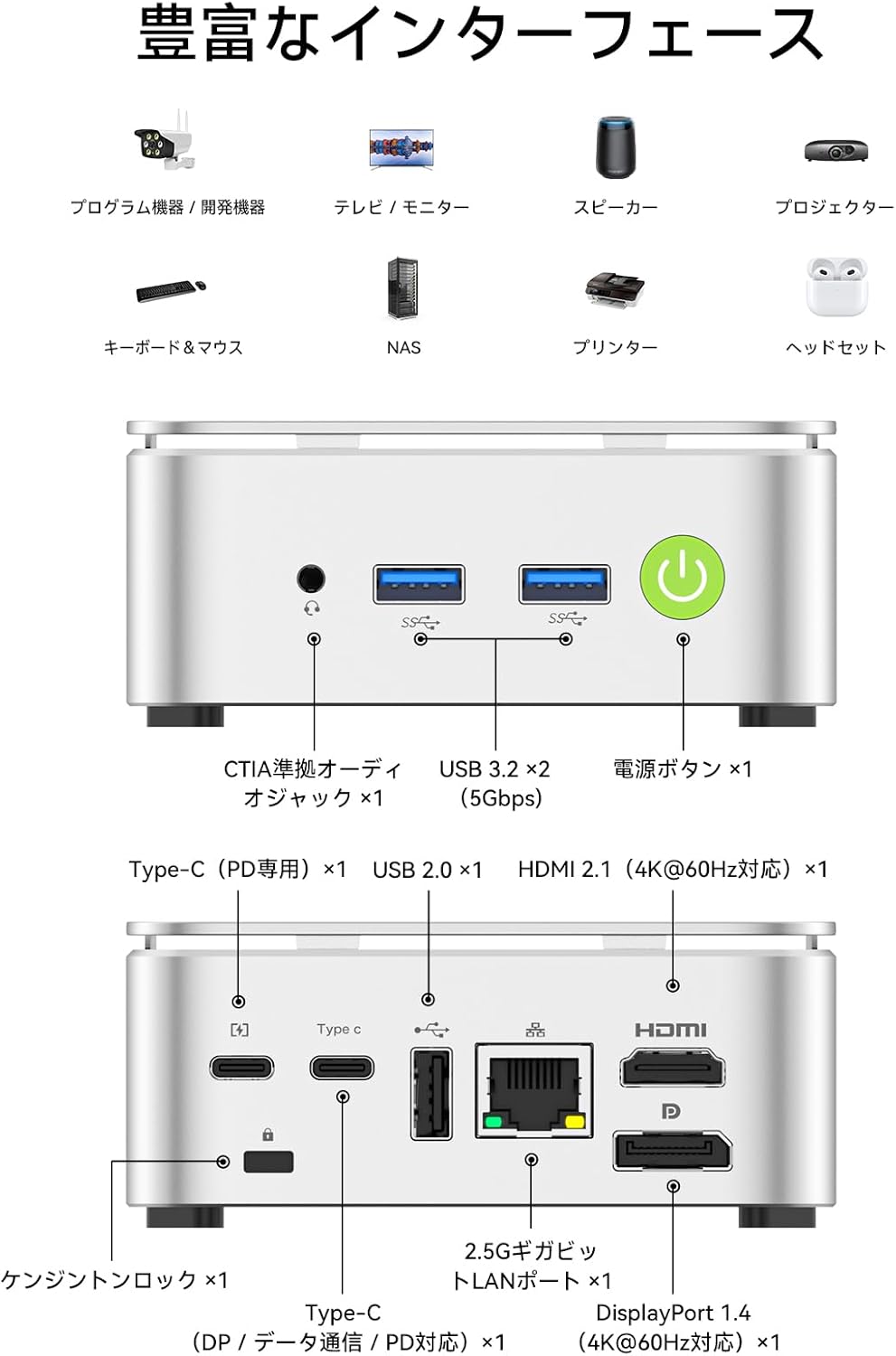
Image: A visual guide to the front and rear ports of the GMKtec G10 Mini PC, including USB, audio, power, HDMI, DisplayPort, Type-C, and LAN connections.
2.4 Bellek ve Depolama
The GMKtec G10 comes with 16GB of DDR4 RAM (8GB x 2) and a 256GB NVMe SSD. Both memory and storage are expandable to meet future needs.
- Hafıza: Two SO-DIMM slots support up to 64GB DDR4 RAM.
- Depolamak: Two M.2 2280 slots support up to 16TB (8TB x 2) of storage.

Resim: Patlamış bir view illustrating the dual-channel DDR4 memory and M.2 2280 SSD slots, highlighting the upgrade potential for RAM up to 64GB and storage up to 16TB.
3. Kurulum Kılavuzu
3.1 Kutudan Çıkarma ve Paket İçeriği
Carefully unbox your GMKtec G10 Mini PC. The package should contain the following items:
- Nucbox G10 Mini PC
- Güç Adaptörü ve Kablo
- HDMI Kablosu
- VESA Mount & Screws
- Kullanım Kılavuzu (bu belge)

Image: The complete package contents of the GMKtec G10 Mini PC, laid out for easy identification.
3.2 İlk Çalıştırma ve Bağlantılar
To set up your Mini PC for the first time:
- Connect the power adapter to the DC-in port on the Mini PC and plug it into a power outlet.
- Connect your monitor(s) to the HDMI, DisplayPort, or Type-C video output ports.
- Klavyenizi ve farenizi mevcut USB bağlantı noktalarına bağlayın.
- Press the power button on the front of the Mini PC to turn it on.
Watch this video for a visual guide on initial setup and connections:
Video: Bir fazlaview of the GMKtec G10 Mini PC, demonstrating its compact size, various ports, and ease of connection to a display for initial use.
3.3 VESA Montajı
The GMKtec G10 supports VESA mounting, allowing you to attach it to the back of a compatible monitor for a clutter-free workspace.
- Attach the VESA mount bracket to the back of your monitor using the provided screws.
- Secure the Mini PC to the VESA mount.
For a visual demonstration of VESA mount installation, refer to this video (note: this video features a similar model, but the VESA mounting process is generally the same):
Video: Demonstration of VESA mount installation for a mini PC. The process shown is applicable to the GMKtec G10 for mounting behind a monitor.
4. Kullanım Talimatları
4.1 Güç Açma/Kapatma
- Güç Açık: Cihazın önündeki güç düğmesine basın.
- Kapat: İşletim sisteminin kapatma işlevini kullanın. Alternatif olarak, kapatmayı zorlamak için güç düğmesini 5 saniye basılı tutun (yalnızca gerektiğinde kullanın).
4.2 Çoklu Ekran Kurulumu
The GMKtec G10 supports connecting up to three displays simultaneously, enhancing productivity for work and entertainment.

Image: A workstation setup showcasing the GMKtec G10 Mini PC driving two large monitors and a tablet, illustrating its triple HD output capability for enhanced productivity.
4.3 Ağ Bağlantısı
- Kablolu LAN: Connect an Ethernet cable to the 2.5G Gigabit LAN port for high-speed internet access.
- Wifi: The device supports Wi-Fi 5. Configure your wireless network settings through the operating system.
- Bluetooth: Bluetooth 5.0 is supported for connecting wireless peripherals like keyboards, mice, and headphones.
5. Bakım
5.1 Temizlik
Regularly clean the exterior of the Mini PC with a soft, dry cloth. Ensure ventilation grilles are free from dust to maintain optimal cooling performance.
5.2 Component Upgrades (RAM & SSD)
The GMKtec G10 allows for upgrades to its RAM and M.2 SSD. Always ensure the device is powered off and unplugged before performing any internal modifications.
For a visual guide on upgrading RAM and SSD, please refer to this video (note: this video features a similar model, but the general procedure for installing RAM and M.2 SSDs is comparable):
Video: A tutorial demonstrating the process of expanding DDR memory and replacing an SSD in a mini PC. This guide can be used as a reference for upgrading the GMKtec G10.
5.3 Soğutma Sistemi
The Mini PC features a silent cooling fan designed to maintain optimal operating temperatures while minimizing noise.

Image: A graph comparing the noise level of the G10 Mini PC (35dB) to other environments, highlighting its quiet operation, alongside a user working in a quiet room.

Image: An internal diagram of the GMKtec G10's high-efficiency cooling system, showing the airflow and heat sink design.
6. Sorun Giderme
6.1 Görüntü Çıkışı Yok
- Ensure all display cables (HDMI, DP, Type-C) are securely connected to both the Mini PC and the monitor.
- Monitörün açık olduğunu ve doğru giriş kaynağına ayarlandığını doğrulayın.
- Farklı bir DisplayPort bağlantı noktasına bağlanmayı veya farklı bir kablo kullanmayı deneyin.
6.2 Wi-Fi Bağlantı Sorunları
- Check if Wi-Fi is enabled in the operating system settings.
- Ensure the Mini PC is within range of your wireless router.
- Restart your wireless router and the Mini PC.
- Update Wi-Fi drivers if available.
6.3 System Unresponsive
- If the system becomes unresponsive, press and hold the power button for 5 seconds to force a shutdown. Wait a few moments, then power it back on.
- Aşırı ısınmayı önlemek için yeterli havalandırma sağlayın.
6.4 External Graphics Card Connection
If you are connecting an external graphics card via Oculink, ensure the Mini PC is powered off before connecting or disconnecting the external GPU. Hot-plugging Oculink is not supported and may damage the motherboard.
For a demonstration of connecting an external graphics card, refer to this video (note: this video features a similar model, but the connection method is relevant):
Video: A guide on how to connect an AD-GP1 external graphics board to a GMKtec M7 Mini PC. This demonstrates the Oculink connection process, which is similar for the G10.
7. Özellikler
| Özellik | Şartname |
|---|---|
| Marka | GMKtec |
| Model Serisi | JP Nucbox G10 |
| Ürün Boyutları | 9.8 x 10.3 x 4.2 cm; 284 g |
| Renk | Beyaz |
| CPU Markası | AMD |
| CPU Türü | Ryzen 5 3500U |
| CPU Hızı | 3.7 GHz |
| İşlemci Sayısı | 4 |
| RAM Memory Type | DDR4, SO-DIMM x 2 |
| Maksimum Bellek Kapasitesi | 64 GB |
| Bellek Saat Hızı | 2400 MHz |
| Sabit Disk Kapasitesi | 256 GB |
| Sabit Disk Türü | SSD |
| Sabit Sürücü Arayüzü | PCIe x4 |
| Ekran Kartı | Radeon Vega 8 Graphic |
| GPU Markası | AMD |
| Grafik Kartı Türü | Entegre |
| VRAM Türü | SODİMM |
| VRAM Kapasitesi | 16 GB |
| Bağlantı | Bluetooth, Wi-Fi 5, 2.5G LAN |
| USB 2.0 Bağlantı Noktaları | 1 |
| USB 3.0 Bağlantı Noktaları | 2 |
| HDMI Bağlantı Noktaları | 1 |
| Optik Sürücü Türü | Hiçbiri |
| İşletim Sistemi | Windows 11 Pro / Linux |
| Dahil Pil | Evet |
| Lityum Pil Enerji İçeriği | 5 Watt Saat |
| Lityum Pil Paketleme | Battery contained in equipment |
| Lityum Pil Ağırlığı | 0.7 Gram |
| Lithium Ion Battery Count | 1 |
| Ürün Kullanımı | Gaming, Business, Multimedia |
| Kişisel Bilgisayar Tasarım Türü | Mini Bilgisayar |
| Kurulu RAM Bellek Boyutu | 16 GB |
8. Garanti ve Destek
For warranty information and technical support, please refer to the official GMKtec website veya doğrudan müşteri hizmetleriyle iletişime geçin. Garanti talepleri için satın alma kanıtı olarak satın alma makbuzunuzu saklayın.


