1. Giriş
The Audiolab 9000A is a high-performance integrated amplifier designed to be the central component of any advanced audio system. It combines a powerful amplifier, a high-resolution Digital-to-Analog Converter (DAC), and a dedicated phono preamplifier, offering extensive connectivity and advanced features for audiophiles.
This manual provides essential information for setting up, operating, and maintaining your Audiolab 9000A to ensure optimal performance and longevity.
2. Güvenlik Bilgileri
Lütfen cihazı çalıştırmadan önce tüm güvenlik talimatlarını dikkatlice okuyun. Bu kılavuzu ileride başvurmak üzere saklayın.
- Güç Kaynağı: Connect the unit only to a power supply of the type marked on the rear panel.
- Havalandırma: Yeterli havalandırma sağlayın. Havalandırma açıklıklarını kapatmayın.
- Su ve Nem: Üniteyi yağmura veya neme maruz bırakmayın. Ünitenin üzerine sıvı dolu nesneler koymayın.
- Sıcaklık: Cihazı radyatör, ısıtma petekleri, soba veya ısı üreten diğer cihazlar gibi ısı kaynaklarının yakınına yerleştirmeyin.
- Temizlik: Sadece kuru bir bezle temizleyin. Sıvı ve sprey temizleyici kullanmayın.
- Servis: Bu ünitenin bakımını kendiniz yapmaya çalışmayın. Tüm bakım işlemlerini yetkili servis personeline yaptırın.
3. Kutuda Neler Var?
Carefully unpack the contents of the box. You should find the following items:
- Audiolab 9000A Integrated Ampcankurtaran
- Güç Kablosu
- Uzaktan kumanda
- Kullanım Kılavuzu (bu belge)
- Antennas (for Bluetooth connectivity)
4. Ürün Bittiview
Ön Panel
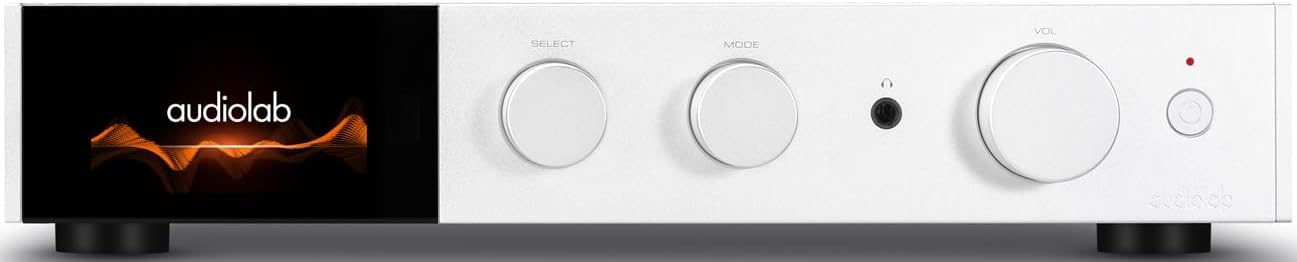
Şekil 4.1: Ön view of the Audiolab 9000A, displaying the Audiolab logo on its full-color IPS LCD screen. The front panel features three rotary controls for Select, Mode, and Volume, along with a headphone jack and power button.

Şekil 4.2: Ön view of the Audiolab 9000A, showcasing the full-color IPS LCD screen displaying VU meters. This visual option provides real-time audio level feedback.
The 9000A features a 4.3-inch (800 x 480mm) full-color IPS LCD screen, providing clear and informative playback, source, and file information. It also offers various display options, including two VU meter styles, allowing for visual feedback or a discreet appearance.
Arka Panel Bağlantıları

Figure 4.3: Rear panel of the Audiolab 9000A, showing a comprehensive array of input and output connections. These include analog, XLR, phono (MM), power amplifier input, SPDIF (coaxial and optical), PC USB, Bluetooth antenna, pre-amplifier output, stereo speaker terminals, and 12V trigger connections.
The rear panel provides a wide range of connectivity options, including multiple analog and digital inputs, a dedicated phono input, balanced XLR input, and various outputs for speakers and external components. Bluetooth antennas are also located here for wireless streaming.
Temel Özellikler
- Ampaçıklama: Discrete Class AB power amplifier delivering 100W per channel into 8 ohms (160W into 4 ohms). Features Audiolab's CFB (Complementary Feedback) topology for superior linearity.
- Dijitalden Analoga Dönüştürücü (DAC): Equipped with the ESS 9038PRO flagship 32-bit DAC chip, supporting PCM up to 32-bit/768kHz and DSD up to DSD512.
- MQA Kod Çözme: Full MQA decoding capability for high-resolution streaming.
- Fono Stage: Dedicated high-performance, low-noise Moving Magnet (MM) phono stage with JFET-based circuitry and precise RIAA equalization.
- Kulaklık Ampkaldırıcı: Özel akım geri bildirimli kulaklık amplifier with wide bandwidth and high slew rate.
- Bağlantı: Multiple analog inputs (3 x AUX, 1 x XLR), digital inputs (2 x Coaxial, 2 x Optical, 1 x PC USB), Bluetooth 5.1 with aptX HD/AAC/LDAC support.
- Çalışma Modları: Integrated, Pre-Power, and Pre Only modes for versatile system integration.
5. Kurulum
5.1 Yerleştirme
Place the Audiolab 9000A on a stable, level surface away from direct sunlight, heat sources, and excessive moisture. Ensure there is adequate space around the unit for ventilation.
5.2 Hoparlörleri Bağlama
- Ensure the 9000A is powered off and unplugged from the mains.
- Connect your loudspeakers to the speaker terminals on the rear panel (refer to Figure 4.3). Ensure correct polarity: red (+) to red (+) and black (-) to black (-).
- Tighten the binding posts securely, but do not overtighten.
5.3 Ses Kaynaklarını Bağlama
The 9000A offers a variety of input options:
- Analog Inputs (AUX1, AUX2, AUX3): Use RCA cables to connect analog sources like CD players, tuners, or tape decks.
- Dengeli XLR Girişi: For high-quality analog sources with XLR outputs.
- Fono (MM) Girişi: Connect your turntable directly to this input. Ensure your turntable has a Moving Magnet (MM) cartridge.
- Digital Inputs (COAX1, COAX2, OPT1, OPT2): Connect digital sources such as CD transports, media streamers, or TVs using coaxial or optical cables.
- PC USB (USB B): Connect your computer for high-resolution audio playback.
- Bluetooth: Attach the supplied antennas to the rear panel for optimal Bluetooth signal reception.
5.4 Güç Bağlantısı
Once all audio connections are made, connect the supplied power cord to the IEC inlet on the rear panel and then to a suitable mains power outlet.
6. Kullanım Talimatları
6.1 Açma/Kapatma
Press the power button on the front panel or the remote control to switch the unit on or off. The display will illuminate upon power-on.
6.2 Kaynak Seçimi
Use the "SELECT" rotary control on the front panel or the source buttons on the remote control to cycle through the available input sources (AUX1, AUX2, AUX3, XLR, Phono, COAX1, COAX2, OPT1, OPT2, PC USB, Bluetooth).
6.3 Ses Kontrolü
Adjust the listening volume using the "VOL" rotary control on the front panel or the Volume Up/Down buttons on the remote control.
6.4 Çalışma Modları
The 9000A offers three distinct operating modes, selectable via the menu:
- Integrated Mode: This is the default mode, where the pre-ampkaldırıcı ve güç ampkaldırıcıtages are combined. Use this for connecting digital and analog sources directly to the 9000A and driving a pair of speakers.
- Pre-Power Mode: This mode disconnects the pre-ampkaldırıcı ve güç ampkaldırıcıtages. The 9000A can then be used solely as a power amplifier (e.g., connected to an AV processor) or to insert external signal processing between the pre-out and power-in connections.
- Pre Only Mode: In this mode, the 9000A functions solely as a pre-amplifier, outputting the processed signal via its pre-amplifier outputs to an external power ampcankurtaran.
6.5 Dijital Filtreler
For digital inputs, the 9000A provides user-selectable digital filters to optimize the response to suit the source file and partnering equipment. Access these options through the unit's menu system.
6.6 Bluetooth Bağlantısı
- Ensure the Bluetooth antennas are connected to the rear panel.
- Select "Bluetooth" as the input source on the 9000A.
- Mobil cihazınızda (akıllı telefon, tablet, dizüstü bilgisayar) Bluetooth'u etkinleştirin ve kullanılabilir cihazları arayın.
- Select "Audiolab 9000A" from the list to pair. Once paired, audio from your device will stream wirelessly to the ampcankurtaran.
- The 9000A supports aptX HD, AAC, and LDAC protocols for high-quality wireless audio.
6.7 Kulaklık Çıkışı
Connect your headphones to the 6.35mm (1/4 inch) headphone jack on the front panel. Connecting headphones will automatically mute the main speaker outputs.
7. Bakım
- Temizlik: Use a soft, dry, lint-free cloth to clean the unit. Do not use abrasive cleaners, waxes, or solvents.
- Havalandırma: Havalandırma açıklıklarının toz ve kirden arındırılmış olduğundan düzenli aralıklarla emin olun.
- Bağlantılar: Ensure all cables are securely connected. Loose connections can affect sound quality.
- Depolamak: Cihazı uzun süre saklayacaksanız, güç kaynağından ayırın ve serin, kuru bir yerde muhafaza edin.
8. Sorun Giderme
| Sorun | Olası Neden | Çözüm |
|---|---|---|
| Güç yok | Power cord not connected; Power outlet faulty; Unit in standby mode. | Check power cord connection; Try a different outlet; Press power button on unit or remote. |
| Hoparlörlerden ses gelmiyor | Incorrect input selected; Speaker cables loose or incorrectly connected; Volume too low; Mute function active; Headphone connected. | Select correct input; Check speaker connections and polarity; Increase volume; Deactivate mute; Disconnect headphones. |
| Bir kanaldan ses gelmiyor | Speaker cable loose or faulty; Source cable faulty; Speaker faulty. | Check speaker and source cable connections; Test with another speaker or source. |
| Vızıltı veya uğultu sesi | Topraklama döngüsü; Yakındaki elektriksel parazit; Arızalı kablo. | Ensure all components are properly grounded; Move unit away from other electronics; Try different cables. |
| Bluetooth eşleştirme sorunları | Antennas not connected; Device too far; Device already paired with another unit. | Connect Bluetooth antennas; Move device closer; Disconnect from other devices and try pairing again. |
9. Özellikler
| Kategori | Detay |
|---|---|
| Genel Açıklama | Entegre Ampcankurtaran |
| Nominal Güç Çıkışı | 2 x 100W (8 ohms, THD<1%); 2 x 160W (4 ohms, THD<1%) Class AB |
| DAC Çipi | ES9038Pro 32-bit DAC |
| Görüntülemek | 4.3" (800 x 480mm) Full View IPS LCD |
| MQA Kod Çözme | Built-in Certified MQA Full Decoder (PC USB, Coax/Optical) |
| Bluetooth | Bluetooth 5.1 (aptX/aptX HD/AAC/LDAC) Support |
| Fono Stage | Dedicated High-performance, Low-noise MM Phono Stage |
| Kulaklık AMP | Özel Akım Geribildirimli Kulaklık AMP |
| Çalışma Modları | Integrated / PRE-POWER / PRE Only Modes |
| USB Upgrade Support | Evet |
| Girişler | 3 x Analogue, 1 x XLR, 1 x Phono (MM), 1 x Power Amplifier, 2 x SPDIF (Coax), 2 x SPDIF (Optical), 1 x PC USB (USB B), 1 x Bluetooth, 1 x 12V Trigger |
| Çıktılar | 1 x ÖN Amplifier, 1 x Stereo Hoparlör, 1 x Kulaklık, 1 x 12V Tetik |
| Sampling Frequency (Optical/Coaxial) | 44.1kHz-192kHz |
| Sampling Frequency (PC USB) | 44.1kHz-768kHz (PCM) / DSD64, DSD128, DSD256, DSD512 |
| Önamplifier Gain (max.) | +6dB (Line), +53dB (Phono MM) |
| Önamplifier THD | <0.0004% (1kHz @ 2V, Volume = 0dB) |
| DAC THD | <0.001% (1kHz @ 0dBFS) |
| Güç Amplifier THD | <%0.002 (1kHz @ 50W / 8 ohm) |
| Kulaklık Amplifier THD | <0.01% (1kHz, 50mW) |
| Net ağırlığı | 9.4 kilo |
| Boyutlar (G x Y x D) | 444x342x89 mm |
| Bitiş Seçenekleri | Siyah / Gümüş |
| Güç Gereksinimleri | 100-120V ~ 50/60Hz |
10. Garanti ve Destek
Audiolab products are manufactured to the highest standards and undergo rigorous quality control. This product is covered by a manufacturer's warranty, the terms of which may vary by region. Please refer to the warranty card included with your product or visit the official Audiolab webayrıntılı garanti bilgileri için site.
For technical support, service, or inquiries regarding your Audiolab 9000A, please contact your authorized Audiolab dealer or distributor. You can also find support resources, FAQs, and contact information on the official Audiolab webalan: www.audiolab.co.uk


